1. Uvod
The IMIKI FRAME LITE ST2 is a versatile smartwatch designed for daily use, offering a blend of style and functionality. It features a 1.96-inch IPS display, Bluetooth connectivity, and various health monitoring capabilities. This manual provides essential information for operating and maintaining your device.
2. Vsebina paketa
Prosimo, preverite, ali so v vašem paketu vsi elementi:
- IMIKI FRAME LITE ST2 Smartwatch
- Magnetni polnilni kabel
- Uporabniški priročnik
3. Naprava je končanaview
Seznanite se z glavnimi komponentami svoje pametne ure.
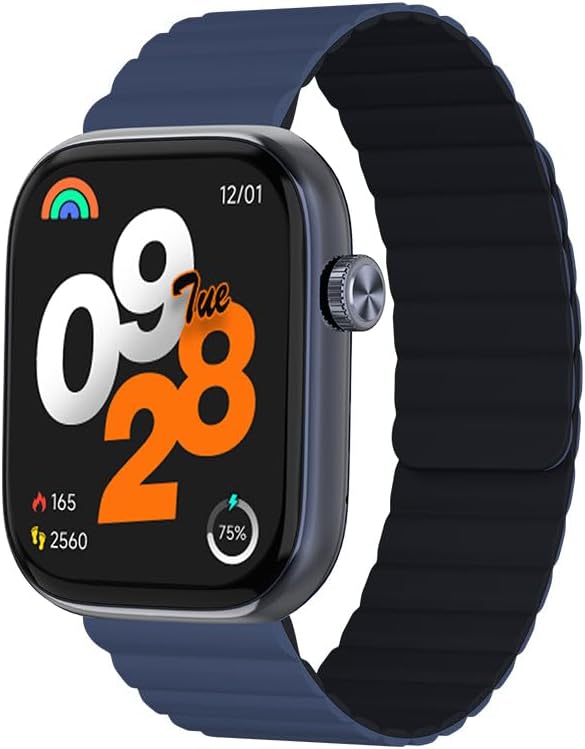
Slika 1: Spredaj view of the IMIKI FRAME LITE ST2 Smartwatch, displaying the time, date, and activity metrics on its 1.96-inch IPS screen. The watch features a blue case and a blue magnetic strap.

Slika 2: Stran view of the IMIKI FRAME LITE ST2 Smartwatch, highlighting its slim profile and the integrated crown button for navigation and control.
4. Nastavitev
4.1 Polnjenje pametne ure
Before initial use, fully charge your IMIKI FRAME LITE ST2 Smartwatch.
- Magnetni polnilni kabel priključite na polnilne priključke na zadnji strani pametne ure.
- Priključite USB konec kabla v standardni USB napajalnik (ni priložen) ali USB vrata računalnika.
- The watch display will indicate charging status. A full charge takes approximately 2 hours.
A fully charged 250 mAh battery provides up to 15 days of typical use or 5 days of intensive use.
4.2 Namestitev spremljevalne aplikacije
To unlock the full features of your smartwatch, download and install the companion application on your smartphone.
- Scan the QR code provided in the quick start guide or search for the official IMIKI app in the Apple App Store (for iOS) or Google Play Store (for Android).
- Namestite aplikacijo na svoj pametni telefon.
- Sledite navodilom na zaslonu, da ustvarite račun in nastavite svojega profesionalca.file.
4.3 Seznanjanje s pametnim telefonom
Ensure Bluetooth is enabled on your smartphone and the smartwatch is sufficiently charged.
- Open the IMIKI companion app on your smartphone.
- V aplikaciji se pomaknite do razdelka »Naprava« ali »Dodaj napravo«.
- The app will search for available devices. Select 'IMIKI FRAME LITE ST2' from the list.
- Po potrebi potrdite zahtevo za seznanjanje tako na pametnem telefonu kot na pametni uri.
- Once paired, the smartwatch will synchronize data with your phone.
5. Upravljanje pametne ure
5.1 Osnovna navigacija
- Zaslon na dotik: Za navigacijo po menijih in obvestilih povlecite levo, desno, gor ali dol. Dotaknite se za izbiro elementov.
- Stranski gumb/krona: Press to wake the screen, return to the home screen, or access the app list. Rotate (if applicable) to scroll through lists.
5.2 Upravljanje klicev
With Bluetooth 5.3 connectivity, you can manage calls directly from your smartwatch when paired with your smartphone.
- Odgovarjanje na klice: Tap the green icon on the watch screen when an incoming call is displayed.
- Zavrnitev klicev: Dotaknite se rdeče ikone, da zavrnete dohodni klic.
- Glasovni asistent: Access your smartphone's voice assistant directly from the watch for hands-free commands.
5.3 Health and Fitness Monitoring
The IMIKI FRAME LITE ST2 is equipped with sensors to track your health and fitness activities.
- Spremljanje srčnega utripa: Optični senzor nenehno spremlja vaš srčni utrip. View podatki v realnem času na uri ali v aplikaciji.
- Merjenje krvnega kisika (SpO2): Measure your blood oxygen saturation levels. Ensure the watch is worn snugly on your wrist for accurate readings.
- Načini vadbe: Choose from 105 supported workout modes to track specific activities. The watch records statistics such as duration, calories burned, and heart rate during exercise.
- Sledenje spanju: Monitor your sleep patterns, including deep sleep, light sleep, and wake times.
NIKOLI Prilagajanje
Personalize your smartwatch experience through the companion app.
- Obrazi za gledanje: Select from a variety of watch faces or create custom ones using the app.
- Nastavitve obvestil: Manage which app notifications appear on your smartwatch.
6. Vzdrževanje
6.1 Čiščenje
Regular cleaning helps maintain the smartwatch's appearance and functionality.
- Zaslon in ohišje ure obrišite z mehko krpo, ki ne pušča vlaken.
- Za trdovratno umazanijo rahlo dampkrpo sperite z vodo. Izogibajte se uporabi agresivnih kemikalij ali abrazivnih materialov.
- Redno čistite polnilne kontakte, da zagotovite pravilno polnjenje.
6.2 Vodoodpornost
The IMIKI FRAME LITE ST2 has an IP68 water resistance rating, meaning it is protected against dust ingress and can withstand immersion in water up to 1.5 meters for 30 minutes. It is suitable for daily use, such as hand washing or light rain. However, it is not recommended for swimming, diving, or exposure to high-pressure water.
6.3 Shranjevanje
When not in use for extended periods, store the smartwatch in a cool, dry place. Ensure it has some charge to prevent deep discharge of the battery.
7. Odpravljanje težav
Če imate težave s pametno uro, si oglejte naslednje pogoste rešitve:
- Ura se ne vklopi: Prepričajte se, da je ura popolnoma napolnjena. Priključite jo na polnilnik za vsaj 10 minut.
- Seznanjanje s pametnim telefonom ni mogoče:
- Prepričajte se, da je Bluetooth omogočen v vašem telefonu.
- Prepričajte se, da je ura v dosegu vašega telefona.
- Znova zaženite pametno uro in pametni telefon.
- Počistite predpomnilnik Bluetooth v telefonu (če je na voljo).
- Netočni zdravstveni podatki: Prepričajte se, da je ura tesno nameščena na zapestju, ne pretesno ali preohlapno. Očistite senzor na hrbtni strani ure.
- Obvestila se ne prikazujejo: Check notification settings in the companion app and on your smartphone. Ensure the app is running in the background.
- Zaslon se ne odziva: Try restarting the smartwatch by pressing and holding the side button for several seconds.
8. Specifikacije
| Funkcija | Specifikacija |
|---|---|
| Znamka | IMIKI |
| Ime modela | IMIKI FRAME LITE ST2 |
| Velikost zaslona | 1.96 palcev |
| Vrsta zaslona | IPS |
| Tehnologija povezljivosti | Bluetooth 5.3 |
| Združljive naprave | Pametni telefon (Android in iOS) |
| Kapaciteta baterije | 250 mAh |
| Tipična uporaba Življenjska doba baterije | Do 15 dni |
| Intensive Usage Battery Life | Do 5 dni |
| Čas polnjenja | Približno 2 ur |
| Ocena vodoodpornosti | IP68 |
| Spremljanje zdravja | Blood Oxygen, Heart Rate |
| Načini vadbe | 105 |
| Vrsta traku | Magnetna |
9. Garancija in podpora
For warranty information and customer support, please refer to the warranty card included in your product packaging or visit the official IMIKI webspletno mesto. Shranite račun kot dokazilo o nakupu.
If you require further assistance or have questions not covered in this manual, please contact IMIKI customer service through their official channels.


