1. Uvod
The SteelSeries Arctis GameBuds are designed to provide a versatile audio experience across multiple gaming platforms, including Xbox, PC, PlayStation 5, Nintendo Switch, and mobile devices. These earbuds feature Quick-Switch Dual Wireless connectivity (2.4GHz and Bluetooth 5.3), Active Noise Cancellation (ANC) with transparency mode, and support for 360° Spatial Audio. This manual provides instructions for setup, operation, maintenance, and troubleshooting.

Image 1.1: SteelSeries Arctis GameBuds in their charging case, featuring the USB-C wireless dongle and key functionalities like Active Noise Cancellation and 100+ Xbox Audio Presets.
2. Vsebina paketa
Preverite, ali so v paketu vsi elementi:
- Arctis GameBuds (Left and Right Earbuds)
- etui za polnjenje
- Brezžični ključ USB-C
- Polnilni kabel USB-A v USB-C
- Silikonski ušesni nastavki (majhni, srednji, veliki)
- Kratki vodnik (ni vključen v ta priročnik)
3. Izdelek je končanview
3.1 Slušalke in polnilni etui
The Arctis GameBuds are designed for comfort and portability. The charging case not only protects the earbuds but also provides additional battery life and houses the 2.4GHz wireless dongle.

Image 3.1: The Arctis GameBuds and their charging case, showcasing the integrated USB-C wireless dongle.
3.2 Brezžični ključ USB-C
The compact USB-C dongle enables high-speed 2.4GHz wireless connectivity for gaming. It features a switch to select between PC and Xbox modes, ensuring optimal performance for your chosen platform.
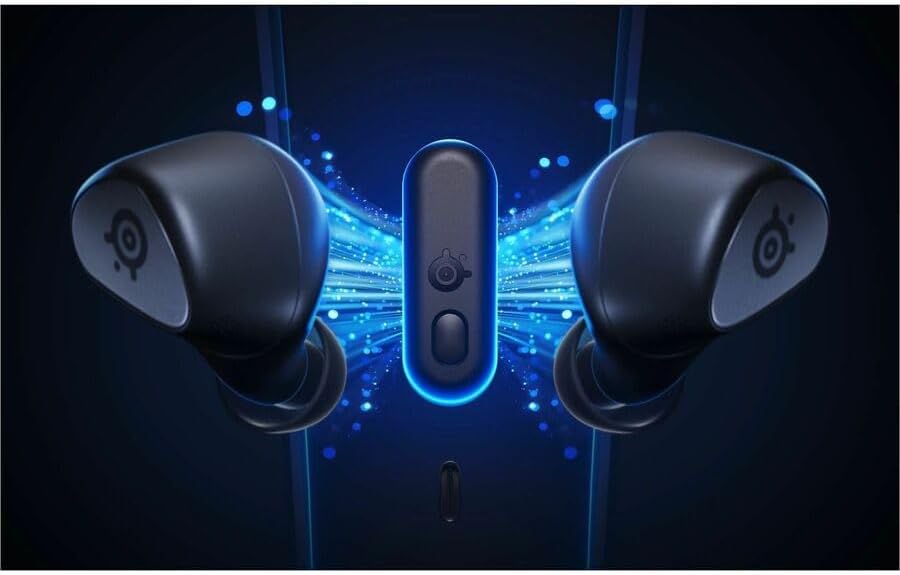
Image 3.2: The Arctis GameBuds and their USB-C dongle, illustrating the wireless connection.
3.3 Udobje in prileganje
The GameBuds come with three sizes of silicone ear tips (Small, Medium, Large) to ensure a secure and comfortable fit for extended use. Proper fit is crucial for optimal audio quality and Active Noise Cancellation performance.

Image 3.3: Demonstrating the comfortable fit of the GameBuds and the included silicone ear tip sizes.
4. Nastavitev
4.1 Začetno polnjenje
Before first use, fully charge the Arctis GameBuds and their charging case. Connect the provided USB-C charging cable to the case and a power source. The case supports Qi wireless charging as well.

Image 4.1: The Arctis GameBuds charging case, which provides up to 40 hours of total battery life.
4.2 2.4GHz Wireless Connection (Xbox, PC, PS5, Switch)
- Insert the USB-C wireless dongle into an available USB-C port on your gaming device (Xbox, PC, PS5, Switch, Steam Deck, etc.). If your device only has USB-A, use the included USB-A to USB-C adapter cable.
- Ensure the switch on the dongle is set to the correct platform (PC or Xbox).
- Remove the earbuds from the charging case. They will automatically attempt to connect to the dongle.
- A successful connection is indicated by a solid light on the dongle and earbuds.

Image 4.2: The USB-C wireless dongle connected, showing the PC/Xbox selection switch.
4.3 Bluetooth 5.3 Connection (Mobile)
- With the earbuds out of the case, activate Bluetooth pairing mode (refer to the Quick Start Guide for specific touch control gestures).
- On your mobile device, navigate to Bluetooth settings and select "Arctis GameBuds" from the list of available devices.
- Potrdite seznanjanje.
4.4 Posodobitev vdelane programske opreme
It is highly recommended to update the firmware of your Arctis GameBuds immediately after purchase for optimal performance and to resolve potential issues. Download the SteelSeries GG software on a PC, connect the charging case (with earbuds inside) via USB, and follow the on-screen instructions to update the firmware.
5. Delovanje
5.1 Quick-Switch Dual Wireless
The Arctis GameBuds allow seamless switching between 2.4GHz wireless (for gaming) and Bluetooth 5.3 (for mobile audio). Refer to the Quick Start Guide for the specific touch control gesture to switch between these modes.
5.2 Aktivno odpravljanje šumov (ANC) in način preglednosti
The earbuds feature 4-mic hybrid ANC for immersive gaming by reducing ambient noise. Transparency mode allows you to hear your surroundings without removing the earbuds. These modes can be toggled via touch controls or the SteelSeries Arctis Companion App.

Slika 5.1: Notranje view of an earbud, illustrating the technology behind Active Noise Cancellation and Spatial Audio.
5.3 360° prostorski zvok
Experience immersive sound with 360° Spatial Audio, providing directional awareness in games. This feature is enhanced by custom Neodymium Magnetic Drivers.
5.4 SteelSeries Arctis Companion App
Download the SteelSeries Arctis Companion App for iOS or Android to customize your audio experience. The app offers:
- Over 100 finely tuned audio presets for popular games.
- Nastavitve izenačevalnika.
- ANC and Transparency mode control.
- Microphone settings.

Image 5.2: The SteelSeries Arctis Companion App, providing access to 100+ game audio presets and other settings.
5.5 Življenjska doba baterije
The earbuds provide up to 10 hours of continuous use on a single charge. The charging case holds an additional 3 full charges, extending total battery life to up to 40 hours.
6. Vzdrževanje
6.1 Čiščenje
Regularly clean your earbuds and charging case to maintain performance and hygiene. Use a soft, dry cloth. For ear tips, remove them and clean with mild soap and water, then dry thoroughly before reattaching.
6.2 Shranjevanje
When not in use, store the Arctis GameBuds in their charging case to protect them and ensure they remain charged.
6.3 Vodoodpornost
The earbuds are rated IP55 for water resistance, meaning they are protected against dust and low-pressure water jets. They are not designed for submersion. Ensure earbuds are dry before placing them back in the charging case.

Image 6.1: An Arctis GameBud demonstrating its IP55 water resistance.
7. Odpravljanje težav
- No Sound/Connectivity Issues:
- Ensure earbuds are charged.
- Verify the 2.4GHz dongle is securely connected and set to the correct platform (PC/Xbox).
- For Bluetooth, ensure earbuds are in pairing mode and selected on your device.
- Perform a firmware update via the SteelSeries GG app on a PC. This often resolves connectivity and performance issues. - Slaba kakovost zvoka:
- Ensure ear tips provide a snug fit. Try different sizes.
- Check audio settings in the SteelSeries Arctis Companion App.
- Ensure no obstructions are blocking the earbud speakers. - Težave z mikrofonom:
- Check microphone settings in the SteelSeries Arctis Companion App and your device's audio settings.
- Ensure the microphone ports on the earbuds are clean. - Slušalke se ne polnijo:
- Ensure the charging cable is properly connected to the case and power source.
- Clean the charging contacts on both the earbuds and inside the case.
- If using wireless charging, ensure the case is correctly positioned on the charging pad.
8. Specifikacije
| Funkcija | Specifikacija |
|---|---|
| Ime modela | Arctis GameBuds |
| Tehnologija povezljivosti | Brezžično (2.4 GHz RF, Bluetooth 5.3) |
| Nadzor hrupa | Prekinitev aktivnega hrupa (ANC) |
| Frekvenčni odziv | 20-20,000 Hz |
| Življenjska doba baterije (slušalke) | Do 10 uri |
| Življenjska doba baterije (s polnilnim ohišjem) | Do 40 uri |
| Charging Case Battery Average Life | 30 Hours (additional charges) |
| Stopnja vodoodpornosti | IP55 (vodoodporno) |
| Združljive naprave | Xbox, PC, PS5, Switch, Mobile |
| Nadzorna metoda | Aplikacija, upravljanje na dotik |
| Teža predmeta | 0.32 unče (slušalke) |
| Dimenzije izdelka | 2.06 x 2.76 x 1.19 palca (polnilna škatlica) |
| Vključene komponente | Gaming Ear Buds |
9. Garancija in podpora
SteelSeries products are covered by a limited warranty. For detailed warranty information, product support, and service inquiries, please visit the official SteelSeries webspletno mesto. Tam lahko najdete tudi pogosta vprašanja in dodatne vire.


