1. Uvod
This manual provides essential information for the installation, operation, and maintenance of your ZOTAC GAMING GeForce RTX 4070 Ti SUPER SOLID OC 16GB graphics card. Please read this manual thoroughly before installation to ensure proper functionality and to prevent damage.

Image 1.1: ZOTAC GAMING GeForce RTX 4070 Ti SUPER SOLID OC 16GB Graphics Card and its retail packaging.
2. Vsebina paketa
Preverite, ali so v paketu prisotni vsi elementi:
- ZOTAC GAMING GeForce RTX 4070 Ti SUPER SOLID OC 16GB Graphics Card
- Podporno stojalo za GPU
- Navodila za uporabo (ta dokument)
- Power Adapter Cable (if applicable, check your specific model)
3. Sistemske zahteve
- Matična plošča, združljiva s PCI Express, z eno grafično režo x16 dvojne širine
- Minimum 750W power supply with three available 8-pin PCIe power connectors (or equivalent 12VHPWR connector)
- Minimum 16GB system memory
- Microsoft Windows 10/11 64-bit or Linux 64-bit operating system
- Internet connection for driver installation
4. Vodič za namestitev
4.1. Priprava
- Izklopite računalnik in odklopite napajalni kabel.
- Odprite ohišje računalnika.
- Ozemljite se, da sprostite morebitno statično elektriko.
4.2. Namestitev grafične kartice
- Na matični plošči poiščite prosto režo PCI Express x16.
- Odstranite potrebne pokrove razširitvenih rež z ohišja računalnika.
- Carefully insert the graphics card into the PCIe x16 slot until it is fully seated. Ensure the retention clip locks into place.
- Grafično kartico pritrdite na ohišje z vijaki.
- Connect the required power cables from your power supply to the graphics card. This model typically requires three 8-pin PCIe power connectors or a single 12VHPWR connector. Ensure all connections are secure.
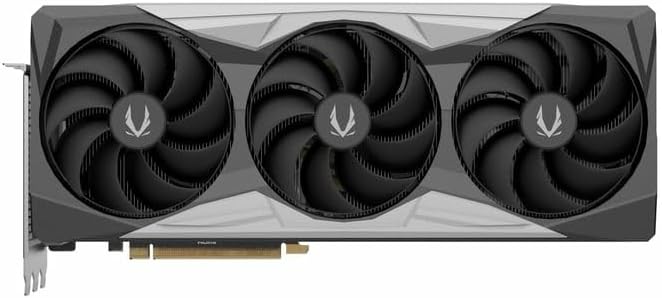
Slika 4.1: Spredaj view of the graphics card, showing the triple fan design.
4.3. Installing the GPU Support Stand
The included GPU support stand helps prevent sag and provides additional stability for the graphics card. Follow the instructions provided with the stand for proper installation within your PC case.
4.4. Closing the Case and Connecting Peripherals
- Zaprite ohišje računalnika.
- Connect your monitor(s) to the display outputs on the graphics card (DisplayPort or HDMI).
- Reconnect the power cable and other peripherals to your computer.

Slika 4.2: Zadaj view of the graphics card, showing three DisplayPort outputs and one HDMI output.
5. Navodila za uporabo
5.1. Namestitev gonilnika
- Vklopite računalnik.
- Once the operating system loads, download the latest graphics drivers from the official NVIDIA webspletno mesto (www.nvidia.com/drivers) ali ZOTAC webspletno mesto (www.zotac.com/support).
- Sledite navodilom na zaslonu, da dokončate namestitev gonilnika. Morda bo potreben ponovni zagon sistema.
5.2. Pripomočki programske opreme
ZOTAC provides utilities such as FireStorm for monitoring and adjusting graphics card settings, including fan speed control (Active Fan Control, FREEZE Fan Stop) and performance profiles. These can be downloaded from the ZOTAC webmesto.
6. Vzdrževanje
- Odstranjevanje prahu: Periodically clean dust from the graphics card fans and heatsink using compressed air. Ensure the computer is powered off and unplugged before cleaning.
- Posodobitve gonilnikov: Keep your graphics drivers updated to ensure optimal performance and compatibility.
- Nadzor temperature: Use monitoring software to keep track of the graphics card's temperature during operation. Excessive temperatures can indicate poor airflow or dust buildup.

Slika 6.1: Pod kotom view of the graphics card, highlighting its robust cooling solution.
7. Odpravljanje težav
- Brez izhoda za prikaz:
- Prepričajte se, da je kabel monitorja varno priključen na grafično kartico in monitor.
- Preverite, ali je grafična kartica popolnoma vstavljena v režo PCIe.
- Check that all power cables are properly connected to the graphics card.
- Če je mogoče, preizkusite z drugim monitorjem ali kablom.
- Nestabilnost ali zrušitve sistema:
- Ensure graphics drivers are correctly installed and up to date.
- Check for adequate power supply capacity.
- Spremljajte temperaturo, da preprečite pregrevanje.
- Verify system memory (RAM) stability.
- Hrup ali okvara ventilatorja:
- Očistite prah z ventilatorjev in hladilnika.
- Prepričajte se, da noben kabel ne ovira vrtenja ventilatorja.
- Use ZOTAC FireStorm utility to check fan speed settings.
8. Specifikacije
| Funkcija | Podrobnost |
|---|---|
| Številka modela | ZT-D40730R-10P |
| Grafični procesor | NVIDIA GeForce RTX 4070 Ti SUPER |
| Video pomnilnik | 16 GB GDDR6X |
| Pomnilniški vmesnik | 256-bitni |
| Spominska ura | 21000 MHz (efektivno) |
| Ura motorja | Povečanje: 2640 MHz |
| Prikaz izhodov | 3x DisplayPort 1.4a, 1x HDMI 2.1a |
| Podpora HDCP | ja |
| Največja digitalna ločljivost | Up to 4K (7680x4320 @60Hz) |
| PCI Express | PCI Express 4.0 x16 |
| Priporočeno napajanje | 750 W |
| Napajalni priključki | 1 x 12VHPWR (or 3 x 8-pin PCIe via adapter) |
| Dimenzije (DxŠxV) | 16.73 x 11.54 x 3.94 palcev (približno) |
| Teža | 2.2 funta (približno) |
| Hladilni sistem | IceStorm 2.0 Advanced Cooling, Triple 100mm Fans, FREEZE Fan Stop, Active Fan Control |
| Lastnosti | NVIDIA DLSS 3.5, Ray Tracing, Metal Backplate, GPU Support Stand |
9. Garancija in podpora
For detailed warranty information, please refer to the warranty card included with your product or visit the official ZOTAC website's support section. ZOTAC provides technical support and resources for their products.
- Podpora ZOTAC Webspletno mesto: www.zotac.com/support
- Registracija izdelka: Register your product on the ZOTAC website to activate your warranty and receive product updates.


