1. Uvod
The Eden FES 100 is an external filter designed for aquariums, providing efficient biological and mechanical filtration. This manual provides essential information for the safe and effective installation, operation, and maintenance of your filter.
Pred uporabo izdelka natančno preberite ta navodila in jih shranite za poznejšo uporabo.
2. Varnostne informacije
Pomembno: Always disconnect the power supply to the filter and any other electrical equipment in the aquarium before performing any maintenance or handling the filter. Ensure your hands are dry when plugging or unplugging the unit.
This appliance is intended for indoor use only. Do not operate if the power cord or plug is damaged. Do not immerse the power plug or controller in water.
Please observe all operating and usage instructions provided in this manual.
3. Značilnosti izdelka
- Integrated dual biological and mechanical filtration system.
- Adjustable flow regulator for customized water circulation.
- Equipped with rubber supports for secure and stable positioning.
- Extra-large closing clamps with a lift function for easy opening and maintenance.
- Designed for optional integration of an EDEN RCA heater (heater not included with FES 100, but compatible).
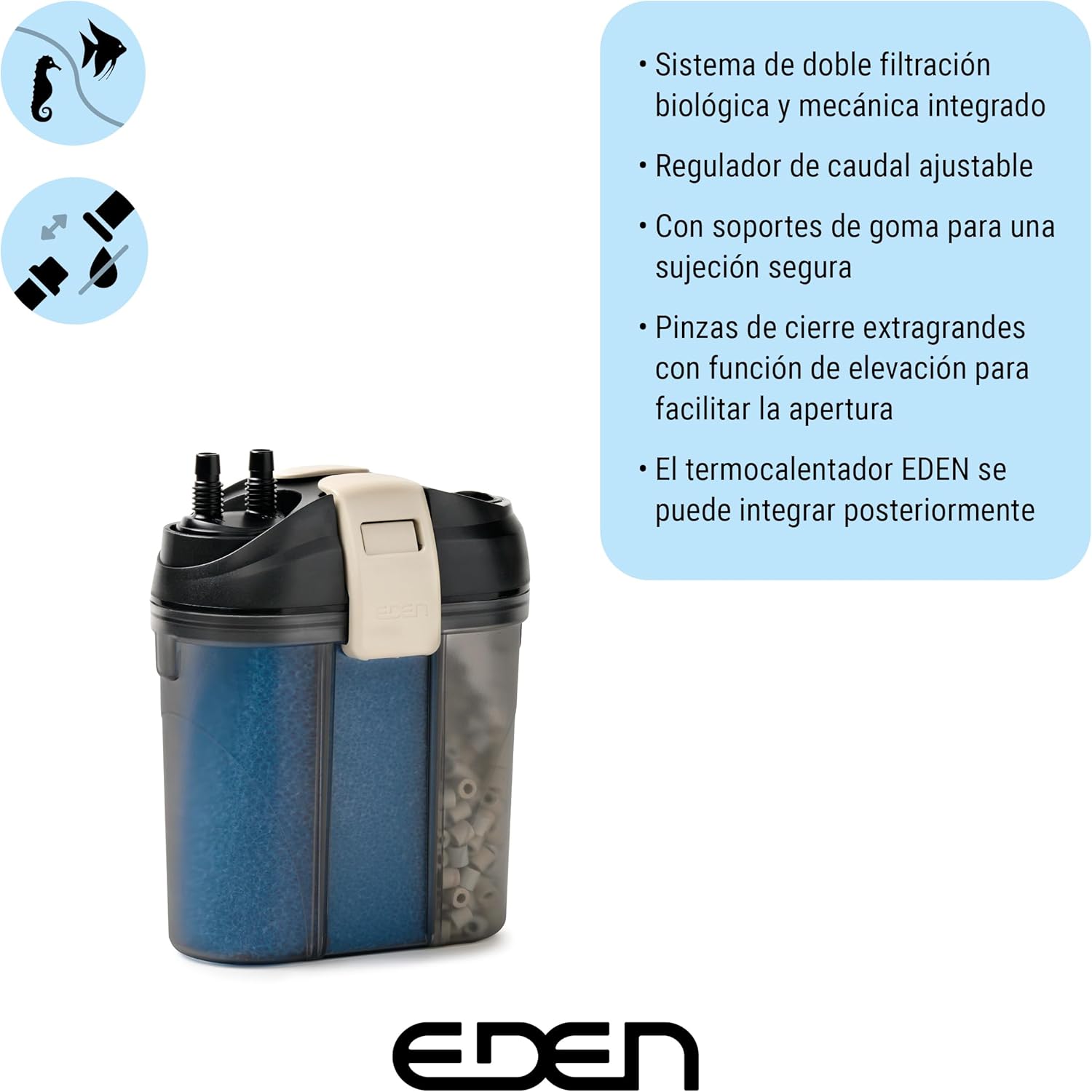
Slika 1: Key features of the Eden FES 100 External Filter.
4. Vsebina paketa
Upon unpacking, ensure all components are present and undamaged. The package typically includes:
- Eden FES 100 External Filter unit
- Dovodne in odvodne cevi
- Connection fittings and suction cups
- Filter media (e.g., sponges, ceramic rings)
- Uporabniški priročnik

Slika 2: Eden FES 100 External Filter packaging.
5. Navodila za nastavitev
- Prepare the Filter Media: Odprite filtrirno enoto z relejemasing the extra-large closing clamps. Rinse all filter media (sponges, ceramic rings) thoroughly under clean water to remove any manufacturing dust. Place the media into the designated compartments within the filter basket.
- Sestavljanje cevi: Connect the inlet and outlet hoses to the filter head. Ensure all connections are secure to prevent leaks.
- Postavitev filtra: Place the filter unit on a stable surface below the aquarium water level. The rubber supports on the base ensure stability and reduce vibration.
- Install Inlet/Outlet in Aquarium: Secure the inlet and outlet pipes inside the aquarium using the provided suction cups. Position the inlet near the bottom of the tank and the outlet near the surface for optimal water circulation.
- Napolnite filter: Follow the manufacturer's instructions for priming the filter to remove air and fill it with water before connecting to power. This usually involves opening the inlet valve and allowing water to flow into the filter until it is full, then closing the valve and connecting the power.

Slika 3: Placing ceramic filter media.

Slika 4: Inserting a filter media bag.

Slika 5: Filter installed in an aquarium cabinet.
6. Navodila za uporabo
- Vklop: Once the filter is primed and all connections are secure, plug the power cord into a suitable electrical outlet. The filter should start operating immediately.
- Prilagodi pretok: Use the adjustable flow regulator located on the filter head to control the water flow rate according to your aquarium's needs. Turn the knob clockwise to decrease flow and counter-clockwise to increase flow.
- Spremljanje: Regularly check the filter's operation to ensure proper water flow and filtration. The Eden FES 100 is designed for quiet operation.

Slika 6: Adjustable flow regulator.
7. Vzdrževanje
Regular maintenance is crucial for the longevity and efficiency of your filter. Perform maintenance at least once a month, or more frequently if water clarity decreases.
- Odklop napajanja: Pred kakršnim koli vzdrževanjem vedno izključite filter iz električne vtičnice.
- Remove Filter Head: Close the inlet and outlet valves (if applicable) and disconnect the hoses from the filter head. Release the extra-large closing clamps and carefully lift the filter head off the canister.
- Clean/Replace Filter Media: Remove the filter baskets. Rinse mechanical filter media (sponges) under aquarium water or dechlorinated tap water to remove accumulated debris. Do not rinse biological media (ceramic rings) too thoroughly with tap water, as this can kill beneficial bacteria; use old aquarium water for rinsing. Replace chemical media (e.g., activated carbon, if used) as per its instructions.
- Čisto rotorsko kolo: Inspect and clean the impeller and impeller housing. Remove any debris or mineral buildup that may hinder its rotation.
- Ponovno sestavite: Reassemble the filter in reverse order, ensuring all seals and clamps are properly seated and secured. Prime the filter again before reconnecting power.

Slika 7: Example of filter sponges.
8. Odpravljanje težav
- Zmanjšan pretok: Check for clogged filter media, kinks in hoses, or a dirty impeller. Clean as necessary. Ensure the flow regulator is set to the desired level.
- Prekomerni hrup: Ensure the filter is properly primed and free of air. Check the impeller for debris or damage. Ensure the filter is placed on a stable surface using its rubber supports.
- Puščanje: Verify that all hose connections are tight and that the filter head is properly sealed with the canister. Check the O-ring for damage or improper seating.
- Filter se ne zažene: Ensure the power cord is securely plugged in. Check for power outages. Inspect the impeller for any obstructions preventing it from spinning.
9. Specifikacije
| Funkcija | Specification (FES 100) |
|---|---|
| Recommended Aquarium Volume | Do 100 litrov (30 galon) |
| Premer cevi | 13 mm (1/2 palca) |
| Hitrost pretoka | 600 l/h (160 gph) |
| Poraba energije | 11 W |
| Glasnost filtra | 1.25 litra (0.34 galone) |
| Mere izdelka (D x Š x V) | 200 x 120 x 240 mm (8 x 5.5 x 10 palca) |
| Teža izdelka | Približno 2.14 kg |
| Številka modela | 94071 |
| Država izvora | Italija |

Slika 8: Eden FES series specifications table.
10. Garancija in podpora
Specific warranty details may vary by region and retailer. Please refer to the warranty card included with your product or contact your point of purchase for detailed information regarding warranty coverage and claims.
For technical support or inquiries, please contact Eden customer service or visit the official Eden webmesto.


