1. Uvod
This manual provides detailed instructions for the safe installation, operation, and maintenance of your PHORUS 48-inch Modern White Ceiling Fan with Lights and Remote/APP Control. Please read all instructions carefully before beginning installation and retain this manual for future reference.
2. Varnostne informacije
- Pred namestitvijo ali servisiranjem se prepričajte, da je napajanje izklopljeno na odklopniku.
- Vsa napeljava mora biti v skladu z nacionalnimi in lokalnimi električnimi predpisi. Če niste seznanjeni z napeljavami, se posvetujte z usposobljenim električarjem.
- The fan must be mounted with a minimum of 7 feet (2.1 meters) clearance from the floor to the blade trailing edge.
- Montažna konstrukcija mora biti sposobna podpirati težo ventilatorja (približno 13.4 funtov).
- Med namestitvijo ali čiščenjem ne upogibajte držal rezil.
- Ta ventilator je zasnovan za notranjo uporabo.
3. Vsebina paketa
Pred začetkom namestitve preverite, ali so prisotne vse komponente:
- Sklop motorja ventilatorja
- Viseča deska
- 5 lopatic ventilatorja
- LED Lampsenca
- Daljinski upravljalnik (z 2 baterijama AAA)
- Vijaki in montažni material
- Navodila za uporabo

4. Specifikacije
| Funkcija | Specifikacija |
|---|---|
| Znamka | FORUS |
| Ime modela | #8907 |
| Velikost | 48 palcev |
| barva | Bela |
| Material | Akril, plastika |
| Vrsta motorja | Enosmerni motor (30 W) |
| Vir svetlobe | LED (28 W) |
| Svetle barve | 3 (White, Warm, Neutral) |
| Razpon zatemnitve | Brezstopenjsko (10 %–100 %) |
| Hitrosti vetra | 6 |
| Nadzorna metoda | Daljinski upravljalnik, upravljanje prek aplikacije |
| Posebne lastnosti | Reversible Function, 2-Hour Timer, Memory Function |
| Nivo zvoka | Pod 35 dB |
| Dimenzije izdelka | 48 cm D x 48 cm Š x 10.83 cm V |
| Teža predmeta | 13.4 funtov |
5. Nastavitev in namestitev
5.1 Kontrolni seznam pred namestitvijo
- Ensure the power supply is turned off at the main circuit breaker.
- Confirm you have all necessary tools (screwdriver, drill, wire strippers, etc.).
- Verify that the ceiling junction box is securely mounted and capable of supporting the fan.
5.2 Namestitev po korakih
- Attach Blades to Motor Assembly: Secure each of the five fan blades to the motor assembly using the provided screws. Ensure the 'THIS SIDE UP' marking on the blade attachment is facing upwards.
- Install LED Light Board: Carefully place the LED light board into the designated area on the motor assembly and secure it with screws. Connect the LED wires.
- Attach LED Lampodtenek: Namestite LED lampshade over the light board and twist it clockwise until it is securely fastened.
- Mount Hanging Board: Secure the hanging board to your ceiling junction box using appropriate screws. Ensure it is firmly attached.
- Povežite ožičenje: Connect the fan's electrical wires to your household wiring. The typical connections are: Black (Live) to Black (Live), White (Neutral) to White (Neutral), and Yellow/Green (Ground) to Green (Ground). Use the provided wire connectors.
- Secure Fan to Hanging Board: Lift the fan assembly and attach it to the hanging board, ensuring all wires are tucked safely inside the canopy. Secure the fan with the provided screws.
6. Navodila za uporabo
6.1 Funkcije daljinskega upravljalnika
The included remote control allows for convenient operation of your ceiling fan:
- Vklop/izklop: Pritisnite gumb za vklop, da vklopite ali izklopite ventilator in luč.
- Hitrost ventilatorja: Select from 6 wind speeds (1-6) to adjust airflow.
- Vklop/izklop luči: Upravljajte luč neodvisno od ventilatorja.
- Barvna temperatura: Cycle through 3 light colors: White (6000K), Neutral (4500K), and Warm (3000K).
- Zatemnitev: Prilagodite svetlost svetlobe od 10 % do 100 %.
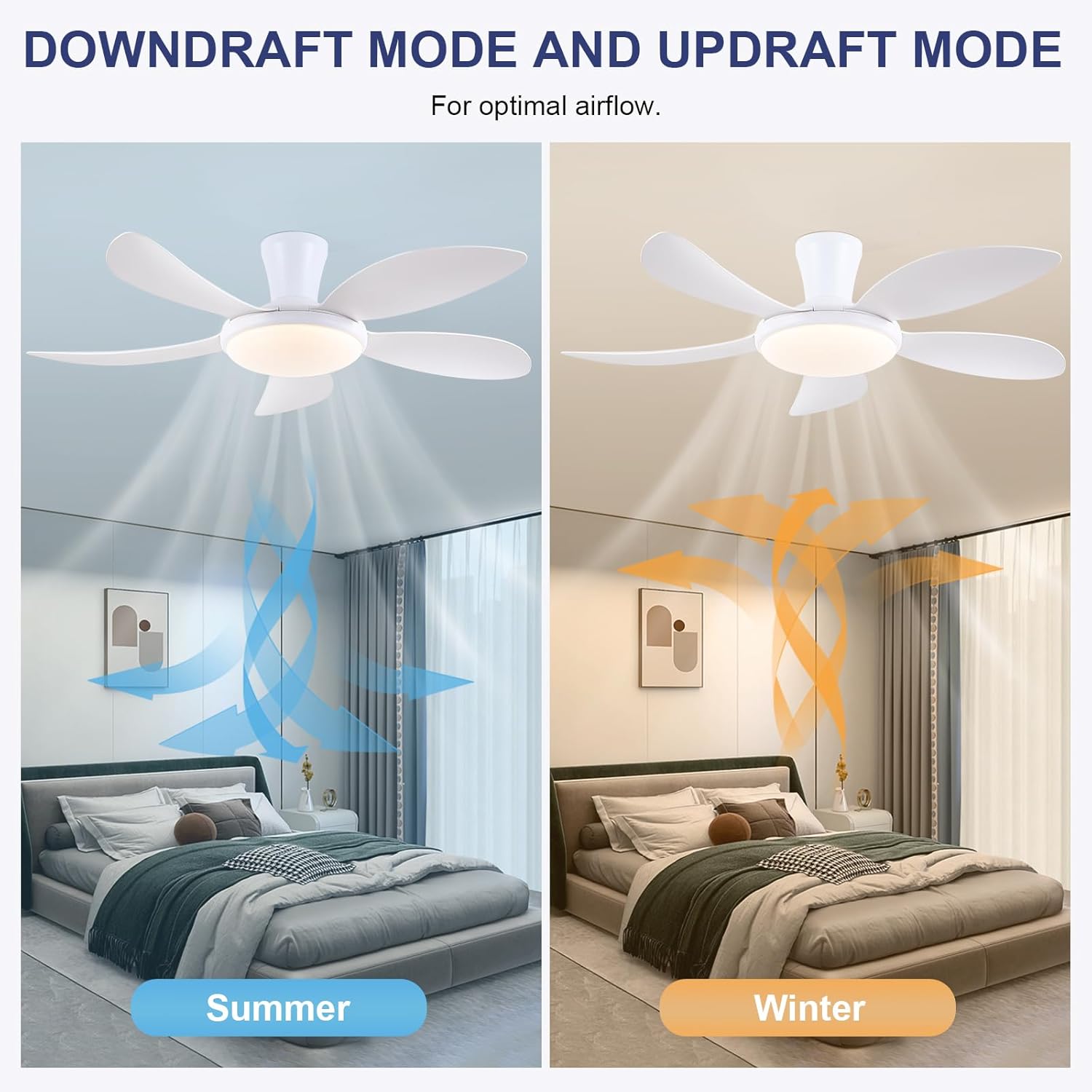
- Reverzibilna funkcija: Press the F/R key to change the blade rotation direction for summer (downdraft) or winter (updraft) modes. The fan will stop briefly before reversing.
- Časovnik: Nastavite 2-urni časovnik za samodejni izklop.
- Nočni način: Activates a low-speed fan and dim light setting.

6.2 Remote Code Pairing
If the remote control is not responding, it may need to be paired:
- Turn off the main power supply to the fan for one minute.
- Turn on the main power supply and simultaneously long-press the 'Code Key' button on the remote control for 3-5 seconds.
- The fan light will blink 2-3 times, indicating successful code matching. The remote can now be operated normally.
6.3 Nadzor APP
Control your fan using the 'Fan Lamp Pro' mobile application:
- Prenesite APP: Scan the QR code provided in the product images or search for "Fan Lamp Pro« v vaši trgovini z aplikacijami.
- Povežite se prek Bluetooth: Prepričajte se, da je Bluetooth na vašem telefonu omogočen.
- Seznani napravo: Open the app, add a new device, and follow the on-screen instructions to connect to your fan. The fan light will blink twice upon successful connection.
- Funkcije: The app allows control over fan speeds, light colors, dimming, reverse function, and timer settings, similar to the remote control.
6.4 Hitrost ventilatorja in pretok zraka
- Stopnje 1-2: Low Comfortable Wind, suitable for sleep.
- Stopnje 3-4: Medium Natural Wind, suitable for daily life.
- Stopnje 5-6: High Cooling Wind, suitable for hot weather.

6.5 Nastavitve svetlobe
- The LED light source supports stepless dimming and memory function, retaining your last brightness and color temperature setting.
- Choose from 3 color temperatures: 3000K (Warm Light), 4500K (Natural Light), and 6000K (White Light).

6.6 Reverzibilna funkcija
The reversible DC motor allows you to change the direction of the fan seasonally:
- Poletni način (prepih navzdol): Lopatice se vrtijo v nasprotni smeri urinega kazalca in potiskajo hladen zrak navzdol.
- Zimski način (vzgonski tok): Lopatice se vrtijo v smeri urinega kazalca, pri čemer se hladen zrak dviga, topel pa kroži navzdol.
7. Vzdrževanje
- Čiščenje: Za čiščenje ventilatorja ga obrišite z mehko krpo,amp krpo. Ne uporabljajte abrazivnih čistil ali topil.
- Nega rezila: The ABS blades are designed to be easy to clean and resistant to deformation.
- Redni pregledi: Periodically check all connections and screws to ensure they are secure.
8. Odpravljanje težav
Če imate težave z ventilatorjem, si oglejte naslednje pogoste težave in rešitve:
- Ventilator ne deluje: Check power supply, ensure all wiring connections are secure, and verify remote control pairing.
- Svetloba ne deluje: Check power supply, ensure light wires are connected, and verify remote control pairing.
- Ventilator je hrupen: Ensure all screws are tightened, especially on the blades and mounting bracket. Check for any obstructions.
- Daljinski upravljalnik ne deluje: Replace batteries, ensure line of sight to the fan, and re-pair the remote control as per section 6.2.
- Težave s povezavo aplikacije: Ensure Bluetooth is on, the app is updated, and try re-pairing the device.
9. Garancija in podpora
PHORUS provides a one-year quality warranty for this product. For any damage or quality problems, free replacement service is offered. If you have any questions or require assistance, please contact PHORUS customer service. You will receive a satisfactory answer within 24 hours.
For additional support and resources, please visit the official PHORUS webspletno mesto ali pa se obrnite na kontaktne podatke, ki ste jih navedli ob nakupu.


