Uvod
This manual provides instructions for the GODIYMODULES DIR9001 24Bit 96kHz Fiber Coaxial Receiver Module. This module converts SPDIF digital audio signals from coaxial or optical fiber inputs to I2S format, supporting samphitrosti do 96 kHz.
Vsebina paketa
Paket vključuje:
- 1 x DIR9001 Receiver Module
- Necessary connecting cables (as shown in product images)
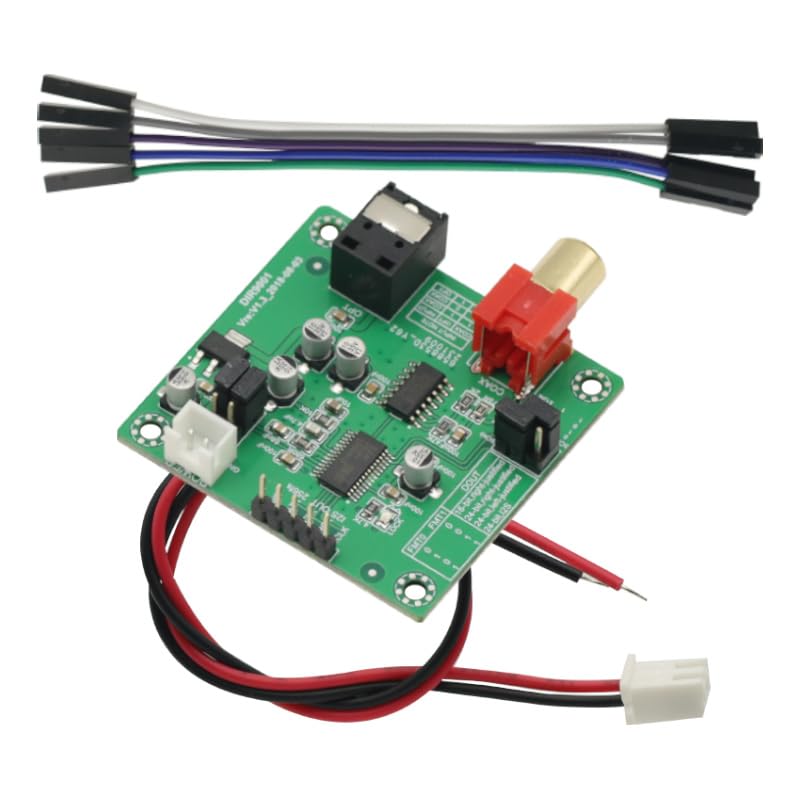
Image: The DIR9001 module shown with included connecting cables, illustrating the complete package contents.
Nastavitev
Follow these steps to set up your DIR9001 module:
- Napajalni priključek: Connect a stable 5V DC power supply to the module's power input. Ensure correct polarity.
- Izbira vnosa:
- For coaxial input, connect your SPDIF source to the RCA coaxial input port.
- For optical fiber input, connect your SPDIF source to the optical fiber input port.
- Opomba: The module automatically prioritizes coaxial input if both are connected. To use optical input, ensure the coaxial input is disconnected.
- Izhodna povezava: Connect the I2S output pins (GND, DATA, BCLK, LRCK, MCLK) to your receiving device (e.g., a DAC). Refer to the module's pinout diagram for correct connections.
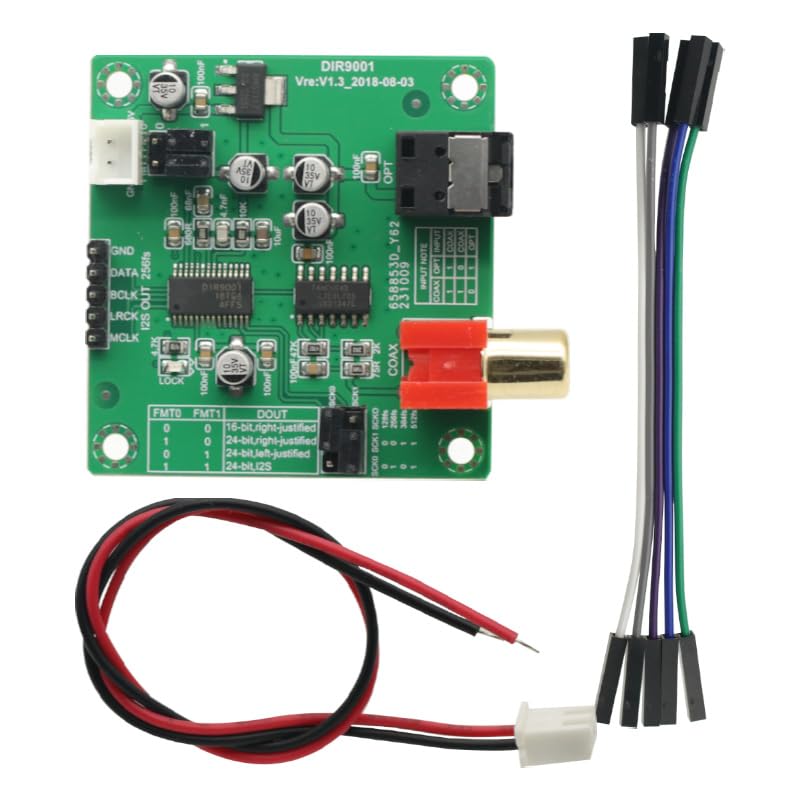
Slika: Podroben pogled od zgoraj navzdol view of the DIR9001 module, highlighting the coaxial (COAX) and optical (OPT) input ports, as well as the I2S output pins (GND, DATA, BCLK, LRCK, MCLK).
Navodila za uporabo
The DIR9001 module operates automatically once powered and an input signal is detected. Key operational aspects include:
- Prioriteta vnosa:
- If only the coaxial (COAX) input is connected, the module will operate in coaxial input mode.
- If only the optical fiber (OPT) input is connected, the module will operate in optical fiber input mode.
- If both OPT and COAX inputs are connected simultaneously, the module will automatically select the coaxial input, and the optical fiber input will be disconnected.
- To use the optical fiber input when both are available, you must physically unplug the coaxial cable.
- Output Format Setting: The module supports various I2S output formats. These can be configured using the FMT1 and FMT0 pins. Refer to the table below for format selection.
I2S Output Format Configuration
| FMT1 | FMT0 | DOUT (Output Format) |
|---|---|---|
| 0 | 0 | 16-bit, MSB-first, right-justified |
| 0 | 1 | 24-bit, MSB-first, right-justified |
| 1 | 0 | 24-bit, MSB-first, left-justified |
| 1 | 1 | 24-bit, MSB-first, I2S |
Opomba: The FMT1 and FMT0 pins are typically configured by connecting them to either ground (0) or VCC (1) on your circuit board.
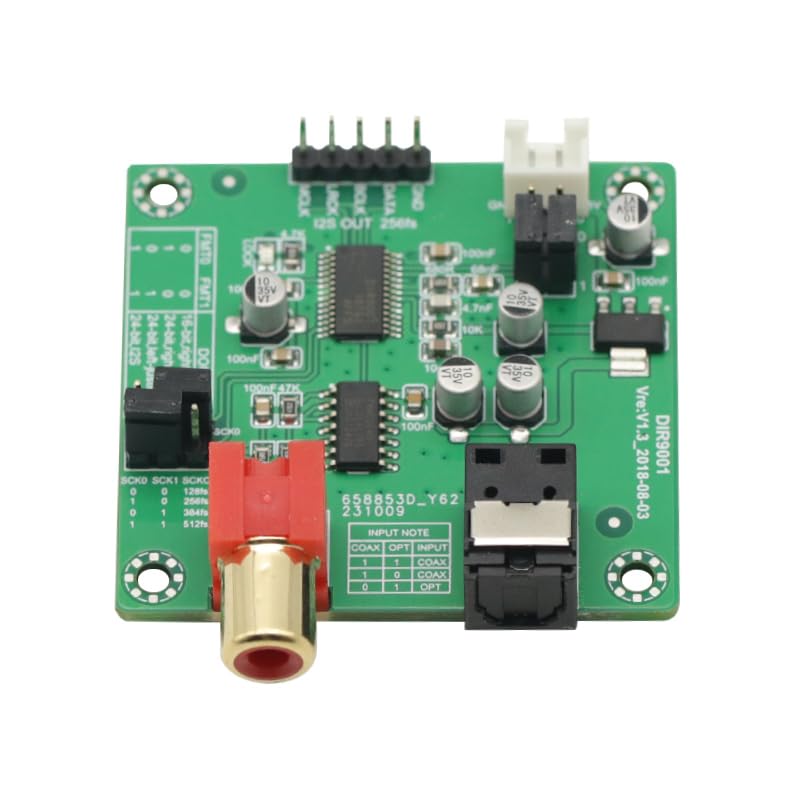
Slika: Bližnji posnetek view of the DIR9001 module, clearly showing the FMT1 and FMT0 pins used for configuring the I2S output format.
Vzdrževanje
The DIR9001 module is designed for reliable operation with minimal maintenance. To ensure longevity:
- Modul hranite v čistem in suhem okolju, stran od prahu in vlage.
- Izogibajte se izpostavljanju modula ekstremnim temperaturam ali neposredni sončni svetlobi.
- Do not attempt to disassemble or modify the module, as this may void any implied warranty and could damage the device.
- Handle with care to prevent physical damage to components or connectors.
Odpravljanje težav
If you encounter issues with your DIR9001 module, consider the following:
- Brez zvočnega izhoda:
- Ensure the 5V power supply is correctly connected and providing stable power.
- Verify that the input source is active and sending an SPDIF signal.
- Check all I2S output connections (GND, DATA, BCLK, LRCK, MCLK) for correct wiring and secure contact.
- Confirm the receiving device (DAC) is correctly configured to accept the I2S signal.
- Optical Input Not Working:
- The module prioritizes coaxial input. Ensure that the coaxial cable is completely disconnected if you intend to use the optical fiber input.
- Check the optical fiber cable for damage and ensure it is securely connected.
- Incorrect Audio Format:
- Review the I2S Output Format Configuration table in the Operating Instructions section.
- Verify that the FMT1 and FMT0 pins are correctly configured for your desired output format.
Specifikacije
| Funkcija | Podrobnost |
|---|---|
| Model | DIR9001 |
| Sample Oceni | 24Bit - 96kHz, 256 fs |
| Dobava Voltage | 5 V (DC) |
| Vhodni vmesnik | Coaxial RCA, Optical Fiber |
| Izhodni vmesnik | Standard I2S (left-aligned, right-aligned, I2S) |
| Število zatičev | 7 (for I2S output and control) |
| Teža predmeta | 1.06 unč |
| Dimenzije paketa | 5.91 x 3.93 x 0.2 palcev |
Informacije o garanciji
Specific warranty details for the GODIYMODULES DIR9001 module are not provided in the product information. Please refer to the retailer's return policy or contact the seller directly for warranty inquiries.
Podpora
For technical assistance or further questions regarding the DIR9001 module, please contact the seller or manufacturer through the platform where the product was purchased.