Uvod
The NEEWER DL400 is an upgraded motorized camera slider dolly designed for smooth and uninterrupted video recording. Featuring an ultra-quiet dual motor drive and non-slip rubber wheels, it supports cameras up to 6.6lb/3kg. Control the dolly wirelessly via the NEEWER App on iOS or Android devices, offering Manual, Live Video, and Time Lapse modes. The device supports various shooting paths including circular, arched, and linear movements with adjustable speeds. It includes a 360° ball head, phone holder, and action camera adapter for wide compatibility.
Vsebina paketa
- 1 x DL400 Motorized Camera Dolly
- 1 x NP-F750 Replacement Battery
- 1 x polnilni kabel USB tipa C
- 1 x Action Camera Mount
- 1 x držalo za telefon
- 1 x kroglična glava

Nastavitev
- Namestitev baterije in polnjenje:
Insert the NP-F750 battery into the designated slot on the dolly. For optimal battery longevity, fully charge the battery before first use using the provided USB Type-C cable. The battery supports up to 5 hours of runtime.

Figure 2: Battery Installation and Charging - Attaching Camera Accessories:
The dolly features a 1/4" screw mount. Attach the included ball head, phone holder, or action camera adapter as needed for your recording device.

Figure 3: Attaching Camera Accessories
Navodila za uporabo
1. Vklop/izklop
Press and hold the power button on the dolly to turn it on or off. The LED indicators will light up to show the current status and battery level.
2. Ročno upravljanje
The dolly features onboard buttons for direct control:
- Prilagoditev hitrosti: Use the speed buttons to select one of 5 speed levels (60s/m, 50s/m, 35s/m, 25s/m, 15s/m).
- Movement Direction: Use the direction buttons to move the dolly forward or backward.
- Način gibanja: Toggle between constant and slow movement modes. Slow mode provides gradual starts and stops.

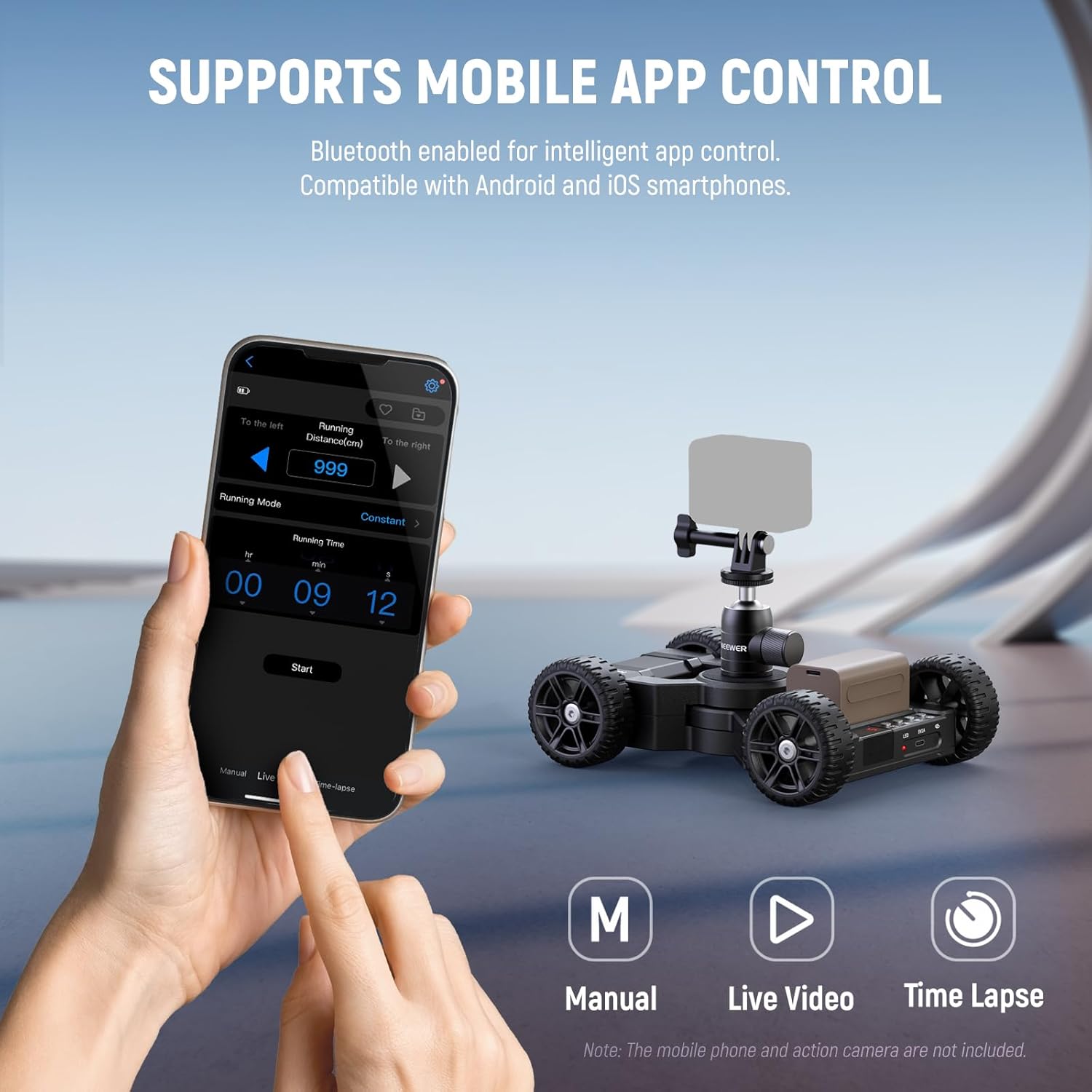
3. App Control (NEEWER App)
For advanced control, download the NEEWER App on your iOS or Android device and connect via Bluetooth.
- Ročni način: Control movement directions and speed.
- Live Video Mode: Set movement directions, movement distance (2.2-32.8ft/66-999cm), and movement mode (constant/slow).
- Način časovnega zamika: Configure shutter speed, frame-by-frame duration, number of shots, and fixed point shooting. Note: Time Lapse photography requires a camera shutter cable (sold separately).
- Shrani prednastavitve: Personalize your shots and save settings for future use.
4. Precise Motion and Flexible Use
The camera dolly can be manually adjusted to move along circular, arched, and linear paths. Adjust the wheel angles (left or right +/-30°) for curved movements. The included ball head allows for 360° rotation and 90° tilt angles for versatile camera positioning.

Vzdrževanje
- Keep the dolly clean and free from dust and debris.
- Store the dolly and battery in a cool, dry place when not in use.
- Ensure the battery is fully charged before long-term storage to maintain its health.
- Redno preverjajte vse vijake in povezave, da se prepričate, da so varno pritrjeni.
Odpravljanje težav
- Dolly Shaking on Slopes: Avoid starting the camera dolly at the highest speed level (5th speed) when climbing slopes to prevent shaking. Start at a lower speed and gradually increase if necessary.
- Neenakomerno gibanje: Ensure the surface the dolly is operating on is as flat and smooth as possible for optimal performance. Uneven surfaces can cause jerky movements.
- Težave s povezljivostjo aplikacije: Ensure Bluetooth is enabled on your mobile device and the dolly is powered on. Restart both the app and the dolly if connection problems persist.
- Baterija se ne polni: Verify the USB Type-C cable is securely connected to both the battery and a power source. Ensure the power source is functional.
Specifikacije
| Model | DL400 |
| Dimenzije izdelka | 7.87 x 3.94 x 5.91 palcev |
| Teža predmeta | 3.75 funta (60 unče) |
| Nosilnost | 6.6 lb / 3 kg |
| Baterija | 1 Lithium Metal (NP-F750, 4400mAh) |
| Runtime | Do 5 ur |
| Vrata za polnjenje | USB tipa C |
| Vrsta motorja | Ultra Quiet Dual Motor Drive |
| Vrsta kolesa | Nedrseča gumijasta kolesa |
| Adjustable Wheel Angle | +/-30° |
| Montažne točke | 1/4" screw |
| Združljive naprave | GoPro, iPhone, Android, Samsung Smartphone, DSLR Camera, Camcorder |
| UPC | 191073091870 |
Garancija in podpora
For warranty information, technical support, or service inquiries, please refer to the official NEEWER webspletno mesto ali se obrnite neposredno na njihovo službo za stranke. Za uveljavljanje garancije shranite račun.


