1. Uvod
This manual provides essential information for the installation, operation, maintenance, and troubleshooting of your PNY RTX 4000 Ada Generation 20GB DDR6 Quadro Graphics Card. This professional graphics card is designed for demanding applications such as 3D rendering, CAD/CAM, scientific simulations, and AI workflows, leveraging the NVIDIA Ada Lovelace architecture.
Key features include 6,144 CUDA cores, 48 RT Cores, 192 Tensor Cores, and 20GB of GDDR6 ECC memory, all within a single-slot, 130W design. It supports up to four 4K monitors or two 8K monitors via DisplayPort 1.4a.

Figure 1: PNY RTX 4000 Ada Generation Graphics Card overview, showing the single-slot design and an illustrative power connector icon.
2. Varnostne informacije
Please read and follow all safety instructions carefully to prevent damage to the product or personal injury.
- Pred nameščanjem ali odstranjevanjem kakršnih koli komponent vedno izključite napajanje računalnika.
- Wear an anti-static wrist strap or frequently touch a grounded metal object to discharge static electricity before handling the graphics card.
- Zagotovite ustrezno prezračevanje v ohišju računalnika, da preprečite pregrevanje.
- Grafične kartice ne izpostavljajte vlagi ali ekstremnim temperaturam.
- Handle the card by its edges; avoid touching the gold-plated connectors or components on the PCB.
3. Vsebina paketa
Preverite, ali so v paketu izdelka vsi elementi:
- PNY RTX 4000 Ada Generation Graphics Card (VCNRTX4000ADA-PB)
- Documentation (this manual, quick start guide, etc.)
Note: Additional accessories such as display adapters or power cables may be sold separately or included depending on your region/retailer.
4. Nastavitev
4.1. Fizična namestitev
- Pripravite svoj sistem: Power off your computer and disconnect the power cable from the wall outlet. Open your computer case.
- Locate a PCIe Slot: Identify an available PCI Express x16 slot on your motherboard. The RTX 4000 Ada Generation is a single-slot card.
- Odstranite pokrove rež: Remove the metal slot cover(s) from the back of your computer case corresponding to the chosen PCIe slot.
- Vstavite grafično kartico: Carefully align the graphics card with the PCIe slot and press down firmly until it is securely seated. Ensure the retention clip on the PCIe slot locks into place.
- Priključite napajanje: The RTX 4000 Ada Generation requires an 8-pin PCIe power connector from your power supply. Connect this cable to the power connector on the top edge of the graphics card. Ensure a secure connection.
- Zavarujte kartico: Use a screw to fasten the graphics card's mounting bracket to the computer case.
- Zapri ohišje in poveži zaslone: Close your computer case. Connect your display monitor(s) to the DisplayPort outputs on the graphics card.
4.2. Namestitev gonilnika
- Vklop: Reconnect the power cable to your computer and power it on. Your system may boot with a basic display driver.
- Prenesi gonilnike: Navigate to the official PNY or NVIDIA website to download the latest drivers for the RTX 4000 Ada Generation. It is recommended to download drivers directly from the manufacturer's webspletno mesto za optimalno delovanje in stabilnost.
- PNY Support: www.pny.com/support
- NVIDIA Drivers: www.nvidia.com/drivers
- Namesti gonilnike: Zaženite preneseni namestitveni program gonilnika in sledite navodilom na zaslonu. Po namestitvi bo morda potreben ponovni zagon sistema.
- Preverite namestitev: After restarting, open the NVIDIA Control Panel or NVIDIA Settings to confirm that the graphics card is recognized and operating correctly.

Figure 2: Display output section of the PNY RTX 4000 Ada Generation, showing four DisplayPort 1.4a connectors.
5. Upravljanje grafične kartice
5.1. Osnovno delovanje
Once installed and drivers are updated, your PNY RTX 4000 Ada Generation graphics card will automatically handle graphics processing for your system. Applications that benefit from GPU acceleration will utilize the card's capabilities.
- Nadzorna plošča NVIDIA: Use the NVIDIA Control Panel (Windows) or NVIDIA Settings (Linux) to adjust display settings, manage 3D application profiles, and monitor GPU status.
- Združljivost programske opreme: Ensure your professional applications (e.g., CAD, rendering software) are updated to versions that support NVIDIA Ada Lovelace architecture for optimal performance.
5.2. Nastavitev več monitorjev
The RTX 4000 Ada Generation supports up to four DisplayPort 1.4a outputs, allowing for flexible multi-monitor configurations.
- Connect your monitors to the available DisplayPort outputs on the graphics card.
- Access your operating system's display settings (e.g., Windows Display Settings) or the NVIDIA Control Panel to configure display arrangement, resolution, and refresh rates.
- The card supports resolutions up to 4K on four monitors simultaneously, or two 8K monitors.
6. Vzdrževanje
6.1. Čiščenje
Redno čiščenje pomaga ohranjati optimalno delovanje in podaljšuje življenjsko dobo vaše grafične kartice.
- Ugasniti: Pred čiščenjem vedno izklopite računalnik in ga odklopite iz vira napajanja.
- Odstranjevanje prahu: Use compressed air to gently blow dust from the heatsink fins and fan blades. Hold the fan blades in place while blowing to prevent over-spinning and potential damage to the fan bearings.
- Čiščenje zunanjosti: Wipe the exterior of the card with a soft, dry, lint-free cloth. Do not use liquid cleaners directly on the card.
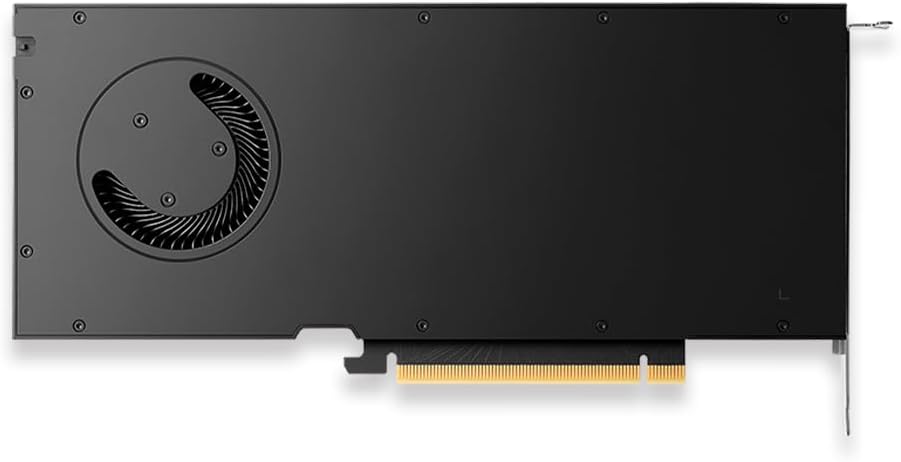
Slika 3: Zadaj view of the PNY RTX 4000 Ada Generation, highlighting the cooling fan for maintenance reference.
6.2. Shranjevanje
If storing the graphics card, place it in an anti-static bag and store it in a cool, dry environment away from direct sunlight and extreme temperatures.
7. Odpravljanje težav
Ta razdelek obravnava pogoste težave, na katere lahko naletite.
- Brez izhoda za prikaz:
- Ensure the monitor is powered on and connected to the graphics card, not the motherboard's integrated graphics.
- Verify the graphics card is fully seated in the PCIe slot and the power cable is securely connected.
- Poskusite z drugim kablom za prikaz ali monitorjem.
- Check your BIOS/UEFI settings to ensure the primary display output is set to PCIe graphics.
- Težave z namestitvijo gonilnikov:
- Uninstall any previous graphics drivers using a utility like Display Driver Uninstaller (DDU) in Safe Mode, then attempt a fresh installation of the latest drivers.
- Ensure you downloaded the correct drivers for your operating system and graphics card model.
- Nestabilnost ali zrušitve sistema:
- Prepričajte se, da vaša napajalna enota (PSU) ustreza minimalnim zahtevam zatagzahteve za vaš sistem, vključno z grafično kartico.
- Monitor GPU temperatures using software utilities. Excessive heat can cause instability. Ensure proper case airflow.
- Verify that your operating system and motherboard BIOS are up to date.
8. Specifikacije
| Funkcija | Podrobnost |
|---|---|
| Znamka | PNY |
| Številka modela | VCNRTX4000ADA-PB |
| Grafični koprocesor | NVIDIA Quadro RTX 4000 Ada Generation |
| Arhitektura | NVIDIA Ada Lovelace |
| Jedra CUDA | 6,144 |
| RT jedra | 48 (3rd Generation) |
| Tenzorska jedra | 192 (4th Generation) |
| Velikost grafične kartice RAM | 20 GB GDDR6 ECC |
| Pomnilniški vmesnik | 160-bitni |
| Pasovna širina pomnilnika | 360 GB/s |
| Taktna hitrost GPU | 2220 MHz (povečanje) |
| Hitrost pomnilnika | 2250 MHz |
| Zmogljivost FP32 | Up to 26.7 TFLOPS |
| Ray Tracing Performance | 61.8 TFLOPS |
| AI Performance (FP8) | 327.6 TFLOPS |
| Video izhodni vmesnik | 4x DisplayPort 1.4a |
| Največja ločljivost zaslona | 3840x2160 (4K) per display, up to 4 displays; 8K on 2 displays |
| Poraba energije | 130 W |
| Faktor oblike | Eno režo |
| Dimenzije izdelka (DxŠxV) | 14.65 x 8.55 x 0.1 palcev |
| Teža predmeta | 1.85 funtov |
9. Informacije o garanciji
PNY products are covered by a manufacturer's warranty. The specific terms and duration of the warranty may vary by region and product type. Please refer to the official PNY website or your product's packaging for detailed warranty information.
For warranty claims or to register your product, visit: www.pny.com/support/warranty
10. Tehnična podpora
If you encounter issues that cannot be resolved using the troubleshooting steps in this manual, or require further assistance, please contact PNY Technical Support.
- PNY Support Webspletno mesto: www.pny.com/support
- Podpora website provides FAQs, driver downloads, and contact information for technical assistance.


