1. Uvod
This manual provides essential instructions for the safe and efficient use of your Meizu Note 21 Pro smartphone. Please read this manual thoroughly before operating the device and retain it for future reference.
2. Kaj je v škatli
- Meizu Note 21 Pro Smartphone
- Napajalni adapter
- (Other accessories such as USB cable, SIM ejector tool, and documentation may vary by region.)
3. Postavitev naprave
Familiarize yourself with the physical components of your Meizu Note 21 Pro.
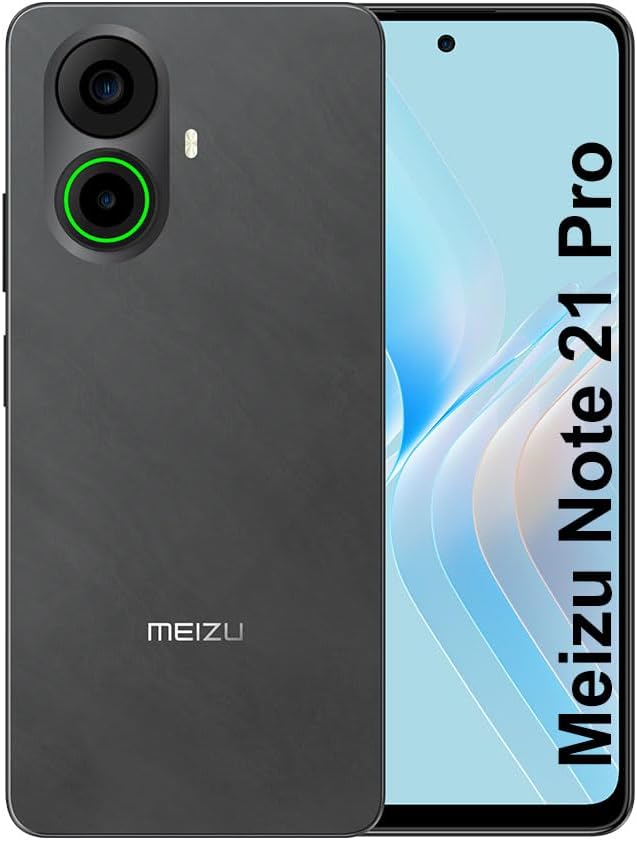
Slika 3.1: Spredaj in zadaj view of the Meizu Note 21 Pro. The front displays the screen with a punch-hole camera. The rear shows the dual camera module with a green accent ring on one lens, a flash, and the "MEIZU" logo at the bottom.
- Sprednji zaslon: 6.78-inch FHD+ screen with a 120Hz refresh rate.
- Sprednja kamera: Nahaja se na zgornjem srednjem delu zaslona.
- Zadnji fotoaparati: Dual camera system, including a 64MP main camera.
- Stranski senzor prstnih odtisov: Integrated for secure access.
- Vrata USB: Za polnjenje in prenos podatkov.
- 3.5 mm avdio priključek: Za slušalke.
- Pladenj za kartico SIM/MicroSD: Supports Dual Nano SIM and MicroSD cards.
4. Nastavitev
4.1. Vstavljanje SIM in MicroSD kartic
- Poiščite pladenj za kartico SIM na strani naprave.
- Vstavite orodje za izmet SIM kartice v majhno luknjo poleg pladnja in ga nežno potisnite, dokler pladenj ne izskoči.
- Place your Nano SIM card(s) and/or MicroSD card into the designated slots on the tray. Ensure the gold contacts face downwards.
- Pladenj previdno vstavite nazaj v napravo, dokler se ne zaskoči.
4.2 Začetni vklop in nastavitev
- Press and hold the Power button until the Meizu logo appears.
- Sledite navodilom na zaslonu, da izberete jezik, se povežete z omrežjem Wi-Fi in nastavite svoj Google Račun.
- During setup, you will be guided to configure security features such as a PIN, pattern, or password.
4.3. Fingerprint Recognition Setup
- Pojdite na nastavitve > Varnost in zasebnost > Odklepanje s prstnim odtisom.
- Follow the on-screen instructions to register your fingerprint by repeatedly touching the side-mounted sensor.
- Ensure your finger covers the entire sensor area during registration for optimal performance.
5. Upravljanje vaše naprave
5.1. Prikaz in navigacija
- The 6.78-inch FHD+ display operates at a 120Hz refresh rate for smooth visuals.
- Navigate the Android 14 operating system using touch gestures: tap, swipe, pinch-to-zoom.
- Do hitrih nastavitev dostopate tako, da podrsate navzdol z vrha zaslona.
5.2. Funkcije kamere
- Odprite aplikacijo Kamera na začetnem zaslonu ali v predalu aplikacij.
- The rear camera system features a 64MP main sensor for high-resolution photos and a 2MP depth-of-field camera for portrait effects.
- The 13MP front-facing camera is suitable for selfies and video calls.
- Tap on the screen to focus, and use the on-screen shutter button to capture images. Explore various modes like Portrait, Night, and Pro within the camera app.
5.3. Zmogljivost in shranjevanje
- The MediaTek G99 Octa Core processor ensures efficient performance for applications and multitasking.
- The device comes with 256GB of internal storage and 8GB of RAM.
- Storage can be expanded using a MicroSD card (sold separately).
5.4. Baterija in polnjenje
- The Meizu Note 21 Pro is equipped with a 5000mAh battery.
- Use the provided Power Adapter for 30W fast charging.
- To charge, connect the USB cable to the phone's USB port and the power adapter, then plug the adapter into a wall outlet.
5.5. Povezljivost
- 4G LTE: Supports various LTE FDD and TDD bands for cellular data. Note: This international version works on T-Mobile in the USA and globally with other carriers.
- Wi-Fi 5: Za dostop do interneta se povežite z brezžičnimi omrežji.
- Bluetooth: Združite z brezžično dodatno opremo, kot so slušalke in zvočniki.
- NFC: Za brezstična plačila in hitro seznanjanje z združljivimi napravami.
- GPS: Za lokacijske storitve in navigacijo.
6. Vzdrževanje
- Čiščenje: Za čiščenje zaslona in ohišja naprave uporabljajte mehko krpo, ki ne pušča vlaken. Izogibajte se agresivnim kemikalijam ali abrazivnim materialom.
- Vzdrževanje baterije: Avoid extreme temperatures. Do not fully discharge the battery frequently. For optimal battery longevity, keep the charge between 20% and 80%.
- Posodobitve programske opreme: Redno preverjajte in nameščajte posodobitve sistema, da zagotovite optimalno delovanje in varnost. Pojdite na nastavitve > Sistem > Posodobitev sistema.
7. Odpravljanje težav
| Izdaja | Možna rešitev |
|---|---|
| Naprava se ne vklopi | Ensure the battery is charged. Connect the device to the power adapter and try again. If unresponsive, press and hold the Power button for 10-15 seconds to force a restart. |
| Slab signal omrežja | Check if the SIM card is correctly inserted. Move to an area with better network coverage. Restart the device. Verify with your carrier that your plan is active. |
| Aplikacije so počasne ali se sesujejo | Close background applications. Clear app cache (nastavitve > Aplikacije > izberite aplikacijo > Shranjevanje in predpomnilnik > Počisti predpomnilnik). Ponovno zaženite napravo. Zagotovite dovolj prostora za shranjevanje. |
| Senzor prstnih odtisov ne deluje | Ensure your finger and the sensor are clean and dry. Re-register your fingerprint in settings. |
8. Specifikacije
- Model: Meizu Note 21 Pro
- Operacijski sistem: Android 14
- Procesor: MediaTek G99 Octa Core (2.2GHz)
- Zaslon: 6.78 inches FHD+ (1080 x 2160 resolution), 120Hz Refresh Rate
- RAM: 8 GB
- Notranji pomnilnik: 256 GB
- Zadnja kamera: 64MP glavna + 2MP globinska
- Sprednja kamera: 13 MP
- Baterija: 5000 mAh, hitro polnjenje 30 W
- Povezljivost: 4G LTE (FDD:1,2,3,4,5,7,8,12,17,18,19,20,26,28,66; TDD:38,40,41), 3G WCDMA, 2G Quad Band, Wi-Fi 5, Bluetooth, NFC, GPS
- Zvočni priključek: 3.5 mm
- Dimenzije: 6.64 x 2.96 x 0.33 palcev
- Teža: 1.1 funtov
9. Garancija in podpora
For warranty information and technical support, please refer to the warranty card included with your product or visit the official Meizu webspletnega mesta. Shranite dokazilo o nakupu za uveljavljanje garancije.
For further assistance, you may contact Meizu customer service through their official channels.


