1. Uvod
The BUSICOM PC-SeaV15c is a 15-inch Windows IoT touch panel PC designed for commercial and industrial applications. This manual provides essential information for the safe and efficient setup, operation, and maintenance of your device. Please read this manual thoroughly before using the product and retain it for future reference.
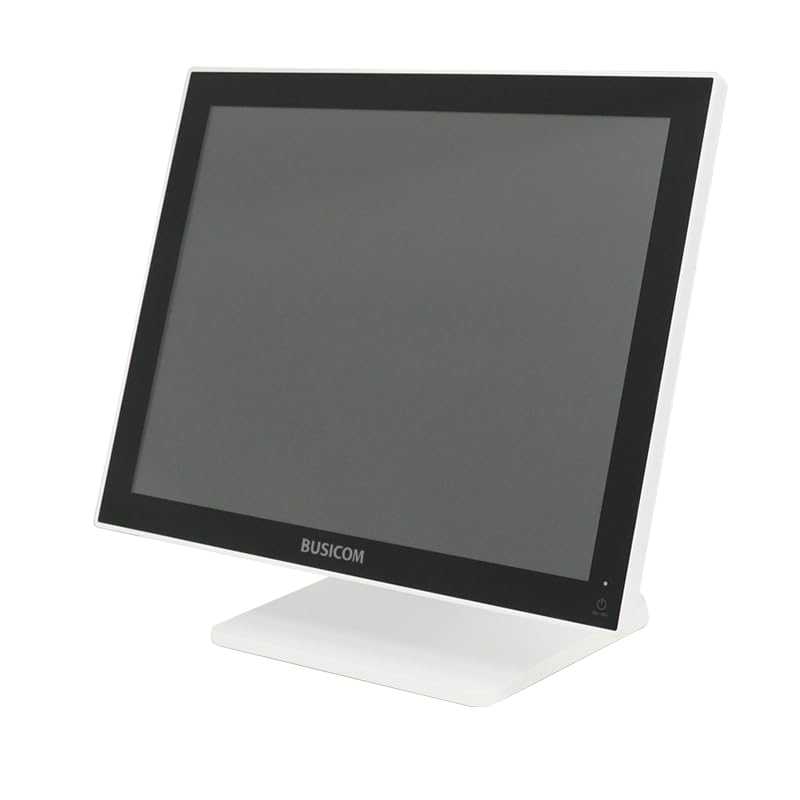
Slika 1: Spredaj view of the BUSICOM PC-SeaV15c Touch Panel PC.
2. Izdelek je končanview
2.1 Ključne lastnosti
- Napredno oblikovanje: Features an ultra-thin bezel and a highly durable 7H reinforced display for enhanced aesthetics and protection.
- Vrhunska zmogljivost: Equipped with Microsoft Windows 10 IoT Enterprise, ensuring long-term support and reliable operation.
- Intuitivna plošča na dotik: Utilizes a capacitive touch method, offering a familiar and responsive touch experience similar to smartphones and tablets.
- Enostavno vzdrževanje: Designed for simple RAM and SSD replacement, facilitating upgrades and servicing.
- Versatile Interfaces: Provides a wide range of connectivity options to integrate with various peripherals.
- Učinkovito shranjevanje: SSD storage ensures fast processing speeds, quiet operation, and excellent shock resistance.
2.2 Komponente
The package typically includes the BUSICOM PC-SeaV15c unit and a power adapter. Additional accessories may vary.

Figure 2: Front and side profile of the PC-SeaV15c unit.

Slika 3: Zadaj view showing access panels for RAM and SSD components.
3. Navodila za nastavitev
3.1 Razpakiranje
- Carefully remove the PC-SeaV15c from its packaging.
- Preverite morebitne vidne poškodbe. Če so poškodovane, se nemudoma obrnite na prodajalca.
- Prepričajte se, da so prisotne vse navedene komponente.
3.2 Priključitev zunanjih naprav
Refer to the interface diagram below for port locations and types.

Figure 4: Detailed diagram of the PC-SeaV15c's rear and bottom interfaces.
- Napajalni priključek: Connect the provided power adapter to the DC In port and then to a power outlet.
- Naprave USB: Use the USB 2.0 (4 ports) and USB 3.0 (2 ports) for connecting keyboards, mice, printers, and other USB peripherals.
- Omrežna povezava: Connect an Ethernet cable to the LAN port for wired network access.
- Avdio izhod: Connect external speakers or headphones to the Audio Out port.
- Serial Ports (RJ45): Utilize COM1, COM2, COM3, and COM6 for connecting specialized POS peripherals such as barcode scanners or receipt printers.
- Cash Drawer (RJ11): Connect a compatible cash drawer to the RJ11 port.
- Zunanji zaslon: If an external monitor is required, connect it to the Mini DisplayPort.
- USB Type-C: Za združljive naprave.
3.3 Vklop/izklop
- Vklop: Press the power button located on the upper right side of the display bezel or the power mark on the rear panel.
- Ugasniti: To safely shut down the system, use the standard Windows shutdown procedure. Avoid direct power disconnection during operation to prevent data loss.
4. Navodila za uporabo
4.1 Windows 10 IoT Enterprise
The PC-SeaV15c operates on Windows 10 IoT Enterprise 2021. Familiarize yourself with the Windows operating system for basic navigation, application management, and system settings.
4.2 Touch Panel Usage
The capacitive touch screen supports multi-touch gestures.
- Tapnite: Enakovredno kliku z miško.
- Dvojni dotik: Enakovredno dvojnemu kliku.
- Pritisnite in držite: Enakovredno kliku z desno tipko miške.
- Povlecite: Za pomikanje ali navigacijo.
- Povečava s ščipanjem in ščipanjem prstov: Za povečavo ali pomanjšavo uporabite dva prsta.
5. Vzdrževanje
5.1 Čiščenje naprave
- Always power off and unplug the device before cleaning.
- Uporabite mehko krpo, ki ne pušča vlaken, dampz vodo ali neabrazivnim čistilom za zaslone.
- Do not spray liquids directly onto the screen or device.
- Izogibajte se uporabi agresivnih kemikalij, topil ali abrazivnih materialov.
5.2 RAM and SSD Replacement
The PC-SeaV15c is designed for easy replacement of RAM and SSD components. Refer to Figure 3 for the access panel location. For detailed instructions on component replacement, consult a qualified technician or the BUSICOM support webmesto.
6. Odpravljanje težav
V tem razdelku so rešitve za pogoste težave, na katere lahko naletite.
- Naprava se ne vklopi:
- Prepričajte se, da je napajalnik varno priključen tako na napravo kot na delujočo električno vtičnico.
- Preverite delovanje vtičnice tako, da vanjo priključite drugo napravo.
- Zaslon na dotik se ne odziva:
- Ponovno zaženite napravo.
- Prepričajte se, da je zaslon čist in brez ovir.
- Brez prikaza:
- Preverite, ali je naprava vklopljena.
- If an external display is connected, ensure the correct input source is selected on the external display.
- Peripheral not detected:
- Ensure the peripheral is correctly connected to the appropriate port (USB, LAN, COM).
- Poskusite priključiti periferno napravo na druga vrata.
- Check the peripheral's own power supply, if applicable.
For further assistance, please contact BUSICOM customer support.
7. Specifikacije
| Funkcija | Podrobnost |
|---|---|
| Znamka | BUSICOM |
| Ime modela | PC-SeaV15c |
| barva | Bela |
| Velikost zaslona | 15 palcev |
| Resolucija | 1024x768 |
| Operacijski sistem | Windows 10 IoT Enterprise 2021 |
| Znamka CPU | Intel |
| Vtičnica za procesor | Intel® N97 |
| Hitrost procesorja | 3.6 GHz |
| Vrsta pomnilnika | DDR4 |
| Nameščen RAM | 4 GB |
| Vrsta trdega diska | SSD |
| Kapaciteta SSD | 128 GB (kot je navedeno v naslovu izdelka) |
| Vrsta grafične kartice | Integrirano |
| Vrsta VRAM-a | DDR4 SDRAM |
| Zmogljivost VRAM-a | 4 GB |
| Vrata USB 2.0 | 4 |
| Vrata USB 3.0 | 2 |
| Optični pogon | Noben |
| Teža izdelka | 6 kilogramov |
| Višina (pribl.) | 307.5 mm (as per dimension diagram) |

Slika 5: Zadaj view of the PC-SeaV15c with approximate height dimension.
8. Garancija in podpora
For warranty information and technical support, please refer to the warranty card included with your product or visit the official BUSICOM webspletnega mesta. Račun shranite kot dokazilo o nakupu za uveljavljanje garancije.
BUSICOM Official Webspletno mesto: BUSICOM Store on Amazon.co.jp


