1. Uvod
The Parsonver Smartwatch Z139 is designed to enhance your daily life with a variety of intelligent functions. This manual provides detailed instructions for setting up, operating, and maintaining your smartwatch to ensure optimal performance and user experience.
Key features include Bluetooth calling, comprehensive health monitoring (heart rate, blood oxygen, sleep), over 100 sports modes, and smart notifications.
2. Začetek: Nastavitev
2.1 Vsebina paketa
- Parsonver Smartwatch Z139
- Polnilni kabel
- Uporabniški priročnik
2.2 Polnjenje pametne ure
Pred prvo uporabo popolnoma napolnite pametno uro. Magnetni polnilni kabel priključite na polnilne kontakte na zadnji strani ure in USB-konec priključite v napajalnik (ni priložen) ali USB-vhod računalnika.
2.3 Namestitev in seznanjanje aplikacij
To unlock the full potential of your Parsonver Smartwatch, download the companion app on your smartphone. The app is compatible with iOS 9.0/Android 6.0 or above.
- Scan the QR code in the manual or search for "Parsonver" in your phone's app store (Google Play Store for Android, Apple App Store for iOS).
- Namestite in odprite aplikacijo.
- Follow the on-screen instructions in the app to create an account and pair your smartwatch via Bluetooth. Ensure Bluetooth is enabled on your smartphone.
- During pairing, grant necessary permissions for notifications, location, and health data synchronization.

Image: The Parsonver Smartwatch Z139, showcasing its main display with time, date, and step count.
3. Navodila za uporabo
3.1 Bluetooth Calls and Smart Notifications
Once connected via Bluetooth, you can manage calls directly from your smartwatch.
- Odgovarjanje/klicanje: Use the watch's interface to answer incoming calls or dial numbers. The watch features high-quality speakers and a high-definition microphone for clear communication.
- Obvestila: Receive alerts for SMS, WhatsApp, Facebook, emails, and other app notifications directly on your watch. The watch will vibrate to inform you of new messages.
- Glasovni asistent: Utilize the integrated voice assistant for hands-free control and information access.
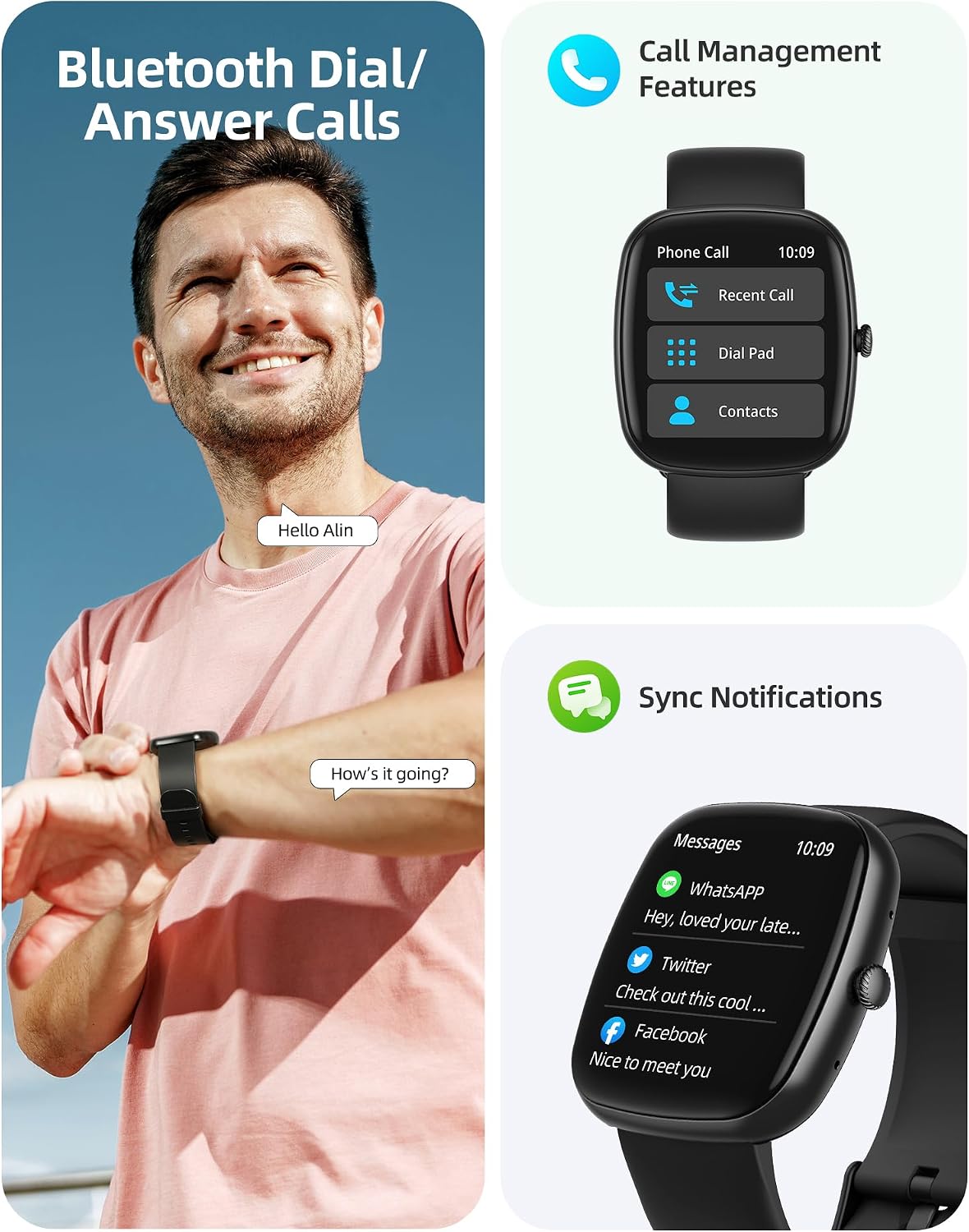
Image: A user interacting with the smartwatch for Bluetooth calls, demonstrating the call management interface.
3.2 Spremljanje zdravja
The smartwatch features advanced sensors for continuous health tracking.
- Spremljanje srčnega utripa: Measures and records your heart rate throughout the day. The app displays trends and alerts for abnormal readings.
- Spremljanje kisika v krvi (SpO2): Spremlja raven nasičenosti krvi s kisikom.
- Spremljanje spanja: Analyzes your sleep patterns, including deep sleep, light sleep, and awake times, to help optimize your sleep habits.
- Spremljanje stresa: Ponuja vpogled v vašo raven stresa.
- Sledenje zdravju žensk: Records menstrual cycles and ovulation periods.

Image: Visual representation of the smartwatch's health monitoring capabilities, including heart rate, blood oxygen, and pressure readings.
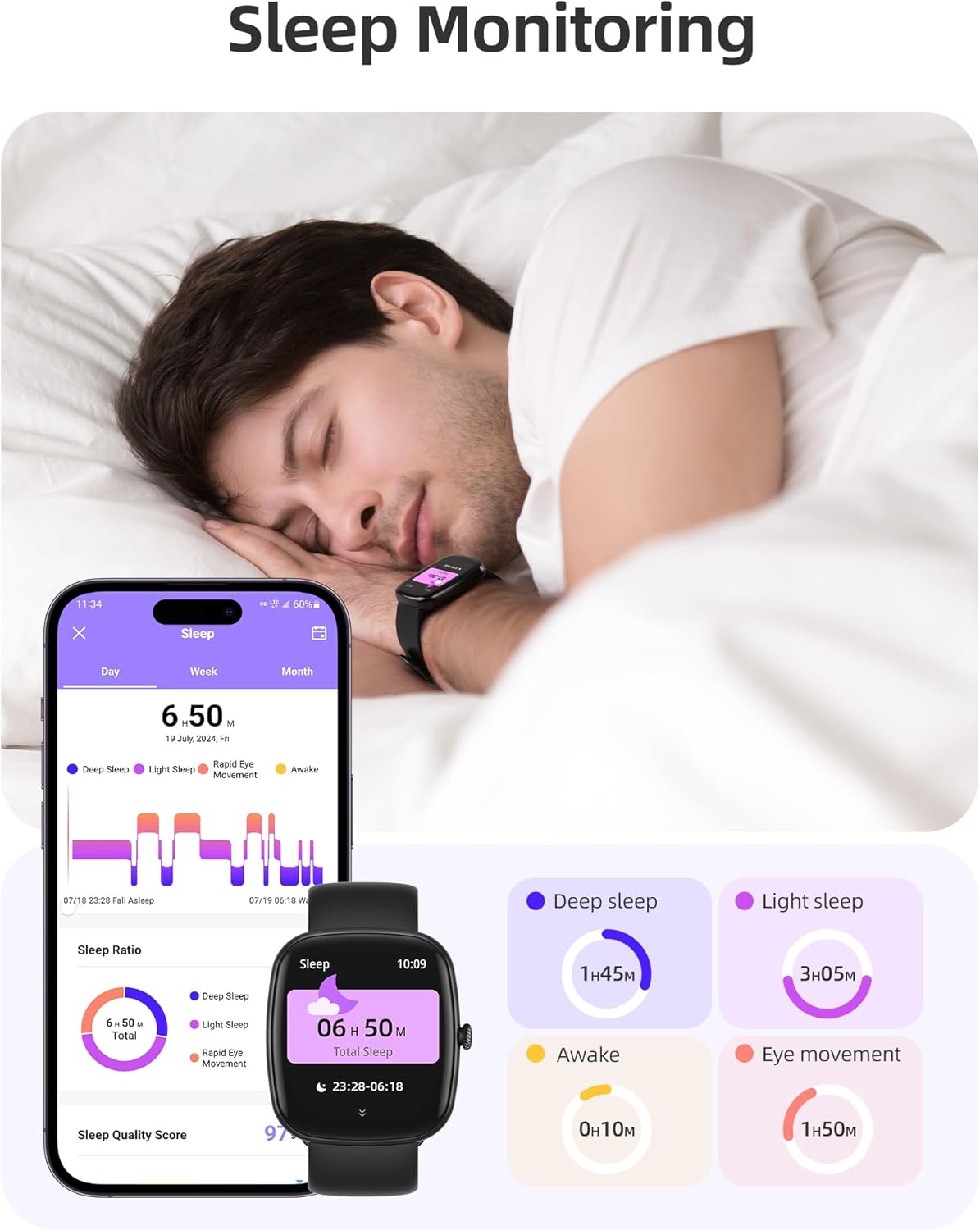
Image: The smartwatch monitoring sleep, with a detailed breakdown of sleep stages displayed on the companion app.
3.3 Športni načini in sledenje aktivnosti
The activity tracker supports over 100 sports modes to monitor your workouts effectively.
- Razpoložljivi načini: Includes yoga, running, jumping, cycling, badminton, football, rowing, and many more.
- Sledenje podatkov: Records steps, distance, calories burned, and real-time heart rate during exercise.
- Daily Readiness Score: Provides a summary of your daily activity and recovery.

Image: The smartwatch tracking a user's activity during a run, displaying key metrics like calories, steps, heart rate, and distance.
3.4 App Experience and BMI Tracking
The companion app offers additional features for health management.
- Weight and BMI Tracking: Manually input your weight in the app to track changes and automatically calculate your Body Mass Index (BMI). View daily, weekly, monthly, and yearly weight trends.
- Training Courses: Access integrated training courses from beginner to advanced levels.
- Relaxation Features: Includes white noise, meditation exercises, and relaxation training.

Image: The companion app displaying weight and BMI tracking features, helping users monitor their body composition.
3.5 prilagodljivih številčnic ure
Personalize your smartwatch with over 200 different watch face designs available through the app.

Image: A selection of customizable watch faces, demonstrating the variety of styles and information layouts available.
3.6 Druge praktične funkcije
The smartwatch includes several other useful features:
- Vremenska napoved: View 7-dnevne vremenske napovedi.
- Nadzor glasbe: Control music playback directly from your wrist.
- Nadzor kamere: Daljinsko upravljajte kamero svojega pametnega telefona.
- Budilka: Nastavite več alarmov.
- Štoparica in časovnik: Natančen čas za različne dejavnosti.
- Sedeči opomnik: Spodbuja vas k gibanju po obdobjih neaktivnosti.
- Dihalne vaje: Guided exercises to reduce stress.
- Najdi telefon: Locate your paired smartphone with a tap on your watch.
- Prilagoditev svetlosti: Continuously adjustable screen brightness for optimal visibility in any lighting condition.

Slika: Prekoview of the various practical functions available on the Parsonver Smartwatch Z139.
4. Vzdrževanje
Proper care ensures the longevity and performance of your smartwatch.
- Čiščenje: Regularly clean the watch and strap with a soft, dry cloth. Avoid harsh chemicals.
- Vodoodpornost: The smartwatch has an IP68 water resistance rating, meaning it can withstand hand washing, rain, and splashes. Do not use it for swimming, diving, or in saunas.
- Polnjenje: Use only the provided charging cable. Avoid exposing charging contacts to moisture.
- Shranjevanje: Uro shranjujte na hladnem in suhem mestu, ko je ne uporabljate.
5. Odpravljanje težav
Če imate težave s pametno uro, poskusite naslednje korake:
- Ura se ne vklopi: Prepričajte se, da je ura popolnoma napolnjena.
- Seznanitev s telefonom ni mogoča:
- Prepričajte se, da je Bluetooth omogočen na telefonu in uri.
- Prepričajte se, da je ura v dosegu vašega telefona.
- Znova zaženite uro in telefon.
- Poskusite prekiniti seznanitev in jo ponovno vzpostaviti prek aplikacije.
- Obvestila niso bila prejeta:
- Check app permissions on your phone to ensure notifications are allowed for the Parsonver app.
- Verify that notifications are enabled within the Parsonver app settings.
- Prepričajte se, da je ura pravilno povezana prek Bluetootha.
- Netočni zdravstveni podatki:
- Prepričajte se, da je ura tesno prilegana zapestju, ne pretesna ali preohlapna.
- Očistite senzor na zadnji strani ure.
- Med meritvami se izogibajte pretiranemu gibanju.
- Zaslon se ne odziva: Try restarting the watch. If the issue persists, contact customer support.
6. Specifikacije
| Funkcija | Specifikacija |
|---|---|
| Znamka | Parsonver |
| Številka modela | Z139 |
| Velikost zaslona | 1.83 palcev |
| Združljivost operacijskega sistema | iOS 9.0/Android 6.0 or above Smartphones |
| Tehnologija povezljivosti | Bluetooth |
| Posebne lastnosti | Bluetooth Calls, 100+ Sports Modes, Heart Rate Monitoring, SpO2 Monitoring, Sleep Monitoring, IP68 Water Resistance, Music Control, Camera Control, Weather, Alarm, Timer, Stopwatch, Sedentary Reminder, Breathing Exercises, Find Phone, Brightness Adjustment, Women's Health Tracking |
| Sestava baterije | Litij-polimer |
| Kapaciteta baterije | 230 mAh |
| Ocena vodoodpornosti | IP68 (Not for swimming/diving/sauna) |
| Zmogljivost pomnilnika | 512 MB |
| GPS | Preko pametnega telefona |
7. Garancija in podpora
For warranty information and customer support, please refer to the documentation included with your purchase or visit the official Parsonver website. Typically, products are covered by a manufacturer's warranty against defects in materials and workmanship for a specified period from the date of purchase. Please retain your proof of purchase.
If you experience any issues not covered in this manual, or require further assistance, please contact Parsonver customer service.


