1. Uvod
The Flashpoint R2 Nano Remote is a compact and advanced wireless flash trigger designed for Panasonic and Olympus camera systems. It offers precise control over your flash settings through an intuitive touchscreen interface and OLED display, enhancing your photography experience with seamless integration and reliable performance.
Glavne lastnosti vključujejo:
- Brezšivna integracija: Full TTL compatibility with Olympus/Panasonic cameras for optimal exposure.
- Ultimate Reliability: Stable 2.4 GHz radio frequency with 32 channels, ensuring consistent triggering up to 328 feet (100 meters).
- Visokohitrostna sinhronizacija (HSS): Achieve sync speeds up to 1/8000s for creative effects and motion freezing.
- Intuitivno upravljanje z zaslonom na dotik: Responsive interface for quick and easy adjustments.
- Versatile Group Control: Manage up to 16 groups (A-F, 0-9) independently for complex lighting setups.
2. Kaj je v škatli
Upon unboxing your Flashpoint R2 Nano, please verify that all components are present:
- Flashpoint R2 Nano Remote
- Polnilni kabel USB-C
- Torba za shranjevanje
- Uporabniški priročnik (ta dokument)
3. Izdelek je končanview
Familiarize yourself with the components and controls of your R2 Nano remote.
Slika 3.1: Spredaj in ob strani View of the R2 Nano with Key Components Labeled.
- Zaslon na dotik: Main interface for settings and control.
- Izberite številčnico: For navigating menus and adjusting values.
- Stikalo za vklop: Vklopi/izklopi napravo.
- Testni gumb: Triggers a test flash.
- Installing/Detaching Button: Releases the remote from the hotshoe.
- Montažna reža: Connects to the camera's hotshoe.
- Vrata za polnjenje USB-C: Za polnjenje baterije.

Figure 3.2: R2 Nano Touchscreen Interface Details.
- Channel (CH): Displays the current wireless channel (e.g., CH6).
- Group (A, B, C, etc.): Indicates the active flash groups.
- Raven izhodne moči: Shows the flash power setting (e.g., +0.0, 1/128).
- Parameters - / +: Touch controls for decreasing/prirastekasinvrednosti g.
- Načini sinhronizacije: Icons indicating sync modes (e.g., HSS, front curtain, rear curtain).
- Modeliranje L.amp: Icon for modeling lamp stanje.
- Indikator baterije: Prikazuje trenutni nivo baterije.
4. Nastavitev
4.1 Polnjenje baterije
The R2 Nano is equipped with a built-in rechargeable lithium battery. Before first use, fully charge the device.
- Locate the USB-C charging port on the side of the R2 Nano.
- Priloženi polnilni kabel USB-C priključite v vrata.
- Drugi konec kabla priključite na napajalnik USB (ni priložen) ali na vrata USB računalnika.
- The battery indicator on the screen will show charging status. A full charge from 0% to 100% typically takes approximately 2 hours.

Figure 4.1: Charging the R2 Nano via USB-C.
4.2 Montaža na kamero
The R2 Nano features an easy-mounting, durable hotshoe design for secure attachment to your camera.
- Prepričajte se, da je fotoaparat izklopljen.
- Slide the R2 Nano's mounting slot onto your camera's hotshoe.
- Gently push until it clicks into place, ensuring a secure connection.
- To detach, press the Installing/Detaching Button and slide the remote off.

Figure 4.2: Mounting the R2 Nano on a Camera Hotshoe.
5. Navodila za uporabo
5.1 Vklop/izklop
- To power on, press and hold the Power Switch until the screen illuminates.
- To power off, press and hold the Power Switch until the screen turns off.
5.2 Navigacija po vmesniku zaslona na dotik
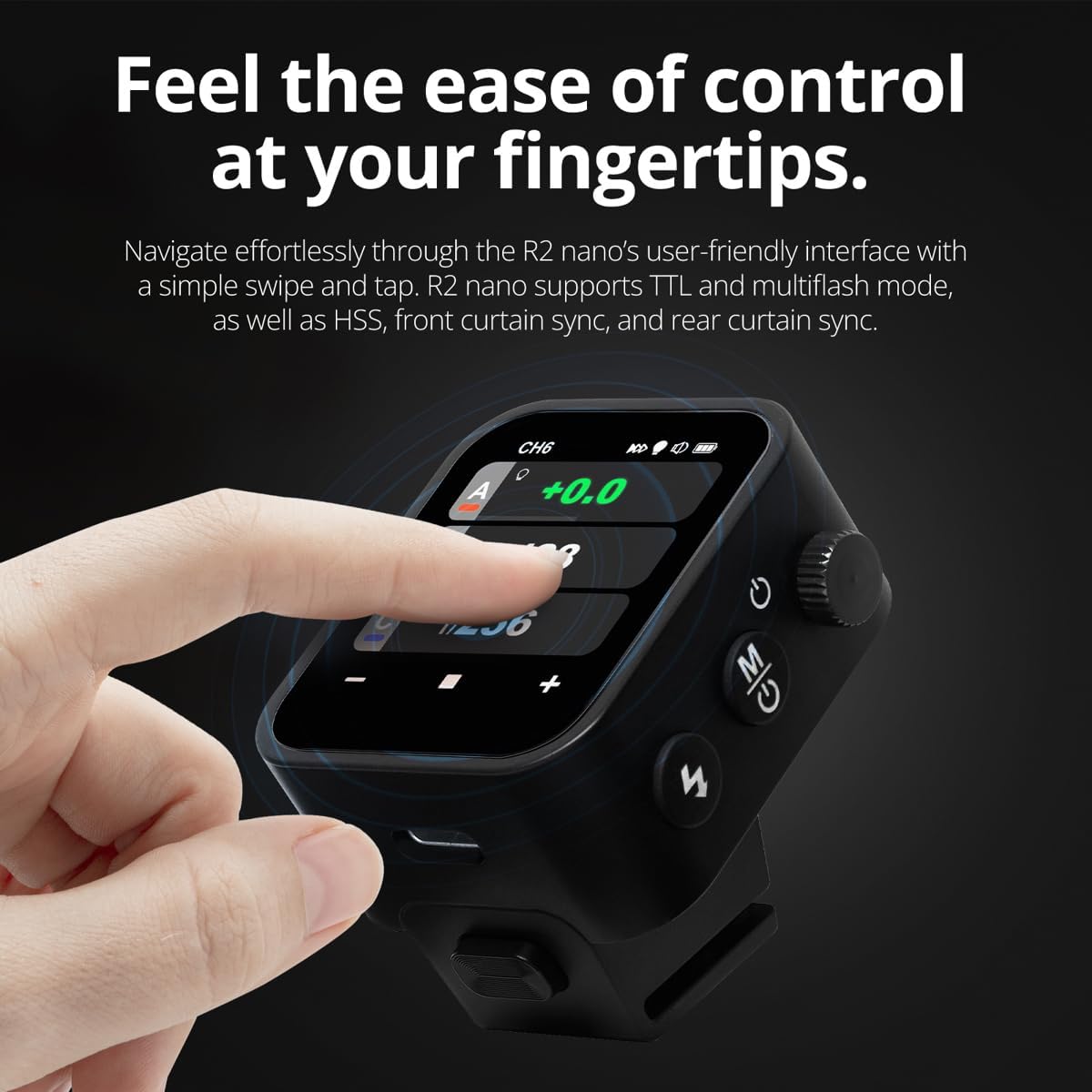
The R2 Nano features a responsive touchscreen and a select dial for intuitive control.

Figure 5.1: High Definition OLED Screen Interface.
- Interakcija z dotikom: Tap on a group (A, B, C, etc.) to select it for adjustment. Tap on parameters like power level to modify them.
- Izberite številčnico: Rotate the dial to scroll through options or adjust values. Press the dial to confirm selections.
- Prilagoditev parametrov: Use the on-screen '-' and '+' buttons or the Select Dial to change flash power, exposure compensation, or other settings.

Figure 5.2: Touchscreen Interaction for Settings Adjustment.
5.3 Setting Channels and Groups
To avoid interference and control multiple flashes, set appropriate channels and groups.
- Access the channel settings through the touchscreen menu. Select a channel from 1 to 32. Ensure your flash units are set to the same channel.
- Assign flash units to different groups (A-F, 0-9) to control them independently. The R2 Nano allows control of up to 16 groups.
5.4 Flash Modes (TTL, Manual, Multi-flash)
The R2 Nano supports various flash modes to suit different shooting scenarios.
- TTL (skozi objektiv): Automatically adjusts flash output for correct exposure. Ideal for fast-paced shooting where lighting conditions change frequently.
- Ročno (M): Allows precise control over flash power output (e.g., 1/1 to 1/256). Suitable for consistent lighting setups and creative control.
- Multi-flash (Stroboscopic): Med eno osvetlitvijo sproži niz hitrih bliskov, da zajame več gibov motiva.
5.5 Sync Modes (HSS, Front Curtain, Rear Curtain)
Select the appropriate sync mode based on your shutter speed and desired effect.
- HSS (High-Speed Sync): Enables flash synchronization at shutter speeds faster than the camera's native sync speed (up to 1/8000s). Useful for overpowering ambient light or using wide apertures in bright conditions.
- Sinhronizacija sprednje zavese: The flash fires at the beginning of the exposure. This is the standard sync mode.
- Sinhronizacija zadnje zavese: The flash fires just before the second curtain closes. This creates a streaking effect behind moving subjects, giving a sense of motion.
6. Vzdrževanje
Proper maintenance ensures the longevity and optimal performance of your R2 Nano remote.
- Čiščenje: Use a soft, dry cloth to clean the exterior of the device. For the touchscreen, use a microfiber cloth specifically designed for electronics. Avoid using harsh chemicals or abrasive materials.
- Shranjevanje: When not in use, store the R2 Nano in its provided storage bag to protect it from dust and scratches. Store in a cool, dry place away from direct sunlight and extreme temperatures.
- Vzdrževanje baterije: Da bi ohranili zdravje baterije, se izogibajte pogostemu popolnemu praznjenju baterije. Če jo shranjujete dlje časa, jo napolnite do približno 50 % vsakih nekaj mesecev.
- Hotshoe Contacts: Keep the hotshoe contacts clean and free of debris to ensure reliable communication with your camera.
7. Odpravljanje težav
If you encounter issues with your Flashpoint R2 Nano, refer to the following common problems and solutions.
| Težava | Možen vzrok | rešitev |
|---|---|---|
| Naprava se ne vklopi. | Baterija je prazna. | Napravo napolnite s kablom USB-C. |
| Bliskavice se ne sprožijo. | Napačne nastavitve kanala ali skupine. | Ensure the R2 Nano and flash units are set to the same channel and correct groups. |
| Bliskavice se ne sprožijo. | Remote not securely mounted. | Ensure the R2 Nano is fully seated in the camera's hotshoe. |
| Inconsistent flash triggering. | Motnje okolja. | Change the wireless channel to one with less interference. Ensure no obstructions between remote and flash. |
| Zaslon na dotik se ne odziva. | Začasna programska napaka. | Power off the device, wait a few seconds, then power it back on. |
| HSS not working. | Camera or flash not set to HSS mode. | Verify HSS is enabled on both the R2 Nano and your compatible flash unit. Ensure camera shutter speed is above sync speed. |
8. Specifikacije
| Funkcija | Podrobnost |
|---|---|
| Model | Flashpoint R2 Nano |
| Združljivost | Panasonic and Olympus Cameras |
| Brezžična frekvenca | 2.4 GHz |
| Kanali | 32 |
| Skupine | 16 (AF, 0-9) |
| Brezžično Domet | Do 100 metrov (328 čevljev) |
| Hitrost sinhronizacije | Do 1/8000 s (HSS) |
| Zaslon | Touchscreen OLED |
| Baterija | Vgrajena litijeva baterija za ponovno polnjenje |
| Vrata za polnjenje | USB-C |
| Dimenzije izdelka | 5.25 x 4.25 x 2.5 palcev |
| Teža predmeta | 6.4 unč |
| Proizvajalec | Plamenišče |
| Prvič na voljo | 19. junij 2024 |
9. Garancija in podpora
Flashpoint products are designed for reliability and performance. For warranty information, technical support, or service inquiries, please refer to the official Flashpoint webspletnega mesta ali se obrnite na pooblaščenega prodajalca.
Prosimo, shranite dokazilo o nakupu za morebitne garancijske zahtevke.


