1. Uvod
This manual provides detailed instructions for the installation, operation, and maintenance of your Hikity Android Carplay Wireless Autoradio. This multimedia system is specifically designed for the Seat Leon MK3 (Left-Hand Drive) models from 2013 to 2019, offering a 9-inch touchscreen display with advanced features such as wireless CarPlay, Android Auto, GPS navigation, Bluetooth, and support for a reversing camera.
Please read this manual thoroughly before installation and use to ensure proper functionality and to maximize your user experience.
2. Varnostne informacije
- Priporočena profesionalna namestitev: Zaradi kompleksnosti avtomobilskih električnih sistemov je zelo priporočljiva profesionalna namestitev, da preprečite poškodbe enote ali vašega vozila.
- Varnost pri vožnji: Sistema ne upravljajte na način, ki bi vas odvračal od vožnje. Vedno dajte prednost varnosti v cestnem prometu.
- Napajanje: Ensure the unit is connected to a 12V DC power supply with a negative ground. Incorrect wiring can cause damage or fire.
- Izogibajte se vlagi: Naprave ne izpostavljajte vodi ali prekomerni vlagi.
- Temperatura: Avoid extreme temperatures. The operating temperature range is typically -20°C to +70°C.
- Prezračevanje: Zagotovite zadostno prezračevanje okoli enote, da preprečite pregrevanje.
3. Vsebina paketa
Verify that all items are present in your package before proceeding with installation:
- Hikity Android Autoradio Unit (9-inch touchscreen)
- Napajalni kabel
- RCA Cable
- USB kabla (x2)
- Vhodni kabel za kamero
- GPS antena
- Radijska antena
- Dekoder CANbusa
- AHD Rear Camera (optional, if included in your package)
- Mikrofon
- Orodje za namestitev
- Povratna vrstica

4. Nastavitev in namestitev
This autoradio is designed for direct fitment in Seat Leon MK3 (2013-2019) Left-Hand Drive vehicles. Ensure your vehicle's dashboard matches the 'Before' image for compatibility.

4.1 Žične povezave
Refer to the wiring diagram provided with your unit and the image below for connecting the various cables. Incorrect wiring can lead to malfunction or damage.

- Napajalni kabel: Connect the main power harness to your vehicle's wiring. Ensure correct positive (B+) and accessory (ACC) connections, and a secure ground (GND). The Canbus decoder should be integrated as per the vehicle's specific wiring.
- RCA kabli: Za zunanje amplifiers, subwoofers, or auxiliary audio/video input/output.
- USB kabli: Connect the two provided USB cables for media playback, phone charging, or wired CarPlay/Android Auto connections.
- Vnos kamere: Connect the AHD rear camera cable here.
- GPS antena: GPS anteno namestite na mesto z neoviranim view neba, običajno na armaturni plošči ali pod vetrobranskim steklom.
- Radijska antena: Priključite radijsko anteno vašega vozila.
- Mikrofon: Za boljšo kakovost klicev in glasovnih ukazov priključite zunanji mikrofon.
Note: Some users have reported that the provided connection harness may not be a direct 'plug and play' for all Seat Leon FR models, requiring modifications or extensions for certain cables (e.g., the cable from the glove compartment CD unit). Please verify your vehicle's specific wiring before installation.
5. Navodila za uporabo
5.1 System Overview
The unit runs on Android 13 with a Quad Core processor, 2GB RAM, and 64GB ROM, providing a responsive user experience on its 9-inch Ultra HD touchscreen with a resolution of 1024*600 pixels.


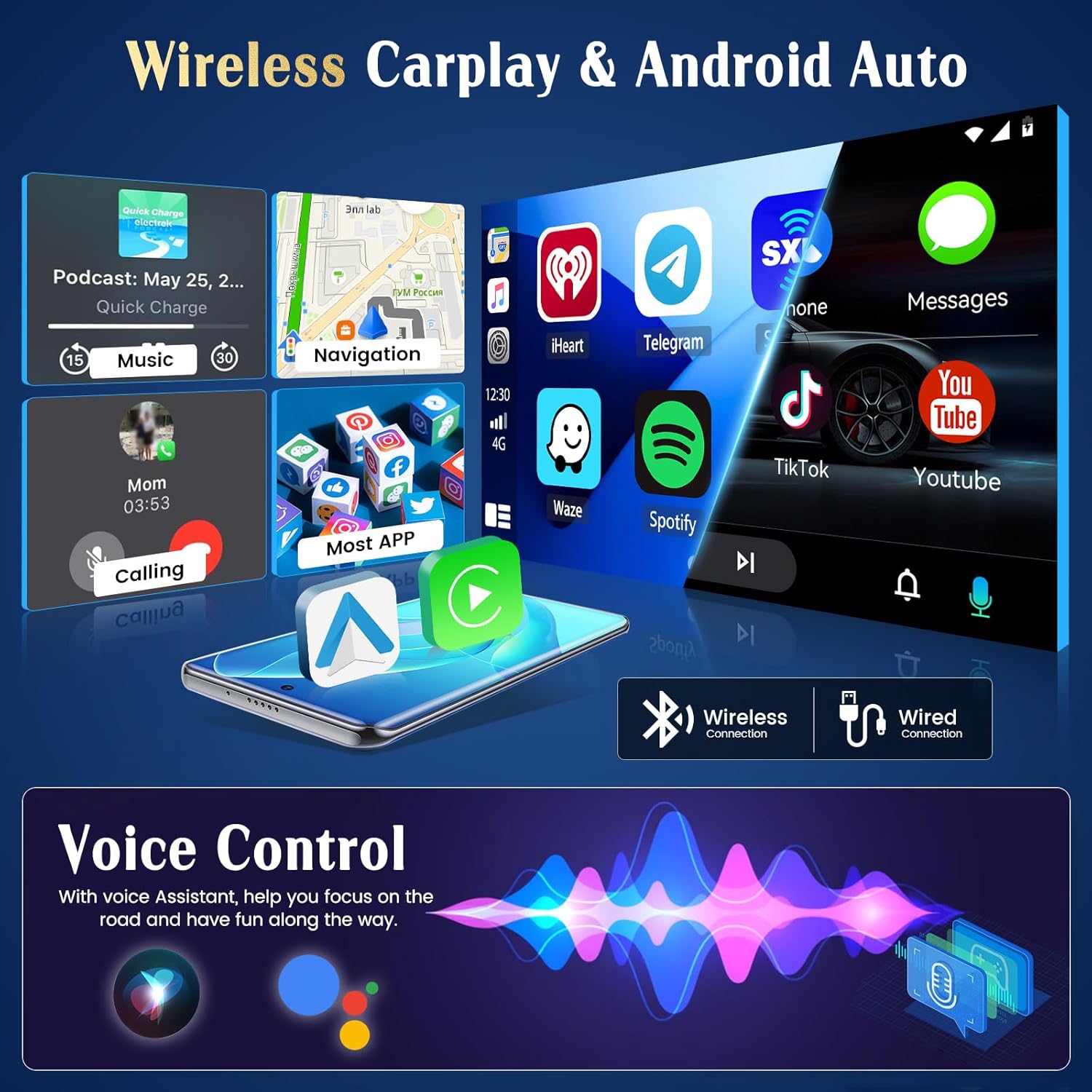
5.2 Brezžični CarPlay in Android Auto
The unit supports both wireless and wired CarPlay and Android Auto. This feature integrates your smartphone's interface directly onto the car's display, allowing access to navigation, music, messages, and calls safely while driving.
- Povezava: Connect your iPhone via Bluetooth for wireless CarPlay or a USB cable for wired CarPlay. For Android phones, connect via Bluetooth for wireless Android Auto or a USB cable for wired Android Auto.
- Funkcionalnost: Once connected, your phone's compatible apps will appear on the autoradio screen.

5.3 GPS navigacija
The autoradio has an integrated GPS receiver and supports both online and offline maps. The pre-installed Herewego app allows you to download free offline maps for global navigation.
- Spletni zemljevidi: Requires a WiFi connection to access real-time traffic and map updates.
- Zemljevidi brez povezave: Download maps in advance to navigate without an internet connection.


5.4 WiFi povezava
Connect the autoradio to a WiFi network (e.g., your phone's hotspot) to access online features.
- Prenosi aplikacij: Access the Google Play Store to download various applications.
- Online Browsing: Deskajte po web, stream content, and use online services.

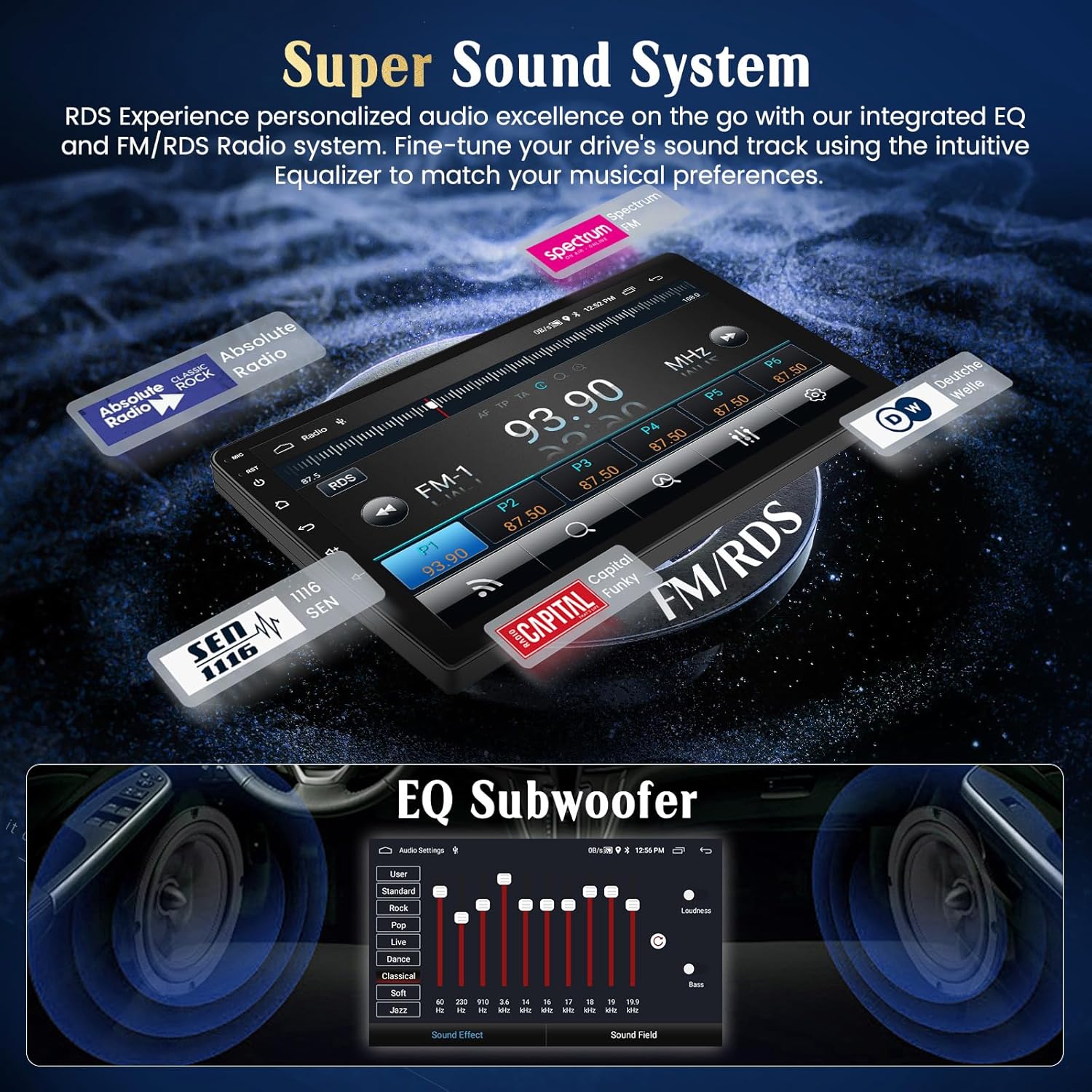
5.5 FM/RDS radio
Tune into your favorite FM radio stations and enjoy real-time broadcast information via RDS (Radio Data System).
- Samodejno skeniranje: Use the auto-scan function to find and save available stations.
- Ročna nastavitev: Manually adjust the frequency to specific stations.
5.6 Funkcionalnost Bluetootha
Za prostoročno klicanje in pretakanje zvoka povežite pametni telefon prek Bluetootha.
- Seznanjanje: Enable Bluetooth on your phone and search for the autoradio unit. Select it to pair.
- Prostoročni klici: Make and receive calls directly from the touchscreen.
- Pretakanje zvoka: Predvajajte glasbo iz telefona prek zvočnikov v avtomobilu.
5.7 Nadzor na volanu
The unit supports your vehicle's original steering wheel controls, allowing you to manage audio and other functions without taking your hands off the wheel.
- Konfiguracija: Access the 'Steering Wheel Control' settings in the system menu to map your vehicle's buttons to the desired functions (e.g., volume up/down, track skip, mode).

5.8 AHD Reversing Input (Backup Camera)
When your vehicle is shifted into reverse gear, the system automatically switches to the rear camera view, providing a clear image to assist with parking and maneuvering.
- Lastnosti: The supported AHD camera offers HD image quality, waterproof design, night vision, and a wide-angle view z navodili za parkiranje.


5.9 zvočni sistem
Customize your audio experience with the integrated equalizer (EQ) and subwoofer output.
- Izenačevalnik: Adjust various frequency bands to tailor the sound to your preferences.
- Izhod za nizkotonec: Za izboljšane nizke tone priključite zunanji nizkotonec.
5.10 Zrcalna povezava telefona
Mirror your Android or iOS smartphone screen directly onto the autoradio display.
- Android: Connect via USB or WiFi.
- iOS: Connect via USB or WiFi.

5.11 Pametni glasovni nadzor
Utilize voice commands through Siri (for CarPlay) or Google Assistant (for Android Auto) to control various functions, keeping your hands on the wheel and eyes on the road.
- Aktivacija: Activate voice control through your connected smartphone's interface.
- Ukazi: Use commands for navigation, music playback, calls, and messages.

5.12 UI Themes
Personalize your user interface with a selection of 28 different UI themes.
- Spreminjanje tem: Long-press on an empty space on the desktop to access theme options and switch between different designs.

6. Vzdrževanje
- Čiščenje zaslona: Za čiščenje zaslona na dotik uporabite mehko krpo, ki ne pušča vlaken. Za trdovratne madeže rahlo obrišiteampkrpo obrišite z vodo ali čistilom za zaslone. Izogibajte se agresivnim kemikalijam.
- Posodobitve programske opreme: Občasno preverite posodobitve programske opreme prek sistemskih nastavitev ali proizvajalčevih nastavitev webspletno mesto, da se zagotovi optimalno delovanje in dostop do novih funkcij.
- Splošna nega: Med parkiranjem se izogibajte postavljanju težkih predmetov na enoto in njeni daljši izpostavljenosti neposredni sončni svetlobi.
7. Odpravljanje težav
If you encounter issues with your Hikity Autoradio, refer to the following common problems and solutions:
| Težava | Možen vzrok | rešitev |
|---|---|---|
| Enota se ne vklopi. | Ohlapna napajalna povezava, pregorela varovalka, napačna napeljava. | Check all power cables (B+, ACC, GND) for secure connection. Inspect vehicle fuses and the unit's fuse. Ensure correct 12V DC connection. |
| Brez zvoka. | Glasnost je prenizka, vklopljen je bil izklop zvoka, napačna napeljava zvočnikov, ampvprašanje lifierja. | Increase volume. Check if mute is active. Verify speaker connections. If using an external ampnapajalnik, preverite njegovo napajanje in povezave. |
| GPS signal izgubljen ali netočen. | GPS antenna obstructed or improperly placed, antenna faulty. | Zagotovite, da ima antena GPS neoviran view of the sky. Check antenna connection. Try repositioning the antenna. |
| CarPlay/Android Auto se ne povezuje. | Bluetooth/USB connection issue, phone compatibility, app not updated. | Ensure Bluetooth is on and paired. Try a different USB cable. Update phone OS and CarPlay/Android Auto apps. Restart both phone and autoradio. |
| Zadnja kamera ne prikazuje slike. | Camera not powered, incorrect camera input connection, reverse trigger wire issue. | Check camera power supply. Verify camera input cable is securely connected. Ensure the reverse trigger wire is correctly connected to the vehicle's reverse light circuit. |
| Upravljanje na volanu ne deluje. | Canbus connection issue, incorrect configuration. | Ensure Canbus decoder is correctly installed and connected. Re-enter the steering wheel control learning interface and re-map buttons. |
If the problem persists after trying these solutions, please contact Hikity customer support.
8. Specifikacije
| Funkcija | Podrobnost |
|---|---|
| Znamka | Hikity |
| Številka modela | ManJu-A7195A3195A4MI2 |
| Velikost zaslona | 9 palcev |
| Ločljivost zaslona | 1024*600 |
| Operacijski sistem | Android 13 |
| Procesor | Štirijedrni |
| RAM | 2 GB |
| ROM (notranji pomnilnik) | 64 GB |
| CarPlay / Android Auto | Brezžično in žično |
| GPS navigacija | Integrated receiver, supports online/offline maps |
| WiFi povezljivost | ja |
| Bluetooth | Hands-free calls, audio streaming |
| Radio | FM with RDS |
| Vrata USB | 2 |
| Združljive naprave | Pametni telefon |
| Posebne lastnosti | EQ settings, Subwoofer output, Steering Wheel Control, AHD Reversing Input, Phone Mirror Link, Voice Control, 28 UI Themes |
9. Garancija in podpora
9.1 Informacije o garanciji
This Hikity Autoradio comes with a 2-letna garancija proizvajalca. Please retain your proof of purchase for warranty claims. The warranty covers manufacturing defects and malfunctions under normal use. It does not cover damage caused by improper installation, misuse, accidents, or unauthorized modifications.
9.2 Podpora strankam
For technical assistance, troubleshooting, or warranty inquiries, please contact Hikity customer support:
- E-pošta: hikityservices@163.com
- Spletni viri: Visit the official Hikity webspletno mesto za pogosta vprašanja, posodobljene priročnike in prenose programske opreme.