1. Uvod
This manual provides detailed instructions for the AULA F75 75% Wireless Mechanical Keyboard and the AULA SC580 Wireless Gaming Mouse. Please read this manual carefully before using the product to ensure proper operation and to maximize your user experience.

Image 1.1: The AULA F75 Wireless Mechanical Keyboard and SC580 Wireless Gaming Mouse Combo.
2. Kaj je v škatli
- Brezžična mehanska tipkovnica AULA F75
- Brezžična igralna miška AULA SC580
- USB-C Cable (for charging and wired connection)
- 2.4 GHz USB sprejemnik
- Izvleček za ključe
- Stikalo Stikalo
- Spare Switches (as gift)
- Uporabniški priročnik
3. Keyboard Features (AULA F75)
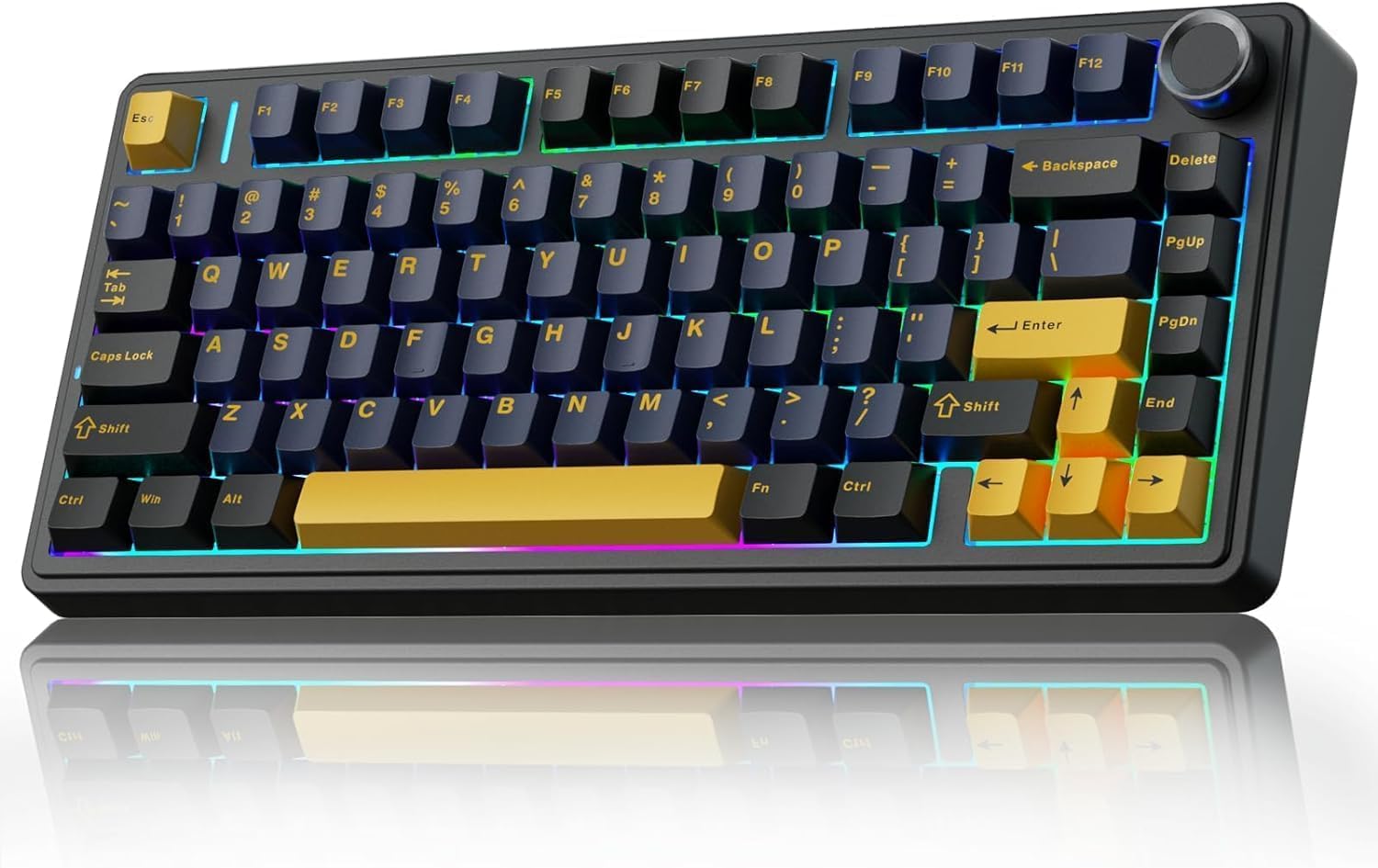
Image 3.1: The AULA F75 Wireless Mechanical Keyboard.
3.1 Tri-mode Connection
- Bluetooth 5.0: Poveže se z do tremi napravami hkrati.
- 2.4 GHz brezžično: Utilizes a dedicated USB receiver for low-latency connection.
- Žično povezovanje z USB-jem: Direct connection via USB-C cable for charging and data.
The F75 keyboard is compatible with PC, laptops, tablets, mobile phones, PS, and XBOX. It features a 4000mAh battery for extended wireless use.

Image 3.2: The compact 75% layout of the AULA F75 keyboard, highlighting its BT5.0/3.0, 2.4GHz, and Type-C connection options.
3.2 Zasnova z možnostjo vroče zamenjave
- Supports 3-pin or 5-pin mechanical switches.
- Omogoča enostavno zamenjavo stikala brez spajkanja.
- Equipped with pre-lubricated stabilizers and LEOBOG Graywood V3 switches for a smooth typing experience.

Image 3.3: The hot-swappable feature of the AULA F75 keyboard, showing included tools and spare switches.
3.3 Gasket Structure & PCB Single Key Slotting
- Gasket structure enhances resilience and stability, providing a softer, more elastic feel.
- Five layers of sound-dampening material (silicone pad, sound-absorbing cotton, IXPE shaft bottom pad, PET voice actor pad, PO base cotton) reduce cavity noise.
- PCB single key slotting further optimizes the typing sound and feel.

Image 3.4: Diagram illustrating the advanced gasket structural design and five layers of sound dampening in the AULA F75 keyboard.
4. Mouse Features (AULA SC580)

Slika 4.1: Zgoraj view of the AULA SC580 Wireless Gaming Mouse.
4.1 Tri-mode Connection & Compatibility
- 2.4 GHz brezžično: For stable, low-latency connection.
- Bluetooth 5.0 (x2): Connects to two Bluetooth devices.
- Žično USB-C: For direct connection and charging.
- Can save up to 4 devices and switch quickly via the bottom switch button.
- Compatible with Windows 7/8/10/XP/Vista, Mac OS, Linux, and Android systems.

Image 4.2: The AULA SC580 mouse demonstrating its tri-mode connectivity across various devices.
4.2 Adjustable DPI Levels & High Polling Rate
- 6 nastavljivih stopenj DPI: 800/1600/2400/3200/6400/10,000 DPI.
- DPI can be adjusted via the DPI button on the mouse or custom software.
- Frekvenca anketiranja 1000 Hz: Ensures low-latency and responsive performance.

Image 4.3: The AULA SC580 mouse highlighting its 6 adjustable DPI levels up to 10,000.

Slika 4.4: Konecview of AULA SC580 mouse features including tri-mode connection, DPI, custom macro, battery life, polling rate, weight, and ergonomic design.
5. Navodila za nastavitev
5.1 Keyboard Setup (AULA F75)
- Vklop: Poiščite stikalo za vklop na tipkovnici in ga potisnite v položaj »VKLOP«.
- Izbira načina: Use the side button or shortcut keys (refer to keyboard specific function keys) to select your desired connection mode: 2.4GHz, Bluetooth, or Wired.
5.1.1 Povezovanje prek brezžične povezave 2.4 GHz
- Ensure the keyboard is in 2.4GHz mode.
- Priključite sprejemnik USB 2.4 GHz v razpoložljiva vrata USB na vašem računalniku.
- The keyboard should automatically connect. If not, press and hold the designated 2.4GHz pairing key (refer to keyboard manual for specific key combination) until the indicator light flashes, then release.
5.1.2 Povezava prek Bluetooth
- Prepričajte se, da je tipkovnica v načinu Bluetooth.
- Press and hold one of the Bluetooth pairing keys (e.g., Fn + 1, Fn + 2, or Fn + 3) until the indicator light flashes rapidly, indicating pairing mode.
- On your device (PC, tablet, phone), go to Bluetooth settings and search for new devices.
- Select "AULA F75" from the list of available devices to pair.
5.1.3 Connecting via USB-C Wired
- Connect one end of the USB-C cable to the keyboard's USB-C port.
- Drugi konec kabla USB-C priključite na prosta vrata USB na računalniku.
- Tipkovnica bo samodejno preklopila v žično delovanje in se začela polniti.
5.2 Mouse Setup (AULA SC580)
- Vklop: Locate the power switch on the bottom of the mouse and slide it to the 'ON' position.
- Izbira načina: Use the switch button on the bottom of the mouse to select your desired connection mode: 2.4GHz, Bluetooth 1, Bluetooth 2, or Wired.
5.2.1 Povezovanje prek brezžične povezave 2.4 GHz
- Ensure the mouse is in 2.4GHz mode.
- Plug the 2.4GHz USB receiver (usually stored in the mouse's bottom compartment) into an available USB port on your computer.
- Miška bi se morala samodejno povezati.
5.2.2 Povezava prek Bluetooth
- Ensure the mouse is in Bluetooth 1 or Bluetooth 2 mode.
- Press and hold the pairing button (refer to mouse manual for specific button) until the indicator light flashes rapidly.
- V napravi pojdite v nastavitve Bluetooth in poiščite nove naprave.
- Select "AULA SC580" from the list of available devices to pair.
5.2.3 Connecting via USB-C Wired
- Connect one end of the USB-C cable to the mouse's USB-C port.
- Drugi konec kabla USB-C priključite na prosta vrata USB na računalniku.
- Miška bo samodejno preklopila v žično delovanje in se začela polniti.
6. Navodila za uporabo
6.1 Keyboard Operation (AULA F75)
- Preklop načina: Use the dedicated switch or Fn key combinations to cycle between 2.4GHz, Bluetooth (BT1, BT2, BT3), and Wired modes.
- Gumb za glasnost: Rotate the metal knob in the top right corner to adjust system volume. Press the knob to mute/unmute.
- Funkcijske tipke (kombinacije Fn): The F75 keyboard features various Fn key combinations for media control, backlight adjustment, and other functions. Refer to the keycap legends for specific commands (e.g., Fn + F1-F12 for media, Fn + arrow keys for backlight).
- Nadzor osvetlitve ozadja: Adjust RGB lighting effects, brightness, and speed using designated Fn key combinations.
- Stikala za vročo menjavo: To replace a switch, gently pull off the keycap using the keycap puller. Then, use the switch puller to carefully remove the switch. Align the pins of the new switch with the holes on the PCB and press firmly until it clicks into place. Replace the keycap.
6.2 Mouse Operation (AULA SC580)
- Prilagoditev DPI: Press the DPI button (usually located behind the scroll wheel) to cycle through the 6 available DPI levels (800/1600/2400/3200/6400/10,000). The indicator lights will change to reflect the current DPI setting.
- Preklop načina: Use the switch on the bottom of the mouse to select between 2.4GHz, Bluetooth 1, Bluetooth 2, and Wired modes.
- Makri po meri: Utilize the official AULA software (downloadable from the AULA website) to program custom macros and button assignments for enhanced gaming and productivity.
7. Vzdrževanje
- Čiščenje: Use a soft, dry cloth to wipe down the keyboard and mouse. For deeper cleaning, use a can of compressed air to remove dust and debris from between keycaps. For the keyboard, keycaps can be removed with the included keycap puller for thorough cleaning.
- Vzdrževanje baterije: To prolong battery life, avoid fully discharging the devices frequently. Charge them when the battery indicator is low. If storing for an extended period, charge to about 50% and power off.
- Shranjevanje: Naprave shranjujte na hladnem in suhem mestu, stran od neposredne sončne svetlobe in ekstremnih temperatur.
8. Odpravljanje težav
- Naprava se ne povezuje:
- Ensure the device is powered on and in the correct connection mode (2.4GHz, BT, Wired).
- Pri 2.4 GHz se prepričajte, da je sprejemnik USB varno priključen.
- For Bluetooth, ensure Bluetooth is enabled on your host device and the device is in pairing mode. Try re-pairing.
- For wired, ensure the USB-C cable is properly connected to both the device and the computer.
- Preverite napolnjenost baterije in jo po potrebi napolnite.
- Zamik ali prekinitve povezave:
- Move the 2.4GHz receiver closer to the device or use a USB extension cable.
- Zmanjšajte motnje zaradi drugih brezžičnih naprav.
- Prepričajte se, da je naprava popolnoma napolnjena.
- Keys or Mouse Buttons Not Responding:
- Restart the device and your computer.
- For keyboard, if a specific key is not working, try hot-swapping the switch with a spare one.
- Ensure no debris is lodged under the keycap or button.
- Osvetlitev ozadja ne deluje:
- Ensure the backlight is not turned off via Fn key combinations.
- Preverite stanje baterije; prazna baterija lahko onemogoči osvetlitev ozadja.
9. Specifikacije
9.1 AULA F75 Keyboard Specifications
| Funkcija | Podrobnost |
|---|---|
| Znamka | AULA |
| Model | F75 |
| Povezljivost | Bluetooth 5.0, 2.4 GHz brezžično, USB-C žično |
| Vrsta tipkovnice | 75% mehanski |
| Stikala | LEOBOG Graywood V3 (Hot-Swappable 3/5-pin) |
| Struktura | Tesnilo nameščeno |
| Kapaciteta baterije | 4000 mAh |
| Osvetlitev ozadja | RGB |
| Material | Plastika |
9.2 AULA SC580 Mouse Specifications
| Funkcija | Podrobnost |
|---|---|
| Znamka | AULA |
| Model | SC580 |
| Povezljivost | Bluetooth 5.0 (x2), 2.4GHz Wireless, USB-C Wired |
| DPI ravni | 800/1600/2400/3200/6400/10,000 |
| Polling Rate | 1000Hz |
| Združljive naprave | PC, Laptop, Mac, Android |
10. Garancija in podpora
AULA products are designed for reliability and performance. For warranty information, technical support, or further assistance, please visit the official AULA brand store or contact AULA customer service through their official channels.
Več informacij in podpornih virov najdete na AULA Brand Store.


