1. Uvod
Thank you for choosing the FLEXISPOT OC17 Ergonomic Office Chair. This manual provides detailed instructions for the assembly, operation, and maintenance of your new chair. Please read this manual thoroughly before assembly and use to ensure proper function and longevity of the product. Keep this manual for future reference.

Spredaj view of the FLEXISPOT OC17 ergonomic office chair, featuring a black mesh back and a blue seat.
2. Izdelek je končanview
The FLEXISPOT OC17 is designed to provide optimal comfort and support during extended periods of sitting. Key features include:
- Nastavljiv vzglavnik: Height and angle adjustable with an integrated hook for clothing.
- Ergonomsko naslonjalo: S-shaped bionic design with 90°-125° recline and 3 lockable positions.
- Nastavljiva ledvena opora: Dynamic 5cm vertical adjustment.
- Nastavljivi nasloni za roke: 10cm vertical adjustment.
- Udoben sedež: 8cm thick, high-density sponge cushion.
- Breathable Materials: Mesh backrest for enhanced airflow.
- Mobilnost: 360° smooth rotation and durable wheels.
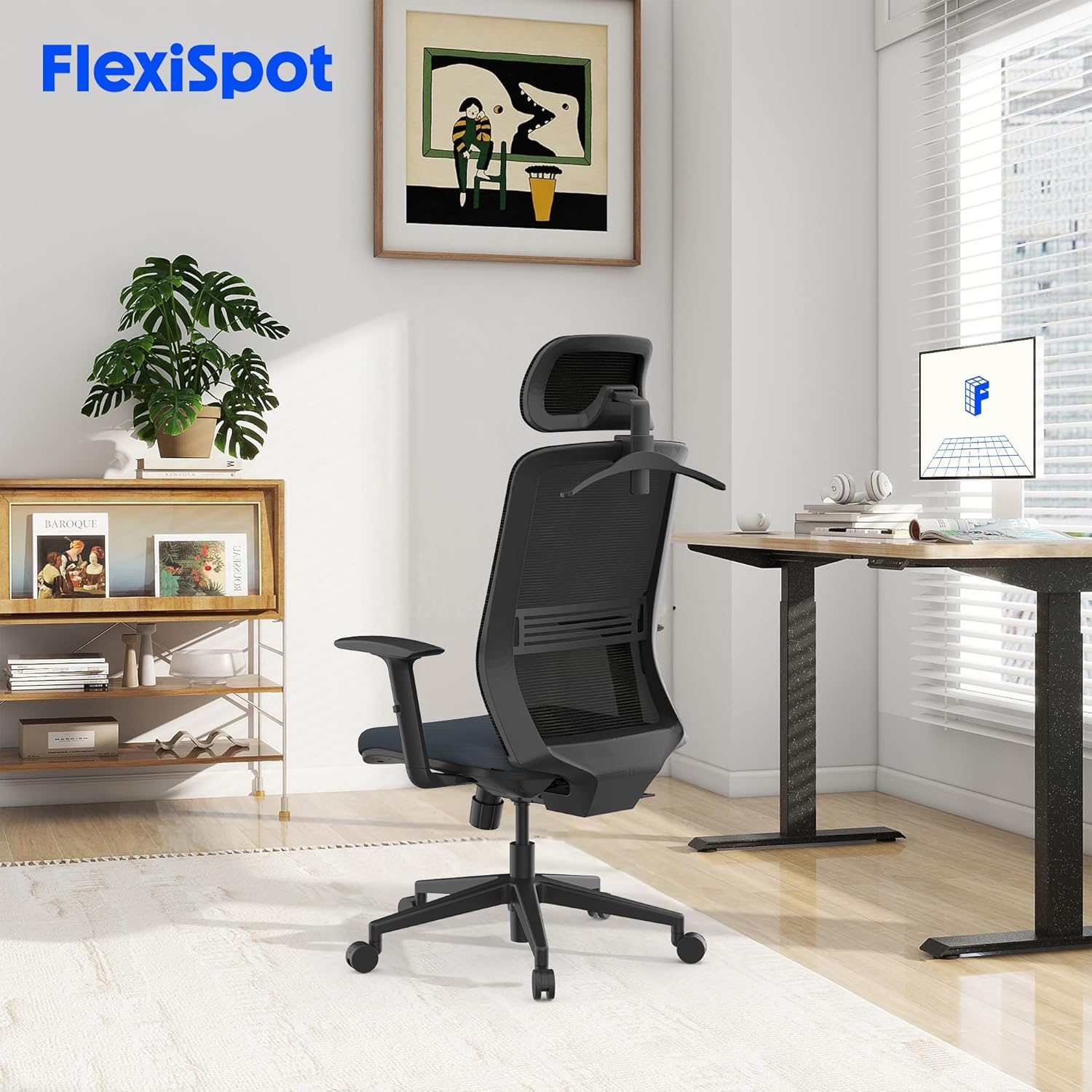
The FLEXISPOT OC17 ergonomic office chair integrated into a modern workspace environment.
3. Nastavitev in montaža
Assembly of the FLEXISPOT OC17 chair is designed to be straightforward. Please follow the included assembly guide for detailed, step-by-step instructions. Ensure all components are present before beginning assembly.
Koraki generalne skupščine:
- Razpakirajte vse komponente in jih preverite s seznamom delov.
- Kolesca pritrdite na podnožje stola.
- Insert the gas lift into the center of the chair base.
- Secure the mechanism plate to the underside of the seat cushion.
- Pritrdite naslonjalo na sklop sedežne blazine.
- Mount the armrests to the seat cushion.
- Sestavljeni sedež in naslonjalo namestite na plinsko dvigalo.
- Namestite vzglavnik na zgornji del naslonjala.
Ensure all screws are tightened securely, but do not overtighten. If you encounter difficulty attaching the base to the seat, refer to the specific diagrams in your assembly guide for clarification.
4. Navodila za uporabo
The FLEXISPOT OC17 chair offers multiple adjustment options to customize your seating experience.
4.1. Nastavitev vzglavnika
- Nastavitev višine: Gently pull the headrest up or push it down to adjust its height within a 6cm range.
- Prilagoditev kota: Tilt the headrest forward or backward to find your preferred angle (0-35 degrees rotation).
- Integriran kavelj: Utilize the hook on the back of the headrest to hang light garments, preventing wrinkles.

Illustration of the headrest's 6cm height adjustment and 0-35 degree rotation capabilities.
4.2. Nagibanje in zaklepanje naslonjala
The backrest can recline between 90° and 125° and be locked in 3 different positions.
- Naslon: Pull the lever located on the side of the chair upwards, lean back to your desired angle, and release the lever to lock the position.
- Odklepanje: To unlock and return to an upright position, pull the lever upwards again while leaning slightly forward.
4.3. Nastavitev ledvene opore
The lumbar support can be adjusted vertically by 5cm to provide targeted support to your lower back.
- Locate the lumbar support mechanism on the backrest.
- Gently push the lumbar support up or down to align it with the natural curve of your spine.

Podrobno view of the chair's ergonomic design, highlighting the S-shaped backrest, 10cm adjustable armrests, and 5cm adjustable lumbar support.
4.4. Nastavitev naslona za roke
The armrests can be adjusted vertically by 10cm to suit your height and desk setup.
- Press the button located on the side of each armrest.
- While holding the button, move the armrest up or down to your desired height.
- Release the button to lock the armrest in place.
4.5. Nastavitev višine sedeža
Adjust the seat height to ensure your feet are flat on the floor and your knees are at a 90-degree angle.
- Za dvig: While standing, pull the lever located under the seat upwards.
- Za znižanje: While seated, pull the lever upwards.
- Spustite ročico, da zaklenete sedež na želeni višini.
4.6. Funkcija vrtenja
The chair features a 360-degree swivel function for easy movement and access to your workspace.
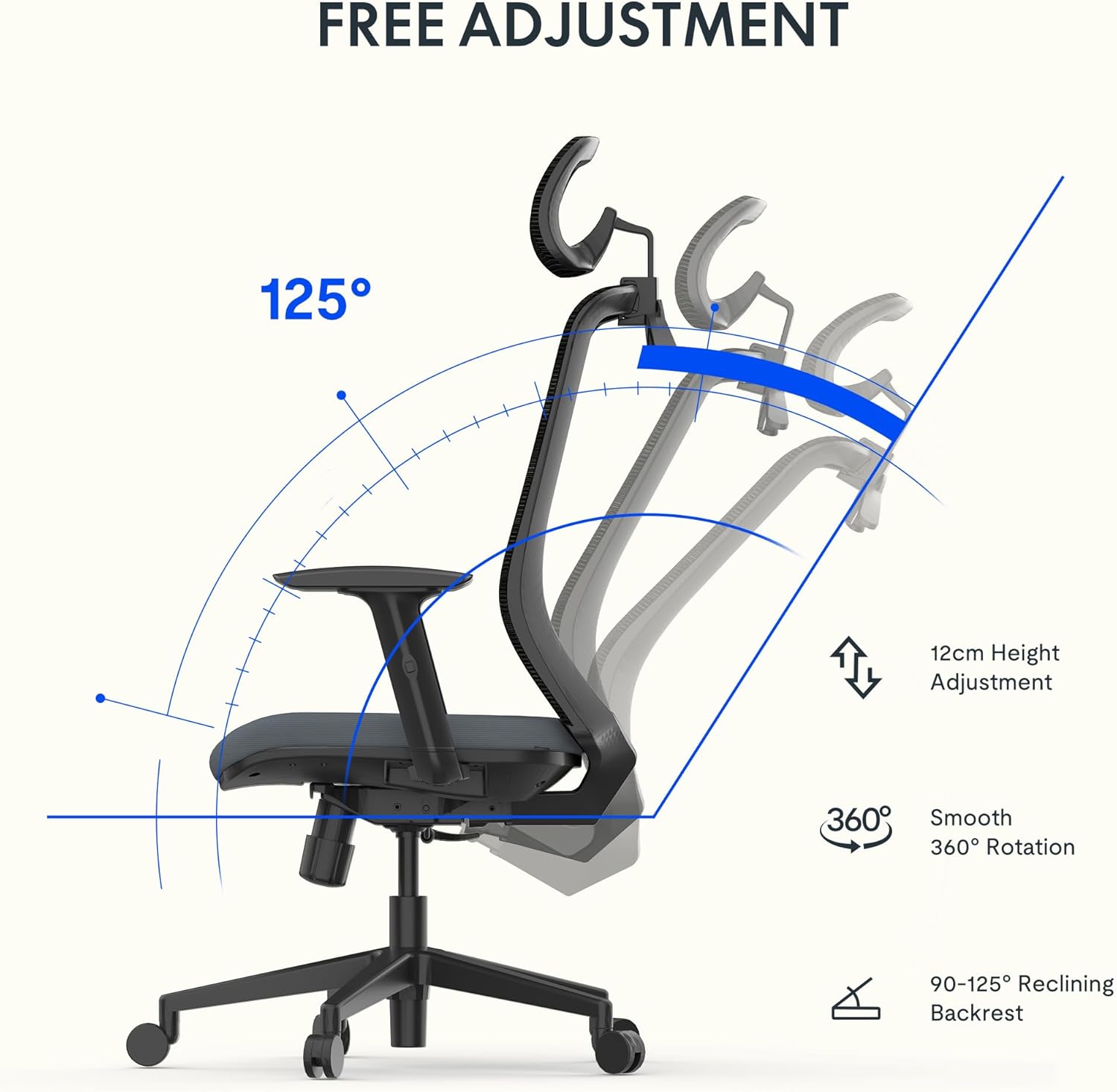
Visual representation of the chair's 12cm height adjustment, 360-degree rotation, and 90-125 degree backrest recline.
5. Vzdrževanje
Regular maintenance will help preserve the appearance and functionality of your FLEXISPOT OC17 chair.
- Čiščenje: Za mrežasto naslonjalo in sedež iz blaga uporabite mehko krpo dampz blagim milom in vodo. Izogibajte se agresivnim kemikalijam ali abrazivnim čistilom.
- Pregled: Občasno preverite vse vijake in pritrdilne elemente, da se prepričate, da so trdno priviti. Po potrebi jih privijte, vendar ne premočno.
- Kolesca: Za nemoteno kotaljenje naj bodo kolesca čista, brez las in umazanije.

Od blizu views highlighting the breathable mesh backrest and the 8cm thick, comfortable seat cushion.
6. Odpravljanje težav
If you encounter any issues with your FLEXISPOT OC17 chair, refer to the following common solutions:
- Škripanje stolov: Check all bolted connections and tighten if loose. A small amount of silicone lubricant can be applied to moving parts if the squeaking persists.
- Težavnost pri nastavljanju višine: Ensure the gas lift lever is fully engaged. If the issue persists, the gas lift may need replacement.
- Stol se zdi nestabilen: Verify that all casters are securely inserted into the base and that the base is properly attached to the gas lift.
- Backrest Not Locking: Check the recline lock mechanism for any obstructions or damage. Ensure the lever is fully engaged.
Za težave, ki jih ti koraki ne odpravijo, se obrnite na podporo strankam.
7. Specifikacije
| Funkcija | Podrobnost |
|---|---|
| Znamka | FLEXISPOT |
| Številka modela | OC17 |
| barva | Črna in modra |
| Mere izdelka (D x Š x V) | 50.5 x 60 x 115.5 cm (minimum height) to 127.5 cm (maximum height) |
| Teža predmeta | 14.6 kilogramov |
| Material | Metal (frame), Textile (seat) |
| Zmogljivost teže | Do 136 kg |
| Posebne lastnosti | Adjustable Armrest, Adjustable Headrest, Ergonomic Design, Adjustable Height, Lumbar Support |
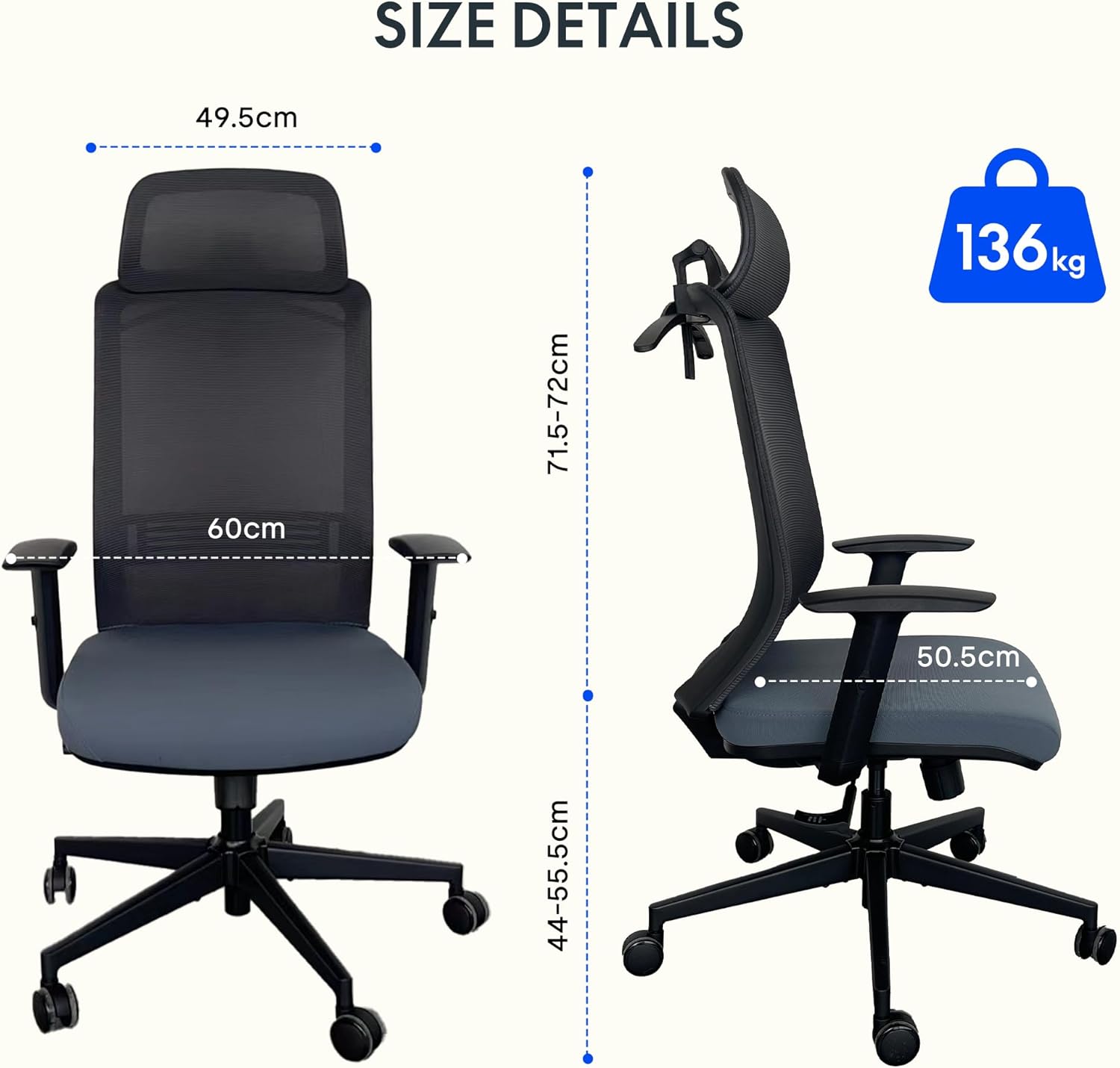
Detailed dimensions of the FLEXISPOT OC17 chair and its maximum load capacity of 136 kg.
8. Garancija in podpora
FLEXISPOT provides a 3-year availability for spare parts for the OC17 ergonomic office chair. For warranty claims, technical support, or inquiries regarding spare parts, please contact FLEXISPOT customer service through their official webspletno mesto ali prodajalec, kjer je bil izdelek kupljen.
Please have your purchase receipt and product model number (OC17) ready when contacting support.


