Uvod
Thank you for choosing the Ourlife WiFi Extender. This device is designed to expand your existing Wi-Fi network coverage, eliminate dead spots, and provide a stable, high-speed internet connection throughout your home or office. With a data transfer rate of up to 300Mbps on the 2.4GHz band, it is ideal for streaming, online gaming, and general internet use. This manual provides detailed instructions for setup, operation, and troubleshooting.
Varnostne informacije
- Naprave ne izpostavljajte vodi ali vlagi.
- Naprave ne poskušajte razstaviti ali popraviti sami.
- Uporabljajte samo napajalnik, ki ga je priložil ali priporočil proizvajalec.
- Napravo hranite stran od virov toplote in neposredne sončne svetlobe.
- Poskrbite za ustrezno prezračevanje okoli naprave, da preprečite pregrevanje.
Vsebina paketa
Prosimo, da natančno preverite vsebino paketa. Če kateri koli predmet manjka ali je poškodovan, se obrnite na prodajalca.
- Ourlife WiFi Extender (repeater body)
- Uporabniški priročnik
Konec izdelkaview
Ourlife WiFi Extender features a compact design with four high-gain external antennas for enhanced signal penetration and coverage. It includes an Ethernet port for wired connections.
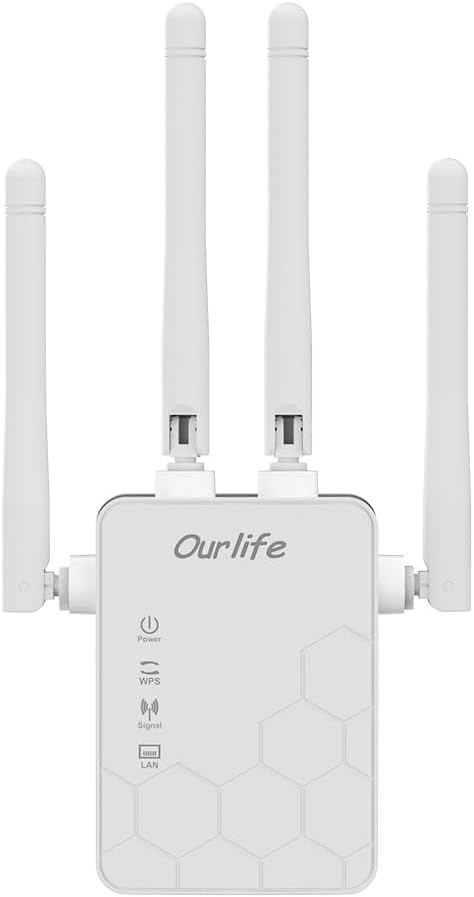
Slika: spredaj view of the Ourlife WiFi Extender, showing the Ourlife logo, power indicator, WPS button, signal strength indicator, and LAN port indicator. Four external antennas are visible.
Ključne komponente:
- Indikator moči: Zasveti, ko je naprava vklopljena.
- Gumb WPS: Used for quick, one-button setup with compatible routers.
- Indikator signala: Shows the strength of the Wi-Fi signal received from the main router.
- Vrata LAN: An Ethernet port for connecting wired devices or for setting up the extender in Access Point (AP) mode.
- Zunanje antene: Four adjustable antennas to optimize signal reception and transmission.

Slika: Stran view of the Ourlife WiFi Extender with dimensions. The device measures approximately 17.2cm/6.8in in height, 5.4cm/2.1in in width, and 3.3cm/1.3in in depth.
Nastavitev
Ourlife WiFi Extender offers two primary setup methods: WPS (Wi-Fi Protected Setup) for quick connection, and manual setup via a web brskalnik.
Method 1: WPS Setup (Recommended for quick setup)
- Vklop: Plug the Ourlife WiFi Extender into an electrical outlet near your main Wi-Fi router. Wait for the Power indicator to light up.
- Pritisnite WPS na razširjevalniku: Press the WPS button on the Ourlife WiFi Extender. The WPS indicator light will start blinking.
- Pritisnite WPS na usmerjevalniku: Within 2 minutes, press the WPS button on your main Wi-Fi router.
- Počakajte na povezavo: The WPS indicator on the extender will stop blinking and remain solid when the connection is established. The Signal indicator will also light up, indicating a successful connection.
- Premesti podaljšek: Once connected, unplug the extender and move it to a location halfway between your router and the Wi-Fi dead zone. Ensure the Signal indicator shows a strong signal (usually green or multiple bars) for optimal performance.

Image: Visual representation of the four simple setup steps: 1. Unbox, 2. Plug it in, 3. Press the button (WPS), 4. And Pair (with router).
Method 2: Manual Setup via Web Brskalnik
- Vklop: Plug the Ourlife WiFi Extender into an electrical outlet near your computer or mobile device.
- Povežite se z omrežjem Wi-Fi razširitvene naprave: On your computer or mobile device, connect to the Wi-Fi network named "Ourlife_Extender" (or similar, check the label on the device). No password is required for the initial connection.
- Odpri Web Brskalnik: Odpri a web browser (e.g., Chrome, Firefox, Safari) and enter the default IP address or domain name (e.g., 192.168.10.1 or reapeter.net) into the address bar. Refer to the device label or included mini-manual for the exact address.
- Prijava: Vnesite privzeto uporabniško ime in geslo (običajno admin/admin).
- Izberite način: Choose "Repeater Mode" or "AP Mode" based on your needs.
- Reater Mode: Extends your existing Wi-Fi network wirelessly.
- Način dostopne točke (AP): Converts a wired internet connection into a wireless Wi-Fi hotspot. Connect an Ethernet cable from your router to the extender's LAN port.
- Konfiguriraj omrežje:
- For Repeater Mode: Select your main Wi-Fi network from the list, enter its password, and choose whether to keep the same SSID or create a new one for the extended network.
- For AP Mode: Set a new SSID (network name) and password for the Wi-Fi hotspot.
- Uporabi nastavitve: Save the settings and wait for the extender to restart.
- Premesti podaljšek: Once configured, unplug and relocate the extender to an optimal position.
Delovanje
After successful setup, the Ourlife WiFi Extender will operate automatically. The Signal indicator will provide visual feedback on the connection quality.
Priključne naprave:
- Brezžične naprave: Connect your smartphones, tablets, laptops, and other Wi-Fi enabled devices to the extended Wi-Fi network (the SSID you configured during setup).
- Wired Devices (via LAN Port): If you are using the extender in Repeater mode, you can connect a wired device (e.g., desktop PC, smart TV, game console) to the extender's LAN port using an Ethernet cable to provide it with network access.
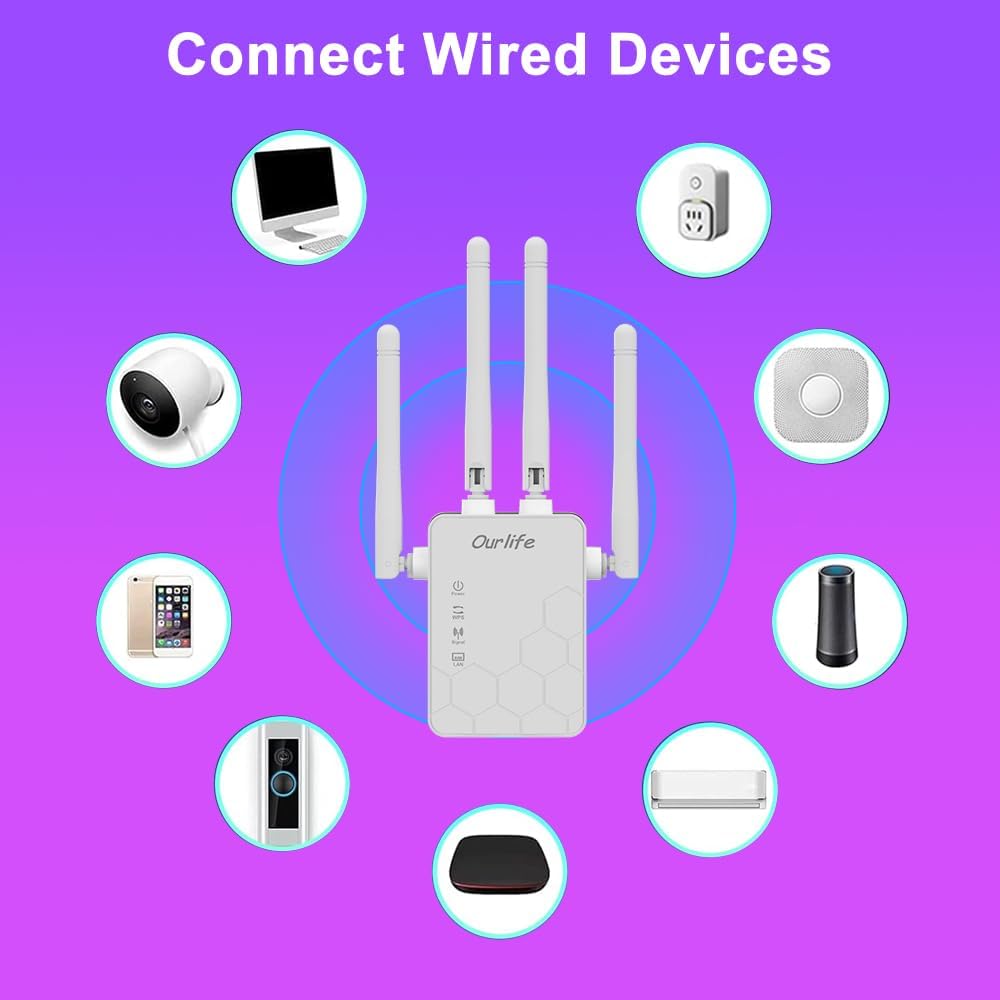
Image: Diagram showing various wired and wireless devices (e.g., desktop computer, smart plug, smart speaker, air conditioner, smart doorbell, security camera, smartphone) that can connect to the Ourlife WiFi Extender.

Image: The Ourlife WiFi Extender plugged into a wall outlet, with an Ethernet cable connected to its LAN port, illustrating its capability to provide a wired connection.
Vzdrževanje
Regular maintenance helps ensure the longevity and optimal performance of your Ourlife WiFi Extender.
- Čiščenje: Za čiščenje naprave uporabite mehko, suho krpo. Ne uporabljajte tekočih čistil ali aerosolov.
- Posodobitve vdelane programske opreme: Občasno preverite proizvajalčeve webspletno mesto za posodobitve vdelane programske opreme. Posodabljanje vdelane programske opreme lahko izboljša delovanje, doda funkcije in odpravi napake.
- Ponovni zagon: Če imate težave z omrežjem, poskusite znova zagnati razširjevalnik tako, da ga za 10 sekund izključite iz električne vtičnice in nato ponovno priključite.
- Optimalna postavitev: Ensure the extender is placed in an open area, away from large metal objects, concrete walls, and other electronic devices that may cause interference.
Odpravljanje težav
If you encounter issues with your Ourlife WiFi Extender, refer to the following common problems and solutions:
| Težava | Možna rešitev |
|---|---|
| Extender not powering on. | Prepričajte se, da je razširjevalnik signala varno priključen v delujočo električno vtičnico. Poskusite z drugo vtičnico. |
| Cannot connect to the extender's Wi-Fi for setup. | Ensure you are connecting to the correct default SSID (e.g., "Ourlife_Extender"). Try restarting the extender and your device. |
| Nastavitev WPS ni uspela. | Ensure your router supports WPS. Press the WPS button on both devices within the 2-minute window. Try manual setup if WPS continues to fail. |
| No internet access after connecting to the extended network. | Check if your main router has internet access. Relocate the extender closer to your main router to ensure a strong signal (check Signal indicator). Reconfigure the extender. |
| Slow speeds on the extended network. | Relocate the extender to an optimal position where the Signal indicator shows a strong connection to the main router. Avoid placing it near interference sources. Ensure your main router is providing good speeds. |
| Ste pozabili geslo za prijavo za web stran za upravljanje. | Perform a factory reset on the extender (usually by pressing and holding a reset button for 5-10 seconds). This will revert all settings to default, including the login credentials. |
Specifikacije
| Funkcija | Podrobnost |
|---|---|
| Znamka | Ourlče |
| Model | Ourlife WiFi Extender 300Mbps |
| ASIN | B0D7HB4DBC |
| Hitrost prenosa podatkov | 300 Megabits Per Second (2.4GHz) |
| Antene | 4 High-Gain External Antennas |
| Ethernet vrata | 1 x LAN priključek |
| barva | Bela |
| Povezljivost | Wireless-N (802.11n/g/b) |
| Varnostni protokoli | Supports Wireless Security (WPA/WPA2) |
| Mere (pribl.) | 17.2 cm (V) x 5.4 cm (Š) x 3.3 cm (G) |
Garancija in podpora
For warranty information and technical support, please refer to the documentation included with your purchase or visit the official Ourlče website. You can also contact Ourlife customer service directly for assistance with product setup, troubleshooting, or warranty claims.
Ourlife Store Link: Visit the Ourlife Store on Amazon


