1. Uvod
Thank you for choosing the Darmoshark N3PRO 8K Wireless Gaming Mouse. This manual provides detailed instructions for setting up, operating, and maintaining your new gaming mouse. Please read this manual thoroughly before use to ensure optimal performance and longevity of the product.
2. Vsebina paketa
- Darmoshark N3PRO Wireless Gaming Mouse
- Polnilni kabel USB-C do USB-A
- 2.4G USB sprejemnik
- Uporabniški priročnik

Image: The Darmoshark N3PRO wireless gaming mouse shown with its accompanying 2.4G USB receiver.
3. Izdelek je končanview
The Darmoshark N3PRO features a lightweight, ergonomic design with multiple connectivity options and programmable buttons.
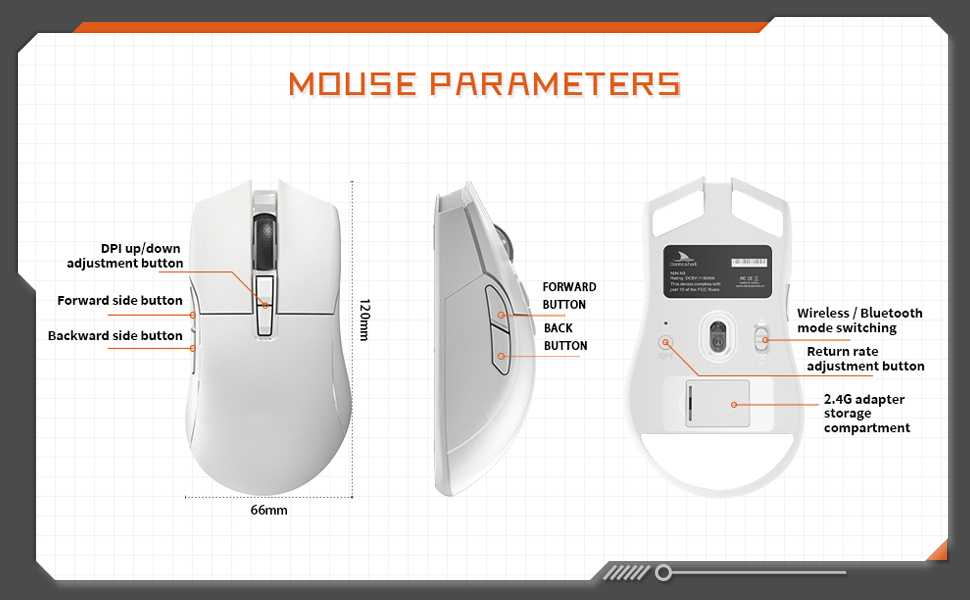
Image: A diagram illustrating the Darmoshark N3PRO mouse from top, side, and bottom views, with labels for buttons and dimensions. Key labels include DPI up/down adjustment button, forward side button, backward side button, forward button, back button, wireless/Bluetooth mode switching, return rate adjustment button, and 2.4G adapter storage compartment.
Funkcije gumbov:
- Levi klik na gumb: Standardna funkcija levega gumba miške.
- Desni klik na gumb: Standardna funkcija desnega gumba miške.
- Kolesce za pomikanje: Scroll up/down, and middle click function.
- DPI Up/Down Adjustment Buttons: Adjust the mouse's sensitivity (DPI) levels.
- Forward Side Button: Default function is 'Forward' in web browsers/applications.
- Backward Side Button: Default function is 'Back' in web browsers/applications.
- Mode Switch (Bottom): Toggles between 2.4G wireless and Bluetooth modes.
- Return Rate Adjustment Button (Bottom): Adjusts the polling rate.
4. Nastavitev
The Darmoshark N3PRO supports three connection modes: Wired (USB-C), 2.4G Wireless, and Bluetooth 5.0. You can connect up to 3 devices simultaneously.

Image: The Darmoshark N3PRO mouse connected to a laptop via a 2.4G receiver, to a device via USB-C cable, and wirelessly to a smartphone via Bluetooth 5.0, illustrating its tri-mode connectivity.
4.1 žična povezava
- Connect the USB-C end of the charging cable to the mouse.
- Connect the USB-A end of the charging cable to an available USB port on your computer.
- The mouse will be automatically detected and ready for use. This mode also charges the mouse.
4.2 Brezžična povezava 2.4G
- Locate the 2.4G USB receiver, typically stored in a compartment on the underside of the mouse.
- Priključite 2.4G USB sprejemnik v prosta USB vrata na računalniku.
- Slide the mode switch on the bottom of the mouse to the 2.4G position.
- Miška se bo samodejno povezala.
4.3 Povezava Bluetooth
- Slide the mode switch on the bottom of the mouse to the Bluetooth position.
- V računalniku ali napravi odprite nastavitve Bluetooth.
- Iskanje new devices and select "Darmoshark N3PRO" from the list.
- Sledite morebitnim pozivom na zaslonu, da dokončate postopek seznanjanja.
5. Navodila za uporabo
5.1 Prilagoditev DPI
The mouse features a PAW3395 optical sensor with adjustable DPI settings up to 26000 DPI. Use the dedicated DPI adjustment buttons on the top of the mouse to cycle through preset DPI levels. The current DPI level may be indicated by an LED color change or through the software.
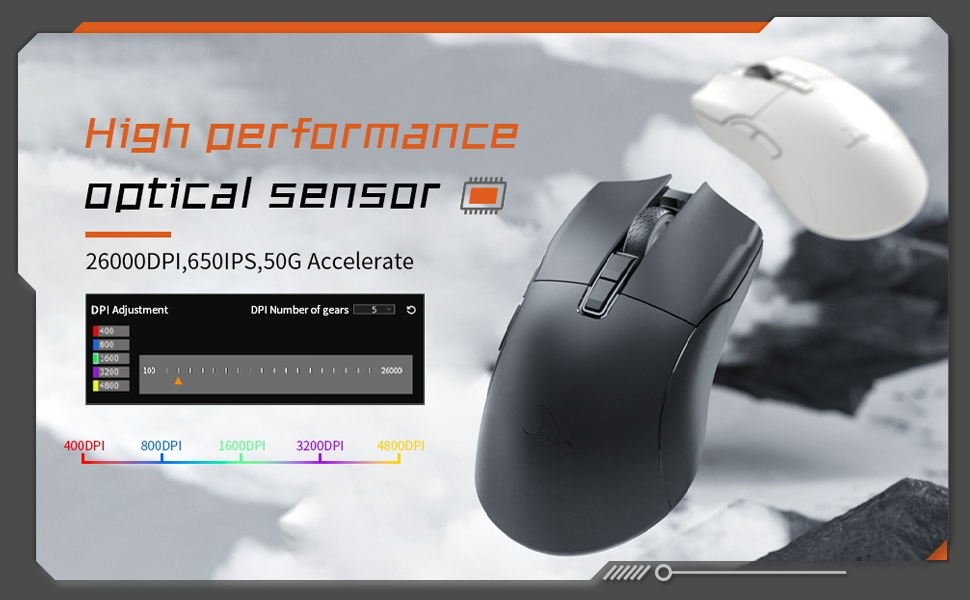
Image: The Darmoshark N3PRO mouse with a blue glowing light, highlighting its adjustable DPI (up to 26000) and IPS (650) settings for precision and speed.
5.2 Prilagoditev stopnje anketiranja
The polling rate can be adjusted using the button on the underside of the mouse or through the customization software. The N3PRO supports polling rates up to 8000Hz for ultra-responsive tracking.
5.3 Programmable Buttons and Software Customization
The Darmoshark N3PRO features 7 programmable buttons. To customize button functions, DPI settings, macros, and other advanced features, download the official Darmoshark software from the manufacturer's website. The software allows for personalized configurations to suit your preferences.
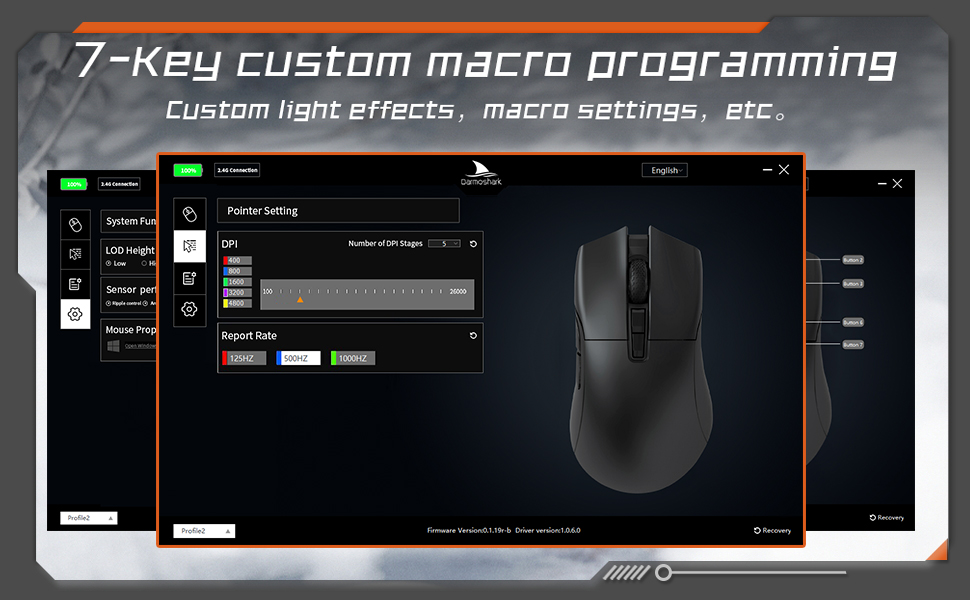
Image: A screenshot of the Darmoshark N3PRO customization software interface, showing options for DPI settings, polling rate, and button assignments, with a visual representation of the mouse.
5.4 Polnjenje miške
Connect the mouse to your computer using the provided USB-C cable. The mouse will charge automatically. A full charge provides approximately 80 hours of battery life (depending on usage and polling rate). The mouse is equipped with a 300mAh Lithium Ion battery.

Image: A close-up of the Darmoshark N3PRO mouse, indicating its 300mAh battery capacity.
6. Vzdrževanje
- Čiščenje: Za čiščenje miške uporabite mehko, suho krpo. Za trdovratno umazanijo rahloamp cloth can be used, ensuring no liquid enters the mouse.
- Senzor: Keep the optical sensor on the underside of the mouse clean and free from dust or debris for accurate tracking.
- Shranjevanje: Ko miške dlje časa ne uporabljate, jo shranite na suhem in hladnem mestu.
- Vzdrževanje baterije: Avoid fully discharging the battery frequently. Charge the mouse when the battery indicator is low.
7. Odpravljanje težav
| Težava | rešitev |
|---|---|
| Miška se ne odziva (žična) |
|
| Miška se ne odziva (brezžično 2.4 G) |
|
| Miška se ne odziva (Bluetooth) |
|
| Netočno sledenje ali zakasnitev kurzorja |
|
| Gumbi ne delujejo po pričakovanjih |
|
8. Specifikacije
- Model: N3PRO
- Povezljivost: Tri-Mode (2.4G Wireless, Bluetooth 5.0, USB-C Wired)
- Senzor: Optični senzor PAW3395
- DPI: Do 26000 DPI
- Hitrost sledenja: 650 IPS
- Pospešek: 50G
- Stopnja glasovanja: Up to 8000Hz (wired/2.4G, depending on settings)
- Gumbi: 7 programabilni gumbi
- Teža: Približno 64g
- Dimenzije: 120mm x 66mm x 40mm (Length x Width x Height)
- Baterija: 300mAh litij-ionska (polnilna)
- Keystroke Lifespan: 60 million clicks (approx.)
- Združljivost: PC, Laptop, Windows, Linux (Bluetooth for various devices)
9. Garancija in podpora
Darmoshark products are designed for reliability and performance. For warranty information, technical support, or to download the latest software and drivers, please visit the official Darmoshark webspletno mesto ali se obrnite na njihovo službo za stranke. Shranite dokazilo o nakupu za uveljavljanje garancije.
Opomba: Specifikacije in lastnosti izdelka se lahko spremenijo brez predhodnega obvestila.


