Uvod
This manual provides detailed instructions for the setup, operation, and maintenance of your MageGee V560 Wireless Gaming Keyboard and Mouse Combo. Please read this manual thoroughly before use to ensure optimal performance and longevity of your device.

Image: The MageGee V560 Wireless Gaming Keyboard and Mouse Combo, featuring a blue, white, and purple color scheme, with the USB receiver visible.
Vsebina paketa
Prosimo, preverite, ali so v paketu prisotni vsi elementi:
- MageGee V560 Wireless Keyboard
- MageGee Wireless Mouse
- 2.4GHz USB Receiver (stored in mouse battery compartment)
- Polnilni kabel USB-C
- Uporabniški priročnik

Image: Contents of the MageGee V560 package, including the keyboard, mouse, USB receiver, charging cable, and user manual.
Navodila za namestitev
- Poiščite USB sprejemnik: Open the battery cover of the wireless mouse. The 2.4GHz USB receiver is stored inside the compartment next to the mouse battery slot.
- Povežite sprejemnik: USB-sprejemnik priključite v razpoložljiva vrata USB na vašem računalniku.
- Naprave za vklop: Ensure both the keyboard and mouse are powered on. The devices are plug-and-play and should connect automatically.
- Začetni strošek: For optimal performance, it is recommended to fully charge both the keyboard and mouse before first use. Use the provided USB-C charging cable.

Image: Illustration showing the 2-in-1 USB receiver connecting the keyboard and mouse wirelessly to a laptop.
Navodila za uporabo
Funkcije tipkovnice
- Nadzor osvetlitve ozadja RGB:
- Pritisnite FN + INS za vklop ali izklop osvetlitve ozadja.
- Pritisnite FN + PgUp or FN + PgDn to adjust the 3-level backlight brightness.
- Pritisnite FN + 1 / 2 / 3 / 4 / 5 to switch between different backlight modes. Note: Backlight settings are not saved after power off.
- Večpredstavnostne bližnjice: Uporabite FN key in combination with F1-F12 keys for quick access to multimedia functions such as volume control, media playback, and more.
- Ergonomska oblika: The keyboard features a stepped layout and foldable brackets at the bottom, allowing you to adjust the typing angle for comfort during extended use.
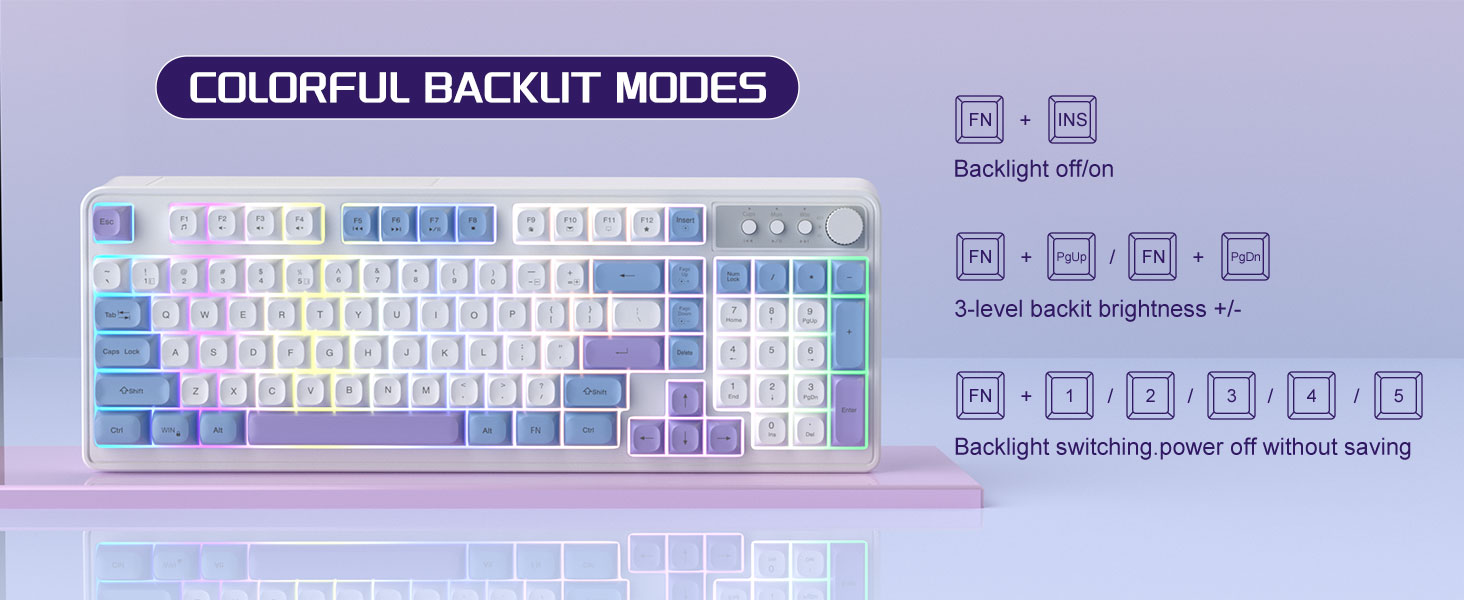
Image: The MageGee V560 keyboard displaying various colorful backlit modes, with instructions for controlling them.

Image: A visual representation of the 16 multimedia shortcuts available on the MageGee V560 keyboard, activated via the FN key.
Funkcije miške
- Prilagoditev DPI: The mouse supports 6 levels of DPI adjustment (600-3200 DPI). Press the DPI button (usually located below the scroll wheel) to cycle through the sensitivity settings. Internal indicator lights will show the current DPI level.
- Breathing Backlight: The mouse features 7 dazzling color breathing backlights. This lighting is automatic and indicates mouse activity.

Image: The MageGee V560 mouse highlighting its DPI settings (1000, 1200, 1600 DPI) and showing the USB-C charging port.
Polnjenje in življenjska doba baterije
- Both the keyboard and mouse are rechargeable. Use the provided USB-C charging cable to charge them.
- Keyboard Standby Time: Do 365 dni.
- Mouse Standby Time: Do 270 dni.
- Funkcija samodejnega spanja: The devices automatically enter sleep mode after a period of inactivity to conserve battery power and extend battery life.

Image: An illustration demonstrating the intelligent auto-sleep feature of the MageGee V560 combo, which conserves battery life.
Združljivost
The MageGee V560 Wireless Gaming Keyboard and Mouse Combo is compatible with the following operating systems:
- Win2000
- Win XP
- Zmagaj ME
- Vista
- Win7
- Win8
- Win10
- Android
- Linux
- Mac OS
Odpravljanje težav
If you encounter issues with your MageGee V560 combo, please refer to the following common solutions:
- Naprava se ne povezuje:
- Prepričajte se, da je USB-sprejemnik varno priključen v delujoča USB-vrata.
- Preverite, ali sta tako tipkovnica kot miška vklopljeni.
- Check the battery levels of both devices and charge if necessary.
- Poskusite vključiti sprejemnik USB v druga vrata USB.
- Zakasnitev ali prekinitev povezave:
- Ensure the devices are within the 33 ft (10 meter) operating range of the USB receiver.
- Minimize interference from other 2.4GHz wireless devices (e.g., Wi-Fi routers, cordless phones).
- Charge the devices to ensure sufficient power.
- Keys Not Registering / Mouse Not Responding:
- Napolnite tipkovnico in miško.
- Prepričajte se, da je USB-sprejemnik pravilno priključen.
- Znova zaženite računalnik.
- Težave z osvetlitvijo ozadja:
- Prepričajte se, da je tipkovnica napolnjena.
- Uporaba FN + INS za vklop osvetlitve ozadja.
- Prilagodite svetlost z FN + Stran gor/Strana dole.
Specifikacije
| Znamka | MageGee |
| Model | V560 |
| Tehnologija povezljivosti | 2.4GHz Wireless |
| Posebne lastnosti | RGB lighting, rechargeable keyboard and mouse, ergonomic design |
| Združljive naprave | Personal Computer (Win2000, Win XP, Win ME, Vista, Win7, Win8, Win10, Android, Linux, Mac OS) |
| Teža predmeta | 1.87 funtov |
| Dimenzije paketa | 16.61 x 9.21 x 1.73 palcev |
| Proizvajalec | MAGEGEE |
Vzdrževanje
- Čiščenje: Za čiščenje tipkovnice in miške uporabite mehko, suho krpo. Za trdovratno umazanijo rahlo obrišiteamp Uporabite lahko krpo, pri čemer pazite, da v napravo ne pride tekočina.
- Shranjevanje: Naprave shranjujte na hladnem in suhem mestu, stran od neposredne sončne svetlobe in ekstremnih temperatur.
- Vzdrževanje baterije: Izogibajte se pogostemu popolnemu praznjenju baterij. Redno jih polnite, da ohranite njihovo zdravje.
Garancija in podpora
Ta izdelek je opremljen z 1-letna garancija od datuma nakupa.
For any questions or support needs, please contact MageGee customer service via Amazon email. We aim to respond within 12 hours and provide a satisfactory solution.


