1. Uvod
This manual provides instructions for the Varmilo Koi 73 JIS Keyboard with Sakura Switches (Model: VMMA73A039SAKURA). This keyboard features a unique design inspired by traditional Chinese Koi fish and water elements, combined with a modern aesthetic. It is a compact 65% size keyboard with a Japanese Industrial Standard (JIS) layout, designed for both functionality and portability. The keyboard is equipped with Cherry-style stabilizers for a stable typing experience.
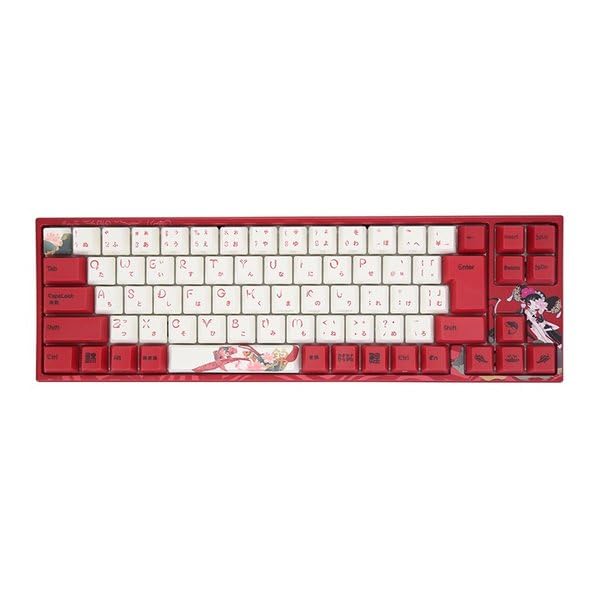
Image: Varmilo Koi 73 JIS Keyboard overview.
2. Ključne značilnosti
- Unique Koi Design: Features vibrant koi fish illustrations and a red aesthetic, developed in collaboration with illustrator Li Huan.
- JIS Layout: 73-key Japanese Industrial Standard layout for specific regional input needs.
- Compact 65% Size: Optimizes desk space while retaining essential function and arrow keys.
- Customizable Switches: Offers a choice of Varmilo mechanical electrostatic capacity switches to suit individual typing preferences.
- Cherry-Style Stabilizers: Ensures consistent and stable key presses, especially for larger keys.
- USB povezljivost: Reliable wired connection for stable performance.
3. Navodila za namestitev
3.1 Vsebina paketa
Preden začnete, se prepričajte, da so v paketu vsi elementi:
- Varmilo Koi 73 JIS Keyboard
- USB kabel
- Uporabniški priročnik (ta dokument)
3.2 Priključitev tipkovnice
To connect your Varmilo Koi 73 keyboard to your computer, follow these steps:
- Poiščite vrata USB-C na zadnji strani tipkovnice.
- En konec priloženega kabla USB priključite v vrata USB-C na tipkovnici.
- Drugi konec kabla USB priključite na razpoložljiva vrata USB na vašem računalniku.
- Vaš operacijski sistem bi moral tipkovnico samodejno prepoznati.
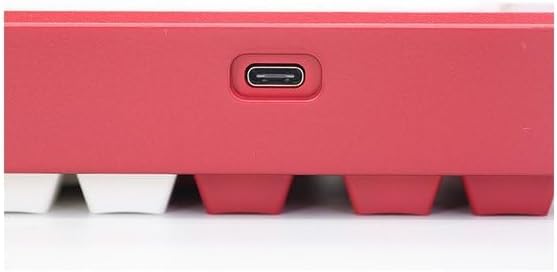
Image: USB-C port for keyboard connection.
3.3 Namestitev gonilnika (neobvezno)
For advanced customization and optimal performance, it is recommended to install the Varmilo driver software. This software allows you to remap keys, adjust performance settings, and customize lighting effects.
Video: This video demonstrates the driver installation process and software usage for Varmilo keyboards. While it features the Muse65 model, the steps for driver installation and basic software navigation are generally applicable to other Varmilo keyboards like the Koi 73.
Please visit the official Varmilo website for the latest driver downloads specific to your keyboard model. Follow the on-screen instructions during installation.
4. Navodila za uporabo
4.1 Osnovne funkcije tipk
The Varmilo Koi 73 keyboard features a standard JIS layout. Most keys function as labeled. For special functions, refer to the combination keys below.
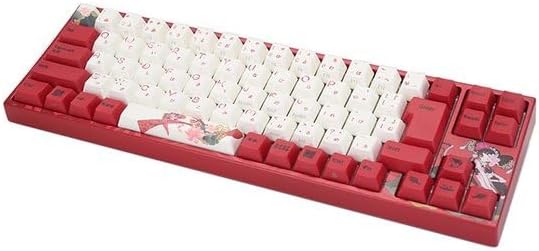
Slika: Konecview of the Varmilo Koi 73 JIS Keyboard layout.
4.2 Function (Fn) Key Combinations
Since this is a 73-key layout, some functions are accessed via the Fn key. Hold down the Fn key and press the corresponding key to activate its secondary function. Common Fn combinations include:
- Fn + F1–F12: Multimedijski gumbi (npr. glasnost, predvajanje/pavza).
- Fn + puščične tipke: Page Up/Down, Home/End (specific to model, refer to keycap legends).
- Tipka Fn + Win: Locks/unlocks the Windows key.

Image: Left side keys, often used with Fn for additional functions.
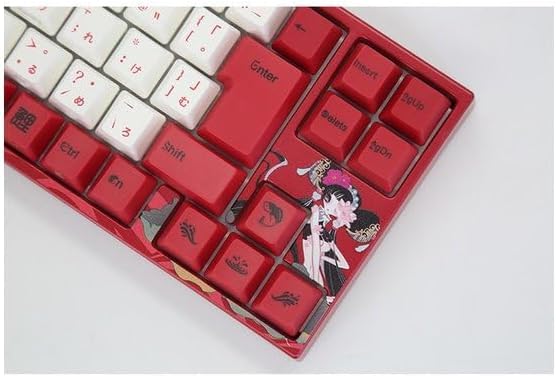
Image: Right side keys, including navigation and utility keys.
4.3 svetlobnih učinkov
The Varmilo Koi 73 keyboard supports various RGB lighting effects. You can cycle through different modes and adjust brightness using specific key combinations. Refer to your keyboard's specific keycap legends or the driver software for detailed lighting controls.
Video: This video showcases various RGB lighting effects on a Varmilo keyboard. While the model shown is Muse65, it provides a general idea of the dynamic lighting capabilities available on Varmilo keyboards, including the Koi 73.
5. Vzdrževanje in nega
Proper maintenance ensures the longevity and optimal performance of your Varmilo Koi 73 keyboard.
- Čiščenje tipk: Gently remove keycaps using a keycap puller. Clean the keycaps with a soft cloth dampz blagim milom in vodo. Pred ponovno namestitvijo se prepričajte, da so popolnoma suhi.
- Čiščenje ohišja tipkovnice: Za brisanje ohišja tipkovnice uporabite mehko, suho krpo. Za trdovratno umazanijo rahlo obrišiteamp cloth with a small amount of isopropyl alcohol can be used. Avoid excessive moisture.
- Odstranjevanje prahu: Za odstranjevanje prahu in umazanije med tipkami uporabite stisnjen zrak.
- Izogibajte se tekočinam: Da preprečite poškodbe, držite tekočine stran od tipkovnice.
- Skrb za kabel: Do not bend or crimp the USB cable excessively.
6. Odpravljanje težav
If you encounter issues with your Varmilo Koi 73 keyboard, try the following solutions:
- Tipkovnica se ne odziva:
- Prepričajte se, da je kabel USB varno priključen tako na tipkovnico kot na računalnik.
- Poskusite tipkovnico priključiti na drug USB vhod na računalniku.
- Znova zaženite računalnik.
- Če uporabljate zvezdišče USB, poskusite priključiti napravo neposredno na računalnik.
- Ključi se ne registrirajo:
- Check for any debris or foreign objects under the keycaps.
- If specific keys are not working, consider reinstalling the keyboard driver.
- Težave z osvetlitvijo:
- Ensure the keyboard driver is installed and up to date.
- Use the Fn key combinations or driver software to adjust lighting modes and brightness.
- Windows Key Locked:
- Pritisnite Fn + Win Key to toggle the Windows key lock.
If the problem persists, please contact Varmilo customer support for further assistance.
7. Specifikacije
| Znamka | Varmilo |
| Številka modela | VMMA73A039SAKURA |
| Razporeditev tipkovnice | 73-key JIS (Japanese Industrial Standard) |
| Povezljivost | USB žično |
| Tip stikala | Mechanical (Linear) |
| Združljive naprave | Prenosni računalnik |
| Dimenzije izdelka | 34.2 cm (D) x 34.2 cm (Š) x 5.1 cm (V) |
| Vključene komponente | USB kabel |
8. Garancija in podpora
Varmilo products typically come with a manufacturer's warranty. Please refer to the warranty card included with your product or visit the official Varmilo webza podrobne garancijske pogoje.
For technical support, driver downloads, or further inquiries, please visit the official Varmilo support page or contact their customer service.
Official Varmilo Webspletno mesto: www.varmilo.com


