1. Uvod
Welcome to the user manual for your Jooeniok L81 Smart Watch. This guide provides detailed instructions on how to set up, operate, and maintain your device, ensuring you get the most out of its features. The Jooeniok L81 is designed to enhance your daily life with its communication, fitness tracking, and health monitoring capabilities.
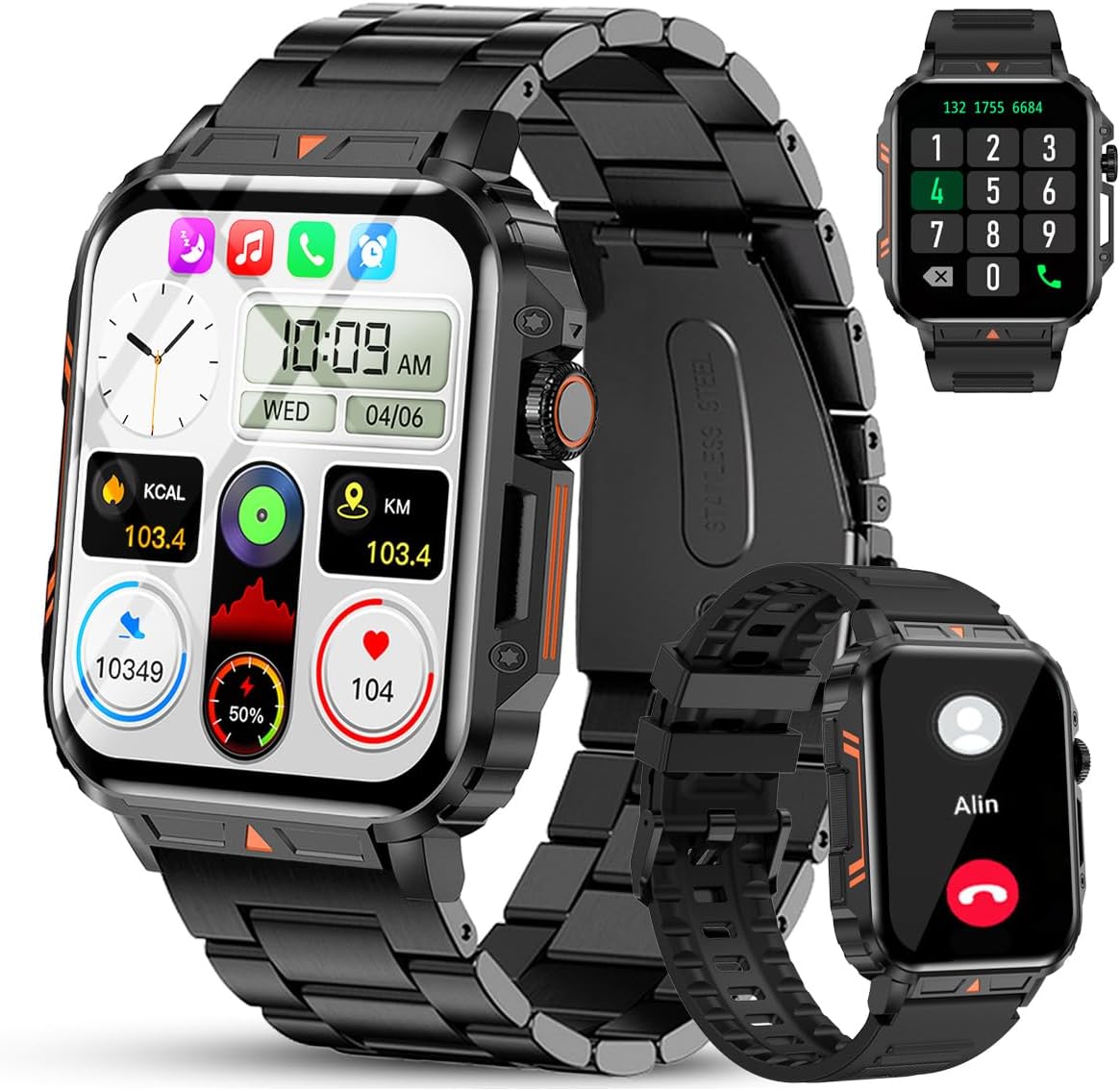
Image 1.1: The Jooeniok L81 Smart Watch, showcasing its main display and interchangeable straps.
2. Ključne značilnosti
- Bluetooth Calling & Message Alerts: Make and receive calls, read messages, and receive notifications from various apps directly on your watch.
- 1.95'' HD Touch Screen & DIY Dial: Enjoy a clear display and personalize your watch face.
- 112+ športnih načinov: Track a wide range of activities including running, cycling, badminton, and hiking.
- Vodoodporen IP68: Suitable for daily use, hand washing, and outdoor activities in rain. (Note: Not recommended for diving, showering, or sauna.)
- Spremljanje zdravja: Monitor heart rate, blood oxygen (SpO2), blood pressure, and sleep patterns.
- Dolgotrajna baterija: Opremljen z baterijo z zmogljivostjo 340 mAh za daljšo uporabo.
- Večnamensko: Includes features like timer, alarm, stopwatch, weather, calendar, water reminder, sedentary reminder, and remote photo control.
3. Navodila za namestitev
3.1. Polnjenje pametne ure
Before initial use, fully charge your Jooeniok L81 Smart Watch. Connect the magnetic charging cable to the charging contacts on the back of the watch and plug the USB end into a standard USB power adapter (not included) or a computer's USB port. The watch display will indicate charging status.

Image 3.1: Illustration of the watch dimensions and the location of the charging contacts.
3.2. Namestitev in seznanjanje aplikacij
- Prenesite aplikacijo: Scan the QR code provided in the watch's quick start guide or search for the official companion app (e.g., "FitCloudPro" or similar, check packaging for exact name) in the Apple App Store (for iOS) or Google Play Store (for Android).
- Omogoči Bluetooth: Prepričajte se, da je Bluetooth na vašem pametnem telefonu omogočen.
- Odprite aplikacijo: Zaženite nameščeno aplikacijo in sledite navodilom na zaslonu, da ustvarite račun ali se prijavite.
- Dodaj napravo: Within the app, navigate to the "Device" or "Add Device" section. The app will search for available Bluetooth devices. Select "L81" or the corresponding device name when it appears.
- Potrdite seznanjanje: Na uri in telefonu se lahko prikaže zahteva za seznanitev. Potrdite seznanitev na obeh napravah.
- Podeli dovoljenja: Za pravilno delovanje aplikacije dovolite potrebna dovoljenja (npr. obvestila, lokacijo, stike).
The watch is compatible with Android 5.1 and above, and iOS 10.0 and above.
3.3. Initial Settings and Language
After successful pairing, the watch should automatically synchronize time and language settings with your phone. If the watch displays an incorrect language, navigate to the watch's settings menu (usually by swiping down from the main screen or pressing the side button to access the app list, then finding the 'Settings' icon). Look for 'Language' or 'System' settings to change it to English or your preferred language.
4. Navodila za uporabo
4.1. Osnovna navigacija
- Zaslon na dotik: Za navigacijo po menijih in funkcijah podrsajte levo/desno, gor/dol. Dotaknite se za izbiro.
- Stranski gumb: Press to return to the main screen or access the app list. Long press for power options.
- Crown Button (if present): Rotate to scroll through lists or adjust settings, press to select.
4.2. Klici in obvestila prek Bluetootha
Once paired, your watch can handle calls and display notifications. Ensure Bluetooth is connected and the companion app has the necessary permissions.
- Klicanje: Access the dial pad or contact list on your watch to initiate calls.
- Prejemanje klicev: When a call comes in, you can answer or reject it directly from the watch.
- Obvestila: Swipe down from the main screen or access the notification center to view incoming messages from SMS, WhatsApp, Facebook, and other apps.
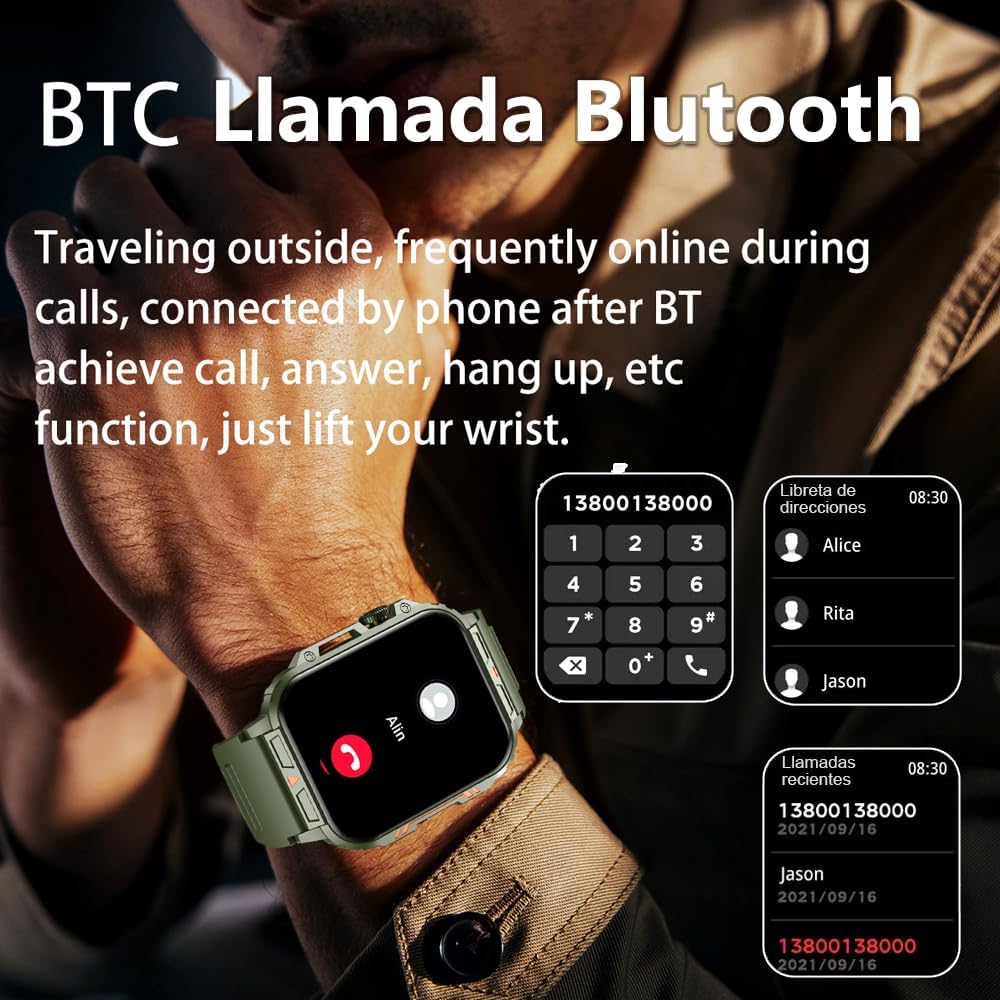
Image 4.1: The watch screen showing an incoming call and the dial pad for making calls.

Image 4.2: The watch displaying notifications from various social media and messaging applications.
4.3. Športni načini
The watch supports over 112 sports modes. To access them, navigate to the 'Sports' or 'Workout' section on your watch. Select your desired activity to start tracking. The watch will record steps, distance, and calories.

Image 4.3: Icons representing various sports modes available on the watch.
4.4. Spremljanje zdravja
The Jooeniok L81 provides continuous monitoring of several health metrics. Access these features through the watch's menu or the companion app.
- Srčni utrip: The watch uses an optical sensor to monitor your heart rate. View podatki v realnem času na uri ali podrobni trendi v aplikaciji.
- Blood Oxygen (SpO2) & Blood Pressure: Initiate a measurement from the watch. Results are displayed on the screen and recorded in the app for historical analysis.
- Spremljanje spanja: Wear the watch to bed for automatic sleep tracking. It analyzes deep sleep, light sleep, and awake times, providing a comprehensive sleep quality report in the app.
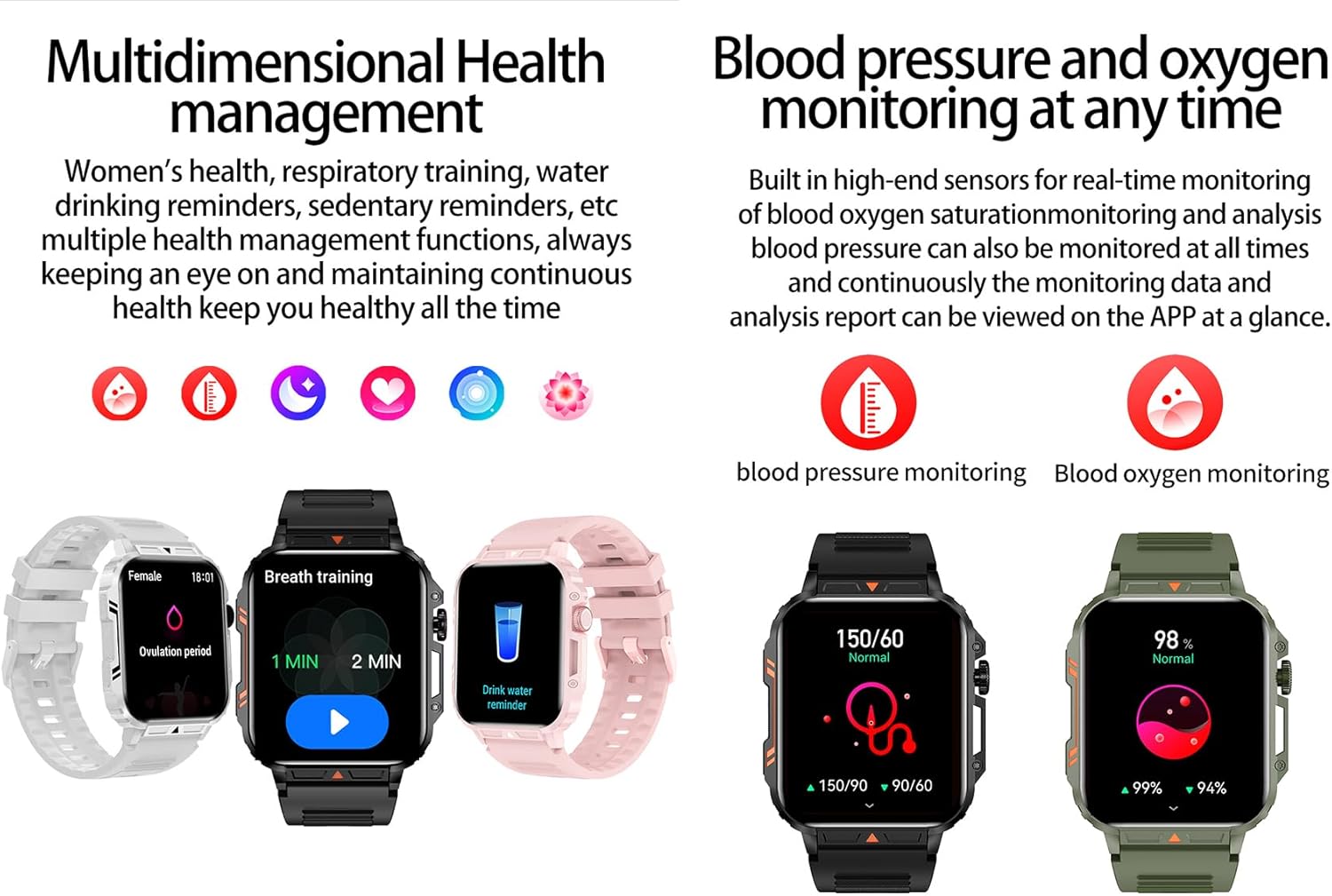
Image 4.4: Watch screens showing blood pressure and blood oxygen monitoring results.

Image 4.5: Watch screens showing real-time heart rate and a summary of sleep data.
4.5. AI Intelligent Voice Function
After connecting the watch to your phone via Bluetooth, activate the voice function on the watch. This allows you to use voice commands to open applications, check weather, make calls, or navigate, offering a hands-free experience.
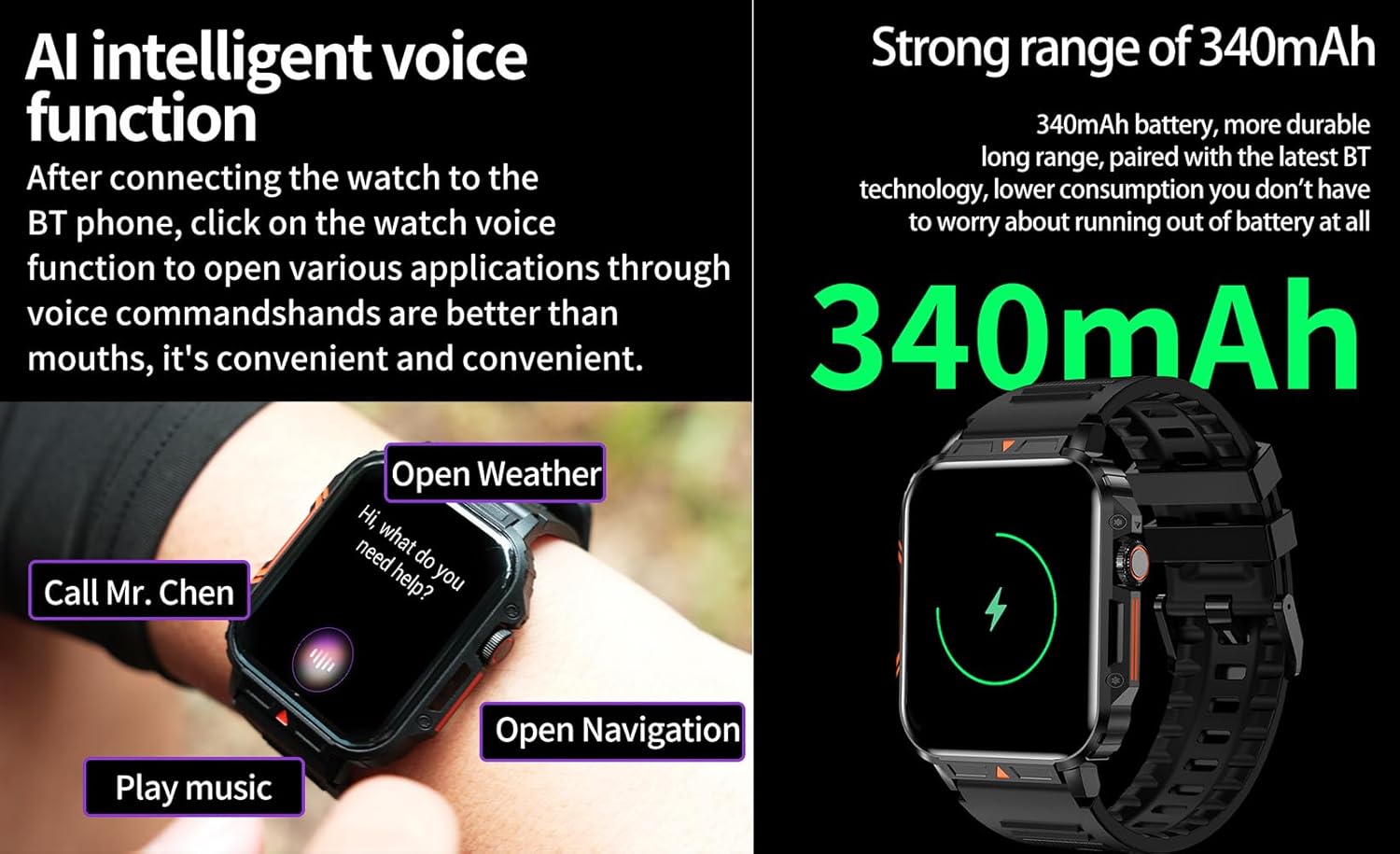
Image 4.6: The watch screen illustrating the AI voice assistant interface with example ukazi.
4.6. Samostojna številčnica
Personalize your watch face by using the DIY dial feature within the companion app. You can often upload custom images or choose from a variety of pre-designed watch faces.
5. Vzdrževanje
5.1. Vodoodpornost
The Jooeniok L81 Smart Watch is IP68 waterproof and dustproof. This means it is resistant to dust and can withstand immersion in water up to 1.5 meters for up to 30 minutes. It is suitable for daily use, hand washing, and light rain.
Pomembno: Ura je ne recommended for diving, hot showers, or saunas, as steam and high water pressure can compromise the seals and cause damage.

Image 5.1: The watch shown with water splashes, indicating its water resistance.
5.2. Čiščenje
Redno čistite uro in pašček, da preprečite draženje kože in ohranite funkcionalnost. Uporabljajte mehko,amp cloth to wipe the screen and body. For the strap, follow the manufacturer's recommendations for the specific material (e.g., silicone, metal).
- Izogibajte se uporabi močnih kemikalij ali abrazivnih materialov.
- Pred polnjenjem ali daljšo uporabo se prepričajte, da je ura popolnoma suha.
5.3. Skrb za baterijo
Za podaljšanje življenjske dobe baterije:
- Izogibajte se ekstremnim temperaturam.
- Ne dovolite, da se baterija pogosto popolnoma izprazni.
- Polnite uro s priloženim kablom.
Image 5.2: The watch screen highlighting its 340mAh battery capacity.
6. Odpravljanje težav
| Težava | Možna rešitev |
|---|---|
| Ura se ne vklopi. | Prepričajte se, da je ura popolnoma napolnjena. Priključite jo na polnilnik za vsaj 30 minut. |
| Seznanitev s pametnim telefonom ni mogoča. |
|
| Incorrect language displayed. | Navigate to the watch's settings menu, find 'Language' or 'System' settings, and select your preferred language. If paired, the app might also have a language setting. |
| Touch screen unresponsive or intermittent. |
|
| Obvestila niso bila prejeta. |
|
| Health monitoring data seems inaccurate. |
|
7. Specifikacije
| Funkcija | Podrobnost |
|---|---|
| Ime modela | L81 |
| Znamka | Jooeniok |
| Velikost zaslona | 1.95 palcev |
| Tehnologija povezljivosti | Bluetooth |
| Standard brezžične komunikacije | Bluetooth |
| Operacijski sistem | Android (compatible with Android 5.1+ and iOS 10.0+) |
| Zmogljivost pomnilnika | 128 MB |
| Baterija | 1 Lithium Polymer battery (340mAh, included) |
| Vodoodpornost | IP68 |
| Posebne lastnosti | Activity Tracker, Notifications, Phone Call, Time Display, Heart Rate Monitor, Blood Oxygen Monitor, Sleep Monitor, 112+ Sports Modes, AI Voice Function |
| Mere (pribl.) | Watch face: 44mm (width) x 52mm (height); Thickness: 12mm; Strap length: 260mm |
8. Garancija in podpora
The Jooeniok L81 Smart Watch is backed by a 365-dnevna garancija od datuma nakupa. Ta garancija krije proizvodne napake in okvare pri normalni uporabi.
For technical support, warranty claims, or any questions regarding your product, please contact Jooeniok customer service through the retailer's platform or the contact information provided on the product packaging or official webmesto.
Prosimo, shranite dokazilo o nakupu za potrditev garancije.


