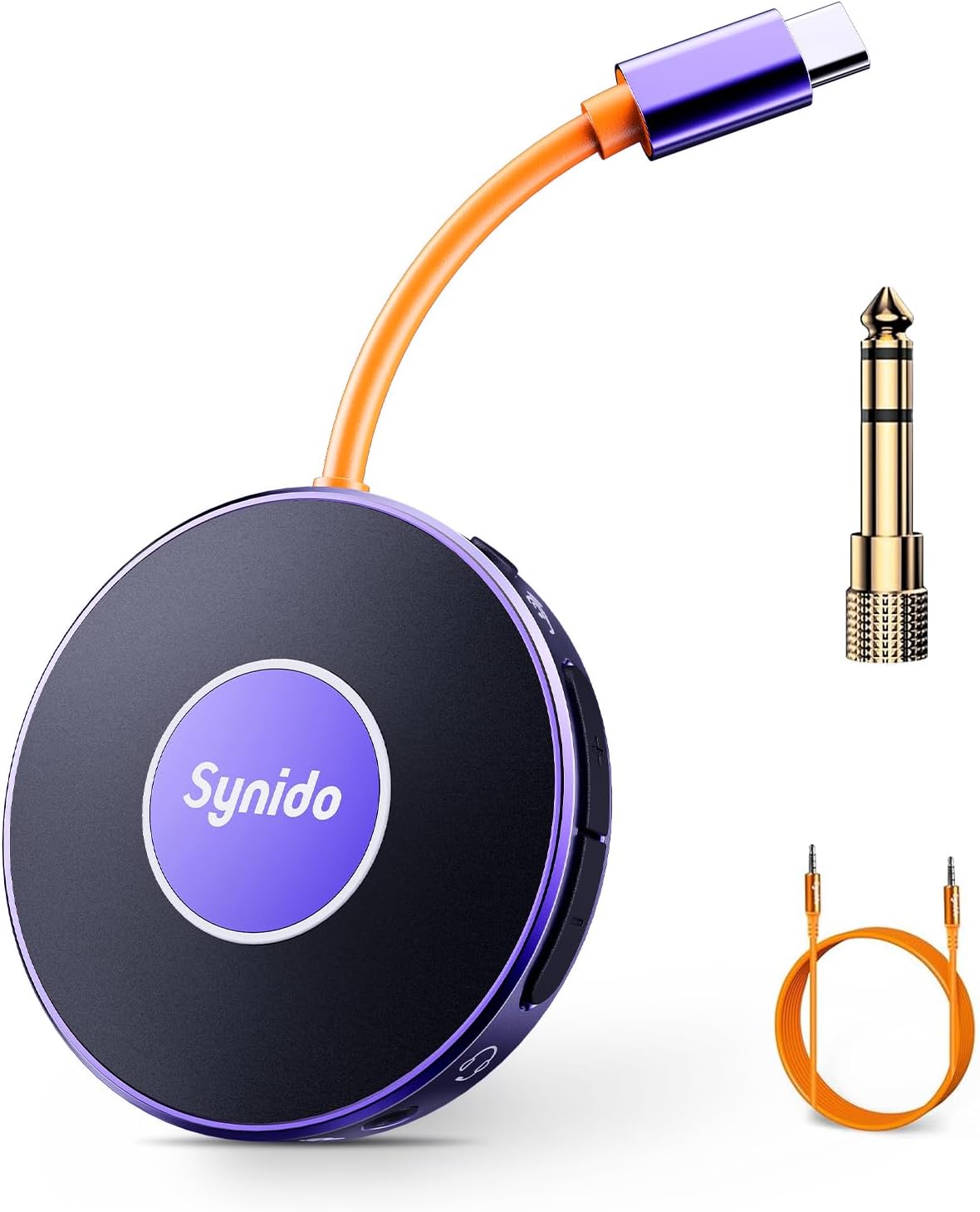
Uporabniški priročnik za prenosni avdio vmesnik Synido
Model: LIVE A10 V1
Uvod
Thank you for choosing the Synido Portable Audio Interface. This compact and versatile device is designed to enhance your live streaming, music recording, and audio experience across various platforms and devices. This manual provides detailed instructions on setting up, operating, maintaining, and troubleshooting your audio interface to ensure optimal performance.
Vsebina paketa
Prosimo, preverite, ali so v vašem paketu priloženi vsi spodaj navedeni artikli:
Portable Audio Interface (1 unit)
6.35mm (1/4'') Instrument Adapter (1 unit)
3.5mm (1/8'') Audio Cable (1 unit)
Uporabniški priročnik (1 enota)
Figure 1: Contents of the Synido Portable Audio Interface package, including the main unit, adapters, and cables. Note: A Lightning adapter for certain iPhone models is not included and must be purchased separately if needed for data transmission.
Konec izdelkaview
The Synido Portable Audio Interface is a mini sound card and audio converter designed for mobile live broadcasts and high-quality music recording. It features a USB-C interface for direct connection to mobile phones or computers, and can simultaneously charge your device during live broadcasts. With 24-bit 48kHz resolution and a dual-core chip, it ensures pristine audio quality and low latency.
Figure 2: The Synido Portable Audio Interface, showcasinzaradi svoje kompaktne zasnove in priložene dodatne opreme.
Ključne značilnosti:
Charging while Broadcasting: Connect a charging cable to power your mobile phone during live streams.
High-Quality Sound & Low Latency: Studio-grade 24-bit 48kHz resolution with dual-core chip for clear audio and minimal delay.
Designed for Players: Features ultra-clear internal loopback and monitor functions, ideal for instrument recording. Includes a 6.35mm (1/4'') instrument adapter.
Sophisticated Functional Design: Dual independent volume buttons for headphone and microphone, independent In-Ear monitor switch, and a secure USB-C buckle design.
Večkratna uporaba: Suitable for live streaming, instrument recording, enhancing music listening, gaming, and voice calls.
Figure 3: Visual breakdown of the Synido audio interface's design elements, highlighting its user-friendly controls and secure connections.
Figure 4: The Synido audio interface in a live streaming setup, emphasizing its compact form factor and versatile features for mobile content creation.
Nastavitev
Začetna povezava:
Connect the USB-C cable of the Synido Portable Audio Interface directly to your mobile phone or computer.
Once connected, your device should automatically recognize the audio interface. For mobile phones, a headphone icon typically appears in the status bar, indicating a successful connection.
Plug your headphones into the designated earphone interface on the audio interface.
If using for live streaming or recording, open your preferred application (e.g., live streaming software, DAW) and select the Synido audio interface as your input/output device.
Figure 5: The Synido audio interface is designed for plug-and-play compatibility with Windows, Mac OS, and Android devices. Please note that a Lightning adapter is required for certain iPhone models to ensure data transmission.
Video Guide: Setting up for Gaming and Voice Streaming (Mobile Phone)
Video 1: This video demonstrates how to set up the Synido audio interface for live streaming with wireless accompaniment, showing connections for streaming phone, accompaniment phone (via Bluetooth), and headset. It highlights the successful connection indicator and how to toggle Bluetooth.
Video Guide: Setting up for Instrument Recording (Mobile Phone and Instrument)
Video 2: This video showcases the Synido audio interface's capabilities for guitar recording and live streaming. It illustrates connecting the device to a phone and a guitar, demonstrating the monitoring feature and wireless accompaniment for a seamless recording and streaming experience.
Navodila za uporabo
Live Streaming with Wireless Accompaniment:
Connect the Synido audio interface to your main streaming phone via USB-C.
Plug your headset into the audio interface's earphone jack.
Press the center button on the Synido Live Dock A10 to turn on Bluetooth. The light will change from steady white to steady blue when connected.
On your accompaniment phone, enable Bluetooth and connect to 'Synido Live Dock' to play background music or accompaniment wirelessly.
Open your live streaming software on the main phone and begin your broadcast.
Snemanje instrumentov:
Connect the Synido audio interface to your mobile phone or computer.
Plug the 6.35mm (1/4'') instrument adapter into the instrument input on the audio interface.
Connect your instrument (e.g., electric guitar) to the adapter using an instrument audio cable.
Plug your headphones into the earphone jack for real-time monitoring.
Press the Loopback switch on the audio interface to enable internal playback and recording.
Open your recording software on your phone or computer and start recording your instrument.
Figure 6: The Synido audio interface facilitating guitar recording, demonstrating the loopback feature for clear audio capture.
General Usage Scenarios:
The Synido Portable Audio Interface is versatile and can be used in various scenarios:
Charging while Broadcasting: Maintain phone battery during extended live sessions.
Hi-Fi Music Experience: Enhance sound quality when listening to music from your phone or computer.
Igranje iger: Experience low-latency audio for an immersive gaming experience.
Glasovni klici: Support for high-definition voice calls.
Figure 7: A visual representation of the diverse applications of the Synido audio interface, from live streaming to music listening.
Additional Video Demonstrations:
Video 3: This video focuses on using the Synido portable audio interface specifically for electric guitar recording. It demonstrates the connection process and highlights features like real-time monitoring and loopback for high-quality instrument recording.
Videoposnetek 4: Ta videoposnetek ponuja splošen pregledview of the Synido portable mini audio interface for live use. It shows the device's compact size, ease of connection, and various applications, including charging while streaming, gaming, and voice calls, emphasizing its versatility.
Vzdrževanje
To ensure the longevity and optimal performance of your Synido Portable Audio Interface, follow these maintenance guidelines:
Čiščenje: Use a soft, dry cloth to wipe the surface of the device. Avoid using abrasive cleaners, solvents, or strong chemicals, as they may damage the finish or internal components.
Shranjevanje: Napravo shranjujte na hladnem in suhem mestu, stran od neposredne sončne svetlobe, ekstremnih temperatur in visoke vlažnosti.
Ravnanje: Handle the device with care. Avoid dropping it or subjecting it to strong impacts, which can cause internal damage.
Povezave: Always insert and remove cables gently to prevent damage to the ports. Ensure connections are secure during use.
Odpravljanje težav
If you encounter issues with your Synido Portable Audio Interface, please refer to the following common problems and solutions:
Brez zvočnega izhoda/vhoda:
Ensure all cables are securely connected to the audio interface, your device, and your headphones/instrument.
Check the volume levels on both the audio interface (using the dual volume buttons) and your connected device.
Verify that the Synido audio interface is selected as the default input/output device in your operating system's sound settings or your application's audio preferences.
If using an iPhone, ensure you have a compatible Lightning adapter that supports data transmission, as it is not included with the product.
Statični šum ali šum v zvoku:
Preverite, ali so povezave ohlapne.
Ensure you are using high-quality cables.
Avoid placing the device near sources of electromagnetic interference (e.g., power adapters, Wi-Fi routers).
If charging while streaming, some electrical interference may occur. Try operating without charging to see if the noise persists.
Težave s povezavo Bluetooth:
Ensure the Bluetooth function on the audio interface is activated (steady blue light).
Make sure Bluetooth is enabled on your accompaniment device and it is within range.
Pozabite napravo v nastavitvah Bluetooth in poskusite ponovno združiti.
Naprava ni prepoznana:
Try connecting to a different USB-C port or a different device to rule out port or device specific issues.
Restart your connected phone or computer.
Specifikacije
Znamka
Synido
Številka modela
LIVE A10 V1
Teža predmeta
5.9 unč
Dimenzije paketa
6.97 x 5.2 x 1.54 palcev
Država izvora
Kitajska
Združljive naprave
Pametni telefon
Podprta programska oprema
Ableton Live, FL Studio, Audacity
Operacijski sistem
Sound card (driverless for most modern OS)
Tehnologija povezljivosti
USB
Število kanalov
2
Avdio ločljivost
24-bit / 48kHz
Figure 8: The Synido audio interface is designed to be highly portable, easily fitting into small bags or pockets for on-the-go use.
Garancija in podpora
For warranty information and customer support, please refer to the official Synido webspletno mesto ali se obrnite neposredno na njihovo službo za stranke. Lahko pa obiščete tudi Synido Brand Store on Amazon za dodatne vire in možnosti stika.
Synido is committed to providing high-quality products and excellent customer service. If you have any questions or require assistance, do not hesitate to reach out.
Povezani dokumenti - LIVE A10 V1
Synido Live 2x2 High-Fidelity Audio Interface User Guide Comprehensive user guide for the Synido Live 2x2 high-fidelity audio interface, covering product introduction, function descriptions for Solo and Duet models, driver installation, control panel usage, technical specifications, package contents, FAQs, and safety precautions. Compatible with Windows, macOS, Android, and iOS.
Synido Live Dock A10: Guía de Usuario para Interfaz de Audio Portátil Explore las funciones del Synido Live Dock A10, una interfaz de audio portátil de alta definición con tecnología avanzada. Aprenda a usar LOOPBACK, Bluetooth y controles de volumen para grabaciones y reproducción de audio profesional.
Zvočni vmesnik Synido Live GO MK2: Uporabniški priročnik in funkcije Celovit vodnik za prenosni avdio vmesnik Synido Live GO MK2, ki zajema izdelek prekoview, opisi funkcij, navodila za povezavo, odpravljanje težav in pomembni previdnostni ukrepi za pretakanje in podcaste.