Uvod
This manual provides comprehensive instructions for the ASWEE P4 Smart Watch, a versatile fitness tracker with call capabilities, a 1.85" TFT display, and various health monitoring features. Please read this manual thoroughly before using your device.
Kaj je v škatli
- ASWEE P4 Smart Watch
- Polnilni kabel
- Uporabniški priročnik
Konec izdelkaview
The ASWEE P4 Smart Watch features a rectangular 1.85-inch TFT-LCD display with a 240x280 resolution. It includes a physical button on the side for navigation and interaction. The watch is designed for comfortable wear and easy access to its functions.
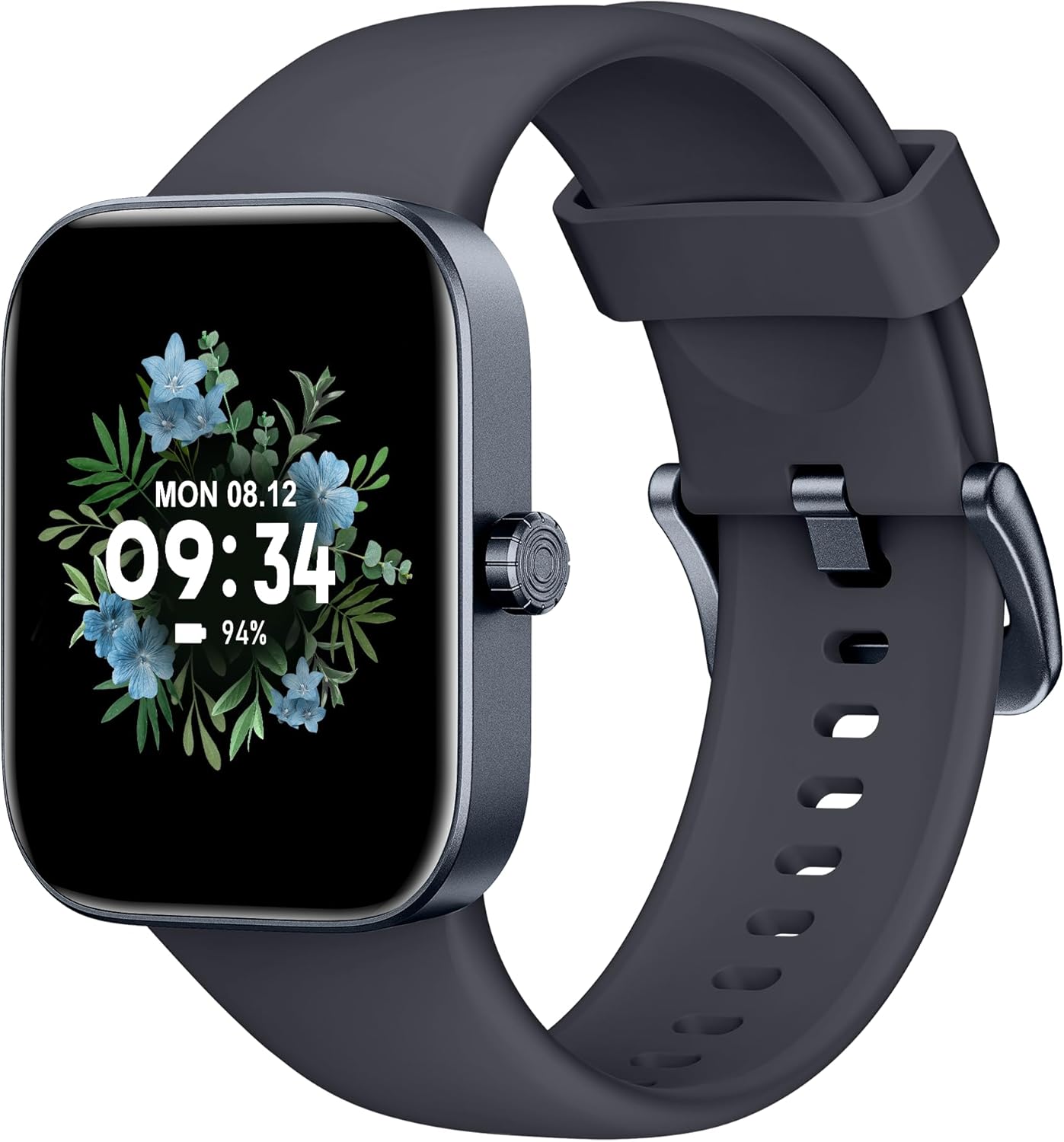
Spredaj view of the ASWEE P4 Smart Watch, displaying time and date with a floral background.
Nastavitev
Polnjenje naprave
The ASWEE P4 Smart Watch comes with a magnetic charging cable. Align the magnetic end of the cable with the charging contacts on the back of the watch. The watch will indicate when it is charging. A full charge typically takes approximately 2 hours and provides up to 7 days of active use or 15 days on standby.

Illustration showing the magnetic charging cable connected to the back of the ASWEE P4 Smart Watch, highlighting battery life indicators.
Namestitev aplikacije in seznanjanje
To utilize all features of your ASWEE P4 Smart Watch, you need to download and install the "FitPro" application on your smartphone. Scan the QR code provided in the watch's packaging or search for "FitPro" in your device's app store.
Seznanjanje z iPhoneom
Follow these steps to pair your watch with an iPhone:
- Prepričajte se, da je Bluetooth omogočen na vašem iPhoneu.
- Open the "FitPro" app.
- Navigate to "Setting" and then "Bind device".
- Select your watch (e.g., KM13Pro) from the scan results.
- Confirm the pairing request by clicking "Pair" and then "Allow" for notifications.
- Go to your iPhone's Bluetooth settings and connect to "KM13Pro Audio" for call functionality.
Video tutorial demonstrating how to bind the ASWEE P4 Smart Watch to an iPhone and how to unbind it.
Pairing with Android Phone
Follow these steps to pair your watch with an Android phone:
- Prepričajte se, da je Bluetooth v telefonu Android omogočen.
- Open the "FitPro" app.
- Navigate to "Set" and then "Bind device".
- Select your watch (e.g., KM13Pro) from the scan results.
- Confirm the pairing request by clicking "Pair".
Video tutorial demonstrating how to bind the ASWEE P4 Smart Watch to an Android phone and how to unbind it.
Navodila za uporabo
Osnovna navigacija
The watch features a touch-sensitive screen for navigation. Swipe left/right or up/down to access different functions and menus. The side button typically serves as a home or back button.
Call and Text Functionality
With its built-in speaker and microphone, the ASWEE P4 allows you to answer/dial calls directly from your wrist when connected via Bluetooth. You can also receive SMS text and SNS messages (Facebook, Twitter, WhatsApp, etc.) with vibration alerts.

Image showing the ASWEE P4 Smart Watch on a wrist, with notification icons for various messaging apps, indicating Bluetooth 5.0 connectivity for calls and texts.
Sledenje zdravju
Ura omogoča celovito spremljanje zdravja:
- Srčni utrip: 24-hour tracking with a high-precision PPG sensor. Stores 7 days of resting heart rate data.
- Kisik v krvi: Measures SpO2 levels using a reflective-light based sensor.
- Spremljanje spanja: Tracks sleep quality through Awake, Light, and Deep sleep stages, helping to improve sleep duration and quality.
- Spremljanje stresa: Zagotavlja vpogled v raven stresa.

Image illustrating the ASWEE P4 Smart Watch's 24-hour data tracking capabilities, including heart rate, stress level, and blood oxygen monitoring.

Image depicting the ASWEE P4 Smart Watch's sleep health assistant feature, showing sleep duration and patterns.
Načini vadbe
The ASWEE P4 supports multiple workout modes, including running, bike riding, basketball, and tennis. It accurately monitors data points like heart rate, time, and calories burned to enhance workout efficiency.

Predstavitev slikeasing the ASWEE P4 Smart Watch's various sports modes, including running, bike riding, basketball, and jumping jack, with activity data like steps, distance, and calories.
Prilagajanje
Choose from over 100 stylish watch faces or create your own using photos from your phone gallery.
Vzdrževanje
Čiščenje
Redno čistite uro in pašček z mehko krpoamp krpo. Izogibajte se uporabi močnih kemikalij ali abrazivnih materialov.
Shranjevanje
Uro shranjujte na hladnem in suhem mestu, ko je ne uporabljate.
Odpravljanje težav
Ura se ne vklopi
- Prepričajte se, da je ura popolnoma napolnjena. Priključite jo na polnilni kabel in vir napajanja za vsaj 30 minut.
Težave s seznanjanjem
- Prepričajte se, da je Bluetooth na vašem telefonu omogočen in da je ura v dosegu.
- Znova zaženite telefon in uro.
- If previously paired, try "forgetting" the device in your phone's Bluetooth settings and re-pairing through the FitPro app.
- Ensure the FitPro app has necessary permissions (Bluetooth, location).
Netočni zdravstveni podatki
- Prepričajte se, da je ura tesno prilegana zapestju, ne pretesna ali preohlapna.
- Očistite senzor na zadnji strani ure.
- Okoljski dejavniki in individualna fiziologija lahko vplivajo na odčitke.
Obvestila se ne prikazujejo
- Check app permissions for FitPro to ensure it can access notifications.
- Verify that notification push settings are enabled within the FitPro app for desired applications.
- Prepričajte se, da je ura povezana s telefonom prek Bluetootha.
Specifikacije
| Funkcija | Podrobnost |
|---|---|
| Ime modela | P4 |
| Znamka | ASWEE |
| Velikost zaslona | 1.85 palcev |
| Tehnologija zaslona | TFT-LCD |
| Resolucija | 240 x 280 PPI |
| Operacijski sistem | Wear OS |
| Povezljivost | Bluetooth 5.3 |
| Vodoodpornost | IP68, 5 ATM |
| Življenjska doba baterije (običajna uporaba) | Do 7 dni |
| Čas pripravljenosti | Do 15 dni |
| Čas polnjenja | Pribl. 2 ur |
| Posebne lastnosti | Fitness Tracker, Sleep Monitor, Reminders, Multimedia control, Answer/Dial Call, Heart Rate Monitor, Blood Oxygen Monitor, Stress Monitor |
| Teža predmeta | 2.89 unč |
Opomba: Specifikacije se lahko spremenijo brez predhodnega obvestila.
Garancija in podpora
For warranty information and technical support, please refer to the official ASWEE webspletno mesto ali se obrnite na njihovo službo za stranke. Shranite račun kot dokazilo o nakupu.


