Uvod
This manual provides detailed instructions for the safe and effective operation of your WOUXUN KG-R56 VHF Professional Radio. Please read this manual thoroughly before using the device to ensure proper function and to prevent damage.
Konec izdelkaview
The WOUXUN KG-R56 is a compact and robust professional VHF transceiver designed for authorized users, operating within the 66-88 MHz frequency range. It features 256 memory channels, advanced menu functions, and integrated USB Type-C charging. The device is compliant with current R&TTE RED CE standards.
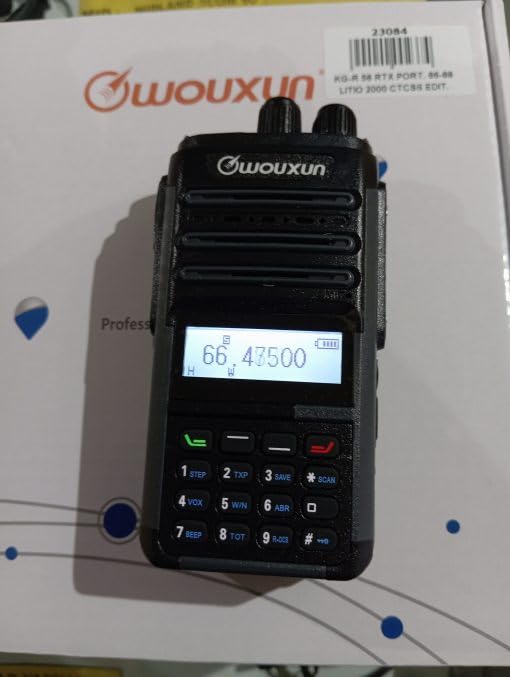
Image: WOUXUN KG-R56 VHF Professional Radio. This image shows the front view of the radio, highlighting its display, keypad, and antenna connection.
Vsebina paketa
Preverite, ali so v vašem paketu prisotni vsi spodaj navedeni elementi:
- KG-R56 Transceiver
- 7.4V - 2000 mAh Lithium-Ion Battery Pack
- Polnilec
- 220V napajalnik
- Flexible Rubber Antenna
- Sponka za pas
- User Manual (in original language)
- Certifikati
Nastavitev
1. Namestitev baterije
- Poravnajte baterijski sklop z utori na zadnji strani radia.
- Potisnite baterijski sklop navzgor, dokler se ne zaskoči.
- Za odstranitev pritisnite zapah za sprostitev baterije (če je prisoten) in potisnite baterijo navzdol.
2. Polnjenje baterije
The KG-R56 features an integrated USB Type-C port for convenient charging.
- Connect a USB Type-C cable to the radio's USB-C port.
- Connect the other end of the cable to the provided charger or a compatible USB power source.
- The charging indicator light on the radio will show the charging status.
- Popolno polnjenje običajno traja več ur. Izogibajte se prenapolnjenju baterije.
3. Pritrditev antene
- Screw the flexible rubber antenna clockwise onto the antenna connector on top of the radio until it is finger-tight.
- Do not overtighten the antenna.
4. Pritrditev sponke za pas
- S priloženimi vijaki pritrdite sponko za pas na za to namenjeno mesto na zadnji strani radia.
Navodila za uporabo
1. Vklop/izklop
Rotate the Power/Volume knob clockwise to turn the radio on. Rotate it counter-clockwise until a click is heard to turn it off.
2. Prilagajanje glasnosti
After powering on, continue rotating the Power/Volume knob to adjust the audio output level to your preference.
3. Izbira kanala
Use the Up/Down arrow keys or the rotary encoder (if present) to select the desired channel or frequency. The display will show the selected channel number, frequency, or channel name.
4. Oddajanje in sprejemanje
- Za oddajanje pritisnite in držite gumb Pritisni in govori (PTT) na strani radia. Govorite jasno v mikrofon.
- Za sprejem spustite gumb PTT.
- Always ensure the channel is clear before transmitting to avoid interference.
5. Navigacija po meniju
The KG-R56 features an advanced menu system for managing various radio functions.
- Pritisnite MENI gumb za vstop v glavni meni.
- Use the Up/Down arrow keys to scroll through the available menu options.
- Pritisnite MENI spet oz OK (if available) to select an option.
- Use the Up/Down keys to change settings within a selected option.
- Pritisnite EXIT or NAZAJ to return to the previous menu or exit the menu system.
Ključne značilnosti
- DTMF Encoding/Decoding: Supports DTMF tones for advanced signaling capabilities.
- CTCSS / DCS: Includes 50 CTCSS groups and 105 DCS groups for selective calling. These can be customized via PC programming software.
- CTCSS/DCS Scanner: Automatically detects CTCSS/DCS tones on a received signal.
- glasovni vodnik: Provides audible prompts for menu navigation and function selection, enhancing user experience.
- Channel Name Display: Allows for editing and displaying custom channel names for easier identification.
- Battery Capacity Inquiry: Check the current battery level directly from the radio.
- Programiranje z računalnikom: Customize radio settings, frequencies, and channels using dedicated PC software.
- Selectable Bandwidth: Choose between various channel spacing options (5K/6.25K/10K/12.5K/25K).
- Reverse Frequency Function: Quickly switch between transmit and receive frequencies for specific operations.
- Multiple Scan Modes (TO/CO/SE): Offers various scanning options for monitoring channels efficiently.
- Načini prikaza: Switch between displaying Frequency, Channel Number, or Channel Name.
- TOT (Časovnik časovne omejitve): Prevents excessively long transmissions by limiting transmission duration.
- Zaklepanje zasedenega kanala (BCLO): Prevents transmission on an occupied channel, avoiding interference.
- Keypad Lock (Automatic/Manual): Prevents accidental key presses and setting changes.
- Wired Clone Function: Copy settings and configurations from one radio to another using a cable.
- USB Type-C Polnjenje: Conveniently charge the radio via a standard USB-C port.
Vzdrževanje
Čiščenje
Površino radia obrišite z mehko krpoamp cloth. Do not use harsh chemicals, abrasive cleaners, or solvents, as these can damage the casing. Ensure the USB-C port cover is closed when not charging to protect against dust and moisture.
Skrb za baterijo
- Pred prvo uporabo popolnoma napolnite baterijo.
- Baterije ne izpostavljajte ekstremnim temperaturam (vročini ali mrazu).
- Če radia ne boste uporabljali dlje časa, odstranite baterijo in jo shranite na hladnem in suhem mestu.
- Use only WOUXUN approved battery packs and chargers to ensure safety and optimal performance.
Odpravljanje težav
| Težava | Možen vzrok | rešitev |
|---|---|---|
| Radio se ne vklopi. | Baterija je skoraj prazna ali ni pravilno vstavljena. | Napolnite baterijo ali jo ponovno pravilno namestite. |
| Ni mogoče prenesti. | Busy Channel Lockout (BCLO) active; incorrect frequency/channel; low battery. | Wait for the channel to clear; verify frequency/channel settings; charge battery. |
| No reception or weak signal. | Antenna not attached correctly; squelch level too high; out of range. | Check antenna connection; adjust squelch level; move closer to transmitting station. |
| Tipkovnica se ne odziva. | Zaklepanje tipkovnice je aktivno. | Disable keypad lock (refer to operating instructions for specific key combination). |
| Polnjenje prek USB-C ne deluje. | Cable or charger faulty; port dirty. | Try a different USB-C cable/charger; carefully clean the port if visibly dirty. |
| Audio output is distorted. | Volume too high; weak signal; speaker damage. | Adjust volume; check signal strength; contact support if speaker is damaged. |
Tehnične specifikacije
- Model: KG-R56
- Frekvenčno območje: 66-88 MHz
- Število kanalov: 256
- Razmik med kanali: 5K/6.25K/10K/12.5K/25K
- Modulacija: FM F3E
- Delovna zvezatage: 7.4V DC
- RF izhodna moč: 5W/1W (selectable)
- Občutljivost sprejemnika: 0.25 µV (12 dB SINAD)
- Občutljivost na zadušitev: <0.16 µV
- Avdio izhodna moč: 500 mW at 8 ohms
- Vrsta baterije: 7.4V - 2000 mAh Lithium-Ion Pack
- Tok v stanju pripravljenosti: 50 mA
- Delovna temperatura: -30°C do +60°C
- Dimenzije (V x Š x G): 105 x 63 x 39 mm (without antenna and battery)
- Teža: 250 g (with battery and antenna)
- Mednarodna stopnja zaščite: IP54 (Protected from limited dust ingress and water spray from any direction)
- Stopnja vodoodpornosti: Not designed for immersion in water.
- Posebne lastnosti: Weather-resistant, USB rechargeable
Opomba: Specifikacije se lahko spremenijo brez predhodnega obvestila.
Varnostne informacije
- Do not operate the radio in explosive atmospheres (e.g., near flammable gases, dust particles, or metallic powders).
- Do not modify the radio. Unauthorized modifications can void your warranty and violate regulatory compliance.
- Keep the radio away from medical devices (e.g., pacemakers) to avoid potential interference.
- Use only WOUXUN approved accessories, including batteries and chargers.
- Do not expose the radio to direct sunlight for extended periods or to extreme heat sources.
- Baterije pravilno zavrzite v skladu z lokalnimi okoljskimi predpisi.
- While rated IP54 for weather resistance, this device is not designed for immersion in water. Avoid exposing it to heavy rain or submersion.
Garancija in podpora
For warranty information or technical support, please contact your authorized WOUXUN dealer or the point of purchase. Keep your purchase receipt as proof of purchase.
For further assistance, you may visit the official WOUXUN website or consult the contact information provided in your original product packaging.


