1. Uvod
Thank you for choosing the VirtuFit VF11007 Vibration Plate Fitness machine. This manual provides essential information for the safe and effective use of your new fitness equipment. Please read it thoroughly before operation and retain it for future reference.

Slika 1: The VirtuFit VF11007 Vibration Plate, including the remote control and resistance bands.
2. Varnostne informacije
Before using the vibration plate, please observe the following safety precautions:
- Preden začnete s katerim koli novim programom vadbe, se posvetujte z zdravnikom, še posebej, če imate že obstoječe zdravstvene težave.
- Ensure the vibration plate is placed on a stable, level surface.
- Naprave ne uporabljajte, če ste noseči, imate srčni spodbujevalnik ali trpite za hudo osteoporozo, epilepsijo ali akutno trombozo.
- Otroci in hišni ljubljenčki naj se med delovanjem ne približujejo stroju.
- Vedno nosite primerno športno obutev.
- Takoj prenehajte z vadbo, če se vam vrti, vam je slabo ali če občutite kakršno koli bolečino.
- Izključite stroj iz električnega omrežja, ko ga ne uporabljate in pred čiščenjem.
3. Nastavitev
The VirtuFit VF11007 Vibration Plate requires minimal setup. Follow these steps:
- Razpakiranje: Carefully remove all components from the packaging. Verify that all parts are present: the vibration plate, remote control, power cable, and resistance bands.
- Umestitev: Position the vibration plate on a flat, stable, and non-slip surface. Ensure there is enough clear space around the unit for safe operation.
- Napajalni priključek: Plug the power cable into the vibration plate's power input, then into a suitable electrical outlet.
- Trakovi za vadbo (neobvezno): If desired, attach the resistance bands to the designated attachment points on the sides of the vibration plate.
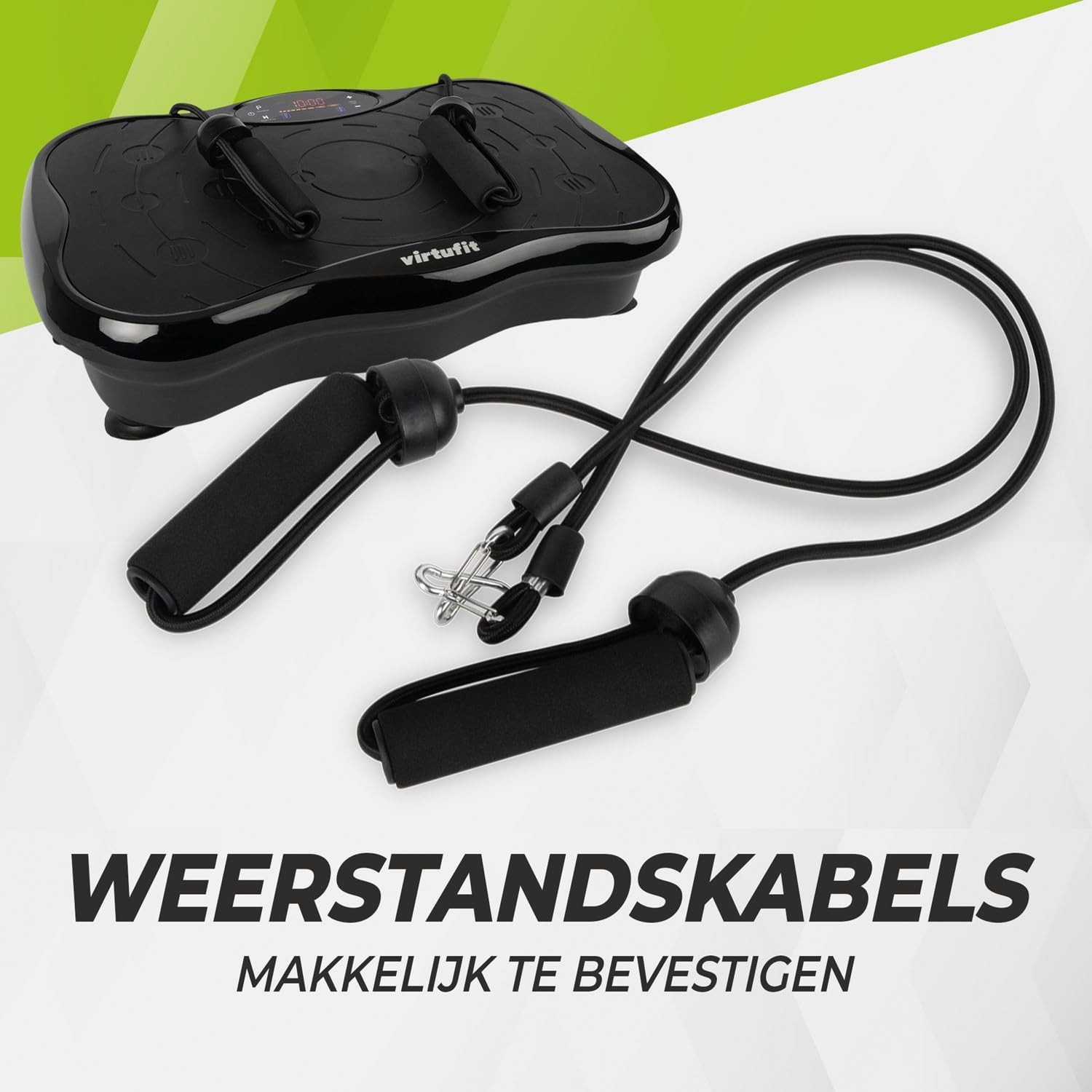
Slika 2: Resistance bands ready for attachment to the vibration plate.
4. Navodila za uporabo
The VirtuFit VF11007 features an intuitive display and a convenient remote control for easy operation.
4.1. Nadzorna plošča in zaslon
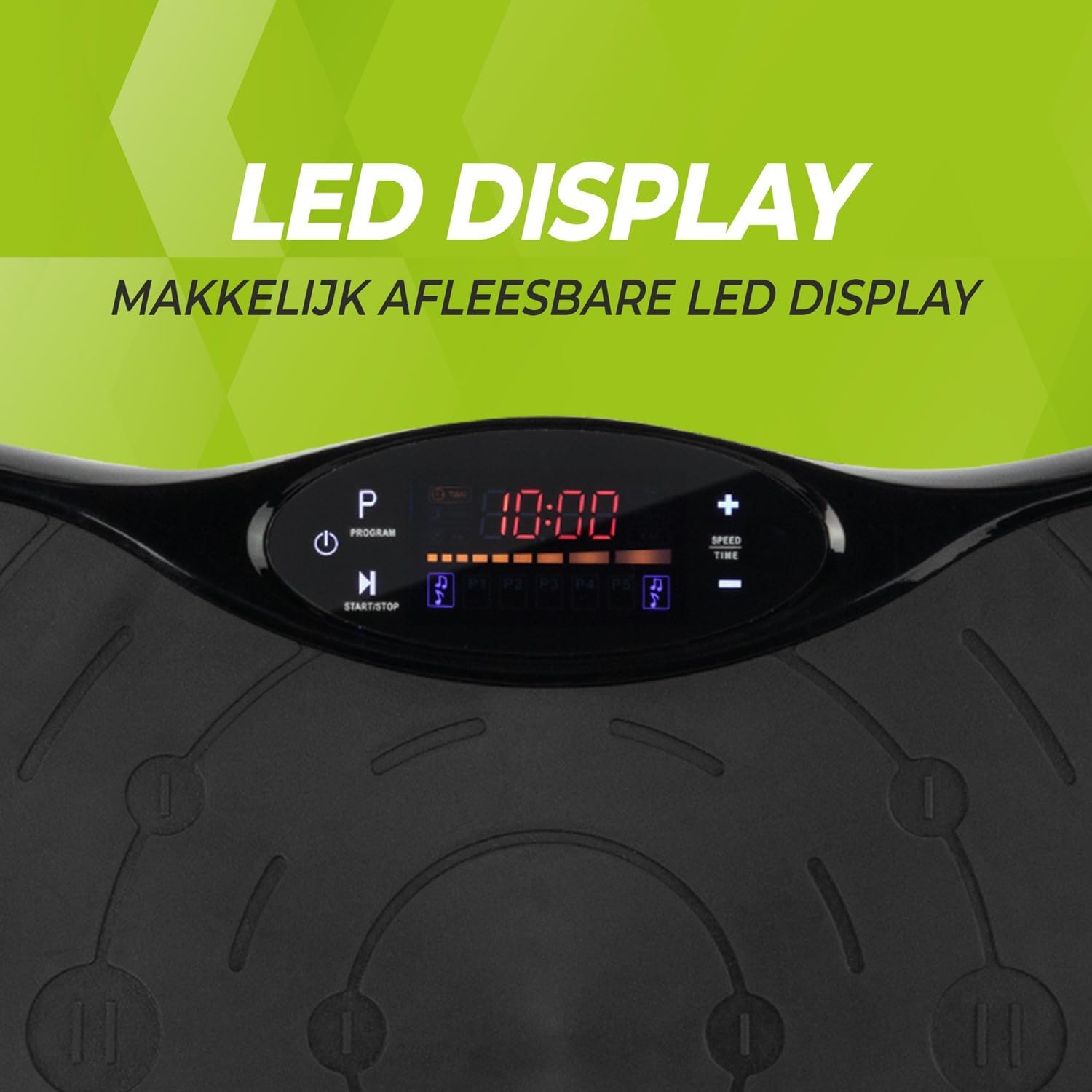
Slika 3: Podrobno view of the LED display, showing time, program, and speed settings.
The integrated computer features an LED display showing time, speed, and program information. Buttons on the panel allow for basic control.
- Gumb za vklop: Vklopi/izklopi enoto.
- Gumb Start/Stop: Initiates or pauses manual operation.
- Programski gumb (P): Cycles through the pre-set programs.
- Gumbi za hitrost +/-: Adjusts the vibration speed in manual mode.
- Gumbi za čas +/-: Adjusts the exercise duration in manual mode.
4.2. Daljinski upravljalnik
The remote control provides full functionality, allowing you to adjust settings without interrupting your workout.

Slika 4: The remote control for convenient adjustment of settings.
- Gumb za vklop: Vklopi/izklopi enoto.
- Gumb Start/Stop: Initiates or pauses manual operation.
- Programski gumb (P): Selects one of the 5 automatic programs or the manual program.
- Gumbi za hitrost +/-: Increases or decreases the vibration speed (99 levels).
- Gumbi za čas +/-: Prilagodi trajanje vadbe.
- Nadzor glasbe: Play/Pause, Next/Previous track, Volume +/- for Bluetooth audio.
4.3. Exercise Programs
The vibration plate offers 10 training programs, including 5 automatic programs (P1-P5) and a manual program.
- Automatic Programs (P1-P5): These programs automatically vary the speed over a 10-minute duration. Select the desired program using the 'P' button on the control panel or remote.
- Ročni program: Allows you to set your preferred speed (1-99) and duration. Use the Speed +/- and Time +/- buttons to customize your workout.
Program Speed Examples (for a 10-minute duration):
| Program | Speed Progression (Example) |
|---|---|
| P1 | 10 - 30 - 40 - 50 |
| P2 | 15 - 25 - 20 - 30 |
| P3 | 20 - 40 - 60 - 80 |
| P4 | 25 - 45 - 50 - 85 |
| P5 | 30 - 50 - 70 - 90 |
Note: These are example speed progressions. Actual speeds may vary slightly.
4.4. Bluetooth Speaker and USB Port
The vibration plate includes an integrated Bluetooth speaker and a USB charging port.

Slika 5: Location of the integrated Bluetooth speaker.
- Povezava Bluetooth: Turn on the vibration plate. Activate Bluetooth on your smartphone or tablet and search for "VirtuFit" or a similar device name. Pair your device.
- Predvajanje glasbe: Once connected, you can play music through the integrated speakers. Use your device or the remote control to manage playback and volume.
- USB polnjenje: Connect your phone or tablet to the USB port to charge it during your workout.
5. Vzdrževanje
Regular maintenance ensures the longevity and optimal performance of your VirtuFit Vibration Plate.
- Čiščenje: Wipe the surface of the vibration plate with a soft, damp krpo po vsaki uporabi. Ne uporabljajte abrazivnih čistil ali topil.
- Shranjevanje: Stroj hranite na hladnem in suhem mestu, stran od neposredne sončne svetlobe in vlage.
- Pregled: Občasno preverite napajalni kabel za morebitne poškodbe. Prepričajte se, da so vse povezave varne.
- Protizdrsna površina: The anti-slip rubber surface is designed for durability. Keep it clean to maintain its grip.

Slika 6: The durable anti-slip rubber surface for secure footing.
6. Odpravljanje težav
If you encounter any issues with your VirtuFit Vibration Plate, refer to the following common problems and solutions:
| Težava | Možen vzrok | rešitev |
|---|---|---|
| Stroj se ne vklopi. | Napajalni kabel ni pravilno priključen; vtičnica ne deluje. | Ensure the power cord is securely plugged into both the machine and the wall outlet. Test the outlet with another device. |
| Brez vibracij. | Machine is paused; Speed setting is too low; Program not started. | Press the Start button. Increase the speed setting. Ensure a program is selected and running. |
| Daljinski upravljalnik ne deluje. | Baterije so prazne ali nepravilno vstavljene; Ovira med daljinskim upravljalnikom in senzorjem. | Replace batteries with new ones, ensuring correct polarity. Remove any obstructions. Point the remote directly at the display sensor. |
| Povezava Bluetooth se ne vzpostavi. | Bluetooth on device is off; Incorrect pairing. | Ensure Bluetooth is enabled on your device. Forget the device on your phone/tablet and re-pair. Ensure the vibration plate is powered on. |
Če težava ne izgine, se obrnite na podporo strankam.
7. Specifikacije
Key technical specifications for the VirtuFit VF11007 Vibration Plate:
- Številka modela: VF11007
- Znamka: VirtuFit
- Dimenzije (D x Š x V): 54 x 12.5 x 32 cm
- Teža: 7.5 kg
- Material: ABS rubber
- Vrsta nadzora: Daljinski upravljalnik
- Vrsta zaslona: Graphic display (LED)
- Maximum Speed Levels: 99
- Število programov: 10
- Način delovanja: Samodejno / ročno
- vir energije: Električni kabel
- Integrirane funkcije: Bluetooth speaker, USB charging port
8. Informacije o garanciji
VirtuFit products are manufactured to high-quality standards. This product is covered by the standard legal warranty applicable in your region. Please retain your proof of purchase for any warranty claims.
For specific warranty terms and conditions, please refer to the VirtuFit official webali se obrnite na svojega prodajalca.
9. Podpora strankam
Should you require assistance, have questions, or need to report an issue, please contact VirtuFit customer support or your authorized retailer.
For more information, visit the official VirtuFit webspletno mesto: VirtuFit Brand Store


