1. Izdelek je končanview
The VIMIN VM-S250501M is a 2.5G Web Managed Ethernet Switch designed for high-performance network environments. It features five 2.5 Gigabit RJ45 ports and one 10 Gigabit SFP+ port, providing flexible connectivity options for various devices. This switch supports multiple speeds (100Mbps, 1Gbps, 2.5Gbps) with intelligent auto-negotiation, making it suitable for 2.5G NAS, gaming PCs, WiFi 6 routers, and 4K video streaming. It incorporates essential Layer 2 management features such as Link Aggregation, IGMP Snooping, Quality of Service (QoS), and VLAN support, all accessible through a user-friendly web-based graphical interface.
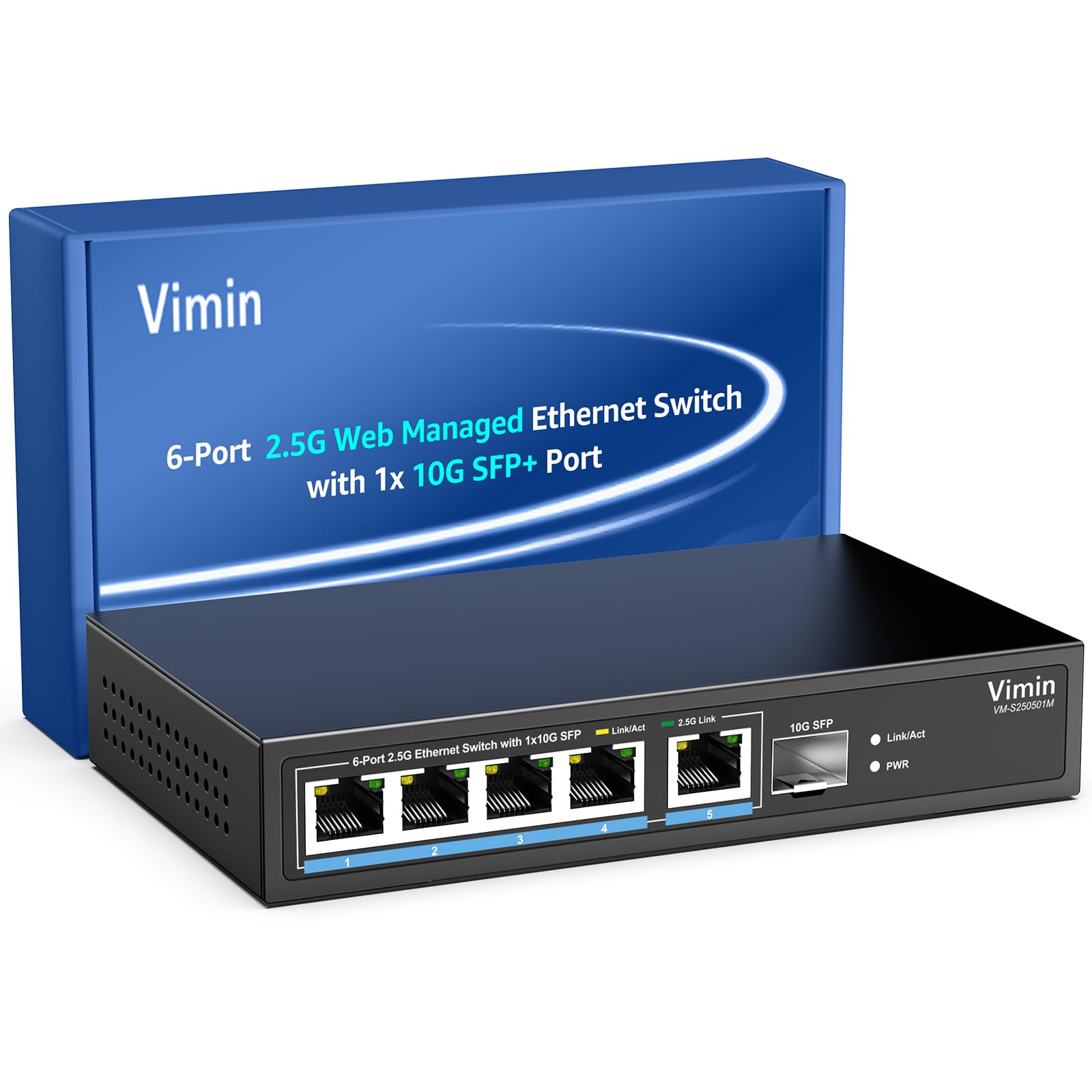
Slika 1: Spredaj view of the VIMIN VM-S250501M switch, showing the 2.5G RJ45 ports, 10G SFP+ port, and LED indicators.

Figure 2: Illustration highlighting the durability, high compatibility, and versatility of the switch.
2. Navodila za nastavitev
2.1 Vsebina paketa
Preverite, ali so v vašem paketu priloženi naslednji elementi:
- 1 x VIMIN VM-S250501M 2.5G Web Upravljano stikalo Ethernet
- 1 x napajalnik
- 1 x uporabniški priročnik

Figure 3: The switch, power cable, and user manual are included in the package.
2.2 Fizična namestitev
The switch can be placed on a desktop or mounted on a wall. Ensure proper ventilation around the device.
- Postavitev na namizje: Stikalo postavite na ravno, stabilno površino.
- Montaža na steno: The switch features two mounting holes at the base for wall installation. Use appropriate screws (not included) to secure the device to a wall.
2.3 Priključitev napajanja
- Connect the power adapter to the DC 12V/1A power port on the rear panel of the switch.
- Drugi konec napajalnika priključite v standardno električno vtičnico.
- The Power LED indicator on the front panel will illuminate when the switch is powered on.
2.4 Povezovanje omrežnih naprav
Connect your network devices (e.g., computers, NAS, routers, access points) to the switch using appropriate Ethernet cables.
- Vrata RJ45 (1–5): Use Category 5e (Cat5e) or Category 6 (Cat6) UTP cables for optimal performance with 1G/2.5G connections. For 100Mbps, Cat5 cables are sufficient.
- Vrata SFP+ (6): Insert a compatible 1G/2.5G/10G SFP+ optical fiber module (not included) into the SFP+ slot, then connect a fiber optic cable.

Figure 4: Illustrates connecting devices to the switch and recommended cable types for different speeds.
3. Upravljanje stikala
3.1 LED indikatorji
LED-lučke na sprednji plošči zagotavljajo informacije o stanju v realnem času:
- 5*2.5G Ports (RJ45):
- Yellow: Indicates a 10/100/1000Mbps link or activity.
- Green: Indicates a 2.5Gbps link.
- 1*10G SFP (SFP+ Port):
- Green: Indicates a 1G/2.5G/10G link.
- Flashing: Indicates data transmission.
- PWR (moč):
- Vklopljeno: Naprava je vklopljena.
- Ne sveti: Naprava je izklopljena.

Figure 5: Detailed explanation of the LED indicators on the switch.
3.2 Dostop do Web Upravljalni vmesnik
The switch can be configured and managed via a web-based graphical user interface (GUI).
- Prepričajte se, da je vaš računalnik priključen na enega od vrat RJ45 stikala.
- Odpri a web brskalnik (npr. Chrome, Firefox, Edge).
- In the address bar, enter the default IP address: 192.168.1.199.
- Pritisnite Enter. Prikazala se bo prijavna stran.
- Vnesite privzeto uporabniško ime in geslo:
- uporabniško ime: admin
- geslo: admin
- Click "Log In" to access the management interface.
Zaradi varnosti je priporočljivo spremeniti privzeto geslo po prvi prijavi.

Figure 6: Screenshot of the web management interface login page.
3.3 Basic Management Features
The web interface provides access to various Layer 2 management functions:
- Združevanje povezav: Combine multiple physical links into a single logical link for increased bandwidth and redundancy. Supports static link aggregation.
- Jumbo okvir: Support for larger Ethernet frames (up to 12KB) to improve network efficiency for large data transfers.
- VLAN (virtualno lokalno omrežje): Segment your network into smaller, isolated broadcast domains. Supports up to 32 VLANs (on 4K VLAN IDs), MTU/Port/802.1Q VLAN.
- Kakovost storitve (QoS): Prioritize network traffic to ensure critical applications receive sufficient bandwidth. Supports port-based, 802.1p, and DSCP priority, with 4 priority queues, rate limiting, and storm control.
- Vohljanje IGMP: Optimizirajte dostavo večvrstnega prometa in preprečite nepotrebno prelivanje večvrstnih paketov na vsa vrata.
- Zrcaljenje vrat: Copy traffic from one or more source ports to a destination port for network monitoring and analysis.
- Preizkus kabla: A diagnostic tool to check the status and length of connected Ethernet cables.

Slika 7: Konecview of the basic management features available through the web vmesnik.
4. Vzdrževanje
4.1 Splošna nega
- Keep the switch in a cool, dry environment, away from direct sunlight, heat sources, and moisture.
- Zagotovite zadosten pretok zraka okoli naprave, da preprečite pregrevanje.
- Zunanjost stikala očistite z mehko, suho krpo. Ne uporabljajte tekočih čistil ali aerosolov.
4.2 Posodobitve vdelane programske opreme
Periodically check the VIMIN official webspletno mesto za posodobitve vdelane programske opreme. Posodobitve vdelane programske opreme lahko zagotovijo nove funkcije, izboljšave delovanja in varnosti. Pazljivo upoštevajte navodila, ki so priložena paketu posodobitve vdelane programske opreme.
4.3 Ponastavitev naprave
If the switch is not functioning correctly or you forget the login credentials, you can reset it to factory default settings. Locate the "Reset" button on the rear panel of the switch. With the switch powered on, use a paperclip or a similar pointed object to press and hold the Reset button for approximately 5-10 seconds until the LEDs flash, then release. The switch will restart with factory default settings.
5. Odpravljanje težav
5.1 Brez napajanja
- Prepričajte se, da je napajalnik varno priključen tako na stikalo kot na delujočo električno vtičnico.
- Preverite delovanje vtičnice tako, da vanjo priključite drugo napravo.
- Preverite napajalnik za morebitne vidne poškodbe.
5.2 No Link/Connectivity
- Preverite ethernetne kable, priključene na stikalo in vaše naprave. Prepričajte se, da so varno priključeni in nepoškodovani.
- Verify the Link/Act LEDs on the switch for the connected ports. If they are off, there might be a cable issue or the connected device is not powered on/configured correctly.
- Try using a different Ethernet cable or port.
- Ensure the connected device's network adapter is enabled and configured correctly.
5.3 Počasna hitrost omrežja
- Ensure you are using Cat5e or Cat6 cables for 1G/2.5G connections. Lower category cables may limit speed.
- Check the Link/Act LED color for the connected port. A yellow LED on a 2.5G port indicates a 1G or lower connection.
- Verify that your connected devices (e.g., network card, NAS) support 2.5G or 10G speeds.
- Preverite, ali je v omrežju preobremenjeno ali da je v njem veliko prometa.
- Consider updating the switch firmware.
5.4 Dostop ni mogoč Web Vmesnik
- Ensure your computer is on the same network segment as the switch. The default IP is 192.168.1.199, so your computer's IP should be in the 192.168.1.x range (e.g., 192.168.1.100) with a subnet mask of 255.255.255.0.
- Verify that the Ethernet cable is properly connected and the Link/Act LED is on.
- Počistite predpomnilnik brskalnika ali poskusite z drugim brskalnikom.
- If you have changed the switch's IP address and forgotten it, or forgotten the login password, perform a factory reset (refer to Section 4.3).
6. Specifikacije
| Model | VM-S250501M |
| Standardi | IEEE 802.3/802.3u/802.3ab/802.3bz/802.3x/802.3cb |
| Pristanišča | 5 x 10/100/1000/2500 Mbps RJ45, 1 x 10G SFP+ slot |
| Preklopna zmogljivost | 45 Gbps |
| Tabela naslovov MAC | 4K |
| Hitrost posredovanja paketov | 33.48 Mpps |
| Okvir Jumbo | 12 KB |
| Paketni vmesnik | 8 Mbit |
| Napajalnik | 12V/1A DC |
| Network Cable (Max 100m) |
|
| Montažni način | Desktop and Wall Mount |
| Delovna temperatura | 0℃ ~ 45℃ (32℉ ~ 113℉) |
| Temperatura shranjevanja | -40℃ ~ 70℃ (-40℉ ~ 158℉) |
| Delovna vlažnost | 10 % ~ 90 % brez kondenzacije |
| Vlažnost pri shranjevanju | 5 % ~ 95 % brez kondenzacije |
| Teža | 380 g |
| Dimenzije (D x Š x V) | 160 x 95 x 30 mm (6.3 x 3.7 x 1.2 palca) |
| Material ohišja | Kovina |
| barva | Črna |
7. Garancija in podpora
7.1 Garancija izdelka
The VIMIN VM-S250501M 2.5G Web Managed Ethernet Switch comes with a enoletna garancija od datuma nakupa. Ta garancija krije proizvodne napake in zagotavlja, da izdelek pri normalni uporabi izpolnjuje določene standarde delovanja. Za uveljavljanje garancije shranite dokazilo o nakupu.
7.2 Tehnična podpora
VIMIN provides doživljenjska tehnična podpora for this product. If you encounter any issues or have questions regarding the setup, operation, or troubleshooting of your switch, please contact our support team.
Kontaktni podatki:
- E-pošta: support@vimintech.com
Figure 8: VIMIN support information, including email contact.


