1. Pomembne varnostne informacije
Please read all safety instructions carefully before using the Makeid E1 Label Printer. Failure to follow these instructions may result in product damage or personal injury.
- This label printer is designed to be used exclusively with official Makeid labels. Using labels from other brands may cause damage to the device and void the warranty.
- Avoid touching the print head with your fingers. If the print head becomes dirty, gently wipe it with a soft, lint-free cloth.
- Do not place foreign objects into the label slot or any other opening of the machine to prevent damage.
- Do not expose the label printer to direct sunlight, rain, high humidity, or excessive dust.
- Keep the device away from heat sources such as radiators, heaters, or the dashboard/tail of a car, and avoid environments with extremely high or low temperatures.
- The standard operating temperature range for this device is 5 °C to 35 °C (41 °F to 95 °F).
2. Izdelek je končanview
Familiarize yourself with the components of your Makeid E1 Label Printer.

Slika 1: Spredaj view of the Makeid E1 Label Printer, showing the label output slot and control buttons.
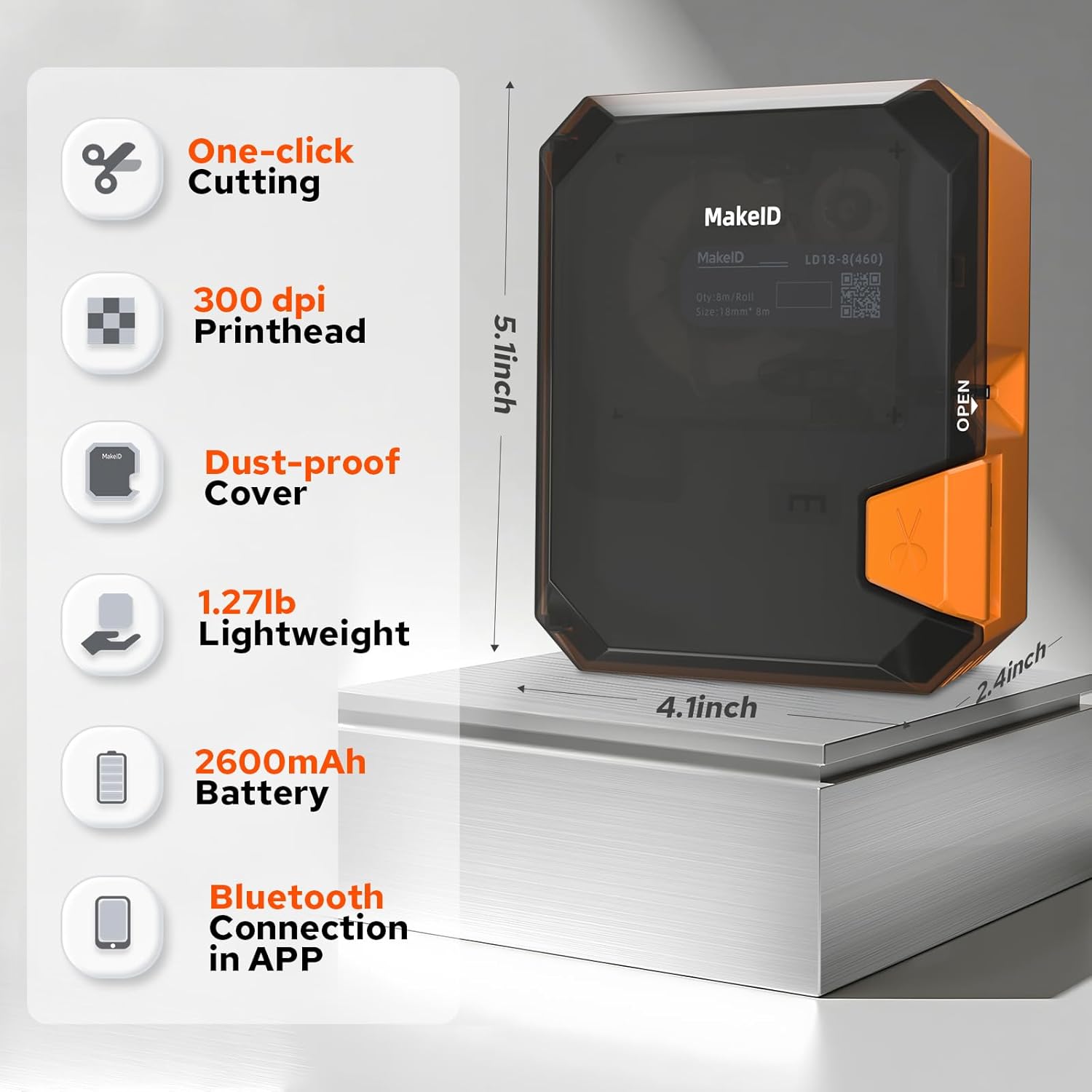
Image 2: Diagram illustrating key features and dimensions of the Makeid E1 Label Printer. Features include one-click cutting, 300 dpi printhead, dust-proof cover, lightweight design (1.27 lbs), 2600mAh battery, and Bluetooth connectivity via app. Dimensions are approximately 5.1 inches (height), 4.1 inches (width), and 2.4 inches (depth).
3. Nastavitev
3.1 Polnjenje naprave
The Makeid E1 Label Printer is equipped with a rechargeable Lithium-ion battery (1000 mAh). Before first use, fully charge the device using the provided USB cable.
- Connect the USB cable to the printer's charging port and to a standard USB power adapter (not included) or a computer's USB port.
- The charging indicator light will show the charging status. Refer to the device's display or indicator for full charge notification.
- A full charge cycle can last over 500 times, ensuring long-term use.
3.2 Nalaganje oznak
Ensure you use official Makeid labels for optimal performance.
- Locate the label compartment on the printer.
- Odprite pokrov predala.
- Insert the label roll with the printing surface facing the correct direction, as indicated by a diagram inside the compartment.
- Pull a small portion of the label out past the print head.
- Varno zaprite pokrov predelka.
The printer supports label widths of 9 mm, 12 mm, and 16 mm.
3.3 Connecting via Bluetooth (for App Use)
To utilize advanced features and design options, connect your printer to a smartphone via the Makeid app.
- Download the official Makeid app from your device's app store (compatible with Android and iOS).
- Prepričajte se, da je Bluetooth na vašem pametnem telefonu omogočen.
- Turn on the Makeid E1 printer.
- Open the Makeid app and follow the on-screen instructions to search for and pair with your printer.
4. Navodila za uporabo
The Makeid E1 offers two primary modes of operation: direct input via the QWERTY keyboard and advanced design via the mobile application.
4.1 Using the QWERTY Keyboard
The integrated QWERTY keyboard allows for quick and convenient label creation without a smartphone.
- Vklopite napravo.
- Use the QWERTY keys to type your desired text. The 3.4-inch LCD screen will display your input.
- Utilize the dedicated keys for various functions, including prototypes, squares, and clear instructions. The device features over 40 keys for ease of use.
- Access a variety of fonts and symbols directly from the keyboard interface.
- The printer supports up to 4 lines of text printing.
- Press the 'Print' button to print your label. The manual cutting blade allows for precise label separation.
4.2 Uporaba mobilne aplikacije
The Makeid app provides extensive customization options and advanced printing features.

Image 3: Screenshot of the Makeid app interface, highlighting versatile templates, over 200 stickers, more than 40 fonts, and additional features like text, barcode, QR code, date, picture, sticker, shape, and scan options.
- After connecting the printer via Bluetooth (Section 3.3), open the Makeid app.
- Vnos besedila: Type your text directly into the app.
- Večvrstično tiskanje: The app supports printing up to 4 lines of text.
- Special Content: Generate timestamps, QR codes, and barcodes with a single click.
- Prilagajanje: Access a rich library of materials, including 16 types of frames, 600 stickers and symbols, and over 54 templates.
- DIY & Images: Support for DIY designs and uploading images/icons to personalize your labels.
- Saving Templates: Store up to 9 customized label templates for future use.
- Serijsko tiskanje: Print up to 9 copies of a label in a single batch.
- Once your design is complete, tap the 'Print' button in the app to send it to the printer.
5. Vzdrževanje
5.1 Čiščenje tiskalne glave
Regular cleaning of the print head ensures optimal print quality and extends the life of your printer.
- Ensure the printer is turned off before cleaning.
- Gently open the label compartment to access the print head.
- Z mehko krpo, ki ne pušča vlaken, rahlo obrišiteampened with isopropyl alcohol, carefully wipe the print head. Do not use abrasive materials or excessive force.
- Allow the print head to dry completely before closing the compartment and resuming use.
5.2 Skrb za baterije
Za maksimiranje življenjske dobe in zmogljivosti baterije:
- Izogibajte se pogostemu popolnemu praznjenju baterije.
- Store the printer in a cool, dry place if not used for extended periods.
- Če baterijo shranjujete dlje časa, jo redno polnite, da preprečite globoko izpraznitev.
6. Odpravljanje težav
If you encounter issues with your Makeid E1 Label Printer, refer to the following common problems and solutions.
- Brez napajanja: Ensure the device is charged. Connect it to a power source using the USB cable.
- Slaba kakovost tiskanja: Check if the print head is clean (refer to Section 5.1). Ensure you are using official Makeid labels. Verify the label roll is inserted correctly.
- Težave s povezavo Bluetooth: Make sure Bluetooth is enabled on your smartphone and the printer is turned on. Restart both the printer and your smartphone, then try pairing again. Ensure the Makeid app is up to date.
- Zastoj nalepke: Turn off the printer, open the label compartment, and carefully remove any jammed labels. Ensure the label roll is properly seated and not creased.
- Tiskalnik se ne odziva: Poskusite napravo ponastaviti tako, da jo izklopite in ponovno vklopite. Če težava ne izgine, se obrnite na podporo strankam.
7. Specifikacije
| Funkcija | Specifikacija |
|---|---|
| Znamka | Makeid |
| Ime modela | E1 |
| Številka modela | P31S |
| Tehnologija tiskanja | Toplotna |
| Tehnologija povezljivosti | Bluetooth, USB |
| Združljive naprave | Pametni telefon (Android, iOS) |
| Največja ločljivost tiskanja (črno-belo) | 203 dpi |
| Največja ločljivost tiskanja (barvno) | 203 dpi (Monochrome output) |
| Največja hitrost enobarvnega tiskanja | 24 (units unspecified, typical for label printers) |
| Največja velikost medija | 110 x 50 mm |
| Podprte širine etiket | 9 mm, 12 mm, 16 mm |
| Največja kapaciteta listov | 100 |
| Dvostransko tiskanje | št |
| Največje število kopij na serijo | 9 |
| Moč | 1000 mAh (Lithium-ion battery) |
| Dimenzije izdelka | 10 G x 20 Š x 8 V cm (približno) |
| Posebne lastnosti | Portable, QWERTY Keyboard, App Control |
| Vključene komponente | Labels (typically one roll) |
8. Garancija in podpora
For warranty information and technical support, please refer to the documentation included with your purchase or visit the official Makeid webspletnega mesta. Shranite dokazilo o nakupu za uveljavljanje garancije.
If you require further assistance or have questions not covered in this manual, please contact Makeid customer service.


