1. Uvod
This manual provides detailed instructions for the safe and effective use of your Codnida Baby Monitor, Model YM-MWM553+MWZ553C-EU. Please read this manual thoroughly before operating the device and retain it for future reference. This baby monitor is designed to provide secure and reliable surveillance of your child, offering features such as a 5.5-inch 2K HD display, PTZ camera control, two-way audio, and environmental monitoring.
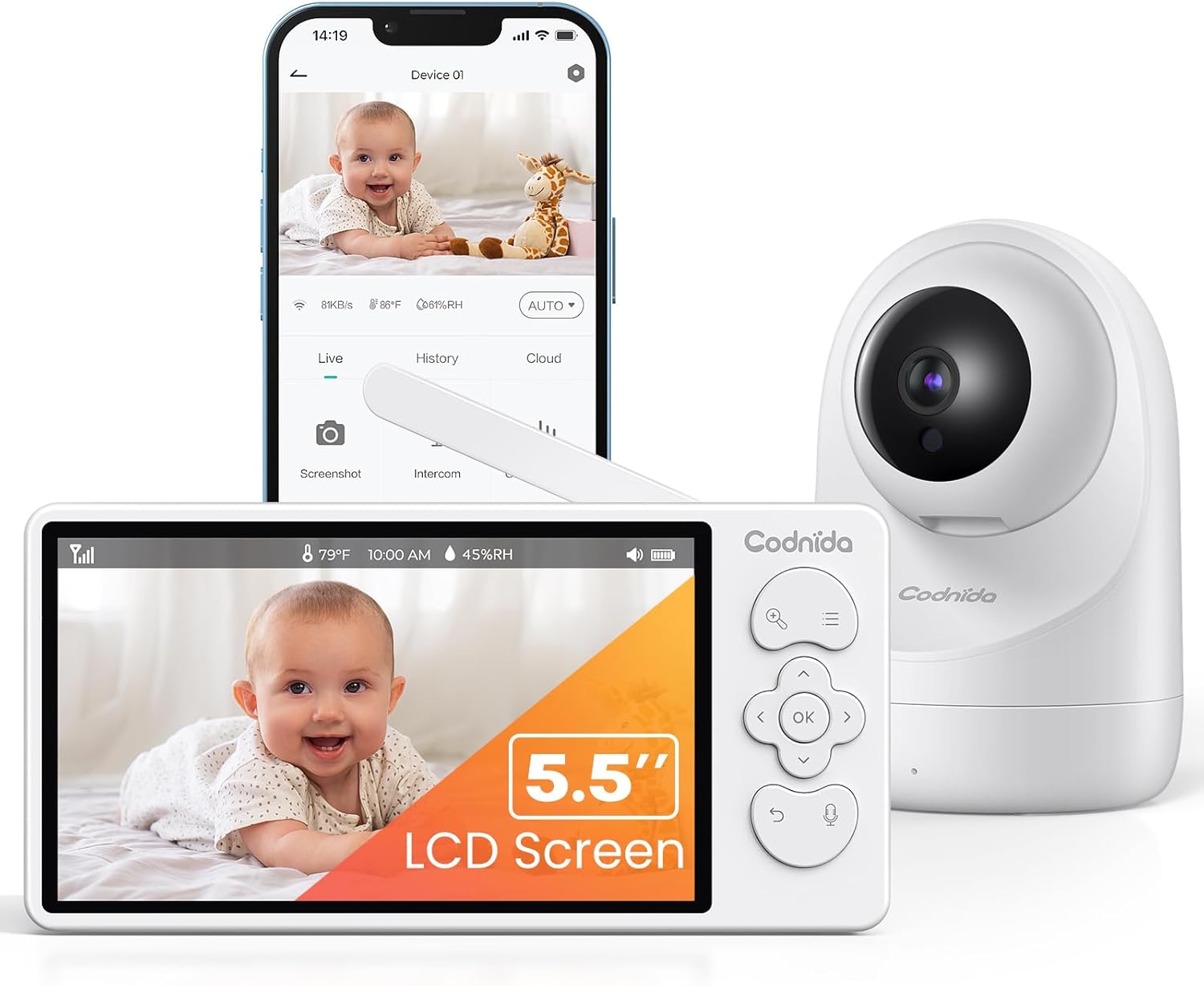
Image 1.1: Codnida Baby Monitor system, showing the monitor, camera, and smartphone interface.
2. Vsebina paketa
Preverite, ali so v paketu prisotni vsi elementi:
- Baby Monitor (Parent Unit)
- Baby Camera (Baby Unit)
- Power Adapters (2x, for monitor and camera)
- USB Charging Cables (2x)
- Komplet za stensko montažo (vijaki in sidra)
- Uporabniški priročnik (ta dokument)

Image 2.1: All components included in the Codnida Baby Monitor package.
3. Izdelek je končanview
3.1 Starševska enota (monitor)
The parent unit features a 5.5-inch LCD screen for live video feed, control buttons for camera functions, and a built-in microphone and speaker for two-way audio communication.
- LCD zaslon: 5.5-inch 2K HD display.
- Gumbi za upravljanje: Navigation, OK, Menu, Talk, Zoom.
- Antena: Za brezžični prenos signala.
- Mikrofon: Za dvosmerni zvok.
- govornik: For listening to your baby and lullabies.
- Napajalni priključek: USB-C for charging.
- Baterija: Integrated 4000mAh rechargeable battery.
3.2 Otroška enota (kamera)
The baby unit is equipped with a 3MP 2K HD camera, infrared LEDs for night vision, and a temperature/humidity sensor.
- Objektiv kamere: 3MP 2K HD resolution.
- Infrardeče LED: For clear night vision up to 8 meters.
- Mikrofon: To detect baby's sounds.
- govornik: To play lullabies and enable two-way audio.
- Senzor temperature/vlažnosti: Monitors room environment.
- Napajalni priključek: USB-C for continuous power.
- Montažna luknja: Za montažo na steno.
4. Nastavitev
4.1 Polnjenje starševske enote
Before first use, fully charge the parent unit for approximately 8 hours. Connect the provided USB charging cable to the parent unit's power port and the power adapter to an electrical outlet. The battery indicator on the screen will show charging status.

Image 4.1: Charging the parent unit and expected battery life.
4.2 Napajanje otroške enote
The baby unit requires continuous power. Connect the provided USB charging cable to the baby unit's power port and the power adapter to an electrical outlet. Ensure the cable is placed safely away from the baby's reach.
4.3 Postavitev kamere
Otroško enoto (kamero) postavite na mesto, ki zagotavlja jasen view of your baby. Ensure it is at least 1 meter (3 feet) away from the baby's crib to prevent any entanglement hazards with the power cord. The camera can be placed on a flat surface or mounted to a wall using the provided kit.
- Za optimalno viewing, position the camera to capture the entire crib area.
- Izogibajte se postavljanju kamere v bližino virov toplote ali neposredne sončne svetlobe.
- Ensure the camera is within the monitor's transmission range (up to 700 meters in open areas).
4.4 Začetna povezava
The Codnida Baby Monitor uses FHSS technology for a secure, direct connection without requiring Wi-Fi or an app for basic operation. Simply power on both the parent unit and the baby unit. They should automatically connect. If they do not connect, refer to the troubleshooting section for pairing instructions.

Image 4.2: Secure FHSS connection between monitor and camera.
5. Navodila za uporabo
5.1 Vklop/izklop
- Starševska enota: Press and hold the power button until the screen turns on/off.
- Otroška enota: Otroška enota se samodejno vklopi, ko je priključena na napajanje.
5.2 V živo View and VOX Mode
The monitor defaults to live view, continuously displaying video from the camera. To conserve battery, you can activate VOX (Voice Operated eXchange) mode.
- Način VOX: In VOX mode, the monitor screen remains black. It will automatically light up and display video when sound or motion is detected in the baby's room.
- To activate/deactivate VOX mode, navigate through the menu settings on the parent unit.

Image 5.1: VOX mode for power saving and automatic activation.
5.3 Upravljanje kamere (PTZ in povečava)
The camera offers Pan, Tilt, and Digital Zoom (PTZ) functions, allowing you to adjust the viewna daljavo.
- Pan/nagib: Use the directional buttons on the parent unit to move the camera lens horizontally (350 degrees) and vertically (90 degrees).
- Digitalni zoom: Press the zoom button to activate 2x or 4x digital zoom for a closer view vašega otroka.
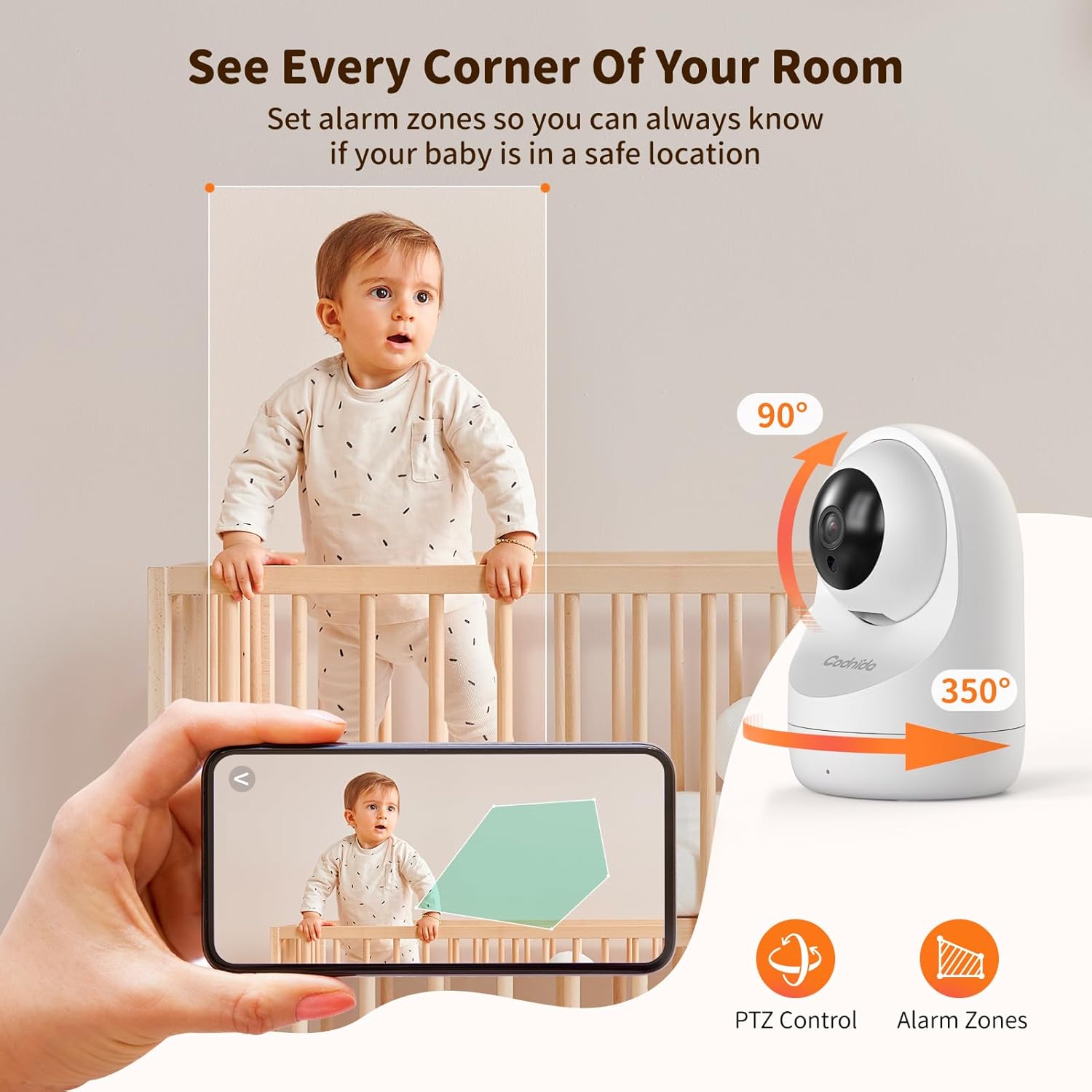
Image 5.2: PTZ control and alarm zone setup.
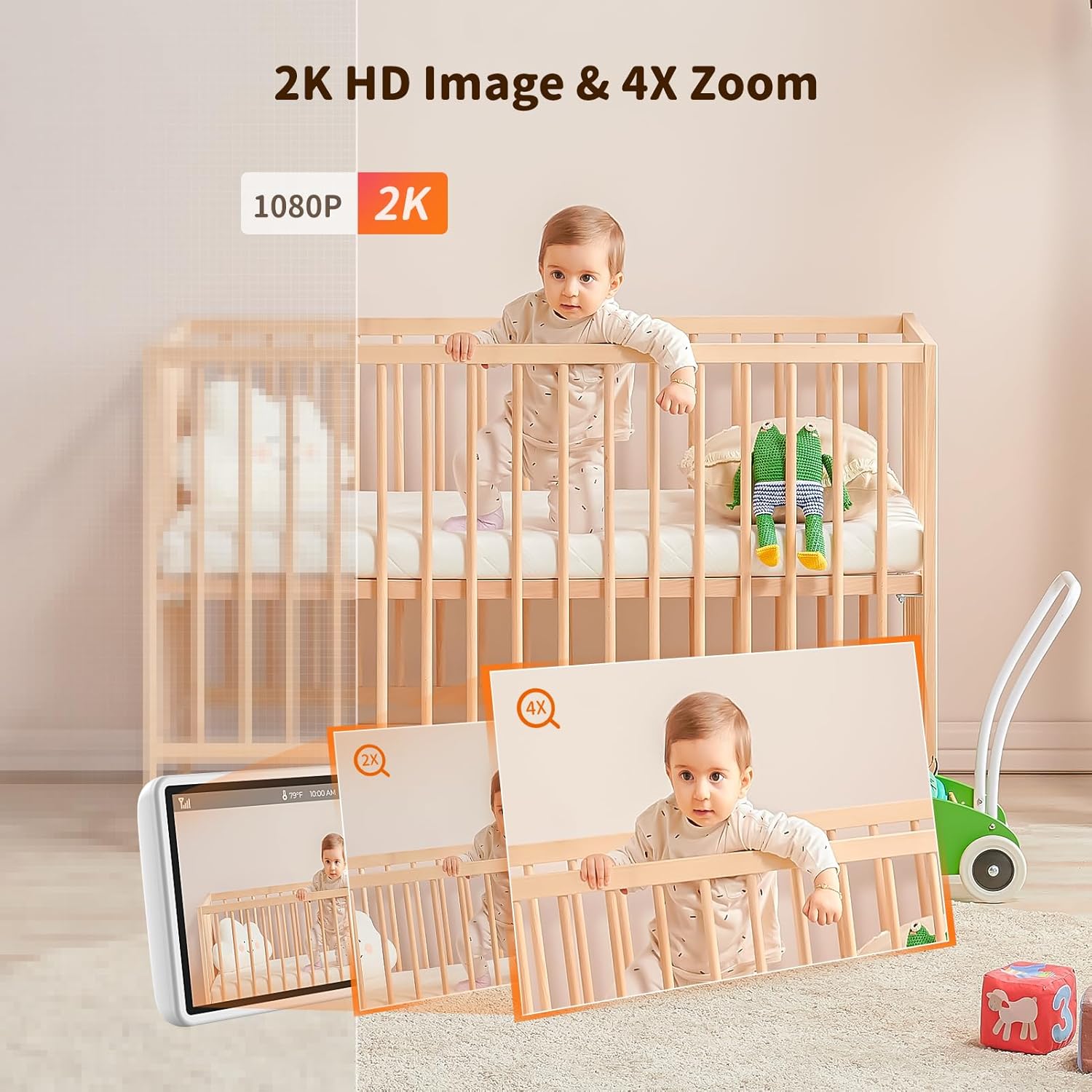
Image 5.3: 2K HD image quality and 4x digital zoom.
5.4 Two-Way Audio and Lullabies
Communicate with your baby or play soothing lullabies directly from the parent unit.
- Dvosmerni zvok: Press and hold the 'Talk' button on the parent unit to speak to your baby through the camera's speaker. Release the button to listen.
- Uspavanke: Access the menu to select and play built-in lullabies. You can adjust the volume and set a timer for playback.

Image 5.4: Two-way audio communication.

Image 5.5: Night vision and lullaby function.
5.5 Funkcije spremljanja
- Nadzor temperature in vlažnosti: The baby unit continuously monitors the room's temperature and humidity. These readings are displayed on the parent unit. You can set alert thresholds in the menu.
- Opomnik za hranjenje: Set up feeding reminders through the parent unit's menu to help maintain a consistent feeding schedule.
- Alarmne cone: Določite specifična območja znotraj kamere view as alarm zones. The monitor will alert you if motion is detected within these zones.

Image 5.6: Temperature and humidity detection.

Image 5.7: Feeding reminder function.
5.6 Recording to SD Card
The Codnida Baby Monitor supports Micro SD cards (FAT32 format, up to 256GB) for video recording. Insert the Micro SD card into the designated slot on the parent unit. You can initiate recording manually or set it to record automatically upon motion/sound detection via the menu settings.
6. Vzdrževanje
6.1 Čiščenje
To clean the monitor and camera units, use a soft, dry cloth. Do not use abrasive cleaners or solvents. For the camera lens, use a lens cleaning cloth to avoid scratches.
6.2 Skrb za baterije
- Avoid fully discharging the parent unit's battery frequently.
- Charge the parent unit regularly to maintain battery health.
- Napravo shranite na hladnem in suhem mestu, če je ne uporabljate dlje časa.
7. Odpravljanje težav
If you encounter issues with your Codnida Baby Monitor, please refer to the following common solutions:
| Težava | Možen vzrok | rešitev |
|---|---|---|
| Ni slike/zvoka na monitorju | Units not powered on, out of range, or not paired. | Ensure both units are powered. Move units closer. Re-pair units via menu settings (refer to manual for specific steps). |
| Slaba kakovost slike | Low light, dirty lens, interference. | Ensure adequate lighting. Clean camera lens. Move units away from other electronic devices. |
| Monitor pogosto izgubi povezavo | Out of range, signal interference, obstacles. | Move units closer. Reduce obstacles (walls, furniture). Avoid placing near thick walls or metal structures. |
| Baterija se hitro izprazni | Continuous live view, high brightness, aging battery. | Activate VOX mode. Reduce screen brightness. Ensure full charge before use. |
| Temperature/Humidity readings incorrect | Sensor obstruction, extreme environmental conditions. | Ensure sensor is not covered. Allow time for sensor to adjust to room conditions. |
8. Specifikacije
| Funkcija | Podrobnost |
|---|---|
| Številka modela | YM-MWM553+MWZ553C-EU |
| Velikost zaslona | 5.5 palcev |
| Video ločljivost | 2K HD (1296p) |
| Ločljivost kamere | 3 milijonov slikovnih pik |
| Brezžična tehnologija | FHSS (spekter širjenja frekvenčnega preskakovanja) |
| Obseg prenosa | Do 700 metrov (odprto območje) |
| Območje nočnega vida | Do 8 metre |
| Pan/Tilt Angle | Pan 350 °, nagib 90 ° |
| Digitalni zoom | 4x |
| Baterija starševske enote | 4000mAh Lithium-ion (1 AAA included for internal components) |
| Podpora za shranjevanje | Micro SD card up to 256GB (FAT32 format) |
| Posebne lastnosti | Two-Way Audio, Motion Detector, VOX Mode, Temperature/Humidity Sensor, Lullabies, Feeding Reminder |
| Material | Plastika |
| Dimenzije (D x Š x V) | 10 x 5 x 5 cm |
| Teža | 860 gramov |
9. Garancija in podpora
Codnida offers a 1-letna garancija for this product and a Politika 30-dnevnega vračila. For any questions regarding your baby monitor or other Codnida products, please contact customer support through your Amazon account:
- Navigate to "Your account"
- Select "Your orders"
- Locate your Codnida Baby Monitor order
- Click on "Ask a question"
Our support team will assist you with any inquiries or issues you may have.


