1. Uvod
Thank you for choosing the Gigaset Pure 100 Cordless Phone. This manual provides essential information for setting up, operating, and maintaining your new phone. Please read these instructions carefully to ensure optimal performance and longevity of your device.
The Gigaset Pure 100 is designed for ease of use, featuring a call blocking button, a 50-contact address book, hearing aid compatibility, and programmable function keys to enhance your communication experience.

Image: The Gigaset Pure 100 cordless phone positioned in a home environment, showcasing njegovo elegantno obliko.
2. Kaj je v škatli
Before you begin, please check the contents of your package. Ensure all items listed below are present:
- 1 slušalka
- 1 bazna postaja
- 2 polnilni bateriji AAA
- 1 Pokrov baterije
- 1 Napajalnik
- 1 Telephone Connection Cable
- 1 Hitri vodnik
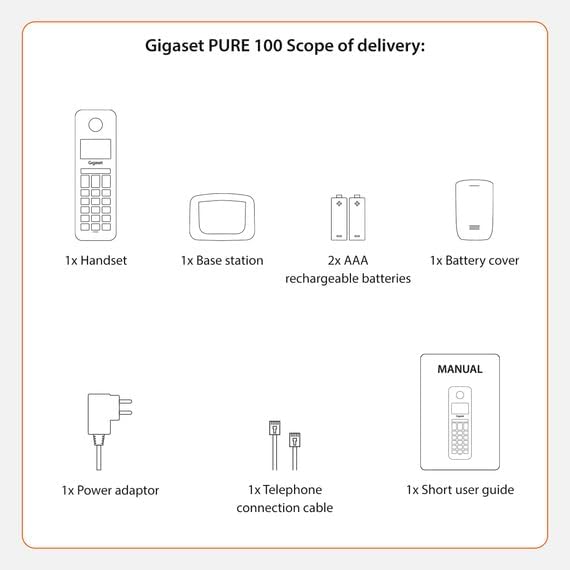
Image: A visual representation of the Gigaset Pure 100's scope of delivery, including handset, base, batteries, and cables.
3. Nastavitev
3.1. Namestitev baterije
- Remove the battery cover from the back of the handset.
- Vstavite dve priloženi polnilni bateriji AAA in pri tem upoštevajte pravilno polarnost (+/-).
- Ponovno namestite pokrov baterije, dokler se ne zaskoči.

Image: The rear side of the Gigaset Pure 100 handset, illustrating where the battery cover is located for installation.
3.2. Povezava z bazno postajo
- Priključite napajalnik na bazno postajo in ga vključite v stensko vtičnico.
- Connect the telephone connection cable to the base station and plug the other end into your telephone wall socket.
- Place the base station on a flat, stable surface.
3.3. Registracija slušalke
The handset is usually pre-registered to the base station. If not, or if you are registering an additional handset:
- Postavite slušalko v osnovno postajo.
- Press and hold the registration/paging button on the base station for approximately 3 seconds. The base station will enter registration mode.
- Follow the on-screen prompts on the handset to complete the registration process. You may need to enter a PIN (default is 0000).

Image: The Gigaset Pure 100 handset securely placed in its charging and communication base station.
4. Navodila za uporabo
4.1. Klicanje
- Dvignite slušalko ali pritisnite Zelena klicna tipka.
- Pokličite želeno telefonsko številko.
- Pritisnite Zelena klicna tipka ponovno, da začnete klic.
- Če želite končati klic, pritisnite Rdeča tipka za končanje klica ali pa slušalko postavite nazaj v bazno postajo.
4.2. Sprejemanje klicev
Ko telefon zazvoni, pritisnite Zelena klicna tipka da sprejmete klic.
4.3. Address Book
The Gigaset Pure 100 can store up to 50 contacts in its address book.
- To access the address book, press the Ključ imenika (usually an icon resembling an open book or person).
- Use the navigation keys to scroll through your contacts.
- To dial a contact, select their entry and press the Zelena klicna tipka.
- To add a new contact, navigate to an empty entry or select the 'New Entry' option and follow the on-screen instructions to enter the name and number.
4.4. Blokiranje klicev
The Gigaset Pure 100 features a dedicated call blocking button to help manage unwanted calls.
- During an incoming call from an unwanted number, press the Call Blocking Button (often marked with a shield or 'Block' icon).
- The number will be added to your block list, and subsequent calls from this number will be rejected.
- Refer to the quick guide for detailed instructions on managing your block list.

Image: The Gigaset Pure 100 handset screen showing a 'Blocked Number' notification, highlighting its call blocking feature.
4.5. Programabilne funkcijske tipke
The phone includes programmable function keys that can be assigned to frequently used numbers or features. Consult your quick guide for instructions on how to program these keys to suit your needs.

Image: An illustration demonstrating the Gigaset Pure 100's effective range, allowing calls from various locations within a property.
5. Vzdrževanje
5.1. Čiščenje
Slušalko in osnovno postajo obrišite z mehko,amp krpo. Ne uporabljajte abrazivnih čistil ali topil. Pazite, da v odprtine naprave ne pride tekočina.
5.2. Skrb za baterijo
Use only the recommended rechargeable AAA batteries. If the phone will not be used for an extended period, remove the batteries to prevent leakage. Replace batteries when their performance significantly degrades.
6. Odpravljanje težav
- Brez znaka centrale:
Check if the power adapter and telephone connection cable are securely plugged into the base station and wall outlets. Ensure the handset is registered to the base. - Ne morem klicati/sprejemati klicev:
Verify that the telephone line is active. Check if the handset batteries are charged. Ensure the handset is within range of the base station. - Slaba kakovost zvoka:
Premaknite se bližje bazni postaji. Preverite, ali obstajajo motnje zaradi drugih elektronskih naprav. - Handset Display is Blank:
Place the handset in the base station to charge the batteries. If the issue persists, replace the batteries.
7. Specifikacije
| Funkcija | Opis |
|---|---|
| Znamka | Gigaset |
| Številka modela | ČISTO 100 |
| barva | Črna |
| zaslon | 1.5 palcev |
| Vrsta napajanja | Baterija |
| Vrsta klicne številke | Enojna tipkovnica |
| Identifikacija klicatelja | ja |
| Material | Plastika |
| Vrsta sistema | Digitalno |
8. Garancija in podpora
For warranty information and technical support, please refer to the quick guide included in your package or visit the official Gigaset webspletnega mesta. Shranite dokazilo o nakupu za uveljavljanje garancije.


