1. Izdelek je končanview
This manual provides essential information for the operation and maintenance of your GHUST MR23GA Replacement Magic Voice Remote Control. This remote is designed as a replacement for various LG Smart TV models, offering convenient control without complex setup.

Image 1.1: The GHUST MR23GA Replacement Magic Voice Remote Control.
Ključne značilnosti:
- Neposredna zamenjava: Functions as a direct replacement for original LG Magic Remote models.
- Programiranje ni potrebno: Ready to use out of the box after battery insertion.
- Vzdržljiva konstrukcija: Made of high-quality ABS material for enhanced durability.
- Kompaktna zasnova: Small and ergonomic for comfortable grip.
- Voice Search Capability: Supports voice commands for easier navigation (functionality may vary based on TV model and original remote features).
- Dedicated Shortcut Buttons: Hiter dostop do priljubljenih storitev pretakanja, kot sta Netflix in Prime Video.
2. Nastavitev in namestitev
The MR23GA remote control is designed for immediate use with compatible LG Smart TVs. No complex programming or pairing procedures are required.
2.1. Namestitev baterije
- Poiščite pokrov prostora za baterije na zadnji strani daljinskega upravljalnika.
- Potisnite pokrov navzdol ali pritisnite zapah, da odprete predal.
- Insert two (2) AAA batteries (not included) into the compartment, ensuring the positive (+) and negative (-) terminals align correctly with the indicators inside.
- Zaprite pokrov predalčka za baterije tako, da ga potisnete nazaj na svoje mesto, dokler se ne zaskoči.

Image 2.1: The remote control is designed for ease of use with no setup or programming required after battery installation.
Once batteries are installed, the remote is ready to operate your compatible LG Smart TV.
3. Navodila za uporabo
This section details the basic functions and operation of your MR23GA remote control.
3.1. Osnovne funkcije
- Gumb za prižig (●): Pritisnite, da vklopite ali izklopite televizor.
- Številski gumbi (0-9): Uporabite za neposreden vnos številk kanalov.
- Povečanje/zmanjšanje glasnosti (+/-): Prilagodite glasnost televizorja.
- Kanal gor/dol (▲/▼): Zamenjaj televizijske kanale.
- Mute Button (🔇): Mute or unmute the TV's audio.
- Navigacijska tipkovnica (gor, dol, levo, desno, V redu): Krmarite po menijih in izbirajte možnosti.
- Back Button (↶): Vrnitev na prejšnji zaslon ali meni.
- Home Button (🏠): Access the TV's Smart Home dashboard.

Image 3.1: The compact size and ergonomic design make the remote easy to hold and operate.
3.2. Glasovni nadzor
Pritisnite in držite Gumb za mikrofon to activate voice control. Speak clearly into the remote to issue commands or search for content. Release the button when finished speaking. Note that voice control functionality may depend on your specific LG TV model and its original features.
3.3. Dedicated Shortcut Buttons
The remote features dedicated buttons for quick access to popular streaming applications:
- Gumb Netflix: Neposredno zaženite aplikacijo Netflix.
- Gumb Prime Video: Neposredno zaženite aplikacijo Amazon Prime Video.
- Gumb Disney+: Neposredno zaženite aplikacijo Disney+.
- Gumb za LG kanale: Directly launch the LG Channels application.
- Sling Button: Directly launch the Sling TV application.
- Gumb Alexa: Activate Alexa voice assistant (functionality depends on TV model).

Image 3.2: Dedicated shortcut buttons provide quick access to your favorite applications.
3.4. Združljivost
This replacement remote control is compatible with a wide range of LG Smart TV models, including but not limited to:
- LG OLED Series: OLED42C3AUA, OLED42C3PUA, OLED48C3PUA, OLED55C3PUA, OLED65C3AUA, OLED77C3PUA, OLED83C3PUA, OLED55G3PUA, OLED65G3PUA, OLED77G3PUA, OLED83G3PUA, OLED55B3PUA, OLED65B3PUA, OLED77B3PUA
- LG QNED Series: 43QNED75URA, 50QNED75URA, 55QNED75URA, 65QNED75URA, 75QNED75URA, 50QNED80URA, 55QNED80URA, 65QNED80URA, 75QNED80URA, 86QNED80URA
- LG UR9000 Series: 43UR9000PUA, 50UR9000PUA, 55UR9000PUA, 65UR9000PUA, 75UR9000PUA
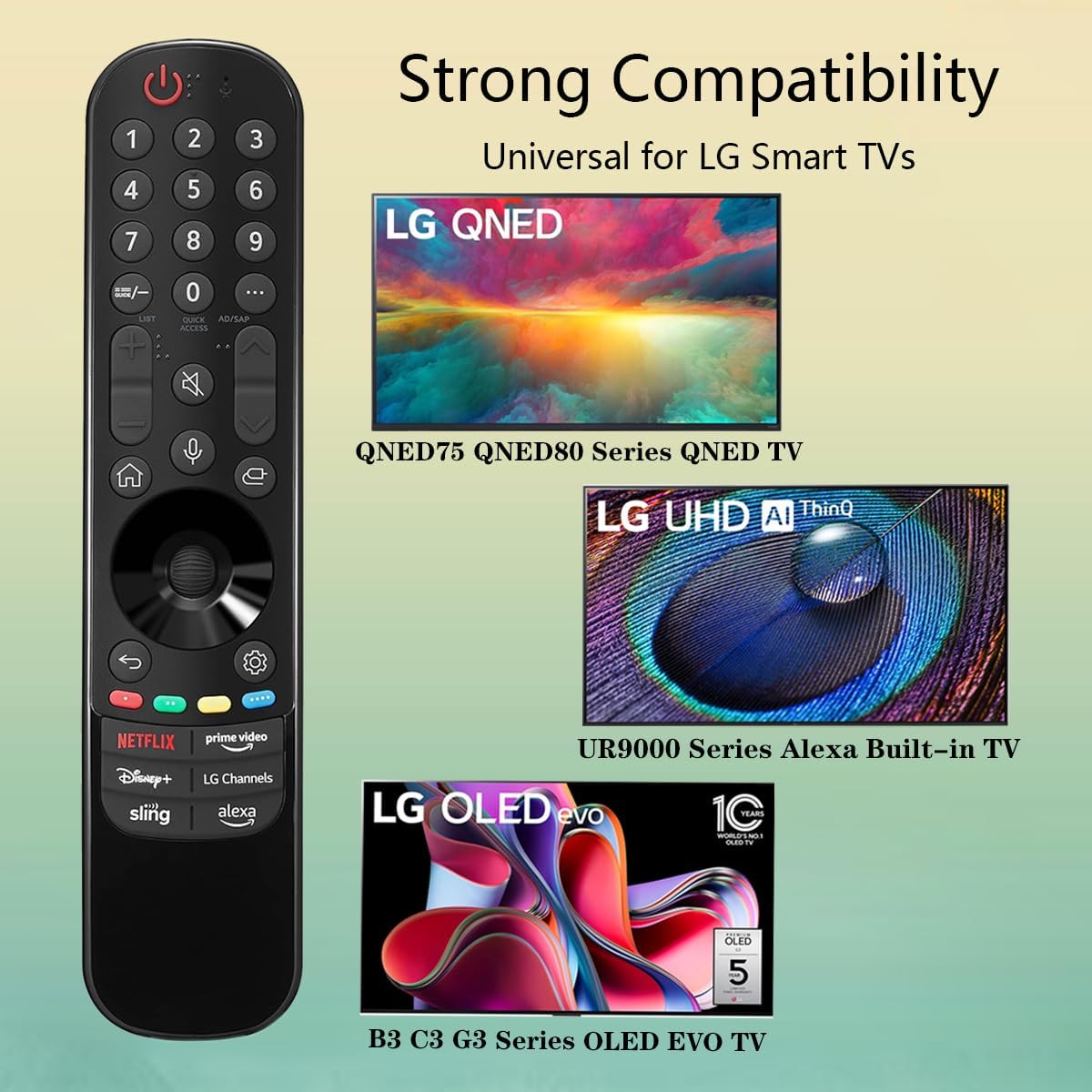
Image 3.3: The remote offers strong compatibility with various LG Smart TV series.
4. Vzdrževanje
Proper care and maintenance will extend the lifespan of your remote control.
4.1. Čiščenje
- Za brisanje površine daljinskega upravljalnika uporabite mehko, suho krpo.
- Za trdovratno umazanijo rahlo dampKrpo obrišite z vodo ali blagim, neabrazivnim čistilom. Čistila ne pršite neposredno na daljinski upravljalnik.
- Avoid using harsh chemicals, solvents, or abrasive cleaning materials, as these can damage the remote's finish or internal components.
4.2. Skrb za baterijo
- Replace batteries when the remote's responsiveness decreases or it stops functioning.
- Vedno zamenjajte obe bateriji hkrati z novima istega tipa (AAA).
- If the remote will not be used for an extended period (e.g., one month or more), remove the batteries to prevent leakage and potential damage to the remote.
- Izrabljene baterije zavrzite v skladu z lokalnimi predpisi.
5. Odpravljanje težav
If you encounter issues with your remote control, refer to the following common problems and solutions:
| Težava | Možen vzrok | rešitev |
|---|---|---|
| Daljinski upravljalnik se ne odziva. | Prazne ali nepravilno vstavljene baterije. | Replace batteries with new AAA batteries, ensuring correct polarity (+/-). |
| Daljinski upravljalnik deluje občasno. | Low battery power; obstruction between remote and TV; infrared sensor blocked on TV. | Replace batteries. Ensure a clear line of sight to the TV's infrared sensor. Remove any obstructions. |
| Voice control or pointer not working. | This replacement remote may not support all advanced features of the original LG Magic Remote, or your TV model does not fully support these features with a replacement remote. | Verify your TV model's compatibility with replacement remotes for advanced features. Basic functions should still operate. |
| Dedicated app buttons (e.g., Alexa, LG Channels) not working. | Functionality depends on TV model and specific app integration. | Some app buttons may not be universally compatible or require specific TV software versions. Verify if other buttons work. |
Če težava po poskusu teh rešitev še vedno obstaja, se obrnite na podporo strankam.
6. Specifikacije
- Številka modela: MR23GA
- Znamka: DUH
- Dimenzije izdelka: 7.3 x 1.6 x 1.2 palcev
- Teža artikla: 2.29 unč
- vir energije: 2 x AAA baterije (niso priložene)
- barva: Črna
- Material: Visokokakovosten ABS
- Združljive naprave: LG Smart Televisions (specific models listed in Section 3.4)
- Posebna lastnost: Voice Search (functionality may vary)
7. Garancija in podpora
GHUST is committed to providing high-quality products and excellent customer service.
7.1. Poprodajne storitve
If you have any questions regarding the quality or functionality of your GHUST MR23GA remote control, please do not hesitate to contact our customer support team. We are dedicated to resolving any issues promptly and ensuring your satisfaction.
For support, please refer to the contact information provided with your purchase or on the official GHUST product page.