1. Uvod
This manual provides comprehensive instructions for the operation and maintenance of your OBSBOT Tail Series Smart Remote Controller. This device is designed to enhance your control over compatible OBSBOT Tail series cameras, including Tail 2 and Tail Air, offering precise Pan-Tilt-Zoom (PTZ) functionality and other advanced features.
2. Izdelek je končanview
The OBSBOT Tail Series Smart Remote Controller features an intuitive layout for seamless interaction with your camera. Below is a visual guide to its components and controls.

Slika 2.1: Spredaj view of the OBSBOT Tail Series Smart Remote Controller.
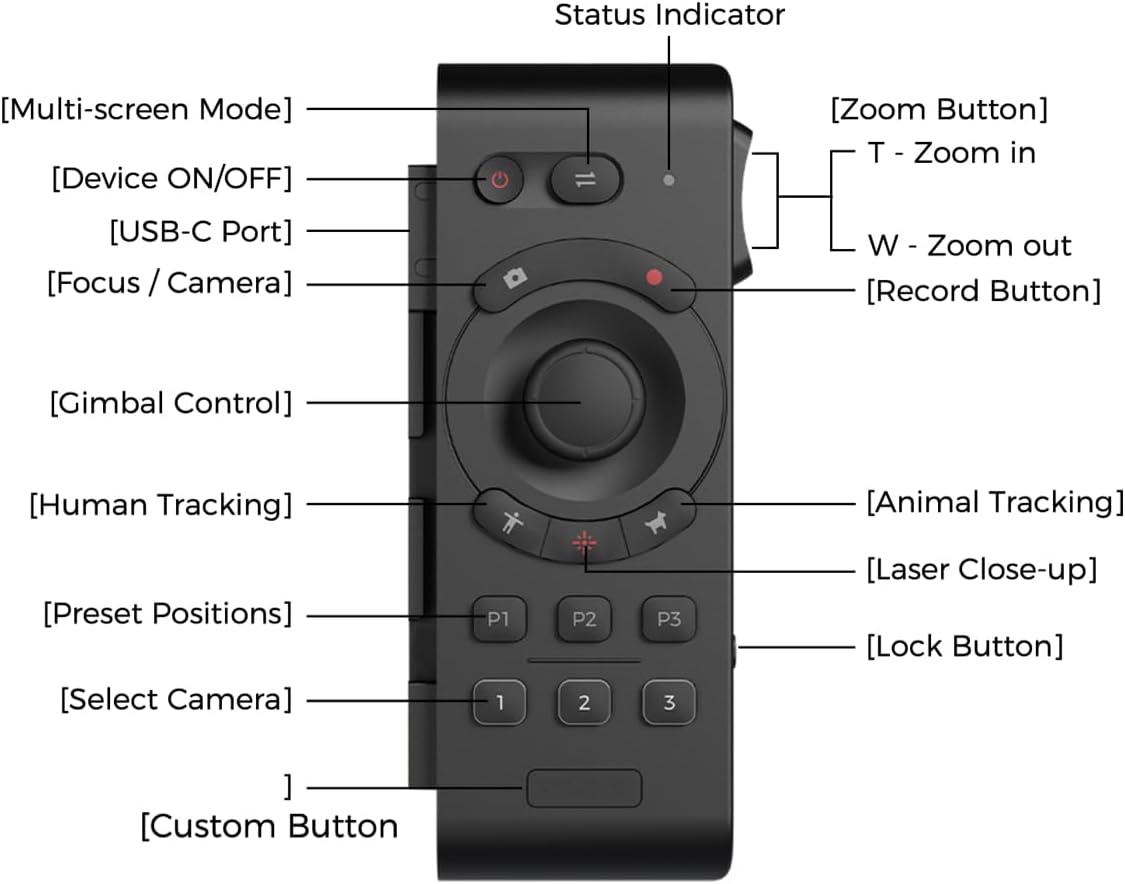
Figure 2.2: Labeled diagram of the remote controller's buttons and features.
- Gumb za VKLOP/IZKLOP naprave: Vklopi ali izklopi daljinski upravljalnik.
- Gumb za večzaslonski način: Preklaplja med različnimi načini prikaza.
- Indikator stanja: Displays the current status of the remote controller.
- Gumb za ostrenje / kamero: Nadzira ostrenje kamere ali preklaplja načine kamere.
- Gumb za snemanje: Začne ali ustavi snemanje videa.
- Krmilna palica za upravljanje z gimbalom: Provides precise control over the camera's pan, tilt, and zoom.
- Gumb za sledenje ljudem: Aktivira sledenje človeškemu subjektu.
- Gumb za sledenje živalim: Aktivira sledenje živalskim objektom.
- Gumb za laserski posnetek od blizu: Double-press to activate the laser pointer for quick close-up tracking.
- Prednastavljeni položaji (P1, P2, P3): Stores and recalls up to three custom camera positions.
- Izberite kamero (1, 2, 3): Switches control between up to three paired OBSBOT Tail series devices.
- Gumb po meri: A programmable button for user-defined functions.
- Gumb za povečavo (T/W): Rocker switch for zooming in (T) or out (W).
- Gumb za zaklepanje: Preprečuje nenamerne pritiske gumbov.
- Vrata USB-C: For charging the remote controller.
3. Nastavitev in seznanjanje
3.1 Polnjenje daljinskega upravljalnika
Before initial use, ensure the remote controller is fully charged. Connect the supplied USB-A to USB-C cable to the USB-C port on the side of the remote controller and to a compatible USB power source.

Figure 3.1: USB-C charging port location on the remote controller.
3.2 Pairing with OBSBOT Tail Series Camera
The remote controller can be wirelessly connected to up to three OBSBOT Tail series devices via Bluetooth. Follow these steps to pair your remote controller with your camera:
- Ensure your OBSBOT Tail series camera (e.g., Tail 2/Air) is powered on.
- On the camera, quickly press the power button three times. The camera's indicator light will begin to flash blue, indicating it is in pairing mode.
- On the remote controller, press and hold the Human Tracking button (person icon) and the '1' button simultaneously. The remote's indicator light will also flash blue.
- Once successfully paired, both the camera and remote controller indicator lights will turn green.
- To pair additional cameras (up to three), repeat steps 2 and 3, using the '2' or '3' button on the remote controller for each subsequent camera.
Video 3.2: Official demonstration of OBSBOT Tail Air Remote Controller features, including pairing and control. This video is provided by the seller.
Note: If the remote is unresponsive, check the lock switch on the side. Slide it to the unlocked position to enable control.

Figure 3.3: Remote controller lock switch in locked (red) and unlocked positions.
4. Navodila za uporabo
4.1 Nadzor PTZ
The remote offers two methods for PTZ control:
- Krmilna palica: Use the central joystick to pan, tilt, and zoom the camera.
- Wrist Movements (Motion Control): With the built-in gyroscope, you can control the camera's gimbal by moving your wrist while holding down the joystick.

Figure 4.1: Demonstrating joystick control for camera movement.
4.2 Funkcije sledenja
- Človeško sledenje: Press the button with the 'person' icon to activate human subject tracking.
- Sledenje živalim: Press the button with the 'paw print' icon to activate animal subject tracking.
- Laser Close-up: Double-press the Laser Close-up button. The camera will instantly follow and zoom in on the area pointed by the remote's laser.
4.3 Prednastavljeni položaji
The remote allows you to save and recall up to three camera positions:
- Shranjevanje prednastavitve: Position the camera as desired, then press and hold one of the P1, P2, or P3 buttons until the indicator confirms the position is saved.
- Recalling a Preset: Briefly press the desired P1, P2, or P3 button to move the camera to the saved position.
4.4 Gumb po meri
The Custom Button can be configured via the OBSBOT app to perform a specific function tailored to your needs.

Figure 4.2: Location of the customizable button.
5. Vzdrževanje
- Čiščenje: Za čiščenje daljinskega upravljalnika uporabite mehko, suho krpo. Izogibajte se uporabi agresivnih kemikalij ali abrazivnih materialov.
- Shranjevanje: Daljinski upravljalnik shranjujte na hladnem in suhem mestu, stran od neposredne sončne svetlobe in ekstremnih temperatur.
- Vzdrževanje baterije: To prolong battery life, avoid fully discharging the remote frequently. Charge it regularly, even if not in constant use.
6. Odpravljanje težav
| Izdaja | Možen vzrok | rešitev |
|---|---|---|
| Daljinski upravljalnik se ne odziva. | Daljinski upravljalnik je zaklenjen. | Check the lock switch on the side of the remote and slide it to the unlocked position. |
| Unable to pair with camera. | Camera or remote not in pairing mode; out of range. | Ensure both devices are powered on and in pairing mode (camera indicator flashing blue, remote indicator flashing blue). Bring devices closer together. |
| PTZ control is erratic or unresponsive. | Low battery; interference; remote not properly paired. | Charge the remote. Re-pair the remote with the camera. Ensure no strong wireless interference. |
7. Specifikacije
| Funkcija | Podrobnost |
|---|---|
| Dimenzije izdelka | 7.9 x 4.8 x 6.3 palcev |
| Teža predmeta | 7.4 unč |
| Številka modela artikla | OBSBOT_TAIL SERIES_REMOTE |
| Znamka | OBSBOT |
| Posebna funkcija | Polnilna |
| barva | Črna |
| Največje število podprtih naprav | 3 |
| Združljive naprave | Tail Series (Tail 2/ Tail Air) |
8. Garancija in podpora
For warranty information and technical support, please refer to the official OBSBOT webspletno mesto ali se obrnite neposredno na njihovo službo za stranke. Za uveljavljanje garancije shranite račun.