1. Uvod
This instruction manual provides comprehensive guidance for the setup, operation, and maintenance of your WOOX R6118-4P Smart Wi-Fi Plugs. Please read this manual carefully before using the product to ensure safe and optimal performance. Keep this manual for future reference.
2. Varnostne informacije
Your WOOX Smart Wi-Fi Plugs are designed with safety as a priority. Adhere to the following guidelines:
- TÜV certificirano: The product is TÜV certified, guaranteeing high safety and quality standards.
- Materiali, ki zavirajo gorenje: Constructed from acrylonitrile butadiene styrene (ABS) and polycarbonate (PC), which are flame-retardant materials, to minimize fire hazards.
- Zaščita pred preobremenitvijo: Equipped with overload protection to prevent damage to connected appliances and the plug itself from excessive current. Do not exceed the maximum load of 16A / 3680W.
- Varnost otrok: Features child safety mechanisms to prevent accidental access to live parts.
- Pravilna namestitev: Ensure the plug is fully inserted into a compatible wall socket. Do not use in wet environments.
- Način pomnilnika: The plug includes a memory mode that restores the previous operating state after a power outage, enhancing safety and convenience.

Slika 2.1: The WOOX Smart Wi-Fi Plug is designed with multiple safety features, including TÜV certification, flame-retardant materials, safe heat dissipation, overload protection, and child safety mechanisms, ensuring reliable and secure operation.
3. Izdelek je končanview
The WOOX R6118-4P Smart Wi-Fi Plug is a smart home device designed to make your electrical appliances intelligent and controllable. It allows for remote control, voice commands, scheduling, and energy consumption monitoring. This package includes four smart plugs.

Slika 3.1: Ta diagram nudi celovit pregledview of the WOOX Smart Wi-Fi Plug's main functionalities, including energy monitoring, remote app control, voice command compatibility, safety features, and scheduling options.
4. Nastavitev
4.1 Namestitev aplikacije
To control your WOOX Smart Wi-Fi Plugs, you need to install the WOOX Home app (or Tuya Smart app, as WOOX products often integrate with the Tuya platform) on your smartphone or tablet.
- Iskanje "WOOX Home" or "Tuya Smart" in the Apple App Store (for iOS devices) or Google Play Store (for Android devices).
- Prenesite in namestite aplikacijo.
- Odprite aplikacijo in registrirajte nov račun ali se prijavite, če ga že imate.
4.2 Seznanjanje naprav
Follow these steps to pair your WOOX Smart Wi-Fi Plug with the app:
- Plug the WOOX Smart Wi-Fi Plug into a power outlet.
- Prepričajte se, da je vaš pametni telefon povezan z 2.4 GHz Wi-Fi omrežje. The plugs do not support 5 GHz Wi-Fi.
- Open the WOOX Home app. Tap the "+" icon in the top right corner to add a device.
- Na seznamu naprav izberite »Električna« ali »Vtičnica (Wi-Fi)«.
- Follow the on-screen instructions to put the plug into pairing mode (usually by pressing and holding the power button on the plug until the indicator light blinks rapidly).
- Preverite, ali indikatorska lučka v aplikaciji hitro utripa.
- Vnesite geslo za omrežje Wi-Fi 2.4 GHz.
- The app will then attempt to connect to the device. Once connected, you can rename the plug for easier identification.
Bluetooth Pairing (for faster connection): The plug supports Bluetooth for a quicker initial connection to the app. Ensure Bluetooth is enabled on your phone during the pairing process. This facilitates the Wi-Fi setup but the plug operates primarily over Wi-Fi.

Slika 4.1: The WOOX Smart Wi-Fi Plug supports local control via Bluetooth, allowing you to manage devices through the app even if your Wi-Fi network is unstable or temporarily disconnected, provided you are within range (approximately 30ft).
5. Navodila za uporabo
5.1 Daljinsko upravljanje prek aplikacije
Once paired, you can control your smart plugs from anywhere using the WOOX Home app:
- Tap on the device name in the app to access its control interface.
- Use the on/off toggle to switch the connected appliance's power.
- Access other features like timers, schedules, and energy monitoring from this interface.
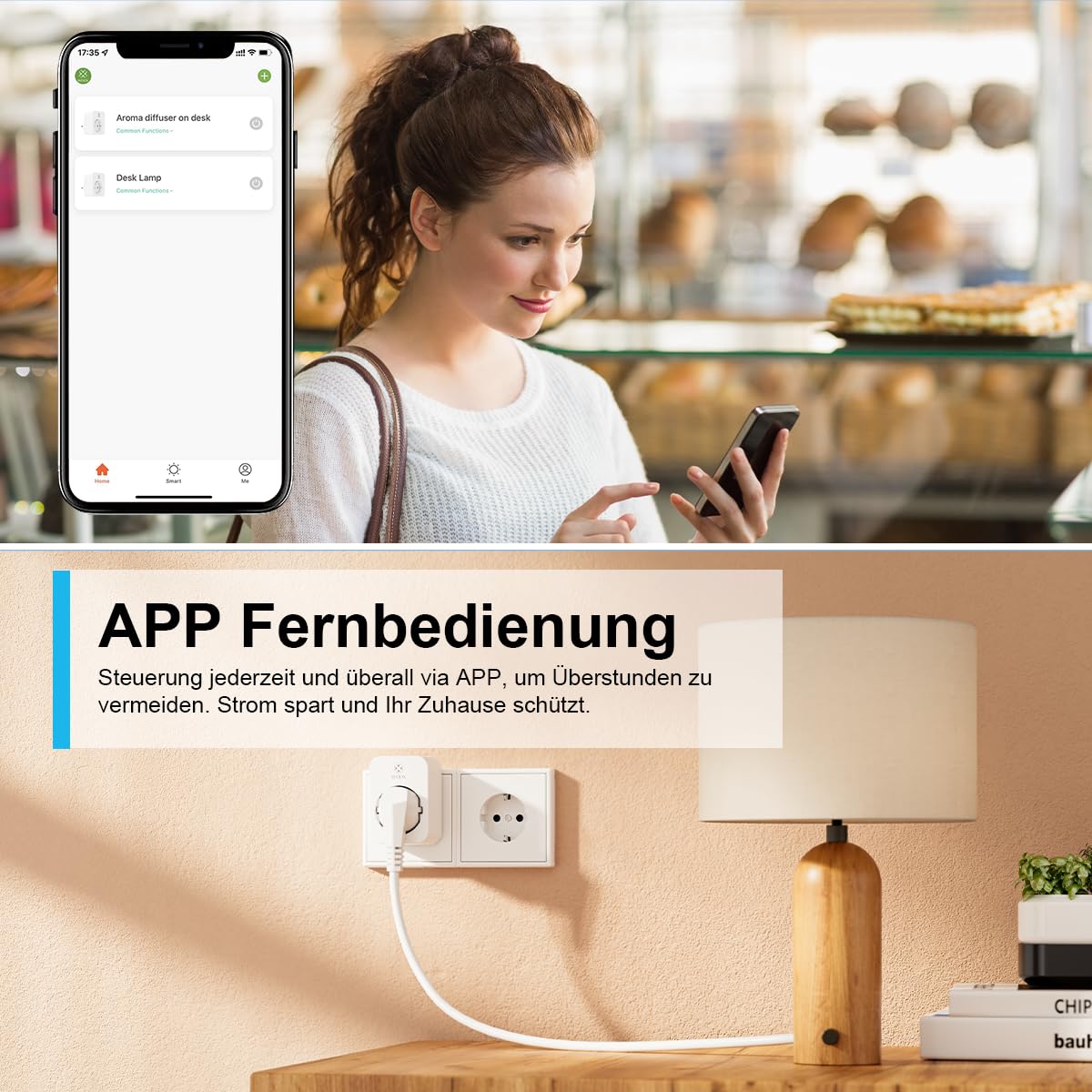
Slika 5.1: Manage your WOOX Smart Wi-Fi Plugs remotely from anywhere using the dedicated mobile application. This feature allows you to turn devices on or off, set schedules, and monitor energy consumption even when you are away from home.
5.2 Glasovno upravljanje (Alexa in Google Home)
Integrate your WOOX Smart Wi-Fi Plugs with Amazon Alexa or Google Home for hands-free control:
- In the WOOX Home app, navigate to "Me" > "More Services" (or similar) and link your Alexa or Google Home account.
- Follow the instructions in the Alexa or Google Home app to discover new devices.
- Ko ga odkrijete, lahko uporabljate glasovne ukaze, kot so:
- "Alexa, vklopi [ime naprave]"
- "Hej Google, izklopi [ime naprave]"
- "Alexa, set [device name] to [on/off]"

Slika 5.2: Control your WOOX Smart Wi-Fi Plugs using voice commands through Amazon Alexa or Google Home. Simply connect the plug to your smart home assistant and use phrases like 'Alexa, turn on the TV' for convenient operation.
5.3 Timer and Scheduling Functions
The app offers 6 different modes for automating your devices:
- Odštevanje: Nastavite časovnik, da se naprava po določenem času vklopi ali izklopi.
- Urnik: Create daily or weekly schedules for automatic power on/off at specific times.
- Cikel: Set the device to repeatedly turn on and off for defined intervals.
- Naključno: Randomly turn the device on and off within a set timeframe, useful for simulating occupancy.
- Astronomski: Automate based on sunrise and sunset times in your location.
- Inching: Set the device to turn on for a very short, specific duration and then automatically turn off.

Slika 5.3: Automate your devices with the WOOX Smart Wi-Fi Plug's versatile timer and scheduling functions. Set countdowns, create daily or weekly schedules, implement cyclical operations, or use random and astronomical timers for enhanced home automation.
5.4 Spremljanje energije
The WOOX Smart Wi-Fi Plug provides real-time and historical energy consumption data:
- In the device's control interface within the app, look for the "Energy Monitoring" or "Statistics" section.
- View daily, monthly, or yearly electricity usage (kWh) and current power draw (W).
- This feature helps you understand and manage the energy consumption of your appliances, potentially leading to energy savings.

Slika 5.4: The WOOX Smart Wi-Fi Plug allows you to monitor the electricity consumption of connected devices. The accompanying app provides detailed statistics, helping you track usage and identify opportunities for energy savings.
5.5 Nadzor skupine in skupna raba naprav
- Nadzor skupine: In the app, you can create groups of smart plugs to control multiple devices simultaneously with a single command. This is useful for controlling all lights in a room or multiple appliances at once.
- Skupna raba naprave: Share control of your smart plugs with family members. They will need to download the WOOX Home app and create an account. You can then invite them to control specific devices.
6. Vzdrževanje
- Čiščenje: Pred čiščenjem izvlecite vtič iz električne vtičnice. Za brisanje površine uporabite suho, mehko krpo. Ne uporabljajte tekočih čistil ali abrazivnih materialov.
- Posodobitve vdelane programske opreme: Periodically check the WOOX Home app for available firmware updates. Keeping your device's firmware up-to-date ensures optimal performance, security, and access to new features.
- Shranjevanje: When not in use for extended periods, store the plugs in a cool, dry place away from direct sunlight and moisture.
7. Odpravljanje težav
| Težava | Možen vzrok | rešitev |
|---|---|---|
| Naprava se ne more povezati z omrežjem Wi-Fi. | Incorrect Wi-Fi password, 5 GHz Wi-Fi network, plug too far from router, router issues. |
|
| Glasovno upravljanje ne deluje. | Not linked to Alexa/Google Home, incorrect device name, internet connection issues. |
|
| Vtič se ne odziva. | No power, network issue, device malfunction. |
|
8. Specifikacije
| Funkcija | Podrobnost |
|---|---|
| Številka modela | R6118-4P |
| Proizvajalec | WOOX |
| Dimenzije (D x Š x V) | 7.2 x 5.1 x 7.8 cm |
| Teža | Približno 410 gramov (teža paketa) |
| Material | Akrilonitril butadien stiren (ABS), polikarbonat (PC) |
| Največja moč | 3680 vatov |
| Maks. Tok | 16 Amperes |
| Delovna zvezatage | 230 voltov (AC) |
| Brezžična povezljivost | Wi-Fi 2.4 GHz (IEEE 802.11b/g/n), Bluetooth |
| Tip stikala | Push-button, 1-way |
| Certifikati | CE, TÜV, RoHS, WEEE |
| Način delovanja | Vklop/izklop |
| Vključene komponente | Power plug (4 units in package) |
| Potrebne baterije | št |
9. Garancija in podpora
WOOX provides a 24-mesečna garancija for the R6118-4P Smart Wi-Fi Plugs from the date of purchase. This warranty covers manufacturing defects and ensures the product meets its specified performance standards under normal use.
For technical assistance, troubleshooting, or warranty claims, please contact WOOX customer support. They offer 24/7 phone service da vam pomagamo pri morebitnih vprašanjih.
Please refer to the official WOOX webZa kontaktne podatke in celotno garancijsko politiko si oglejte spletno mesto ali dokumentacijo o nakupu.


