1. Uvod
The RadioShack FT C10U Multimedia Bluetooth Speaker is the perfect combination of design, functionality, and sound quality. Designed to offer an immersive audio experience, this speaker features adjustable bass and a master volume that enhances every note, bringing your music to life.
Thanks to its versatile connectivity, you can play your favorite music from multiple sources, including Bluetooth, USB, SD, and auxiliary cable. This makes it an ideal choice for any occasion, from a family gathering to a karaoke night with friends.
The included remote control adds an unparalleled level of convenience, allowing you to manage all essential functions from a distance. Change tracks, adjust volume, or configure sound without having to approach the speakers. Manufactured with high-quality materials such as ABS, HIPS, PVC, and iron, this speaker not only ensures durability but also an elegant design that adapts to any space. Its solid construction ensures superior and reliable audio performance. Additionally, its compact and lightweight design makes it easy to transport, so you can enjoy your music wherever you go. With practical adjustment buttons and powerful sound, this speaker is the perfect companion for any music lover.
2. Značilnosti izdelka
- Exceptional and Immersive Sound: Enjoy a unique auditory experience with adjustable bass and master volume for personalized sound.
- Vsestranska povezljivost: Compatible with Bluetooth, USB, SD, and auxiliary cable for music playback from multiple devices.
- Priročen daljinski upravljalnik: Adjust volume, change tracks, and configure sound from a distance.
- Durable and Elegant Construction: Made with high-quality ABS, HIPS, PVC, and iron for resistance and modern design.
- Portability and Ease of Use: Compact and lightweight design, perfect for transport, with physical volume adjustment keys for easy handling.
3. Vsebina paketa
Prosimo, da paket natančno preverite, ali so vsi predmeti prisotni in v dobrem stanju.
- 1 x RadioShack Multimedia Bluetooth Speaker System (1 Subwoofer, 2 Satellite Speakers)
- 1 x daljinski upravljalnik
- 1 x napajalni kabel
- 1 x AUX/USB Cable
- 1 x Uporabniški priročnik (ta dokument)
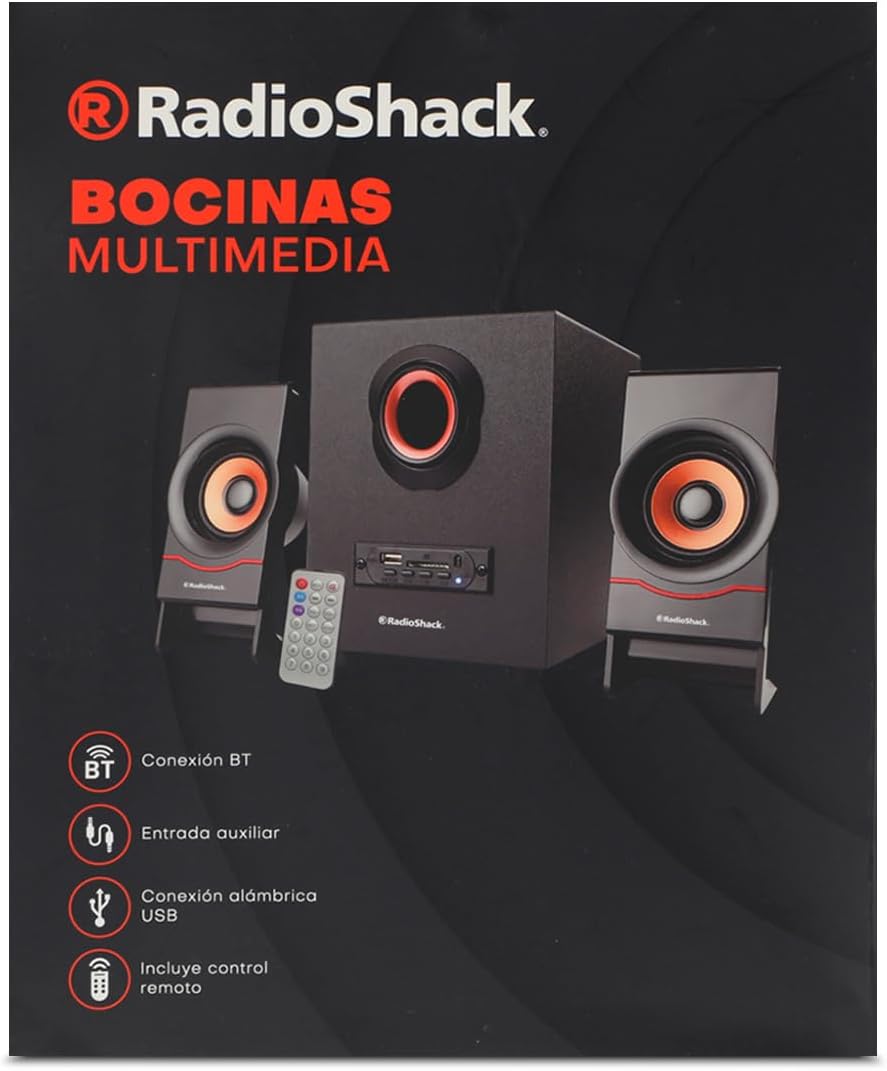
Image: The product packaging box, showing the speaker system, remote, and connectivity icons.
4. Izdelek je končanview

Image: The complete speaker system, including the central subwoofer, two satellite speakers, and the remote control.

Image: Front panel of the subwoofer, showing the USB port, SD card slot, and various control buttons.

Slika: Stran view of the subwoofer, highlighting the control panel with input ports.

Slika: spredaj view of the two compact satellite speakers, each with a single driver.

Image: The included AUX and USB cable, used for wired audio input and potentially power or data transfer.
5. Navodila za namestitev
- Razpakirajte sistem: Carefully remove all components from the packaging. Place the subwoofer on a stable, flat surface.
- Priključitev satelitskih zvočnikov: Plug the audio cables from the two satellite speakers into the corresponding output jacks on the back of the subwoofer. Ensure a secure connection.
- Priključite napajanje: Insert the power cable into the power input port on the subwoofer, then plug the other end into a standard electrical outlet (AC 100-240V, 50/60Hz).
- Vklop: Press the power button on the front panel of the subwoofer or on the remote control to turn on the speaker system. The LED indicator will light up.
6. Navodila za uporabo
6.1. Vklop/izklop
Pritisnite MOČ button on the front panel of the subwoofer or the MOČ gumb na daljinskem upravljalniku za vklop ali izklop enote.
6.2. Izbira načina
Pritisnite NAČIN button on the front panel or the remote control to cycle through available input modes: Bluetooth (BT), USB, SD, and AUX.
6.3. Bluetooth povezava
- Vklopite zvočnik in izberite način Bluetooth z NAČIN button. The speaker will emit a pairing tone, and the Bluetooth indicator will flash.
- Omogočite Bluetooth na svoji napravi (pametnem telefonu, tablici, prenosniku).
- Iskanje "RadioShack FT C10U" or similar in your device's Bluetooth list.
- Select the speaker to pair. Once connected, the speaker will emit a confirmation tone, and the Bluetooth indicator will stop flashing and remain solid.
- Zdaj lahko predvajate zvok iz naprave prek zvočnika.
6.4. Predvajanje z USB-ja/SD-kartice
- Insert a USB flash drive or SD card (with MP3/WMA audio files) into the corresponding slot on the subwoofer's front panel.
- Zvočnik bo samodejno preklopil v način USB ali SD in začel predvajati prvi združljiv zvočni posnetek. file. If not, press the NAČIN gumb za izbiro pravilnega vnosa.
- Uporabite PREDVAJAJ/PAVZA, PREJŠNJA, in NASLEDNJI buttons on the speaker or remote to control playback.
6.5. Priključek AUX
- Connect one end of the included AUX cable (3.5mm jack) to the AUX input port on the subwoofer.
- Connect the other end of the AUX cable to the headphone jack or audio output of your external device (e.g., MP3 player, computer).
- Pritisnite NAČIN gumb za izbiro vhoda AUX.
- Predvajanje in glasnost lahko upravljate z zunanje naprave.
6.6. Funkcije daljinskega upravljalnika
The remote control provides convenient access to all speaker functions:
- Gumb za vklop: Vklopi/izklopi zvočnik.
- Gumb za način: Switches between Bluetooth, USB, SD, and AUX modes.
- Gumb za predvajanje/pavzo: Predvaja ali začasno ustavi predvajanje zvoka.
- Gumbi Prejšnji/Naslednji: Preskoči na prejšnjo ali naslednjo skladbo.
- Gumbi za povečanje / zmanjšanje glasnosti: Prilagodi glavno glasnost.
- Gumb EQ: Preklaplja prednastavitve izenačevalnika (če so na voljo).
- Številski gumbi (0-9): For direct track selection on USB/SD (if supported).
- RPT (Repeat) Button: Ponavlja trenutno skladbo ali vse skladbe.
- Gumb DISC: (Function may vary, typically related to disc playback or specific mode).
7. Vzdrževanje
- Čiščenje: Za čiščenje površine zvočnika uporabite mehko, suho krpo. Ne uporabljajte tekočih čistil ali abrazivnih materialov.
- Shranjevanje: Ko zvočnika dlje časa ne uporabljate, ga shranite na hladnem in suhem mestu, stran od neposredne sončne svetlobe in ekstremnih temperatur.
- Ravnanje: Avoid dropping the speaker or subjecting it to strong impacts. Do not expose it to water or high humidity.
- Prezračevanje: Ensure proper ventilation around the subwoofer to prevent overheating. Do not block any ventilation openings.
8. Odpravljanje težav
| Težava | Možen vzrok | rešitev |
|---|---|---|
| Brez moči | Power cable not connected; Power outlet not working; Speaker is off. | Ensure power cable is securely plugged in. Test the outlet with another device. Press the power button on the speaker or remote. |
| Brez zvoka | Volume is too low; Incorrect input mode selected; Device not playing audio; Cables not connected properly. | Increase volume on speaker and connected device. Press MODE button to select correct input. Ensure audio is playing on your device. Check all cable connections. |
| Bluetooth se ne povezuje | Speaker not in pairing mode; Device Bluetooth is off; Speaker is already connected to another device; Interference. | Ensure speaker is in Bluetooth mode and flashing. Turn on Bluetooth on your device. Disconnect from other devices. Move speaker closer to device, away from other electronics. |
| USB/SD se ne predvaja | Nepravilno file format; USB/SD kartica poškodovana; izbran napačen način. | Zagotovite files are MP3/WMA format. Try another USB/SD card. Press MODE button to select USB/SD mode. |
| Popačen zvok | Volume too high; Audio source quality is poor; Speaker placed too close to interference. | Lower the volume. Try a different audio source. Move speaker away from other electronic devices. |
9. Specifikacije
| Funkcija | Podrobnost |
|---|---|
| Vrsta zvočnika | Multimedija |
| Posebna funkcija | Bluetooth |
| Združljive naprave | Prenosnik, tablica, pametni telefon |
| Vrsta krmilnika | Daljinski upravljalnik |
| Vključene komponente | Napajalni kabel |
| Mere izdelka (D x Š x V) | 25 x 22 x 30 cm |
| Proizvajalec | RadioShack |
| Številka modela | 100124617 |
| Število izdelkov | 1 |
| Zvočnik Ampvrsta lifikacije | Pasivno |
| Wattage | 5 vatov |
| Vir napajanja | Električni kabel |
| Potrebne baterije | št |
| Največja izhodna moč zvočnika | 5 vatov |
| Tehnologija povezljivosti | Bluetooth |
| Način avdio izhoda | Stereo |
10. Garancija in podpora
For warranty information and technical support, please refer to the warranty card included with your product or visit the official RadioShack webspletnega mesta. Račun shranite kot dokazilo o nakupu za morebitne garancijske zahtevke.
If you encounter issues not covered in this manual, please contact RadioShack customer service for assistance.


