1. Uvod
Hvala za nakupasing the Goldair GRPF-1632 Rechargeable Pedestal Fan. This manual provides essential information for the safe and efficient operation, assembly, maintenance, and troubleshooting of your fan. Please read these instructions thoroughly before use and retain them for future reference.
2. Pomembna varnostna navodila
- Ventilator vedno postavite na stabilno, ravno površino, da preprečite prevrnitev.
- Med delovanjem ventilatorja ne vstavljajte prstov ali kakršnih koli predmetov skozi rešetko ventilatorja.
- Ventilatorja hranite stran od vode ali drugih tekočin. Ne uporabljajte ga v mokrem okolju.
- Unplug the fan from the power source before cleaning, maintenance, or when not in use.
- Ventilatorja ne uporabljajte s poškodovanim kablom ali vtičem. Za popravilo se obrnite na usposobljeno servisno osebje.
- Ta naprava ni namenjena uporabi s strani oseb (vključno z otroki) z zmanjšanimi fizičnimi, senzoričnimi ali duševnimi sposobnostmi ali s pomanjkanjem izkušenj in znanja, razen če jih oseba, ki je odgovorna za njihovo varnost, nadzoruje ali jim daje navodila glede uporabe naprave.
- Otroke je treba nadzorovati, da se zagotovi, da se ne igrajo z napravo.
- Use only the charging adapter supplied with the fan.
- Ne blokirajte zračnih odprtin.
3. Izdelek je končanview
The Goldair GRPF-1632 is a 16-inch rechargeable pedestal fan designed for versatile cooling. It features a robust construction, multiple speed settings, and an adjustable head for directional airflow. Its rechargeable battery provides cordless operation, enhancing portability.
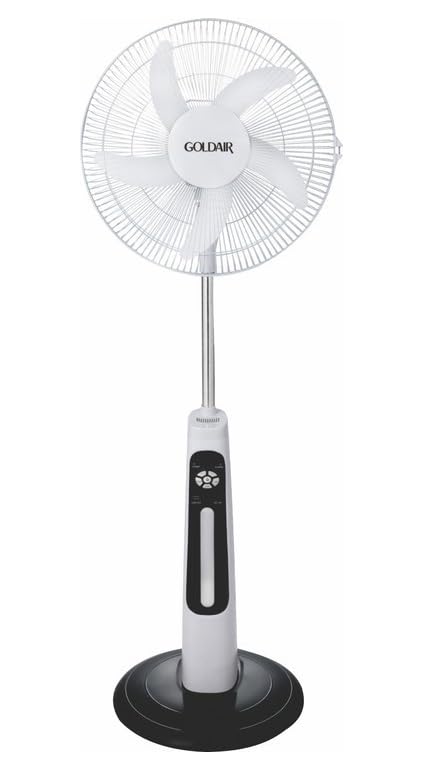
This image displays the complete Goldair Rechargeable Pedestal Fan. It features a white fan head with a protective grille and five blades, an adjustable silver-colored pole, a white and black control panel housing the fan's functions, and a stable black round base.
4. Vsebina paketa
- Fan Head Assembly (including blades and grilles)
- Adjustable Pedestal Pole
- Okrogla osnova
- Vijak za pritrditev podstavka
- Napajalnik/polnilec
- Uporabniški priročnik
5. Nastavitev in montaža
Follow these steps to assemble your Goldair Pedestal Fan:
- Pritrdite osnovo: Place the pedestal pole onto the round base. Align the holes and secure the pole to the base using the provided fixing screw from underneath the base. Tighten securely.
- Namestitev glave ventilatorja: Carefully slide the fan head assembly onto the top of the pedestal pole. Ensure it clicks into place or is secured according to the specific design (some models may have a screw or locking mechanism).
- Preverite stabilnost: Once assembled, gently test the fan's stability on a flat surface.
6. Navodila za uporabo
Familiarize yourself with the control panel on the fan body:
- Gumb za vklop: Pritisnite za vklop ali izklop ventilatorja.
- Nastavitve hitrosti: Press the speed button repeatedly to cycle through different fan speeds (e.g., Low, Medium, High). Indicator lights will show the current speed.
- Gumb za nihanje: Pritisnite za vklop ali izklop funkcije nihanja, ki omogoča, da se glava ventilatorja premika z ene strani na drugo.
- Gumb časovnika: If available, press to set a timer for automatic shutdown (e.g., 1 hour, 2 hours, 4 hours).
- Nastavitev nagiba: Manually adjust the angle of the fan head up or down to direct airflow as desired. Hold the fan head firmly and tilt it to the desired position.
7. Polnjenje baterije
The Goldair GRPF-1632 fan is equipped with a rechargeable battery for cordless operation. To charge the fan:
- Ensure the fan is turned OFF.
- Connect the power adapter to the charging port on the fan body.
- Priključite adapter v standardno električno vtičnico.
- The charging indicator light will illuminate (e.g., red for charging, green for fully charged).
- Allow the fan to charge completely before its first cordless use. Charging time may vary.
The fan can also operate while connected to the power adapter.
8. Vzdrževanje in čiščenje
Redno čiščenje zagotavlja optimalno delovanje in podaljšuje življenjsko dobo vašega ventilatorja.
- Pred čiščenjem: Always unplug the fan from the power outlet and ensure it is turned off.
- Čiščenje zunanjosti: Zunanje površine ventilatorja obrišite z mehko,amp krpo. Ne uporabljajte abrazivnih čistil, topil ali agresivnih kemikalij, saj lahko poškodujejo površino.
- Rešetka in lopatice: To clean dust from the fan blades and inside the grilles, you may need to carefully remove the front grille. Refer to the assembly instructions in reverse for safe removal. Use a soft brush or vacuum cleaner with a brush attachment to remove accumulated dust. Ensure all parts are dry before reassembling.
- Shranjevanje: Ko ventilatorja dalj časa ne uporabljate, ga shranite na hladnem in suhem mestu, po možnosti v originalni embalaži, da ga zaščitite pred prahom in poškodbami.
9. Odpravljanje težav
If you encounter issues with your fan, refer to the following table for common problems and solutions:
| Težava | Možen vzrok | rešitev |
|---|---|---|
| Ventilator se ne vklopi. | No power supply or low battery. | Ensure the power adapter is securely plugged in and the outlet is functional. Charge the fan battery if operating wirelessly. |
| Šibek pretok zraka. | Hitrost ventilatorja je prenizka ali pa so rešetke blokirane. | Increase the fan speed setting. Clean any dust or debris from the front and rear grilles and blades. |
| Ventilator je hrupen. | Loose parts or dust accumulation. | Ensure all assembly screws are tightened. Clean the fan blades and grilles to remove any dust buildup. |
| Oscilacija ne deluje. | Funkcija oscilacije ni aktivirana. | Pritisnite gumb za oscilacijo, da aktivirate funkcijo. |
10. Specifikacije
- Znamka: Goldair
- Številka modela: GRPF-1632
- Zasnova električnega ventilatorja: Talni ventilator
- Dolžina rezila: 16 palcev
- Število rezil: 3
- Material: Aluminij
- Vrsta regulatorja: Nadzor gumbov
- Teža artikla: 4 kg
- Dimenzije izdelka: 62.8 D x 13 Š x 56.5 V centimetrov
- barva: Multicolor (as per product specifications)
11. Garancija in podpora strankam
Goldair products are manufactured to high standards and are warranted against defects in materials and workmanship. For specific warranty terms and conditions, please refer to the warranty card included with your purchase or visit the official Goldair website. For technical support, spare parts, or service inquiries, please contact Goldair customer support through their official channels.


