Pomembna varnostna navodila
Please read these instructions carefully before using the Goldair GIWF-26A Wall Fan and retain them for future reference. Failure to follow these instructions may result in electric shock, fire, or serious injury.
- Prepričajte se, da je napajalnik voltage se ujema z nalepko z nazivnimi vrednostmi na ventilatorju.
- Ventilatorja ne uporabljajte s poškodovanim kablom ali vtičem. Če je kabel poškodovan, ga mora zamenjati proizvajalec, njegov serviser ali podobno usposobljena oseba, da se izognete nevarnosti.
- Unplug the fan from the power outlet before cleaning, servicing, or moving.
- Med delovanjem ventilatorja ne vstavljajte prstov ali kakršnih koli predmetov skozi rešetko.
- Ventilatorja hranite stran od vode in vlage. Ne uporabljajte ga v kopalnicah ali drugih vlažnih okoljih.
- Ensure the fan is mounted securely to a solid wall structure capable of supporting its weight.
- Ta naprava ni namenjena uporabi s strani oseb (vključno z otroki) z zmanjšanimi fizičnimi, senzoričnimi ali duševnimi sposobnostmi ali s pomanjkanjem izkušenj in znanja, razen če jih oseba, ki je odgovorna za njihovo varnost, nadzoruje ali jim daje navodila glede uporabe naprave.
- Otroke je treba nadzorovati, da se zagotovi, da se ne igrajo z napravo.
Konec izdelkaview
The Goldair GIWF-26A is a high-power 26-inch wall-mounted fan designed for efficient air circulation. Its robust construction and multiple speed settings provide optimal cooling performance.
Vsebina paketa
- Goldair GIWF-26A Wall Fan Unit
- Montažni nosilec
- Pritrdilni material (vijaki, stenski sidri)
- Uporabniški priročnik (ta dokument)
Ključne značilnosti
- 3 Speed settings for varied airflow control.
- Automatic oscillation for wide area coverage.
- Modern design suitable for various environments.
- High quality aluminum blades for durability and efficient air movement.
- Lightweight construction for easier installation.
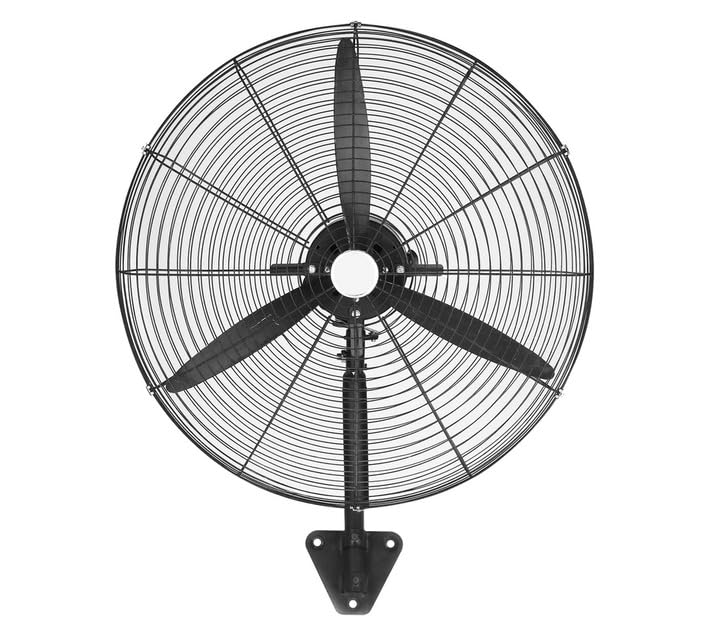
Image: Goldair GIWF-26A High Power 26-Inch Wall Fan, showcasing its black finish and robust design. This image illustrates the overall appearance of the fan unit.
Nastavitev
Montaža ventilatorja
The Goldair GIWF-26A Wall Fan must be securely mounted to a sturdy wall surface. Choose a location that allows for optimal airflow and is away from obstructions.
- Izberite mesto namestitve: Identify a suitable wall location, ensuring it is structurally sound and can support the fan's weight (approximately 10.8 kg).
- Označite vrtalne točke: Hold the mounting bracket against the wall at the desired height and use a pencil to mark the positions for drilling holes.
- Vrtanje lukenj: Drill pilot holes at the marked positions using an appropriate drill bit for your wall type. Insert wall anchors if necessary.
- Pritrdite montažni nosilec: Securely fasten the mounting bracket to the wall using the provided screws. Ensure it is level and firmly attached.
- Namestitev ventilatorja: Carefully lift the fan unit and align its mounting points with the bracket. Secure the fan to the bracket according to the specific design (e.g., sliding into place and tightening screws).
Električna povezava
Before connecting the fan to power, ensure all mounting steps are complete and the fan is stable.
- Ensure your hands are dry before handling the power cord or plug.
- Plug the fan's power cord into a standard 230 Volt AC electrical outlet.
- Avoid using extension cords if possible. If an extension cord is necessary, ensure it is rated for the fan's power requirements (200 watts) and is in good condition.
Navodila za uporabo
Nadzorna plošča
The Goldair GIWF-26A Wall Fan is operated via a button control panel located on the fan unit. This panel typically includes buttons for power, speed selection, and oscillation control.
Vklop/izklop
- Za vklop ventilatorja ON, press the Power button once.
- Za vklop ventilatorja IZKLOP, press the Power button again.
Nastavitve hitrosti
The fan offers three distinct speed settings to adjust airflow intensity:
- Hitrost 1 (nizka): Provides a gentle breeze for quiet operation and minimal air movement.
- Hitrost 2 (srednja): Offers moderate airflow for general cooling.
- Hitrost 3 (visoka): Delivers maximum airflow for rapid cooling or larger spaces.
To change the speed, press the Speed button repeatedly until the desired setting is reached.
Samodejno nihanje
The oscillation feature allows the fan head to sweep from side to side, distributing air across a wider area.
- To activate oscillation, press the Oscillation button.
- To stop oscillation, press the Oscillation button again. The fan head will stop in its current position.
Vzdrževanje
Regular maintenance ensures the longevity and efficient operation of your Goldair GIWF-26A Wall Fan. Always unplug the fan before performing any maintenance.
Čiščenje
- Čiščenje zunanjosti: Zunanje površine ventilatorja obrišite z mehko,amp krpo. Ne uporabljajte abrazivnih čistil ali topil, saj lahko poškodujejo površino.
- Čiščenje rezila: Periodically, dust may accumulate on the fan blades. To clean, carefully remove the front grille (refer to assembly instructions if needed) and gently wipe the blades with a soft, dry or slightly damp cloth. Ensure blades are completely dry before reassembling the grille.
- Ventilatorja ne potapljajte v vodo in ne dovolite, da voda kaplja v ohišje motorja.
Shranjevanje
Ko ventilatorja dalj časa ne uporabljate, ga shranite na hladnem in suhem mestu, po možnosti v originalni embalaži, da ga zaščitite pred prahom in poškodbami.
Odpravljanje težav
If you encounter issues with your Goldair GIWF-26A Wall Fan, please consult the following table before contacting customer support.
| Težava | Možen vzrok | rešitev |
|---|---|---|
| Ventilator se ne vklopi. | Brez napajanja. Gumb za vklop ni pritisnjen. | Check if the fan is plugged into a live outlet. Trdno pritisnite gumb za vklop. |
| Šibek pretok zraka. | Nastavitev nizke hitrosti. Nabiranje prahu na rezilih. | Povečajte nastavitev hitrosti. Očistite lopatice ventilatorja in rešetko v skladu z navodili za vzdrževanje. |
| Ventilator je hrupen. | Ohlapni deli. Fan not mounted securely. | Preverite, ali so kakšni vijaki ali komponente ohlapni, in jih privijte. Ensure the fan is securely mounted to the wall bracket. |
| Oscilacija ne deluje. | Oscillation button not activated. Oviranje. | Press the Oscillation button. Ensure there are no obstructions preventing the fan head from moving. |
Specifikacije
Technical specifications for the Goldair GIWF-26A High Power 26-Inch Wall Fan:
| Znamka | Goldair |
| Številka modela | GIWF-26A |
| barva | Črna |
| Moč / Wattage | 200 vatov |
| voltage | 230 volta |
| Material | Aluminij |
| Teža predmeta | 10.8 kg |
| Dimenzije izdelka | 72 D x 19 Š x 96 V centimetrov |
| Število rezil | 3 |
| Vrsta namestitve | Stenski nosilec |
| Vrsta krmilnika | Nadzor gumbov |
Garancija in podpora
Goldair products are manufactured to high-quality standards. For information regarding warranty coverage, please refer to the warranty card included with your purchase or visit the official Goldair webmesto.
If you require technical assistance, troubleshooting beyond this manual, or spare parts, please contact Goldair customer support. Contact details can typically be found on the product packaging or the official Goldair webmesto.
Please have your model number (GIWF-26A) and purchase date available when contacting support.


