Uvod
This manual provides detailed instructions for the safe and effective operation of your ROTAZA S118 Foldable 4K Camera Mini Drone. Designed for ease of use, this drone is suitable for beginners and children, offering features like one-button takeoff and landing, altitude hold, and a 4K HD FPV camera for capturing stunning aerial photos and videos. Please read this manual thoroughly before first use to ensure optimal performance and safety.
Vsebina paketa
Upon opening your ROTAZA S118 drone package, you should find the following items:
- ROTAZA S118 Mini Drone
- Daljinski upravljalnik
- Torbica za prenašanje
- Rechargeable Batteries (Quantity: 1 A batteries included)
- Polnilni kabel
- Rezervni propelerji
- Small Screwdriver (for maintenance)
- Uporabniški priročnik (ta dokument)

Image: The ROTAZA S118 Mini Drone, its remote control, spare parts, and carrying case are neatly arranged, showcasinvse vključene komponente.
Vodnik za namestitev
- Razgrnite dron: Gently unfold the four arms of the drone until they lock into place. Ensure all propellers are securely attached and free from obstruction.

Image: The ROTAZA S118 drone with its foldable arms extended, illustrating its compact design and readiness for operation.
- Namestitev baterije drona: Vstavite popolnoma napolnjeno baterijo drona v za to namenjeni predal na dronu. Prepričajte se, da se trdno zaskoči.
- Vklop drona: Press and hold the power button located on the top of the drone until the indicator lights illuminate.
- Namestite baterije za daljinski upravljalnik: Open the battery compartment on the back of the remote control and insert the required batteries. Close the compartment securely.
- Daljinski upravljalnik za vklop: Press the power button on the remote control. The indicator lights should begin to flash.
- Seznanjanje: The drone and remote control should automatically pair. The indicator lights on both devices will become solid once successfully paired. If pairing fails, turn both devices off and repeat steps 3-5.
- Kalibracija žiroskopa: Place the drone on a flat, level surface. Push both joysticks on the remote control down and to the right simultaneously for a few seconds until the drone's lights flash rapidly and then become solid, indicating successful calibration.
- Connect to App (Optional): Download the official ROTAZA drone app from your device's app store. Connect your smartphone to the drone's Wi-Fi network (usually named "ROTAZA-XXXX"). Open the app to view the live camera feed and access additional features.
Navodila za uporabo
Osnovne kontrole letenja
- Vzlet/pristanek z enim gumbom: Press the one-key takeoff/landing button (often indicated by an arrow pointing up/down) on the remote control. The drone will automatically ascend to a stable hovering height or descend gently for landing.
- Ročni vzlet: Push the left joystick up to start the propellers. Then, push the left joystick up again to lift off.
- Zadrževanje višine: The drone features an altitude hold function, allowing it to maintain a stable height automatically once the left joystick is released.
- Smerni nadzor: Z desno igralno palico upravljajte gibanje naprej, nazaj, levo in desno.
- Vrtenje: Z levo igralno palico zavrtite dron levo ali desno.
Napredne funkcije
- Brezglavi način: Activate Headless Mode by pressing the dedicated button on the remote. In this mode, the drone's orientation is relative to the pilot, making it easier to control without worrying about the drone's front direction.
Image: A visual representation of the drone's beginner-friendly features: Headless Mode, One Key Start/Land, and Altitude Hold, simplifying flight control.
- 360° obračanje: Ensure the drone has sufficient altitude (at least 2 meters). Press the 360° flip button, then push the right joystick in any direction to perform an aerial flip.
- Načini hitrosti: The drone offers 3 speed modes (5 km, 10 km, 15 km) to accommodate different skill levels. Press the speed adjustment button to cycle through the modes.

Image: The drone's brushless motor for powerful and quiet operation, alongside an illustration of its three adjustable speed modes for varied flying experiences.
- Izogibanje oviram: Activate the obstacle avoidance feature via its dedicated button. The drone will automatically detect and attempt to avoid obstacles in its path, enhancing safety for beginners.
- Pametno upravljanje z gestami: Utilize specific hand gestures to command the drone for taking photos or videos. Refer to the app's guide for detailed gesture recognition.
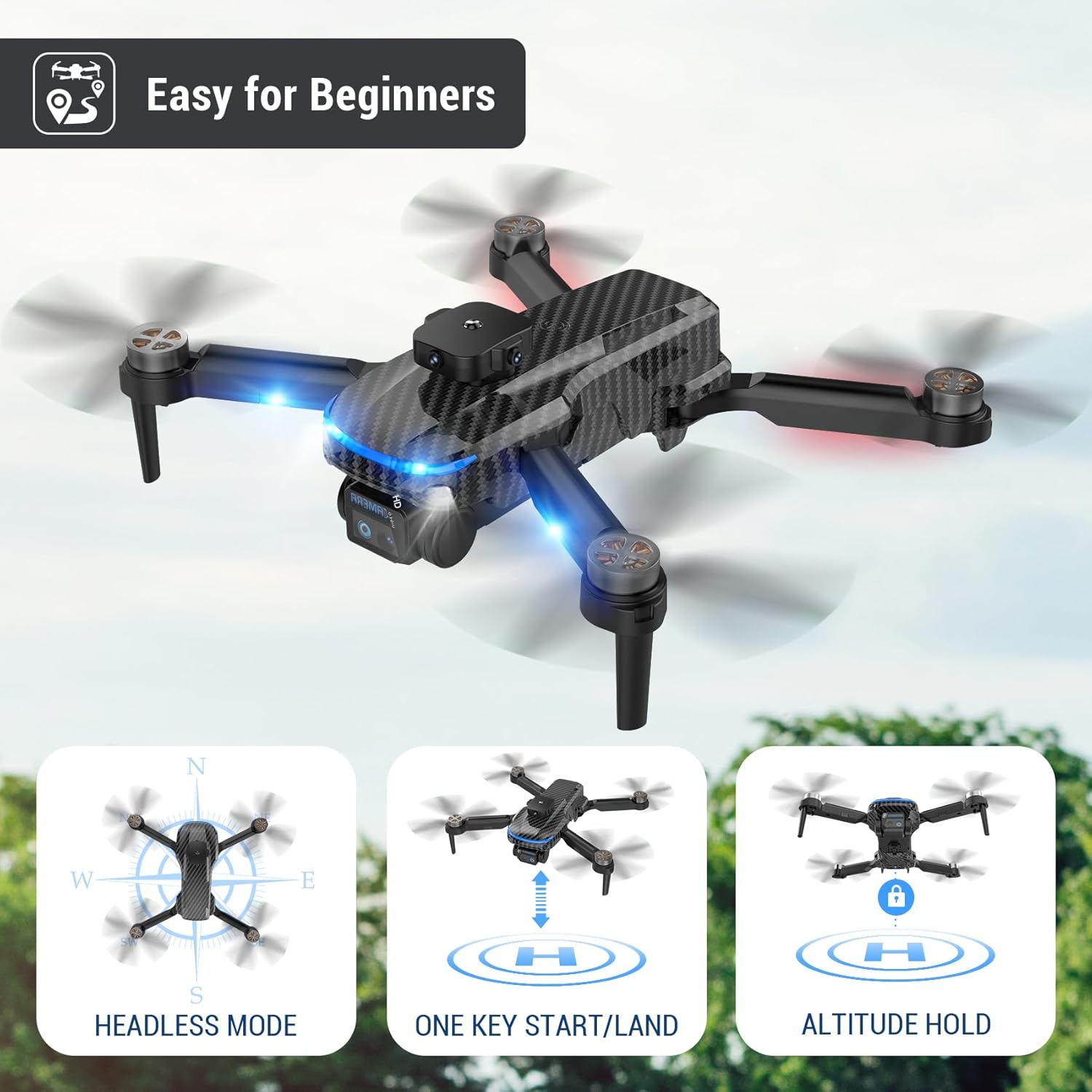
Image: People using hand gestures to control the drone, illustrating the Smart Gesture Control feature for capturing photos and videos.
Delovanje kamere
- 4K HD FPV Camera: The drone is equipped with a 4K HD FPV camera. Connect to the drone's Wi-Fi via the app to view a live feed on your smartphone.
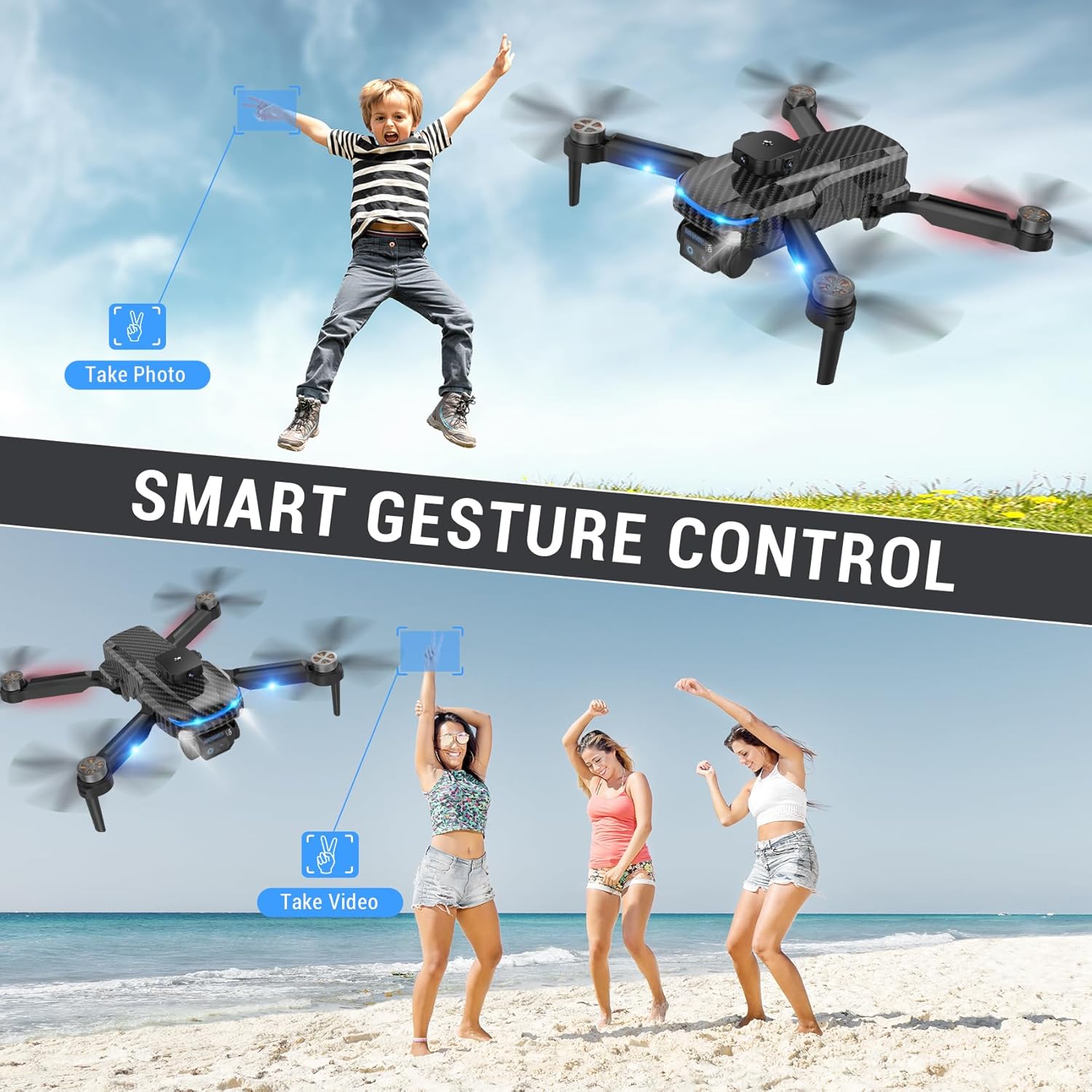
Image: Close-up of the drone's adjustable 4K camera, highlighting its ability to support both vertical and horizontal screen angle shooting for diverse aerial photography.
- Prilagoditev kamere: The camera supports 90° adjustment for varied shooting angles. This can be controlled manually or via the app.
- Zajem fotografije/videoposnetka: Use the dedicated buttons on the remote control or the app interface to capture photos (JPEG, PNG) and record videos (MP4).
Vzdrževanje
- Pregled propelerja: Regularly check propellers for damage (cracks, bends). Replace damaged propellers using the provided spare parts and screwdriver.
- Vzdrževanje baterije: Charge batteries fully before each flight. Do not overcharge. Store batteries in a cool, dry place when not in use.
- Čiščenje: Za čiščenje ohišja drona in objektiva kamere uporabite mehko, suho krpo. Izogibajte se uporabi agresivnih kemikalij ali tekočin.
- Shranjevanje: When not in use, fold the drone and store it in its carrying case to protect it from dust and damage.
Odpravljanje težav
| Težava | Možen vzrok | rešitev |
|---|---|---|
| Dron se ne vklopi. | Nizka ali prazna baterija. | Prepričajte se, da je baterija popolnoma napolnjena in pravilno vstavljena. |
| Daljinski upravljalnik se ne odziva. | Baterije daljinskega upravljalnika so skoraj prazne ali nepravilno vstavljene. Ni seznanjen. | Replace remote control batteries. Re-pair drone and remote. |
| Dron med letom lebdi v zraku. | Gyroscope not calibrated. Wind interference. | Calibrate the gyroscope on a flat surface. Fly in calm conditions. |
| Poor camera quality/no live feed. | Weak Wi-Fi connection. App not connected. | Ensure strong Wi-Fi connection. Reconnect app to drone's Wi-Fi. |
| Drone does not perform 360° flip. | Insufficient battery charge or altitude. | Ensure battery is fully charged and drone is at least 2 meters high. |
Specifikacije
- Znamka: ROTAZA
- Ime modela: S118
- barva: Črna
- Material: Ogljikova vlakna
- Dimenzije izdelka: 5.5 cm D x 3.54 cm Š x 2.95 cm V (zloženo)
- Teža artikla: 4.4 unče (123.99 grama)
- Ločljivost zajema videa: 4K
- Video izhodna ločljivost: 4K
- Format za zajem videa: MP4
- Podprt format slike: jpeg, png
- Tehnologija povezljivosti: Wi-Fi
- Tehnologija daljinskega upravljanja: Wi-Fi
- Vrsta nadzora: Nadzor aplikacij
- Sestava baterijskih celic: Litij
- Baterije: 1 A battery required (included), Rechargeable Battery Included: Yes
- Raven znanja: Začetnik
- Starostna skupina (opis): Otrok
- Posebna lastnost: Carbon fiber pattern
- Vključene komponente: Torbica za prenašanje
- UPC: 767552622066
Garancija in podpora
For warranty information or technical support, please refer to the contact details provided in the product packaging or visit the official ROTAZA webspletnega mesta. Račun shranite kot dokazilo o nakupu za morebitne garancijske zahtevke.
For more products from ROTAZA, visit the ROTAZA Store on Amazon.


