Uvod
This manual provides essential information for the setup, operation, maintenance, and troubleshooting of your Star Micronics mC-Label3 MCL32CBI Direct Thermal Printer. Please read this manual thoroughly before using the printer to ensure proper and safe operation.
Vsebina paketa
Preverite, ali so v vašem paketu priloženi vsi spodaj navedeni elementi:
- mC-Label3 Multifunctional Printer
- AC adapter
- Napajalni kabel
- USB Cables (C-C 1.0m and C-A 1.8m)
- LAN kabel (1m)
- Simple Setup Sheet Safety Guide

Slika: spredaj view of the Star Micronics mC-Label3 printer, showcasing its compact design and label output slot.
Nastavitev
1. Priključitev tiskalnika
The mC-Label3 MCL32CBI printer offers multiple connectivity options:
- USB-C: Connect the printer directly to your PC, Android, or iOS device using the provided USB-C to USB-C or USB-C to USB-A cables.
- Ethernet (LAN): For network connectivity, connect the printer to your router or network switch using the supplied LAN cable.
- Bluetooth: The MCL32CBI model supports Bluetooth connectivity for iOS and Android devices. Ensure Bluetooth is enabled on your device and pair with the printer.

Slika: Zadaj view of the mC-Label3 printer, highlighting the LAN, USB, and power ports for various connection types.
2. Nalaganje medijev
The printer supports various media types, including linerless labels, die-cut labels, continuous labels, and thermal receipt paper.
- Open the top cover of the printer by lifting the latch.
- Place the media roll into the media compartment, ensuring the leading edge feeds out from the top.
- Pull a small amount of media past the print head and close the top cover securely.
- Ensure the media is properly aligned within the guides.

Slika: Od zgoraj navzdol view of the mC-Label3 printer with its cover open, illustrating the internal mechanism for loading thermal paper or label rolls.
Navodila za uporabo
1. Vklop/izklop
Connect the power cable to the printer and a power outlet. Press the power button located on the front of the printer to turn it on. The status indicator light will illuminate.
2. Printing Labels and Receipts
The mC-Label3 MCL32CBI printer is designed for efficient label and receipt printing. It supports various applications and cloud services.
- Združljivost programske opreme: Works seamlessly with PC, Android, and iOS applications.
- Storitve v oblaku: Utilize Star Micronics Cloud Services to design and manage labels.
- One Touch Label: This feature allows storing pre-made receipts and labels for quick and easy printing directly from the printer.
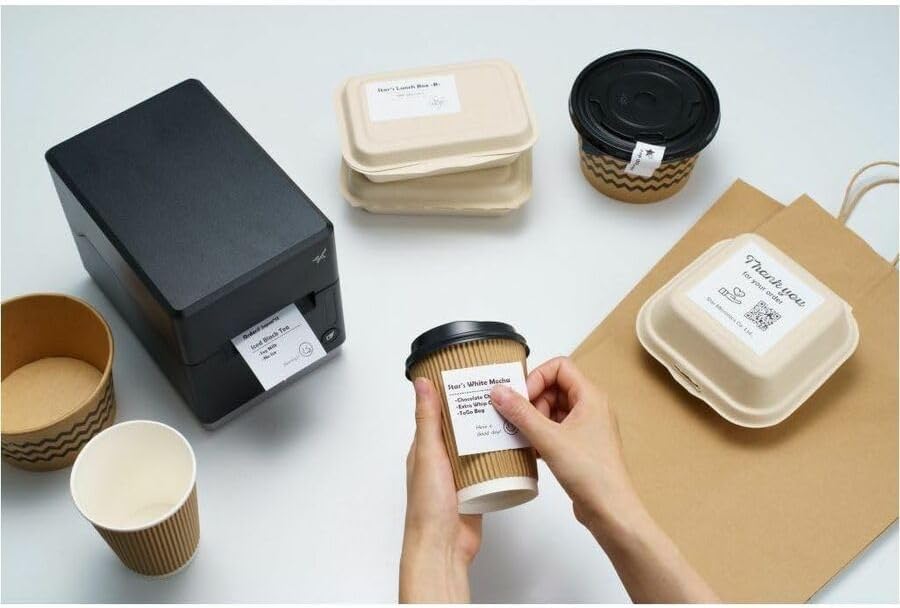
Image: A hand pressing the feed button on the mC-Label3 printer, demonstrating the printing of a 'Thank you' label.

Image: The mC-Label3 printer shown in a practical setting, printing labels for food containers and coffee cups, illustrating its versatility.
Vzdrževanje
1. Čiščenje tiskalnika
Regular cleaning ensures optimal performance and extends the life of your printer.
- Uporabite mehko krpo, ki ne pušča vlaken dampočiščena z izopropilnim alkoholom za čiščenje tiskalne glave.
- Wipe down the exterior of the printer with a soft, dry cloth.
- Izogibajte se uporabi abrazivnih čistil ali topil.
2. Replacing Media
When the media roll is depleted, follow the media loading instructions in the Setup section to replace it.
3. Effortless Repairs
The mC-Label3 is designed for effortless, no-tools-required repairs with minimal upkeep, simplifying any necessary component replacements.
Odpravljanje težav
V tem razdelku so rešitve za pogoste težave, na katere lahko naletite.
| Težava | Možen vzrok | rešitev |
|---|---|---|
| Tiskalnik se ne vklopi | Napajalni kabel ni priključen; Težava z električno vtičnico | Prepričajte se, da je napajalni kabel varno priključen; poskusite z drugo vtičnico. |
| Ni izpisa | Out of media; Media loaded incorrectly; Driver issue | Load new media; Re-load media correctly; Reinstall printer drivers. |
| Slaba kakovost tiskanja | Dirty print head; Low quality media | Clean the print head; Use recommended thermal media. |
| Težave s povezljivostjo | Incorrect cable connection; Bluetooth not paired; Network configuration | Check USB/Ethernet cables; Re-pair Bluetooth; Verify network settings. |
Specifikacije
| Funkcija | Podrobnost |
|---|---|
| Ime modela | mC-oznaka3 |
| Številka modela artikla | MCL32CBI |
| Tehnologija tiskanja | Neposredna toplota |
| Izhod tiskalnika | Enobarvno |
| Največja hitrost črno-belega tiskanja | 23 ppm |
| Največja ločljivost črno-belega tiska | 203 dpi (203 x 203 dpi) |
| Tiskarski mediji | Labels (Linerless, Die-Cut, Continuous), Thermal Receipt |
| Tehnologija povezljivosti | Bluetooth, Wired (USB, Ethernet) |
| Strojni vmesnik | USB-Ethernet |
| Združljive naprave | PC, Android, iOS |
| Vrsta krmilnika | iOS, Android |
| Dimenzije izdelka | 6.7" G x 5.6" Š x 8.3" V (17.0 x 14.2 x 21.1 cm) |
| Teža predmeta | 7.2 funtov (3.27 kg) |
| Zmogljivost pomnilnika | 64 MB |
| barva | Črna |
| Proizvajalec | STAR MICRONICS |
| Država izvora | Kitajska |
Informacije o garanciji
The Star Micronics mC-Label3 MCL32CBI printer comes with a manufacturer's warranty. For specific terms and conditions, please refer to the warranty card included in your package or visit the official Star Micronics webmesto.
Vrsta garancije: Proizvajalec
Podpora
For further assistance, technical support, or to download the latest drivers and firmware, please visit the official Star Micronics support webspletno mesto ali se obrnite na njihovo službo za stranke.
Star Micronics Official Webspletno mesto: www.starmicronics.com
Povezava za podporo: www.starmicronics.com/support