1. Uvod
The FeiyuTech VB4 SE is a compact and foldable 3-axis smartphone gimbal stabilizer designed to capture smooth and stable video footage with your iPhone or Android device. This manual provides detailed instructions for setup, operation, and maintenance to ensure optimal performance and longevity of your device.
2. Pomembne varnostne informacije
- Do not immerse the gimbal in water or expose it to rain.
- Avoid dropping or subjecting the gimbal to strong impacts.
- Keep the gimbal away from heat sources and direct sunlight.
- Do not attempt to disassemble or modify the gimbal. Repairs should only be performed by authorized service personnel.
- Ensure the smartphone is securely mounted and balanced before powering on the gimbal.
- Uporabljajte samo priloženi polnilni kabel in združljiv napajalnik.
3. Vsebina paketa
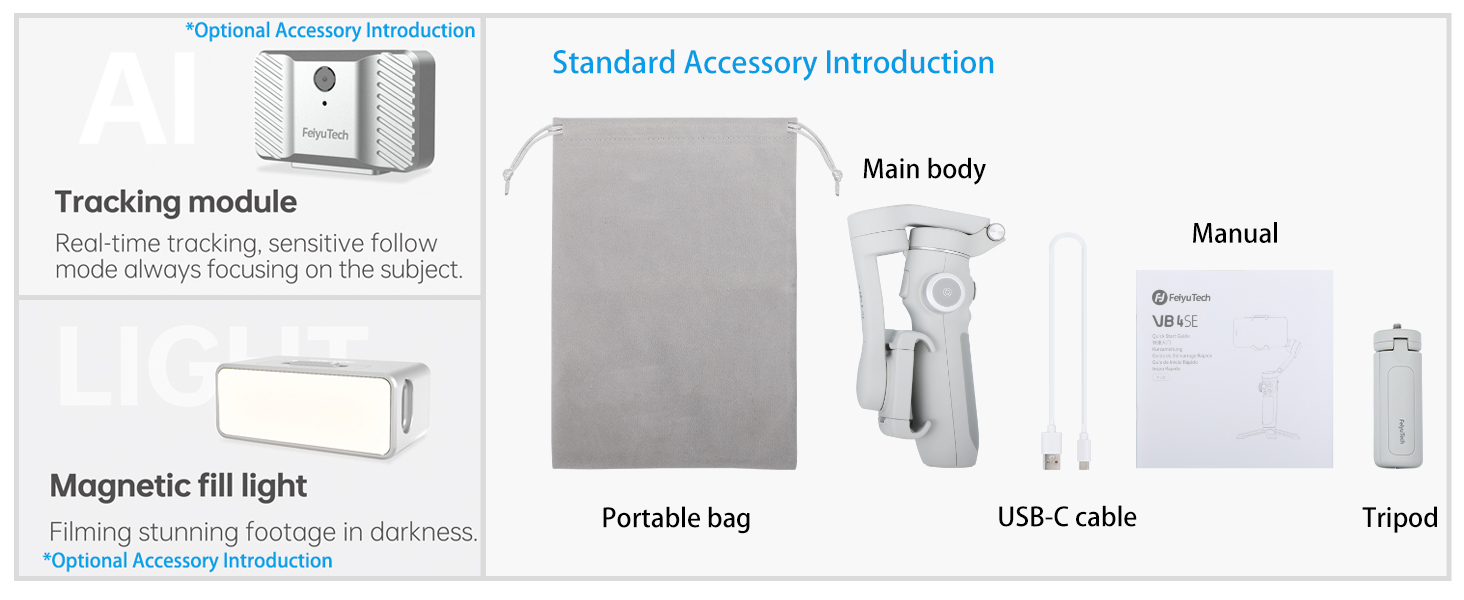
Preverite, ali so v paketu vsi elementi:
- FeiyuTech VB4 SE Gimbal (Main body)
- Prenosna torba
- Polnilni kabel USB-C
- Mini stojalo
- Uporabniški priročnik

Image: FeiyuTech VB4 SE package contents. Includes the gimbal, a portable bag, a USB-C cable, and a tripod.
4. Izdelek je končanview
Familiarize yourself with the components of your FeiyuTech VB4 SE gimbal.

Slika: Bližnji posnetek view of the FeiyuTech VB4 SE gimbal showing the control panel with joystick, multifunction knob, and buttons.
Ključne značilnosti:
- 3-osna stabilizacija: Ensures smooth and steady footage.
- Zložljiv dizajn: Kompakten in prenosen za enostaven transport.
- Built-in Extension Rod: Extends for wider shots and selfies.
- Večnamenski gumb: Controls pan, tilt, focus, and zoom.
- Nadzor s kretnjami: Start/stop recording or take photos with hand gestures.
- Sledenje predmetom: Automatically follows a selected subject.
- One-Button Vertical Shooting: Quickly switch between horizontal and vertical modes.
- Dolga življenjska doba baterije: Vgrajena baterija s kapaciteto 1300 mAh za daljšo uporabo.

Image: Diagram illustrating the key features of the FeiyuTech VB4 SE, including its foldable design, lightweight nature, magnetic expansion, gesture control, multi-functional knob, smart AI follow, one-button portrait/landscape switch, and album control.
5. Nastavitev
5.1 Polnjenje stabilizatorja
Before first use, fully charge the gimbal. Connect the USB-C charging cable to the charging port located near the power button and plug the other end into a USB power adapter (not included). The indicator lights will show charging status.
5.2 Mounting the Smartphone
Podaljšajte telefonsko dolžinoamp and carefully place your smartphone in it. Ensure the phone is centered and secure. The camera lens should be on the left side when facing the gimbal's front.
5.3 Uravnoteženje stabilizatorja
The gimbal features an automatic balancing system. Once the phone is mounted, power on the gimbal, and it will automatically adjust to balance the phone. Manual adjustment may be needed if the phone is significantly off-center.
5.4 App Installation (Feiyu ON)
Download the Feiyu ON app from your smartphone's app store (iOS App Store or Google Play Store). The app unlocks advanced features and provides a better user experience.
5.5 Povezava Bluetooth
Turn on the gimbal and enable Bluetooth on your smartphone. Open the Feiyu ON app and search for available devices. Select "VB4 SE" to connect. Once connected, the Bluetooth indicator light on the gimbal will turn solid blue.
6. Delovanje
6.1 Vklop/izklop
- Vklop: Pritisnite in držite gumb za vklop 3 sekund.
- Ugasniti: Pritisnite in držite gumb za vklop 3 sekund.
Video: This video demonstrates the basic power on/off function, joystick control, stabilization, and switching between horizontal and vertical modes of the FeiyuTech VB4SE gimbal.
6.2 Osnovne kontrole
- igralna palica: Controls the pan and tilt movements of the smartphone.
- Večnamenski gumb: Rotates to control focus or zoom, and can switch between three-axis rotation modes.
- Sprožilec: Pritisnite enkrat za fotografiranje, pritisnite in držite za snemanje videa.
- Gumb za način (M): Cycles through different operating modes (Pan Follow, Tilt Follow, FPV, Lock Mode).
Slika: Podrobna view of the gimbal's control panel, highlighting the indicator area for battery and connection status, the button area for various functions, and the multi-functional knob for sensitive control.
6.3 Načini delovanja
Press the Mode button (M) to switch between the following modes:
- Pan Follow (PF): The camera pans left/right with your hand movements, while tilt and roll axes are locked.
- Tilt Follow (TF): The camera follows both pan and tilt movements, while the roll axis is locked.
- Način FPV: The camera follows all three axes (pan, tilt, and roll) for a first-person view izkušnje.
- Način zaklepanja: All three axes are locked, keeping the camera pointed in a fixed direction.
6.4 Upravljanje z gestami
Enable gesture control in the Feiyu ON app. Use specific hand gestures to initiate actions like taking photos, starting/stopping video recording, or activating object tracking.

Image: Visual guide for gesture control, showing hand signs for taking photos, recording video, starting face tracking, zoom function (iOS only), switching to vertical mode, horizontal mode, and stopping tracking.
6.5 Object Tracking
In the Feiyu ON app, select a subject on your screen, and the gimbal will automatically track its movement, keeping it in the frame.

Image: The gimbal tracking a dog in motion, with a green box indicating the tracked subject on the smartphone screen.
6.6 Vertical/Horizontal Switching
Press the dedicated button to quickly switch your smartphone between horizontal (landscape) and vertical (portrait) shooting orientations, ideal for social media content.

Image: The gimbal rotating a smartphone from horizontal to vertical orientation, demonstrating the quick switch feature.
6.7 Scenario Modes (via Feiyu ON App)
The Feiyu ON app offers various creative shooting modes:
- Light Trail: Capture stunning light trails in low-light conditions.
- Dvojna izpostavljenost: Combine two images into one creative shot.
- Dolly Zoom: Create a dramatic cinematic effect where the background appears to zoom while the foreground remains constant.
- Časovni zamik: Condense long events into short, dynamic videos.
6.8 Using the Extension Rod
The built-in extension rod can be pulled out to extend the gimbal's reach, allowing for wider angles, higher shots, and easier selfies.

Image: The FeiyuTech VB4 SE gimbal with a smartphone mounted, standing on its mini tripod with the extension rod partially extended.
7. Vzdrževanje
7.1 Čiščenje
Wipe the gimbal with a soft, dry cloth. Do not use liquid cleaners or solvents.
7.2 Shranjevanje
Store the gimbal in its portable bag in a cool, dry place away from direct sunlight. Avoid placing heavy objects on top of it.
7.3 Skrb za baterije
To prolong battery life, charge the gimbal at least once every three months if not in regular use. Avoid fully discharging the battery frequently.
8. Odpravljanje težav
- Gimbal se ne vklopi: Prepričajte se, da je baterija napolnjena. Priključite polnilnik in poskusite znova.
- Gimbal unstable/vibrating: Check if the smartphone is properly mounted and balanced. Restart the gimbal.
- Težave s povezavo Bluetooth: Ensure Bluetooth is enabled on your phone and the gimbal. Restart both devices and try reconnecting via the Feiyu ON app.
- Aplikacija se ne odziva: Close and reopen the Feiyu ON app. Ensure your app and phone's operating system are up to date.
- Motors making noise: This can occur if the gimbal is not properly balanced or if the phone is too heavy. Re-balance the phone or check its weight compatibility.
9. Specifikacije
| Model | VB4 SE |
| Dimenzije izdelka | 7.87 x 3.94 x 7.87 cm (razgrnjeno) |
| Zložena velikost | Približno 6 palcev (dolžina) |
| Teža predmeta | 11.1 unče (315 gramov) |
| Kapaciteta baterije | 1300 mAh litij-ionski |
| Vrata za polnjenje | USB-C |
| Povezljivost | Bluetooth |
| Združljive naprave | Smartphones up to 3.5" wide and 9.2 oz in weight |
10. Garancija in podpora
FeiyuTech products come with a standard manufacturer's warranty. For detailed warranty information, please refer to the warranty card included in your package or visit the official FeiyuTech website. For technical support, product inquiries, or service requests, please contact FeiyuTech customer service through their official channels.
Za garancijske zahtevke shranite dokazilo o nakupu.