1. Uvod
This manual provides essential information for the proper use and care of your Bose Wireless Charging Earbud Case Cover. This accessory is designed to upgrade your Bose QuietComfort Ultra Earbuds and QuietComfort Earbuds II charging cases with wireless charging capabilities and provide protective coverage.
2. Kaj je v škatli
- Bose Wireless Charging Case Cover
- Karabin
- Varnostna navodila
3. Nastavitev
3.1 Installing the Case Cover
To install the silicone case cover:
- Gently slide your Bose QuietComfort Ultra Earbuds or QuietComfort Earbuds II charging case into the silicone cover.
- Ensure the case is fully seated and fits snugly within the cover, aligning all ports and indicators.

Image: The Bose Wireless Charging Earbud Case Cover in black, shown with the original earbud case inserted.
3.2 Brezžično polnjenje
To charge your earbuds wirelessly:
- Place the covered earbud case onto a Qi-compatible wireless charging pad.
- The indicator light on the front of the case cover will illuminate to show charging status:
- Rumena luč: Indicates the case is currently charging.
- Bela svetloba: Indicates the case is fully charged.
4. Operating the Case Cover
4.1 Accessing Earbuds
To open the case and access your earbuds, simply lift the top flap of the silicone cover. The original earbud case will open as usual.
4.2 Bluetooth seznanjanje
If you need to pair your earbuds with a new device or re-pair them, locate the small button on the back of your original earbud charging case. Press and hold this button while the case is open to initiate Bluetooth pairing mode. The case cover is designed with an opening to allow access to this button.
4.3 Using the Carabiner
The included carabiner allows for convenient attachment of your earbud case to bags, belt loops, or other gear for easy portability.
- Attach the carabiner to the designated loop on the side of the silicone case cover.
- Securely clip the carabiner to your desired item.
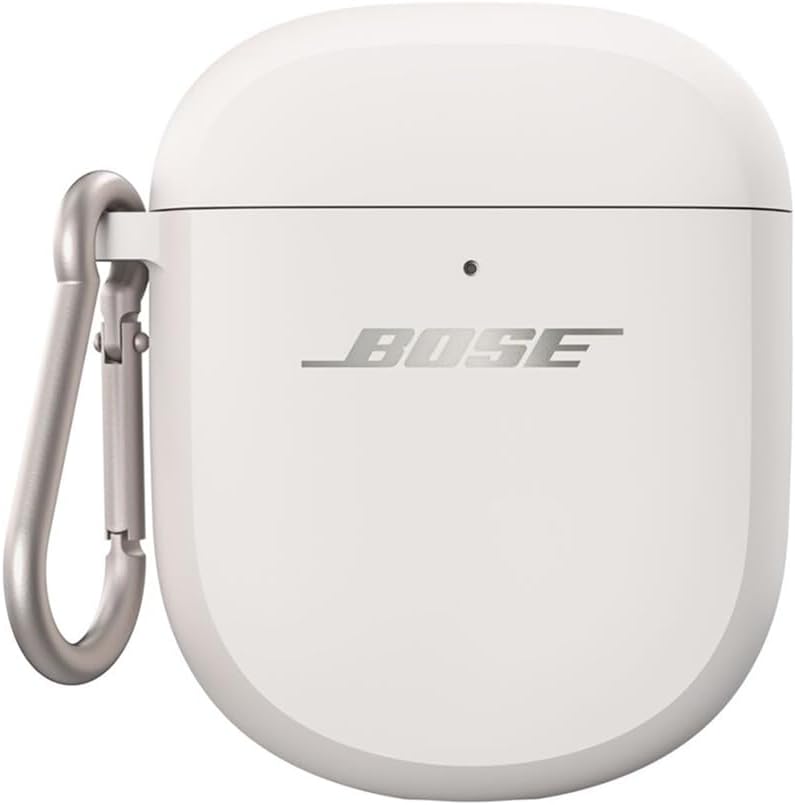
Image: The carabiner attached to the side of the Bose Wireless Charging Earbud Case Cover.
5. Vzdrževanje
5.1 Cleaning the Case Cover
To maintain the appearance and functionality of your silicone case cover:
- Obrišite zunanjost z mehko damp krpo.
- Avoid using harsh chemicals or abrasive materials, as these may damage the silicone.
- For optimal lid adhesion, periodically clean the inside of the lid cover and the top of your earbud charging case with an alcohol wipe to remove any dust or oils.
5.2 Zaščita
The soft silicone exterior is designed to protect your QuietComfort Ultra Earbuds and QuietComfort Earbuds II charging case from external scratches and scuffs during daily use.
6. Odpravljanje težav
6.1 Lid Not Staying Secure
If the top portion of the silicone cover does not stay securely attached to your earbud case:
- Ensure the earbud case is fully inserted and aligned correctly within the silicone cover.
- Clean the interior surface of the silicone lid and the top of your earbud case with an alcohol wipe to remove any residue that might affect adhesion.
6.2 Težave s polnjenjem
If your case is not charging wirelessly:
- Verify that your wireless charging pad is powered on and functioning correctly.
- Ensure the earbud case is properly centered on the wireless charging pad.
- Check the charging indicator light on the case cover (yellow for charging, white for fully charged).
7. Specifikacije
| Funkcija | Podrobnost |
|---|---|
| Dimenzije izdelka | 1.22 x 2.47 x 3.06 palcev |
| Teža predmeta | 1.41 unč |
| ASIN | B0CG678FTX |
| Številka modela artikla | 884181-0010 |
| barva | Črna |
| Faktor oblike | Pokrov |
| Vrsta školjke | Mehko |
| Združljive naprave | Bose QuietComfort Ultra Earbuds and Bose QuietComfort Earbuds II |
8. Garancija in podpora
For warranty information and customer support, please refer to the official Bose website or contact Bose customer service directly. The included Safety Instructions document may also contain relevant contact details.


