1. Izdelek je končanview
The Vorago BSP-500-V2 is a portable Bluetooth speaker designed for robust performance and durability. It features IPX5 water resistance, making it suitable for various environments, including outdoor adventures and parties. This manual provides detailed instructions for setting up, operating, and maintaining your speaker.
Ključne značilnosti:
- Povezljivost True Wireless Stereo (TWS): Connect two BSP-500-V2 speakers for an immersive stereo sound experience.
- Podaljšana življenjska doba baterije: Enjoy up to 7 hours of music playback at 70% volume, thanks to its 2000 mAh battery.
- USB Type-C Polnjenje: Convenient and modern USB-C port for charging.
- Vsestranska povezljivost: Supports Bluetooth for wireless streaming and a 3.5mm auxiliary input for wired connections.
- Vodoodpornost IPX5: Zaščiteno pred nizkotlačnimi vodnimi curki iz katere koli smeri.
Vsebina paketa:
- Vorago BSP-500-V2 Bluetooth zvočnik
- USB polnilni kabel tipa C
- 3.5 mm avdio kabel
- Uporabniški priročnik (ta dokument)
Diagram izdelka:

Slika 1.1: Spredaj view of the Vorago BSP-500-V2 Bluetooth speaker, showcasing its mesh grille and central Vorago logo.

Slika 1.2: Pod kotom view of the speaker, highlighting its robust, rectangular design and integrated carrying strap.

Slika 1.3: Zgornji del view showing the control panel with power, volume down, play/pause, and volume up buttons.
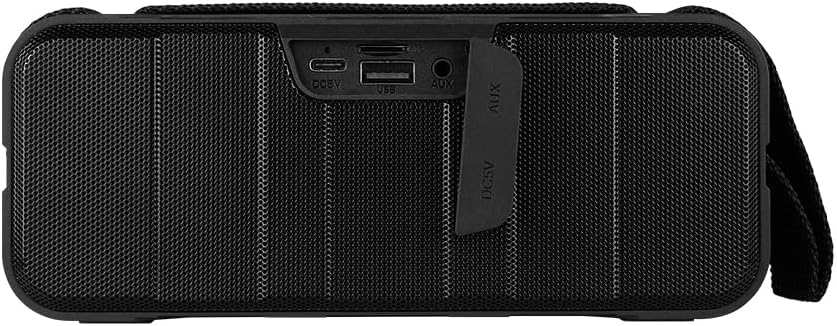
Slika 1.4: Zadaj view of the speaker, showing the protective flap covering the input ports.

Figure 1.5: Close-up of the input ports, including DC 5V (USB-C), USB-A, and AUX (3.5mm) inputs, protected by a rubber cover.
2. Varnostne informacije
- Zvočnika ne izpostavljajte ekstremnim temperaturam (vročini ali mrazu).
- Izogibajte se padcem ali izpostavljanju zvočnika močnim udarcem.
- Zvočnik hranite stran od neposredne sončne svetlobe in virov toplote.
- Do not disassemble, repair, or modify the speaker yourself. This will void the warranty.
- Ensure the port cover is securely closed when using the speaker near water to maintain IPX5 water resistance.
- Do not immerse the speaker in water. IPX5 rating protects against splashes and light rain, not submersion.
- Za polnjenje uporabljajte samo priloženi polnilni kabel ali certificiran kabel USB Type-C.
- Zvočnik očistite z mehko, suho krpo. Ne uporabljajte abrazivnih čistil ali topil.
3. Nastavitev
3.1 Polnjenje zvočnika
- Open the protective rubber cover on the rear of the speaker to access the charging port.
- Connect the USB Type-C end of the charging cable to the speaker's DC 5V port.
- Drugi konec kabla USB priključite na napajalnik USB (ni priložen) ali na vrata USB računalnika.
- Indikatorska lučka polnjenja bo med polnjenjem svetila in ugasnila, ko bo naprava popolnoma napolnjena.
- Once charging is complete, securely close the protective rubber cover to maintain water resistance.
3.2 Vklop/izklop
- Za vklop: Pritisnite in držite Gumb za vklop on the top panel for approximately 3 seconds until you hear an audible prompt.
- Za izklop: Pritisnite in držite Gumb za vklop for approximately 3 seconds until you hear an audible prompt.
3.3 Bluetooth seznanjanje
- Ensure the speaker is powered on. It will automatically enter Bluetooth pairing mode, indicated by a flashing LED light.
- V napravi (pametnem telefonu, tablici, prenosniku) omogočite Bluetooth in poiščite razpoložljive naprave.
- Select "BSP-500-V2" from the list of found devices.
- Once successfully paired, the speaker will emit an audible confirmation, and the LED light will stop flashing and remain solid.
- Zvočnik se bo ob vklopu samodejno ponovno povezal z zadnjo seznanjeno napravo, če je naprava v dosegu in je Bluetooth omogočen.
3.4 Združevanje s pravim brezžičnim stereo sistemom (TWS)
TWS allows you to connect two BSP-500-V2 speakers together for a true stereo sound experience.
- Ensure both BSP-500-V2 speakers are powered on and not connected to any other Bluetooth device.
- Na enem od zvočnikov (to bo glavni zvočnik) dvakrat pritisnite Gumb za predvajanje/pavzoZvočnik bo preklopil v način seznanjanja TWS.
- The two speakers will automatically search for and connect to each other. You will hear an audible confirmation once they are successfully paired.
- Once TWS is established, connect your device to the primary speaker via Bluetooth as described in Section 3.3.
- To disconnect TWS, double-press the Gumb za predvajanje/pavzo na obeh zvočnikih.
3.5 Pomožna (AUX) povezava
For devices without Bluetooth, you can use the 3.5mm audio cable.
- Open the protective rubber cover on the rear of the speaker.
- En konec 3.5 mm avdio kabla priključite na AUX priključek zvočnika.
- Drugi konec kabla priključite na avdio izhod na vaši napravi.
- Zvočnik se bo samodejno preklopil v način AUX.
- Once disconnected, securely close the protective rubber cover.
4. Navodila za uporabo
4.1 Funkcije gumbov:
| Gumb | Funkcija (kratek pritisk) | Funkcija (dolg pritisk) |
|---|---|---|
| Gumb za vklop | N/A | Vklop/izklop |
| Gumb za zmanjšanje glasnosti | Zmanjšaj glasnost | Prejšnja skladba |
| Gumb za predvajanje/pavzo | Predvajanje/začasna ustavitev glasbe, sprejem/končanje klica | Reject Call, Double-press for TWS Pairing |
| Gumb za povečanje glasnosti | Povečaj glasnost | Naslednja skladba |
5. Vzdrževanje
- Čiščenje: Use a soft, dry, lint-free cloth to clean the speaker's surface. For stubborn dirt, slightly dampKrpo sperite z vodo. Ne uporabljajte agresivnih kemikalij, čistilnih topil ali močnih detergentov.
- Vodoodporna nega: Always ensure the rubber port cover on the back of the speaker is fully and securely sealed when using the speaker outdoors or near water. This maintains its IPX5 water resistance. After exposure to water, wipe the speaker dry before opening the port cover for charging or auxiliary connections.
- Shranjevanje: When not in use for extended periods, store the speaker in a cool, dry place, away from direct sunlight and extreme temperatures. It is recommended to charge the speaker fully before storing and to recharge it every few months to maintain battery health.
- Vzdrževanje baterije: To prolong battery life, avoid fully discharging the battery frequently. Charge the speaker when the low battery indicator is active.
6. Odpravljanje težav
| Težava | Možen vzrok | rešitev |
|---|---|---|
| Zvočnik se ne vklopi. | Nizka baterija. | Charge the speaker fully using the provided USB Type-C cable. |
| Seznanitev prek Bluetootha ni mogoča. | Speaker is not in pairing mode; Device's Bluetooth is off; Speaker is already connected to another device; Device is too far from speaker. | Ensure speaker is powered on and flashing (pairing mode). Turn on Bluetooth on your device. Disconnect from other devices. Move device closer to speaker (within 10 meters). |
| Ni zvoka ali nizka glasnost. | Glasnost zvočnika ali naprave je prenizka; Napačen način vnosa; Zvočnik ni priključen. | Increase volume on both speaker and connected device. Ensure correct mode (Bluetooth or AUX) is active. Verify successful Bluetooth pairing or AUX cable connection. |
| Popačenje zvoka. | Previsoka glasnost; Naprava je predaleč od zvočnika; Motnje. | Reduce volume on speaker and/or device. Move device closer to speaker. Avoid obstacles between speaker and device. |
| Seznanjanje s TWS ni uspelo. | Speakers are already paired to a device; Speakers are too far apart. | Ensure both speakers are disconnected from any Bluetooth devices. Place speakers close to each other during TWS pairing. |
7. Specifikacije
| Funkcija | Podrobnost |
|---|---|
| Ime modela | BSP-500-V2 |
| Vrsta zvočnika | Multimedija |
| Posebna funkcija | Bluetooth |
| Priporočena uporaba | Za glasbene predvajalnike |
| Združljive naprave | Prenosnik, MP3 predvajalnik, pametni telefon, tablični računalnik |
| Vrsta krmilnika | Gumb |
| Konfiguracija kanala za prostorski zvok | 5.0 |
| Življenjska doba baterije | 7 ur |
| Vključene komponente | Zvočnik |
| Dimenzije izdelka | 5D x 15Š x 18V centimetrov |
| Teža izdelka | 1 kilogramov |
| Vodotesen | Da (IPX5) |
| Kapaciteta baterije | 2000 mAh |
| Ampvrsta dvigala | Aktiven |
| Vir napajanja | Baterija |
| Frekvenčni odziv | 180 Hz |
| Tehnologija povezljivosti | Bluetooth |
| Način avdio izhoda | Stereo |
| Vrsta namestitve | Namizni nosilec |
8. Garancija in podpora
The Vorago BSP-500-V2 Bluetooth Speaker comes with a limited warranty. Please refer to the warranty card included with your product for specific terms and conditions, or visit the official Vorago webstran za več podrobnosti.
For technical support, troubleshooting assistance, or warranty claims, please contact Vorago customer service through their official channels. You can find more information and contact details on the Vorago Brand Store on Amazon ali njihov uradnik webmesto.
Prosimo, shranite dokazilo o nakupu za namene garancije.


