1. Uvod
This manual provides comprehensive instructions for the setup, operation, and maintenance of your Xprinter XP-Q801K Thermal Receipt Printer. This printer is designed for efficient and reliable receipt printing in various business environments, featuring high-speed direct thermal printing and a USB interface for easy connectivity.

Slika 1: Spredaj view of the Xprinter XP-Q801K Thermal Receipt Printer, showing the paper output slot and control buttons.
2. Nastavitev
2.1 Razpakiranje
Previdno vzemite tiskalnik in vso dodatno opremo iz embalaže. Preverite, ali so prisotne vse komponente:
- Xprinter XP-Q801K Thermal Receipt Printer
- Napajalni adapter
- USB kabel
- Paper Roll (starter)
- Uporabniški priročnik (ta dokument)
2.2 Priključitev tiskalnika
Before connecting, ensure the printer is powered off. Locate the ports on the rear of the printer.
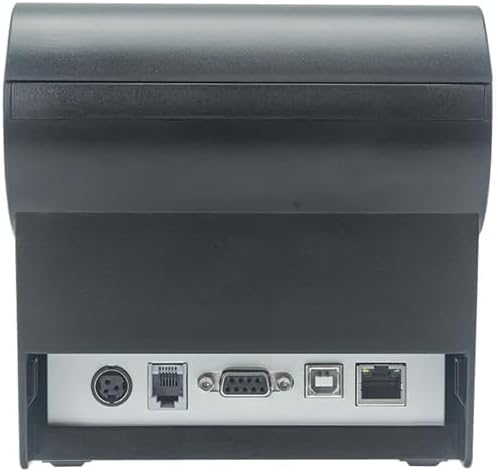
Slika 2: Zadaj view of the printer, highlighting the power, USB, and other interface ports.
- Priključite napajanje: Insert the power adapter cable into the printer's power input port (DC 24V/2.5A) and plug the adapter into a suitable electrical outlet (AC 100-240V, 50-60Hz).
- Priključite USB: Connect one end of the provided USB cable to the USB port on the printer and the other end to an available USB port on your computer.
- Cash Drawer (Optional): If using a cash drawer, connect its cable to the cash drawer port (DC 24V/1A) on the printer.
2.3 Loading the Paper Roll
Tiskalnik uporablja role termičnega papirja širine 80 mm.
- Open the paper cover by pushing the cover open button (usually located on the side or front).
- Insert the thermal paper roll with the printing surface facing the print head. Ensure the roll is seated correctly in the paper compartment.
- Izvlecite majhno količino papirja mimo rezalnika.
- Pokrov za papir trdno zaprite, dokler se ne zaskoči.
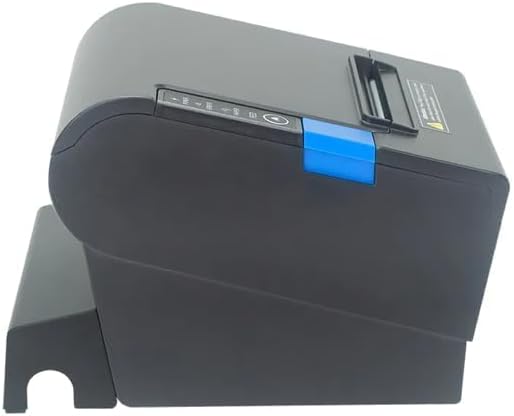
Slika 3: stran view of the printer, illustrating the paper cover mechanism.
2.4 Namestitev gonilnika
The printer requires a driver to communicate with your computer. Drivers are typically available for Windows, Linux, Android, and Mac operating systems.
- For Windows users, the printer often supports plug-and-play installation or requires a specific Windows driver.
- For Linux, Android, and Mac, SDKs (Software Development Kits) are usually provided for integration.
Glejte navodila proizvajalca website or the included driver CD/USB drive for the latest drivers and installation instructions specific to your operating system.
3. Upravljanje tiskalnika
3.1 Vklop/izklop
Locate the power switch on the side or rear of the printer. Flip the switch to the 'ON' position to power on the printer. The 'POWER' indicator light will illuminate. Flip to 'OFF' to power down.
3.2 Indicator Lights and Buttons
The front panel typically features several indicator lights and buttons:
- MOČ: Označuje, da je tiskalnik vklopljen.
- NAPAKA: Illuminates or flashes to indicate an error condition (e.g., paper out, print head overheating, cutter error).
- PAPIR: Indicates that the paper roll is low or out.
- Gumb FEED: Press to manually feed paper. Hold to perform a self-test print (if supported by model).
3.3 Osnovno tiskanje
Once the printer is connected and drivers are installed, you can print receipts from your POS software or application. Ensure the printer is selected as the default or active printer in your system settings.
The printer supports various print speeds up to 300 mm/s and automatic paper cutting after each print job.
4. Vzdrževanje
Redno vzdrževanje zagotavlja optimalno delovanje in podaljšuje življenjsko dobo vašega tiskalnika.
4.1 Čiščenje tiskalne glave
The print head should be cleaned regularly, especially if print quality degrades.
- Izklopite tiskalnik in odklopite napajalni kabel.
- Odprite pokrov papirja.
- Z vatirano palčko rahlo obrišiteampened with isopropyl alcohol (ethanol) to gently wipe the thermal elements of the print head.
- Preden zaprete pokrov in ponovno priključite napajanje, pustite, da se tiskalna glava popolnoma posuši.
4.2 Cleaning the Cutter
Paper dust can accumulate around the cutter blade, affecting its performance.
- Izklopite tiskalnik in odklopite napajalni kabel.
- Carefully remove any visible paper dust or debris from around the cutter blade using a soft brush or compressed air.
- Do not use liquids on the cutter.
4.3 Generalno čiščenje
Zunanjost tiskalnika obrišite z mehko,amp krpo. Izogibajte se uporabi močnih kemikalij ali abrazivnih čistil.
5. Odpravljanje težav
Ta razdelek obravnava pogoste težave, na katere lahko naletite s tiskalnikom.
| Težava | Možen vzrok | rešitev |
|---|---|---|
| Tiskalnik se ne vklopi. | Napajalni kabel ni priključen; Okvara vtičnice; Stikalo za napajanje je izklopljeno. | Ensure power cable is securely connected. Test power outlet. Turn power switch to 'ON'. |
| No printing. | Paper out; Paper loaded incorrectly; Driver not installed or incorrect; USB cable loose; Printer not selected. | Load new paper roll. Re-load paper correctly. Install/reinstall correct driver. Check USB connection. Select printer in software. |
| ERROR light is on/flashing. | Paper out; Paper jam; Print head overheating; Cutter error. | Load paper. Clear paper jam. Allow printer to cool down. Check cutter for obstructions. |
| Slaba kakovost tiskanja. | Dirty print head; Low quality paper; Old paper roll. | Clean the print head (see Section 4.1). Use high-quality thermal paper. Replace old paper rolls. |
Če težava po poskusu teh rešitev še vedno obstaja, se obrnite na podporo strankam.
6. Specifikacije
| Funkcija | Podrobnost |
|---|---|
| Metoda tiskanja | Neposredna toplota |
| Širina papirja | 80 mm |
| Hitrost tiskanja | 230 mm / s, 260 mm / s, 300 mm / s |
| Vmesnik | USB |
| Razmik med vrsticami | 3.75 mm (adjustable by commands) |
| Character Size (ANK) | Font A: 1.5 × 3.0 mm (12 × 24 dots) Font B: 1.1 × 2.1 mm (9 × 17 dots) |
| Character Size (Chinese/Traditional Chinese) | 3.0 × 3.0 mm (24 × 24 dots) |
| Vrste črtne kode | UPC-A / UPC-E / JAN13 (EAN13) / JAN8 (EAN8) / CODE39 / ITF / CODABAR / CODE93 / CODE128 |
| 2D črtna koda | QR Code / PDF417 |
| NV Flash Memory | 256 KB |
| Vhodna moč | AC 100-240V, 50-60Hz |
| Izhodna moč | DC 24V/2.5A |
| Izhod iz predala za gotovino | DC 24V/1A |
| Teža | 1.0 kg |
| Mere (D × Š × V) | 194.5 × 145 × 146.4 mm |
| Delovna temperatura | 0~45°C |
| Delovna vlažnost | 10~80 % RH |
| Življenje rezalnika | 1.5 milijonov kosov |
| Življenje tiskalne glave | 150 km |
| Združljivost OS | Windows, Linux, Android, Mac |


