Konec izdelkaview
The CHUWI GemiBook Plus is a 15.6-inch business laptop designed for efficient daily computing. It features an Intel N100 CPU, 8GB of LPDDR5 RAM, and a 256GB SSD, running on Windows 11. This laptop is built for portability and performance, suitable for both work and entertainment.

Slika: spredaj view of the CHUWI GemiBook Plus laptop displaying the Windows 11 logo on its screen, highlighting its operating system.
Kaj je v škatli
- CHUWI GemiBook Plus Laptop
- 38Wh Li-ion Battery (integrated)
- Napajalni adapter
- Dokumentacija (uporabniški priročnik, garancijski list)
Vodnik za namestitev
1. Začetno polnjenje
Before first use, connect the power adapter to the laptop's charging port and a power outlet. Charge the laptop until the battery indicator shows a full charge. This ensures optimal battery performance.
2. Vklop
Press the power button located on the keyboard to turn on the laptop. The power button is typically found in the top right corner of the keyboard area.

Slika: Od zgoraj navzdol view of the CHUWI GemiBook Plus laptop, showing the full keyboard layout and touchpad, indicating the power button location.
3. Namestitev sistema Windows 11
Follow the on-screen prompts to complete the Windows 11 initial setup. This includes selecting your region, language, connecting to a Wi-Fi network, and creating a user account. Ensure you have an active internet connection for this process.
Navodila za uporabo
Tipkovnica in sledilna ploščica
The laptop features a full-sized keyboard and a responsive touchpad for navigation. The touchpad supports multi-touch gestures for enhanced control.

Image: A hand demonstrating the use of the touchpad on the CHUWI GemiBook Plus laptop, highlighting its multi-touch capabilities.
Povezovanje zunanjih naprav
Prenosnik je opremljen z različnimi priključki za priključitev zunanjih naprav:
- Vrata USB: Connect USB devices such as mice, keyboards, or external storage drives. The laptop has 1 USB 2.0 port.
- Vrata HDMI: Za večji zaslon priključite zunanji monitor ali televizor.
- Zvočni priključek: Priključite slušalke ali zunanje zvočnike.
Brezžična povezljivost
The CHUWI GemiBook Plus supports Wi-Fi 6 (802.11ax) for high-speed internet access and Bluetooth 5.2 for connecting wireless accessories like headphones or speakers.
Webcam Privacy Switch
For enhanced privacy, the laptop includes a physical switch to block the webcam lens. Slide the switch to cover or uncover the camera as needed.
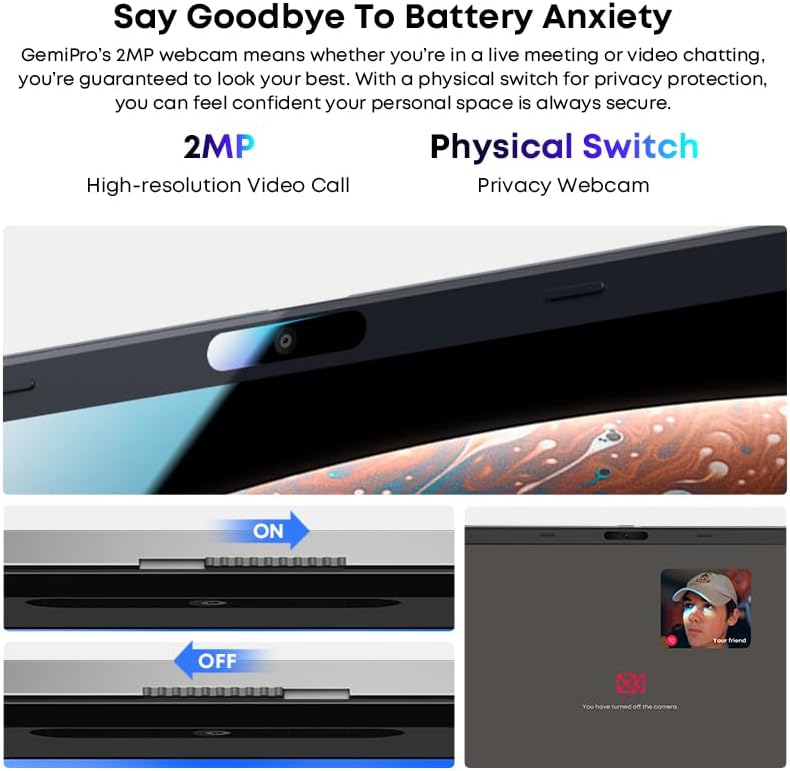
Slika: Bližnji posnetek view of the laptop's webcam, illustrating the physical privacy switch in both open and closed positions.
Vzdrževanje
Čiščenje prenosnika
Za čiščenje zaslona in zunanjih površin uporabite mehko krpo, ki ne pušča vlaken. Za trdovratne madeže rahlo obrišiteampKrpo sperite z vodo ali raztopino za čiščenje zaslona. Izogibajte se agresivnim kemikalijam ali abrazivnim materialom.
Skrb za baterijo
The laptop is equipped with a 38Wh Li-ion battery. To prolong battery life, avoid extreme temperatures and fully discharging the battery frequently. It takes approximately 3 hours for a full recharge.
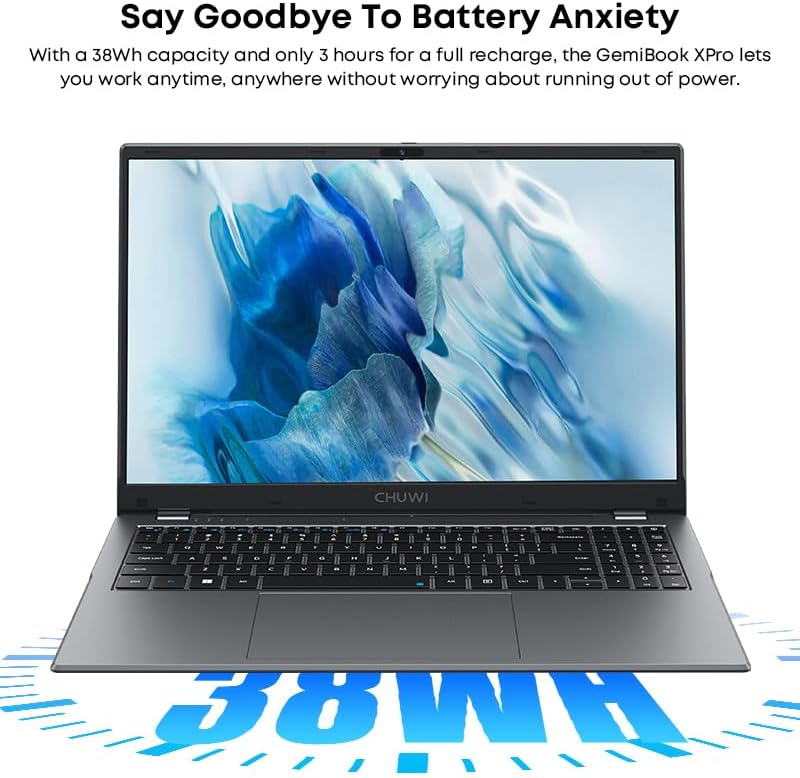
Image: The CHUWI GemiBook Plus laptop with an overlay indicating its 38Wh battery capacity, emphasizing its power endurance.
Posodobitve programske opreme
Redno preverjajte in nameščajte posodobitve sistema Windows in posodobitve gonilnikov, da zagotovite optimalno delovanje in varnost.
Odpravljanje težav
Prenosnik se ne vklopi
- Prepričajte se, da je napajalnik varno priključen tako na prenosnik kot na delujočo električno vtičnico.
- Preverite, ali vtičnica deluje, tako da vanjo priključite drugo napravo.
- Če je baterija popolnoma prazna, lahko traja nekaj minut polnjenja, preden se prenosnik lahko vklopi.
Brez povezave Wi-Fi
- Preverite, ali je v nastavitvah sistema Windows omogočen Wi-Fi.
- Znova zaženite usmerjevalnik Wi-Fi in prenosnik.
- Ensure you are within range of a Wi-Fi network and have entered the correct password.
Počasno delovanje
- Zaprite nepotrebne aplikacije, ki se izvajajo v ozadju.
- Preverite in namestite morebitne čakajoče posodobitve sistema Windows.
- Run a disk cleanup and defragmentation (for HDD) or optimize drives (for SSD).
- Zagotovite dovolj prostega prostora na SSD-ju.
Specifikacije
| Funkcija | Podrobnost |
|---|---|
| Znamka | CHUWI |
| Ime modela | GemiBook Plus |
| Velikost zaslona | 15.6 palcev |
| Ločljivost zaslona | 1920 x 1080 slikovnih pik (FHD) |
| Procesor | Intel N100 CPU (up to 3.4GHz) |
| RAM | 8 GB LPDDR5 |
| Trdi disk | 256 GB SSD (M.2 2280 SSD expansion up to 1TB supported) |
| Operacijski sistem | Windows 11 |
| Grafična kartica | Integrated Intel UHD Graphics for 12th Gen Intel Processors |
| Brezžična vrsta | Wi-Fi 6 (802.11ax) |
| Bluetooth | Bluetooth 5.2 |
| Pristanišča | 1x USB 2.0, HDMI, Audio Jack |
| Teža predmeta | 3.85 funtov (1.74 kg) |
| Dimenzije izdelka | 14.1 x 9.5 x 0.78 palcev (35.8 x 24.1 x 1.98 cm) |
| Baterija | 38 Wh litij-ionska baterija |
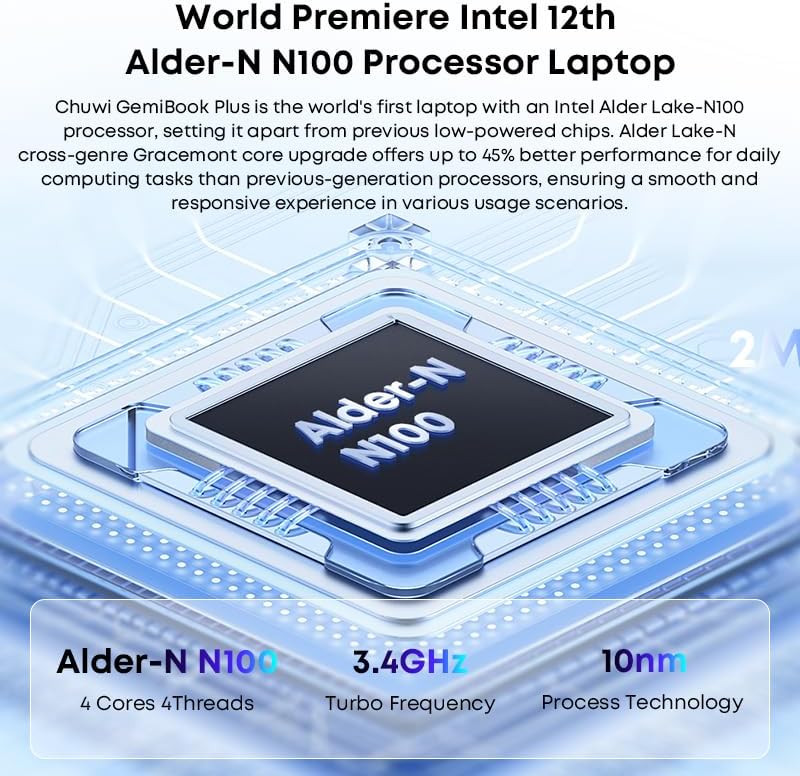
Image: Diagram illustrating the Intel Alder-N N100 processor with details on its 4 Cores 4 Threads, 3.4GHz Turbo Frequency, and 10nm Process Technology.
Garancija in podpora
Informacije o garanciji
The CHUWI GemiBook Plus laptop comes with a 1-letna garancija valid immediately after purchase. This warranty covers manufacturing defects and ensures product reliability.
Podpora uporabnikom
CHUWI offers lifetime factory professional support and 24 hours of online support to assist with any issues or questions you may have. For support, please refer to the contact information provided in your product documentation or visit the official CHUWI webmesto.
Obiščete lahko tudi CHUWI Store on Amazon za več informacij in virov.


