Uvod
This manual provides detailed instructions for the installation, operation, and maintenance of your ANJIELO SMART 10-inch Video Doorbell System. This system features a 1080P camera, infrared night vision, 160° wide-angle lens, PIR motion detection, and a 10-inch touch screen monitor for enhanced home security and communication. Please read this manual thoroughly before use to ensure proper functionality and safety.
Vsebina paketa
- 1 x 10-inch TFT-LCD Touch Screen Indoor Monitor
- 1 x Outdoor Doorbell Camera (2MP 1080P)
- 1 x Power Adapter (DC 12V, 2A)
- Montažni vijaki in sidra
- 4-wire Connection Cable
- 1 x 32 GB Micro SD kartica
- Uporabniški priročnik (ta dokument)
Varnostne informacije
- Pred namestitvijo ali vzdrževanjem se prepričajte, da je napajanje izklopljeno.
- Notranjega monitorja ne izpostavljajte vlagi ali ekstremnim temperaturam.
- Uporabljajte samo priloženi napajalnik.
- Izdelek hranite izven dosega otrok.
- Refer to a qualified electrician for complex wiring if unsure.
Nastavitev in namestitev
1. Outdoor Doorbell Camera Installation
The outdoor doorbell camera is designed for surface or flush mounting. Choose a location near your entrance that provides a clear view of visitors and is protected from direct heavy rain. The unit has an IP66 waterproof rating.
- Označite mesta za vrtanje na steni s pomočjo nosilca kot šablone.
- Izvrtajte luknje in po potrebi vstavite stenska sidra.
- Pritrdite nosilec na steno z vijaki.
- Connect the 4-wire cable from the doorbell to the designated wiring in your wall. Ensure correct polarity.
- Attach the doorbell camera to the mounting bracket.
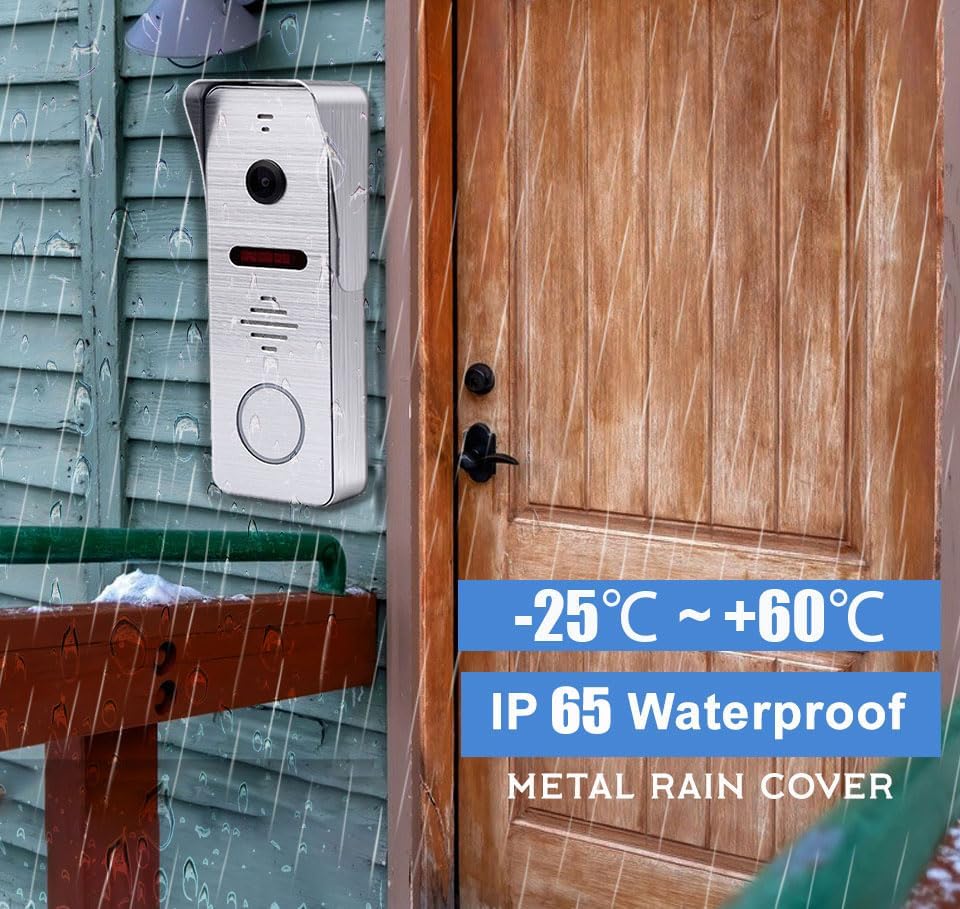
Slika 1: The outdoor doorbell camera is designed for outdoor use with an IP65 waterproof rating, capable of withstanding temperatures from -25°C to +60°C. It is shown mounted on a wooden wall next to a door.
2. Namestitev notranjega monitorja
The indoor monitor is designed for surface mounting. Select a central location within your home where the monitor is easily accessible and visible.
- Mark and drill holes for the monitor's mounting bracket.
- Montažni nosilec pritrdite na steno.
- Connect the 4-wire cable from the outdoor doorbell to the indoor monitor.
- Connect the DC 12V power adapter to the monitor and plug it into a power outlet.
- Mount the indoor monitor onto its bracket.

Slika 2: The indoor monitor displays the visitor, while the outdoor doorbell is ready for interaction. A smartphone app allows for remote control, including unlocking.
3. App Configuration (Tuya Solution)
The indoor monitor supports Wi-Fi connectivity and integrates with the Tuya Smart app for remote monitoring and control.
- Prenesite aplikacijo »Tuya Smart« iz trgovine z aplikacijami za vaš pametni telefon (iOS ali Android).
- Registrirajte se ali se prijavite v svoj račun Tuya Smart.
- On the indoor monitor, navigate to the Wi-Fi settings and connect to your home Wi-Fi network.
- Follow the in-app instructions to add your video doorbell system. This typically involves scanning a QR code displayed on the monitor or entering a device ID.
- Once connected, you can receive calls, view v živo footage, and control the system remotely via the app.
Navodila za uporabo
1. Visitor Interaction
- Zvonec na vratih: When a visitor presses the outdoor doorbell button, the indoor monitor will ring, and the Tuya Smart app on your smartphone will receive an immediate call notification.
- Dvosmerna komunikacija: Answer the call from the indoor monitor or your smartphone app to see, hear, and speak to the visitor.
- Oddaljeno spremljanje: Uporabite aplikacijo za view live video from the doorbell camera at any time.

Slika 3: The system enables seamless two-way communication, allowing you to see, speak to, and hear visitors directly from your indoor monitor or smartphone.
2. Zaznavanje in snemanje gibanja
- PIR zaznavanje gibanja: The doorbell features PIR motion detection combined with radar detection to accurately identify human movement near your entrance.
- Alarm v realnem času: Upon detecting motion, the system will send an alert to your smartphone app and record the event. Recorded videos can be reviewed on the indoor monitor.
- Samodejno snemanje: All captured moments are saved to the included 32GB Micro SD card in the local monitor.

Slika 4: Motion sensors provide notifications when movement is detected, with event logs accessible via the smartphone app.
3. Načini delovanja
The indoor monitor offers three selectable operating modes:
- Residence Mode: Standard operation with full alerts and ringing.
- Non-residence Mode: When you are away, the doorbell camera will automatically record visitor calls and motion events, notifying you via the app without ringing the indoor monitor.
- Način tišine: The doorbell and monitor will not produce sound, providing a quiet environment. App notifications for calls and motion detection will still be active.
4. Širokokotni objektiv View in nočni vid
- 160° Ultra Wide Viewkot kota: The camera provides a 160° horizontal field of view and a 100° vertical field of view, ensuring comprehensive coverage of your entrance area.
- Infrardeči nočni vid: Equipped with 8 enhanced infrared lights, the doorbell camera provides clear 1080P HD images even in low-light conditions or complete darkness, without color deviation.

Slika 5: The 160° wide-angle lens and infrared night vision ensure clear visibility day and night, capturing a broad area around your door.
5. Preusmeritev klicev
If a visitor presses the call button and the primary indoor monitor is not answered, the call can be forwarded to another indoor monitor within the system, allowing other users to interact with the visitor.

Slika 6: The call forwarding feature allows a visitor's call to be transferred to another indoor monitor if the initial one is not answered.
Vzdrževanje
- Čiščenje: Uporabite mehko, damp cloth to clean the indoor monitor screen and the outdoor doorbell camera lens. Avoid abrasive cleaners or solvents.
- Zaščita pred vremenskimi vplivi: While the outdoor unit is IP66 waterproof, regularly check for any debris or obstructions around the camera lens and microphone/speaker.
- Posodobitve vdelane programske opreme: Check the Tuya Smart app periodically for any available firmware updates for your system to ensure optimal performance and security.
- Upravljanje SD kartice: Občasno ponovnoview and manage recordings on the 32GB Micro SD card. Format the card if necessary to free up space or resolve recording issues.
Odpravljanje težav
- Ni napajanja za monitor:
- Ensure the power adapter is securely plugged into both the monitor and a working electrical outlet.
- Preverite vtičnico z drugo napravo.
- Ni videa/zvoka iz zvonca na vratih:
- Verify that the 4-wire connection between the outdoor doorbell and indoor monitor is secure and correctly wired.
- Restart both the outdoor doorbell (by temporarily disconnecting power) and the indoor monitor.
- App Not Receiving Notifications:
- Ensure the indoor monitor is connected to Wi-Fi.
- Check your smartphone's notification settings for the Tuya Smart app.
- Verify that the app is running in the background or has necessary permissions.
- Ensure the monitor is not in "Silence Mode" if you expect audible alerts from the monitor.
- Zaznavanje gibanja ne deluje:
- Check motion detection settings in the indoor monitor and Tuya Smart app.
- Ensure the sensor area is clear of obstructions.
- Adjust sensitivity settings if false alarms or missed detections occur.
- Slaba kakovost nočnega vida:
- Prepričajte se, da je objektiv fotoaparata čist in brez umazanije ali madežev.
- Check for any reflective surfaces close to the doorbell that might interfere with the infrared lights.
Specifikacije
| Funkcija | Podrobnost |
|---|---|
| zaslon | 10-palčni TFT-LCD zaslon na dotik |
| Resolucija | 1024 x 680 |
| Prstani | 7-akordni melodični obroči |
| Povezava | 4-wires, WIFI (Tuya solution) |
| Material plošče | Akrilni/ABS pokrov |
| Namestitev | Nadometna montaža |
| Vhodna voltage | AC 100-240V 50/60Hz |
| Delovni letniktage | DC 12V, 2A |
| Dimenzije | 198 x 130 x 21 mm (7.8 x 5.1 x 0.8 palca) |
| Funkcija | Podrobnost |
|---|---|
| Vodoravna ločljivost | 2MP 1080P |
| Slikovni senzor | CCD/barvni CMOS senzor |
| Velikost senzorja | 1/3 palca |
| Vizualni kot | 160 degrees (140° horizontal, 100° vertical) |
| Nočni vid | IR Cut, B/W Night Vision (8 enhanced IR lights) |
| Material plošče | Kovina |
| Namestitev | Nadometna/vgradna montaža |
| Dimenzije | 135 x 47 x 33 mm (5.7 x 3.6 x 1.5 palca) |
| Delovna temperatura | -40 °C do 50 °C (-40 °F do 122 °F) |
| Ocena IP | Vodoodporen IP66 |
Druge specifikacije:
- Protokol povezljivosti: Wi-Fi, Wired (4-wire connection)
- Združljive naprave: Smartphone (iOS/Android), Tablet
- Shranjevanje: 32 GB Micro SD kartica (priložena)
- Nadzorna metoda: Touch (monitor), App
- Številka modela: AHD7+94206
- ASIN: B0CF1VS7D1
Garancija in podpora
For warranty information and technical support, please refer to the documentation provided with your purchase or contact ANJIELO SMART customer service directly.
Proizvajalec: ANJIELO SMART
Prvič na voljo: 8. avgust 2023