1. Uvod
This manual provides essential information for the safe and efficient use of your FLEXISPOT 42-inch Sit-to-Stand Desk Riser. This height-adjustable computer workstation is designed to promote a healthy balance between sitting and standing throughout your workday. Please read these instructions thoroughly before assembly and operation.
2. Varnostne informacije
- Pred uporabo se prepričajte, da so vse komponente varno pritrjene.
- Do not exceed the maximum weight capacity of 33 lbs for the desktop and 4.4 lbs for the keyboard tray.
- Keep hands and fingers clear of moving parts during height adjustment to prevent injury.
- Place the desk riser on a stable, level surface.
- Distribute weight evenly on the desktop to maintain stability.
- Med delovanjem naj se otroci in hišni ljubljenčki ne približujejo enoti.
3. Vsebina paketa
Pred začetkom montaže preverite, ali so vsi deli prisotni. Če kateri koli deli manjkajo ali so poškodovani, se obrnite na podporo strankam.
- Main Desk Riser Unit
- Odstranljiv pladenj za tipkovnico
- Assembly Hardware (screws for keyboard tray)
- Navodila za uporabo
4. Navodila za nastavitev
The FLEXISPOT Sit-to-Stand Desk Riser is designed for quick and straightforward assembly. Two people are recommended for easier setup.
- Razpakirajte enoto: Previdno odstranite vse komponente iz embalaže.
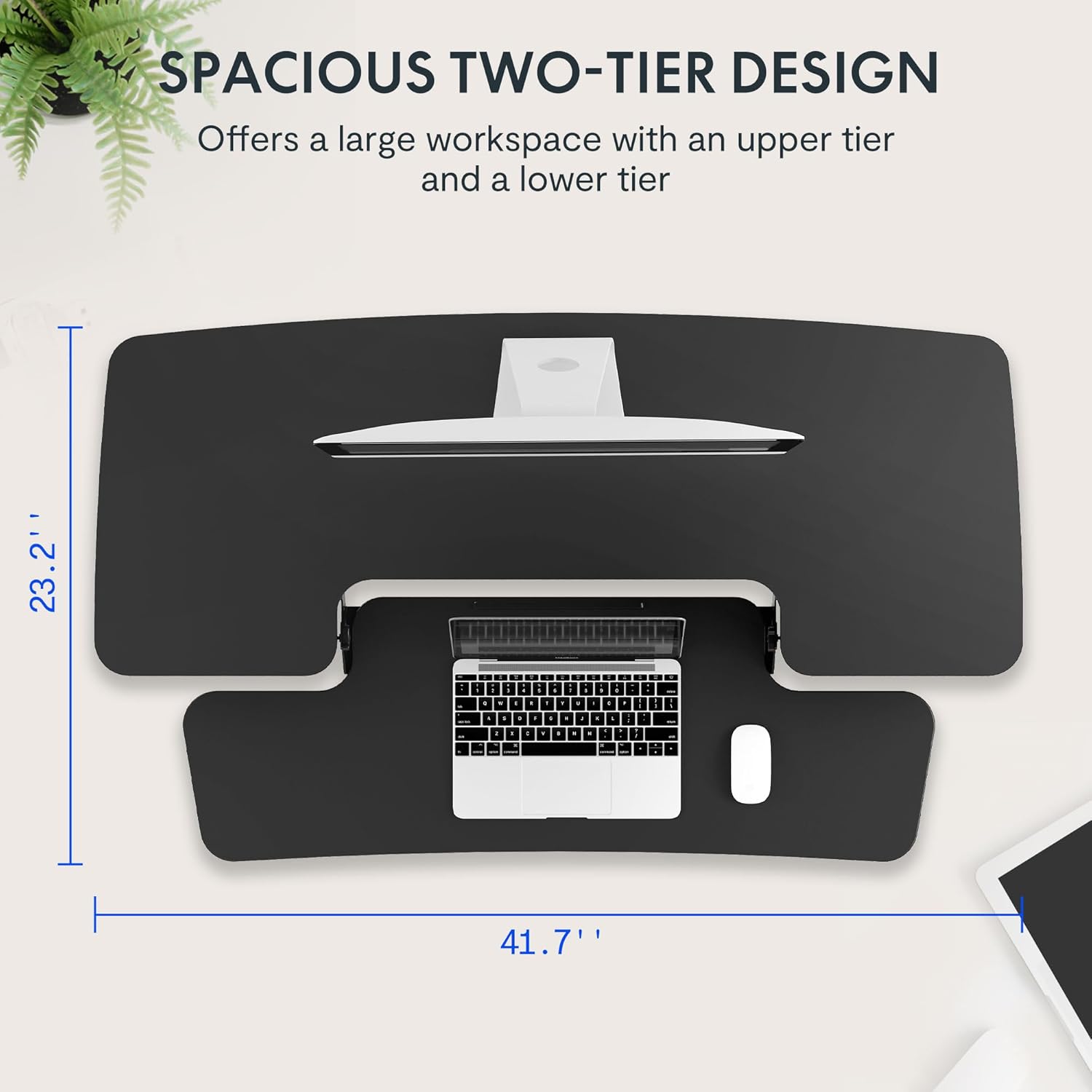
- Postavite glavno enoto: Place the main desk riser unit on your existing desk or workstation. Ensure it is centered and stable.
- Pritrdite pladenj za tipkovnico: Align the removable keyboard tray with the designated slots on the underside of the main unit. Slide the tray into place until it clicks securely. Use a Phillips screwdriver (not included) to fasten any provided screws for additional stability.
- Organizirajte kable: Utilize the included cable management loops to organize your monitor, keyboard, and mouse cables. Ensure cables have enough slack to accommodate the full range of height adjustment.


5. Navodila za uporabo
The desk riser features a spring-assisted lifting mechanism for smooth and effortless height adjustments.
- Nastavitev višine: To raise or lower the desk, locate the lever on the right side of the main unit. Squeeze the lever firmly.
- Dvigovanje mize: While squeezing the lever, gently lift the desktop to your desired standing height. The spring-assisted mechanism will help elevate the unit. Release the lever to lock the desk in place.
- Spuščanje mize: While squeezing the lever, gently push down on the desktop to lower it to your desired sitting height. Release the lever to lock the desk in place.
- Vertikalno gibanje: The desk riser moves straight up and down within its own footprint, requiring no additional spatial accommodations. The height can be adjusted between 4.7 inches (minimum) and 19.7 inches (maximum).


6. Vzdrževanje
Regular maintenance ensures the longevity and optimal performance of your desk riser.
- Čiščenje: Površine obrišite z mehko, damp krpo. Izogibajte se abrazivnim čistilom ali močnim kemikalijam, ki lahko poškodujejo zaključek.
- Pregled: Občasno preverite vse vijake in povezave, da se prepričate, da so trdno priviti. Po potrebi jih privijte.
- Gibljivi deli: The lifting mechanism is designed to be maintenance-free. Do not attempt to lubricate or disassemble it.
7. Odpravljanje težav
If you encounter any issues with your desk riser, refer to the following common solutions:
- Desk is difficult to adjust: Ensure no objects are obstructing the lifting mechanism. Verify that the weight on the desktop does not exceed the maximum capacity.
- Desk feels unstable: Check that the unit is placed on a flat, stable surface. Ensure all components, especially the keyboard tray, are securely attached. Redistribute weight evenly on the desktop.
- Keyboard tray is loose: Re-check the connection points of the keyboard tray and ensure any fastening screws are tightened.
If problems persist, please contact FLEXISPOT customer support for assistance.
8. Specifikacije
| Funkcija | Specifikacija |
|---|---|
| Znamka | FLEXISPOT |
| Model | B0CDWSPYKQ |
| Mere izdelka (D x Š x V) | 24"D x 42"Š x 19.7"V |
| barva | Črna |
| Vrsta zgornjega materiala | Konstruiran les |
| Teža predmeta | 52 funta |
| Najmanjša višina | 4.7 palcev |
| Največja višina | 19.7 palcev |
| Nosilnost namiznega računalnika | 33 lbs |
| Keyboard Tray Load Capacity | 4.4 lbs |
| Zahtevana montaža | Yes (Keyboard Tray) |
| Priporočeno število ljudi za montažo | 2 |

9. Garancija in podpora
Your FLEXISPOT Sit-to-Stand Desk Riser comes with a limited warranty. For specific details regarding warranty coverage, please refer to the warranty documentation included with your purchase or visit the official FLEXISPOT webmesto.
For technical support, troubleshooting assistance, or warranty claims, please contact FLEXISPOT customer service. You can typically find contact information on the manufacturer's webspletnega mesta ali prek vaše nakupovalne platforme.
Spletna podpora: Obiščite FLEXISPOT Store on Amazon za informacije o izdelku in vire podpore.


