1. Uvod
Welcome to the user manual for your KLIM Discover Portable CD Player. This device combines classic CD playback with modern features such as Bluetooth connectivity, FM radio, FM transmission, and SD card support. This manual will guide you through the setup, operation, and maintenance of your new portable CD player to ensure an optimal listening experience.

Image 1.1: The KLIM Discover Portable CD Player, showcasing its compact design and included headphones.
2. Vsebina paketa
Prosimo, preverite, ali so v vašem paketu priloženi vsi spodaj navedeni artikli:
- KLIM Discover CD Player
- KLIM Fusion Wired Headphones
- Ear Accessories (various sizes)
- Polnilni kabel USB-C
- Torbica za nošenje

Image 2.1: All components included with the KLIM Discover Portable CD Player.
3. Izdelek je končanview
Familiarize yourself with the buttons and ports on your KLIM Discover CD Player:

Image 3.1: The KLIM Discover Portable CD Player, showing its front panel and connected headphones.
The KLIM Discover features a clear LCD display and intuitive controls on its front panel. Key components include:
- LCD zaslon: Shows track information, mode, battery status, and settings.
- Nadzor predvajanja: Buttons for Play/Pause, Stop, Next/Fast Forward, and Previous/Rewind.
- Gumbi načina: Buttons for changing playback modes (e.g., Repeat, Random), activating FM Radio, FM Transmitter, and Bluetooth.
- EQ/Record Button: For cycling through equalizer presets and initiating recording.
- DIR/Speed Buttons: For changing directories on MP3 CDs and adjusting playback speed.
- Nadzor glasnosti: A dedicated control for adjusting audio output.
- HOLD Switch: A physical switch, typically on the side, to lock all buttons.
Additional ports (typically on the side or back):
- Vrata za polnjenje USB-C: Za priklop polnilnega kabla.
- 3.5mm Audio Output (Headphone Jacks): Two ports for connecting headphones or external speakers, allowing two users to listen simultaneously.
- Reža za kartico SD: For inserting an SD/TF memory card.
4. Nastavitev
4.1. Polnjenje naprave
The KLIM Discover has a built-in rechargeable battery. Before first use, fully charge the device.
- Connect the supplied USB-C charging cable to the USB-C port on the player.
- Drugi konec kabla priključite na napajalnik USB (ni priložen) ali na vrata USB računalnika.
- The charging indicator on the display will show charging status. A full charge typically provides over 12 hours of playback.

Image 4.1: The KLIM Discover features a long-lasting rechargeable battery.
4.2. Vklop/izklop
To power on the device, slide the power switch (usually located on the side) to the "ON" position. To power off, slide it to "OFF".
4.3. Using the HOLD Function
The HOLD switch locks all buttons to prevent accidental operation. Slide the switch to "HOLD" to activate, and slide it back to deactivate.
5. Navodila za uporabo
5.1. Predvajanje CD-ja
- Odprite pokrov predala za CD-je.
- Carefully place a CD (CD, CD-R, CD-RW, HDCD, MP3 CD) onto the spindle, label side up.
- Pokrov predala za CD-je trdno zaprite, dokler ne klikne.
- Pritisnite Predvajaj/Premor gumb za začetek predvajanja.
- Uporabite Naslednja skladba/hitro naprej in Prejšnja skladba/Previjanje nazaj gumbi za navigacijo po skladbah.
- Prilagodite glasnost z uporabo nadzora glasnosti.
Anti-Shock Protection: The KLIM Discover features an anti-shock chip that buffers 100 seconds of audio to prevent interruptions during movement. This also helps protect your CDs from damage.
5.2. Bluetooth povezljivost
The KLIM Discover can connect to Bluetooth headphones or speakers.
- Prepričajte se, da so vaše slušalke/zvočnik Bluetooth v načinu seznanjanja.
- Pritisnite Bluetooth button on the KLIM Discover. The Bluetooth icon on the display will flash, indicating it's searching for devices.
- Once connected, the Bluetooth icon will become solid.
Note on Car Bluetooth: Bluetooth compatibility varies with car infotainment systems. While the device strives for broad compatibility, some car systems may experience connection issues due to software updates. If you encounter problems, consider using the FM Transmitter or AUX connection options.
5.3. FM radio
- Pritisnite FM Radio/Speed - gumb za vstop v način radia FM.
- Uporabite MODE/FM (+) in PROG/FM (-) buttons to tune to desired frequencies.
- The included headphones act as the antenna for better reception.
5.4. FM Transmitter (Car Connectivity)
The FM transmitter allows you to play audio from the KLIM Discover through your car's FM radio.
- Pritisnite FM oddajnik button to activate the feature.
- The display will show an FM frequency.
- Tune your car's FM radio to the same frequency displayed on the KLIM Discover.
- Play your CD or SD card audio, and it will transmit wirelessly to your car's speakers.
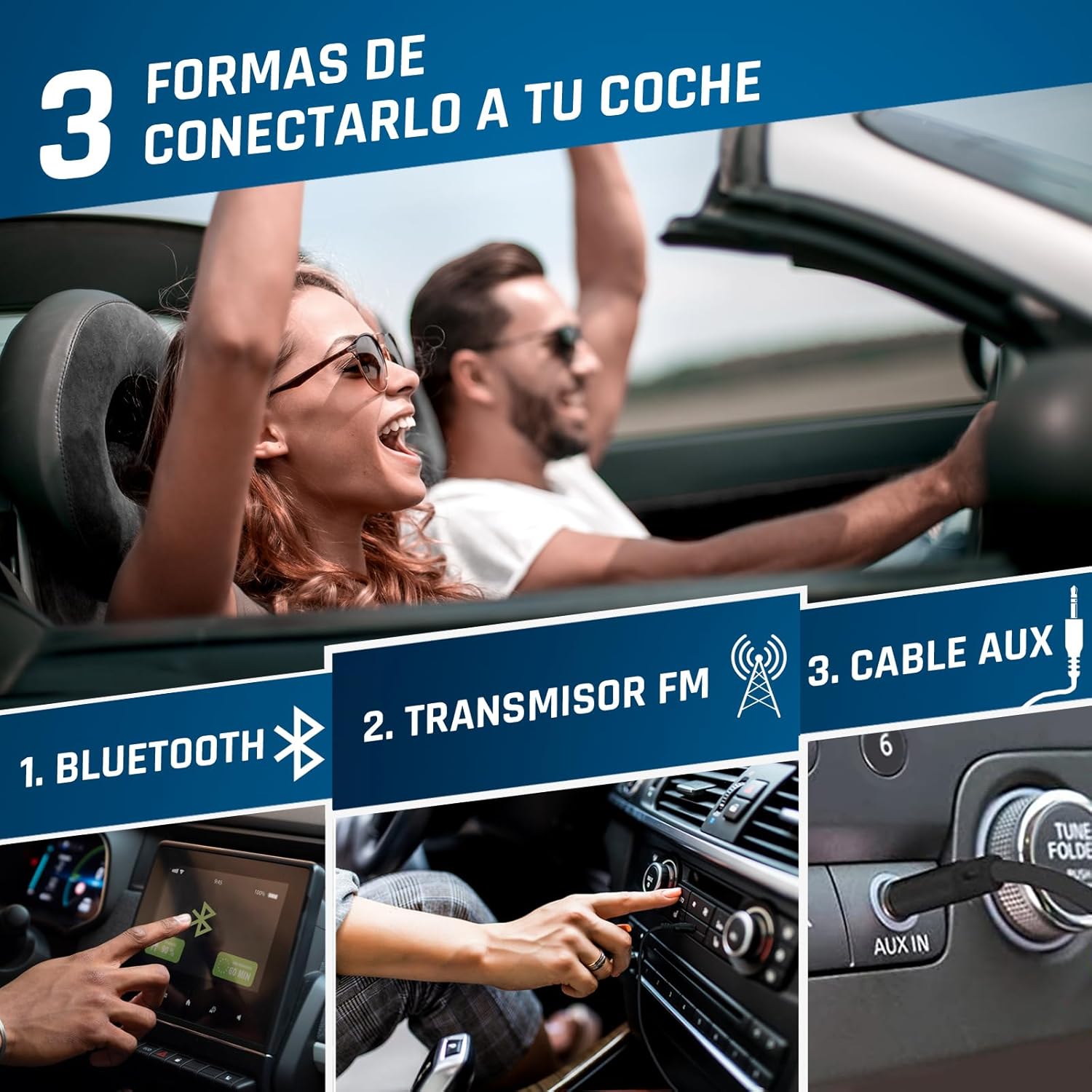
Image 5.1: Connection options for car audio systems: Bluetooth, FM Transmitter, and AUX cable.
Other Car Connection Options:
- AUX kabel: If your car has an AUX input, connect the KLIM Discover using a 3.5mm audio cable (not included).
- Car Bluetooth: Attempt to pair the KLIM Discover with your car's Bluetooth system as described in section 5.2.
5.5. Predvajanje s kartice SD
- Insert a formatted SD/TF card (up to 32GB) into the SD card slot.
- The player will automatically switch to SD card mode or you may need to press the NAČIN gumb, da ga izberete.
- Supported audio formats include MP3 and WMA.
- Za izbiro in predvajanje skladb uporabite navigacijske gumbe.
5.6. Funkcija snemanja
The KLIM Discover supports recording audio onto an inserted SD card. Refer to the on-screen prompts or specific instructions for initiating recording using the EQ/Record gumb.
5.7. Izenačevalnik (EQ)
Pritisnite EQ/Record button repeatedly to cycle through different equalizer presets (e.g., Pop, Jazz, Rock, Classic, Bass, Flat) to customize your audio experience.
5.8. Playback Speed Control
Uporabite DIR/Speed + in FM Radio/Speed - buttons to adjust the playback speed of your audio.
6. Vzdrževanje
- Čiščenje: Use a soft, dry cloth to clean the exterior of the player. For the lens inside the CD compartment, use a specialized CD lens cleaner.
- Shranjevanje: Predvajalnik shranjujte na hladnem in suhem mestu, stran od neposredne sončne svetlobe in ekstremnih temperatur.
- Vzdrževanje baterije: Da podaljšate življenjsko dobo baterije, se izogibajte pogostemu popolnemu praznjenju baterije. Redno jo polnite, tudi če je dalj časa ne uporabljate.
- Ravnanje s CD-ji: Always handle CDs by their edges. Keep them clean and free of scratches to ensure optimal playback.
7. Odpravljanje težav
| Težava | Možen vzrok | rešitev |
|---|---|---|
| Naprava se ne vklopi. | Low battery; Power switch in OFF position. | Charge the device; Slide power switch to ON. |
| CD se ne predvaja ali preskakuje. | CD is dirty, scratched, or inserted incorrectly; CD compartment not closed properly. | Clean the CD; Ensure CD is inserted correctly; Close compartment firmly. |
| Iz slušalk ni zvoka. | Headphones not connected; Volume too low; Headphones faulty. | Ensure headphones are fully plugged in; Increase volume; Test with different headphones. |
| Težave s povezavo Bluetooth. | Device not in pairing mode; Target device too far or not in pairing mode; Car infotainment system incompatibility. | Ensure both devices are in pairing mode and close to each other; Refer to car manual; Use FM Transmitter or AUX as alternatives. |
| FM oddajnik ne deluje. | Car radio not tuned to correct frequency; Interference. | Ensure car radio matches player's FM frequency; Try a different, clear frequency. |
| SD-kartica ni prepoznana. | Card inserted incorrectly; Card not formatted or corrupted; Unsupported file format. | Reinsert card; Ensure card is formatted correctly (FAT32); Check for MP3/WMA files. |
If you continue to experience issues, please contact KLIM customer service for assistance.
8. Specifikacije
| Funkcija | Podrobnost |
|---|---|
| Znamka | KLIM |
| Ime modela | Odkrij |
| Številka modela | KLIM Nomad (KLDIS5373) |
| Tehnologija povezljivosti | Bluetooth |
| Posebne lastnosti | Bluetooth, FM radio, FM transmitter, SD card reader, Recorder |
| Združljive vrste medijev | CD, SD Card, MP3, WMA |
| Podprti zvočni formati | MP3, WMA |
| Zmogljivost pomnilnika | Up to 32 GB (SD/TF Card) |
| Tehnologija sprejemnika | FM |
| Tehnologija zaslona | LCD |
| Vrsta vira napajanja | Battery Powered (Rechargeable Lithium-Cobalt) |
| Povprečna življenjska doba baterije | 12+ ur |
| Dimenzije izdelka | 14 x 14 x 2.8 cm |
| Teža predmeta | 250 g |
| Vključene komponente | KLIM Discover CD Player, KLIM Fusion Wired Headphones, Ear Accessories, USB-C Charging Cable, Carry Pouch |
9. Garancija in podpora
The KLIM Discover Portable CD Player comes with a 5-year product support from KLIM Technologies. This ensures long-term assistance for any issues you may encounter.
Additionally, you are covered by a 30-dnevno obdobje vračila, allowing you to return the product for a full refund if you are not satisfied with your purchase.
For technical support, warranty claims, or any questions, please visit the official KLIM website or contact their customer service directly. Contact details can typically be found on the KLIM webna mestu ali v embalažnih materialih.


