1. Uvod
This manual provides detailed instructions for the setup, operation, and maintenance of your Logitech POP Mouse. The POP Mouse is a compact, wireless mouse designed for multi-device use with customizable features.

Image: The Logitech POP Mouse in Graphite, showcasing njegovo kompaktno in ergonomsko zasnovo.
2. Vsebina paketa
- Logitech POP Wireless Mouse
- 1x AA Battery (pre-installed)
- Uporabniška dokumentacija

Image: The Logitech POP Mouse and a single AA battery, representing the items included in the product package.
3. Navodila za nastavitev
3.1. Namestitev baterije
- Gently remove the top cover of the mouse. The cover is magnetically attached.
- Vstavite priloženo baterijo AA in pazite na pravilno polarnost (+/-).
- Namestite zgornji pokrov in se prepričajte, da se varno zaskoči.
3.2. Povezava prek Bluetooth
- Vklopite miško s stikalom za vklop na dnu.
- Press and hold one of the Easy-Switch buttons (1, 2, or 3) on the bottom of the mouse until the LED indicator starts blinking rapidly. This indicates pairing mode.
- On your device (computer, tablet, or phone), open Bluetooth settings.
- Select "Logitech POP Mouse" from the list of available devices to complete the pairing process.
- The LED indicator will glow solid for a few seconds, then turn off, confirming a successful connection.

Image: The underside of the POP Mouse, highlighting the Easy-Switch buttons for multi-device pairing.
4. Navodila za uporabo
4.1. Osnovne funkcije
- Levi klik: Primary selection and interaction.
- Desni klik: Dostopa do kontekstnih menijev.
- Kolesce za pomikanje: Navigates vertically through documents and web strani.
4.2. Tehnologija SilentTouch
The POP Mouse features SilentTouch Technology, which significantly reduces click noise, providing a quieter user experience without compromising tactile feedback.

Image: A hand operating the POP Mouse, illustrating the quiet operation provided by SilentTouch Technology.
4.3. Pomikanje s pametnim kolescem
The SmartWheel automatically switches between two modes:
- Natančni način: For detailed, line-by-line navigation.
- Speed Scroll Mode: For rapid scrolling through long documents or web strani.

Image: A user's hand demonstrating the use of the SmartWheel for efficient navigation.
5. Prilagajanje
5.1. Customizable Top Button (Emoji Button)
The top button, located below the scroll wheel, is customizable. By default, it can be configured to open an emoji menu or assign other shortcuts.
- Download and install the Logitech Options+ Software from the official Logitech webspletno mesto (logitech.com/optionsplus).
- Open the Logitech Options+ Software.
- Select your POP Mouse from the detected devices.
- Navigate to the button customization settings.
- Assign your desired function to the top button, such as an emoji shortcut, Snip Screen, Mic Mute, or Voice-to-Text.
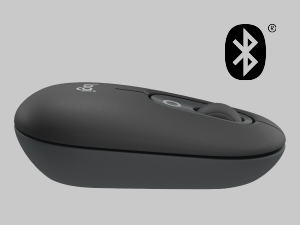
Image: A visual representation of the customizable top button on the POP Mouse, showing its function to access an emoji menu on a connected computer.
6. Povezljivost več naprav
The Logitech POP Mouse can connect to up to three different devices simultaneously using Bluetooth. You can easily switch between these devices.
6.1. Preklopne naprave
To switch between paired devices, press the Easy-Switch button (1, 2, or 3) on the bottom of the mouse corresponding to the desired device. The LED indicator will briefly light up to confirm the selected channel.
6.2. Logitech FLOW (Advanced Feature)
For seamless control across multiple computers, install Logitech Options+ Software on all devices. With Logitech FLOW enabled, you can move your mouse cursor across screens as if they were a single desktop, even copying and pasting text, images, and files med njimi.
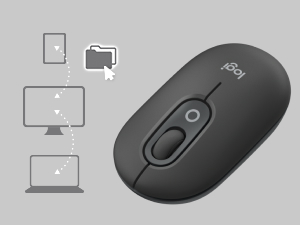
Image: A diagram showing how the POP Mouse can control multiple devices, illustrating the FLOW feature for cross-device interaction.
7. Vzdrževanje
7.1. Zamenjava baterije
The POP Mouse operates on a single AA battery with an estimated life of up to 24 months. When the battery is low, the LED indicator on the bottom of the mouse may flash. Replace the battery by following the steps in Section 3.1.
7.2. Čiščenje
Za čiščenje miške uporabite mehko krpo, ki ne pušča vlaken. Za trdovratno umazanijo rahlo obrišiteampkrpo sperite z vodo. Izogibajte se uporabi agresivnih kemikalij ali abrazivnih materialov.
8. Odpravljanje težav
| Težava | rešitev |
|---|---|
| Miška se ne vklopi. | Ensure the power switch on the bottom of the mouse is in the 'ON' position. Check and replace the AA battery if necessary. |
| Mouse not connecting via Bluetooth. |
|
| Premikanje kurzorja je neenakomerno ali se ne odziva. |
|
| Custom button not working. | Ensure Logitech Options+ Software is installed and running on your computer, and the button is correctly configured. |
9. Specifikacije
| Funkcija | Podrobnost |
|---|---|
| Številka modela | 910-007165 |
| Povezljivost | Bluetooth 5.1 |
| Brezžično Domet | Do 10 metrov (32.81 čevljev) |
| Senzorska tehnologija | Logitech High Precision Optical Tracking |
| Število gumbov | 4 (Left/Right click, Scroll wheel click, Top customizable button) |
| Vrsta baterije | 1 x AA baterija |
| Življenjska doba baterije | Do 24 mesecev (lahko se razlikuje glede na uporabo) |
| Dimenzije (DxŠxV) | 14.12 x 2.34 x 1.38 palcev (35.86 x 5.94 x 3.51 cm) |
| Teža | 2.89 ounces (82g with battery) |
| Združljivost operacijskega sistema | Windows 10 ali novejši, macOS 10.15 ali novejši, iPadOS, Chrome OS, Android |

Image: Technical drawing displaying the length, width, and height measurements of the Logitech POP Mouse.
10. Garancija in podpora
Za informacije o garanciji in tehnično podporo obiščite uradno spletno stran za podporo Logitech. website or refer to the user documentation included in your product package.
- Spletna podpora: support.logi.com
- Registracija izdelka: Registering your product can help you receive faster support and updates.


