1. Uvod
This user manual provides comprehensive instructions for the setup, operation, and maintenance of your FULLJA 17-inch Dual-WiFi Digital Picture Frame. This device allows you to instantly share photos and videos with loved ones from anywhere using the VPhoto app or email, supporting both 2.4 GHz and 5 GHz Wi-Fi networks. With its large display, ample storage, and versatile features, it is designed to preserve and display your precious memories with ease.
2. Varnostne informacije
Please read all safety instructions carefully before using the device to ensure proper operation and to prevent damage or injury. Keep this manual for future reference.
- Naprave ne izpostavljajte vodi ali prekomerni vlagi.
- Naprave ne postavljajte v bližino virov toplote, kot so radiatorji, grelniki, štedilniki ali druge naprave (vključno z amplifiers), ki proizvajajo toploto.
- Uporabljajte samo napajalnik, ki je priložen napravi.
- Ne blokirajte prezračevalnih odprtin. Namestite v skladu z navodili proizvajalca.
- Zaščitite napajalni kabel pred hojo ali stiskanjem, zlasti na vtičih, vtičnicah in na mestu, kjer izstopajo iz naprave.
- Napravo izklopite med nevihtami ali ko je dlje časa ne uporabljate.
- Za vse servise se obrnite na usposobljeno servisno osebje. Servis je potreben, če je bila naprava kakorkoli poškodovana, na primer poškodovan je napajalni kabel ali vtič, je bila polita tekočina ali so v napravo padli predmeti, je bila naprava izpostavljena dežju ali vlagi, ne deluje normalno , ali je bil opuščen.
- Čistite samo s suho krpo.
3. Vsebina paketa
Preverite, ali so v paketu prisotni vsi elementi:
- 1x FULLJA 17-inch Digital Picture Frame
- 1x uporabniški priročnik
- 1x napajalnik
- 1x Bracket (for stand)
- 1x daljinski upravljalnik
- Micro USB kabel 1x

Image: FULLJA Brand Logo
This image displays the official FULLJA brand logo, typically found on product packaging and documentation.

Image: FULLJA 17-inch Digital Picture Frame
This image shows the 17-inch FULLJA Digital Picture Frame in a vertical orientation, resting on a surface.
4. Izdelek je končanview
4.1. Komponente in krmilniki
Familiarize yourself with the various parts of your digital picture frame:
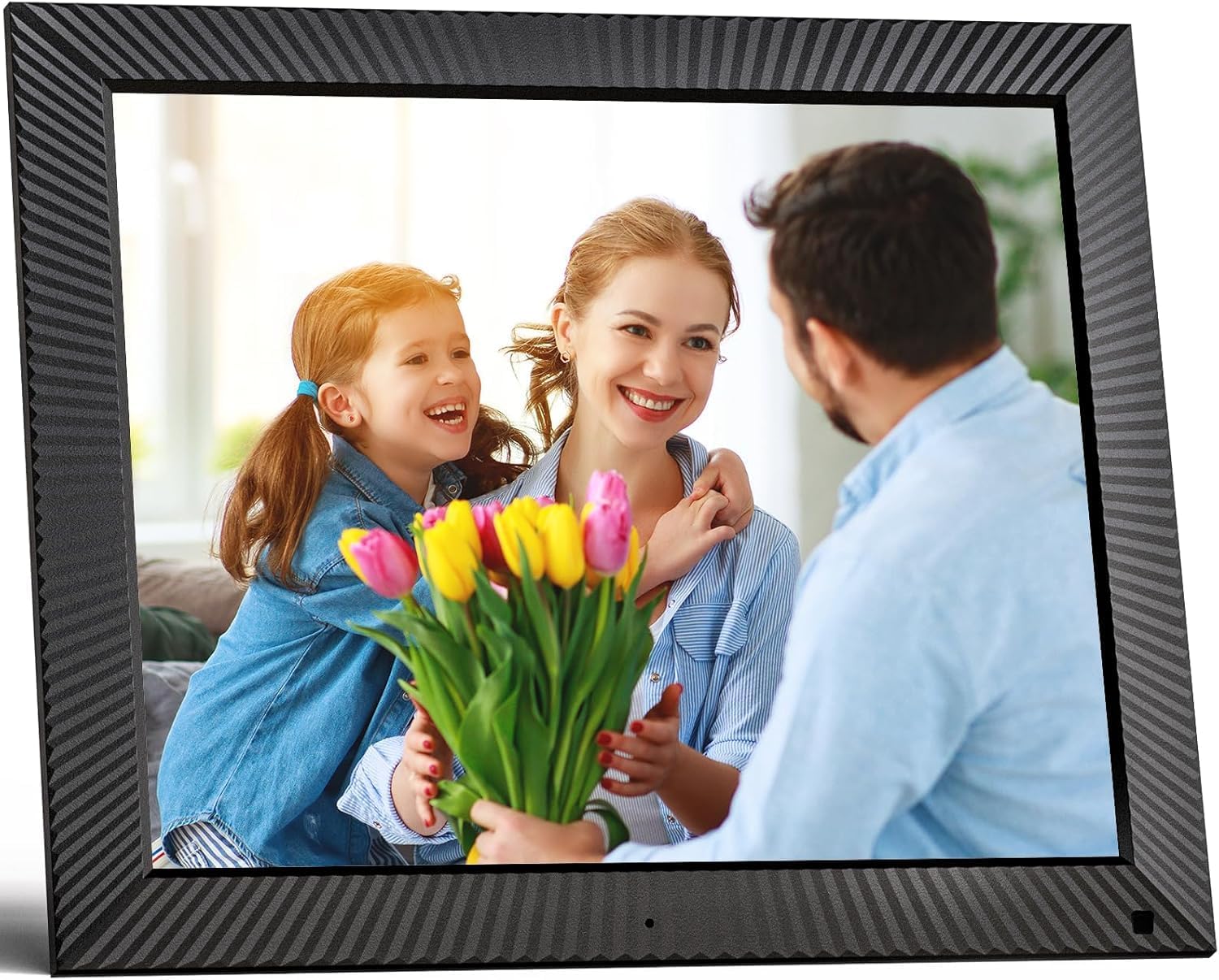
Slika: spredaj view of the FULLJA 17-inch Digital Picture Frame
This image displays the front of the digital picture frame, showcasing its large screen with a family photo displayed. The frame has a textured black border.

Image: Features of the FULLJA 17-inch Digital Picture Frame
This image highlights key features of the 17-inch digital picture frame, including its touch screen, HD 1280x1024 pixel resolution, 4:3 aspect ratio, and remote control functionality. It shows the frame in both landscape and portrait orientations, with a view of the back panel and stand.
- Zaslon: 17-inch IPS display with 1280x1024 resolution. Touch-enabled for direct interaction.
- Gumb za vklop: Located on the back or side, used to turn the frame on/off or put it into standby.
- Vrata USB: For connecting USB sticks to transfer photos/videos.
- Reža za TF kartice: For inserting TF (MicroSD) cards (up to 64GB) to expand storage or transfer media.
- Vrata za mikro USB: For connecting to a computer for data transfer or firmware updates.
- Vhod DC moči: Za priključitev napajalnika.
- Senzor gibanja: Detects presence to automatically turn the screen on/off, saving energy.
- Vgrajeni zvočnik: For audio playback with videos or background music.
- Wall Mount Holes: VESA compatible holes on the back for wall mounting.
- Stand Bracket: Attachable bracket for desktop placement in portrait or landscape orientation.
4.2. Daljinski upravljalnik
The included remote control provides convenient access to various functions without touching the screen.
- moč: Turn the frame on/off.
- Meni/Nastavitve: Access the main menu and settings.
- Navigacijski gumbi (gor/dol/levo/desno): Krmarjenje po menijih in možnostih.
- OK/Vnesite: Potrdite izbire.
- Nazaj/Izhod: Vrnitev na prejšnji zaslon ali izhod iz menija.
- Glasnost +/-: Prilagodite glasnost zvoka.
- Predvajanje/pavza: Upravljajte predvajanje medijev.
- Naslednji/Prejšnji: Skip to the next or previous photo/video.
5. Nastavitev
5.1. Začetni vklop
- Razpakirajte digitalni fotookvir in vso dodatno opremo.
- Attach the stand bracket to the back of the frame if you intend to place it on a desk or shelf. Ensure it is securely fastened.
- Connect the power adapter to the DC power input port on the frame, then plug the adapter into a wall outlet.
- The frame will automatically power on or you may need to press the power button.
- Sledite navodilom na zaslonu, da izberete jezik in časovni pas.
5.2. Povezovanje z Wi-Fi
A Wi-Fi connection is essential for sharing photos via the app or email.
- V glavnem meniju se pomaknite do nastavitve.
- Izberite Wi-Fi.
- The frame will scan for available networks. Select your desired 2.4 GHz or 5 GHz network from the list.
- Vnesite geslo za Wi-Fi z zaslonsko tipkovnico.
- Tapnite Povežite se. Once connected, a Wi-Fi icon will appear on the screen.

Image: Digital Picture Frame with Wi-Fi Sharing
This image illustrates the capability of the digital picture frame to share photos and videos wirelessly via Wi-Fi. It shows the frame displaying a family photo, with a smartphone in the foreground indicating app-based sharing.
5.3. Installing the VPhoto App
The VPhoto app is available for both iOS and Android devices and is the primary method for sharing content remotely.
- Iskanje "VPhoto" in the Apple App Store (for iOS) or Google Play Store (for Android).
- Prenesite in namestite aplikacijo v pametni telefon ali tablični računalnik.
- Open the VPhoto app and create an account or log in.
- To connect your frame, go to the nastavitve menu on your digital picture frame and find the unique binding code.
- In the VPhoto app, select Dodaj napravo and enter the binding code displayed on your frame.
- Once connected, you can start sending photos and videos to your frame. Up to 30 app accounts can be bound to one frame.

Image: Sharing Options for Digital Picture Frame
This image demonstrates the various ways to share content with the digital picture frame, including the free VPhoto app for iOS and Android, unlimited cloud storage with 32GB built-in, and the ability to invite multiple family members to share. It shows the frame displaying a photo and a smartphone screen with the VPhoto app interface.
6. Navodila za uporabo
6.1. Sending Photos and Videos
There are multiple ways to send media to your FULLJA digital picture frame:
- Via VPhoto App: Open the VPhoto app, select the photos/videos you wish to send (up to 50 at a time), choose your connected frame, and tap send.
- Prek e-pošte: Each frame has a unique email address. You can send photos and short videos as attachments to this email address. The frame will automatically receive and display them.
- Via USB Stick/TF Card: Insert a USB stick or TF card into the respective port. Navigate to the Mapa s fotografijami or Video section on the frame, select the external storage, and copy files to the internal memory if desired.

Image: Digital Picture Frame with 32GB Internal Storage
This image highlights the frame's built-in 32GB internal storage, capable of storing approximately 80,000+ photos. The main frame displays a photo of a mother and child, surrounded by smaller circular images representing the vast number of memories that can be stored.
6.2. Osnovne funkcije
- Slideshow Playback: Photos and videos will automatically play in a slideshow. You can adjust the display interval and transition effects in the settings.
- Photo/Video Browsing: Tap the screen or use the remote to manually browse through your media.
- Nadzor glasnosti: Adjust the volume for videos or background music using the touch screen controls or the remote.
- Samodejno vrtenje: Okvir samodejno prilagodi orientacijo zaslona (pokončno ali ležeče) glede na to, kako je postavljen.
6.3. Napredne funkcije
- Senzor gibanja: Enable this feature in settings to have the frame automatically turn on when motion is detected and off when no motion is detected for a set period, saving energy.
- Auto Screen On/Off: Set specific times for the frame to automatically turn on and off daily.
- Ura in koledar: Access the built-in clock and calendar functions from the main menu.
- Alarm: Nastavite alarme za opomnike.
- Razdeljen zaslon: Display multiple photos simultaneously (check settings for layout options).
- Text Captions: Add captions to your photos via the VPhoto app.
- Predvajanje glasbe: Play background music during slideshows (ensure music files are on the frame's internal storage or connected USB/TF card).

Image: Digital Picture Frame with Function Icons
This image showcases the multi-functional capabilities of the digital picture frame, including Wi-Fi connectivity, weather display, clock, calendar, photo and video playback, music, and slideshow features. Two frames are shown, one on a wall and one on a cabinet, with icons representing these functions below.
7. Vzdrževanje
7.1. Čiščenje okvirja
- Always unplug the frame before cleaning.
- Zaslon in okvir nežno obrišite z mehko, suho krpo, ki ne pušča vlaken.
- For stubborn smudges on the screen, lightly dampen the cloth with water or a screen-cleaning solution (specifically designed for electronics) and wipe carefully. Do not spray liquid directly onto the screen.
- Avoid using abrasive cleaners, waxes, or solvents as they may damage the surface.
7.2. Posodobitve programske opreme
Periodically check for software updates in the frame's settings menu to ensure optimal performance and access to new features. Updates are typically downloaded and installed over Wi-Fi.
7.3. Upravljanje shranjevanja
While the frame has 32GB of internal storage and unlimited cloud storage, you may occasionally want to manage local files:
- Dostop do Mapa s fotografijami or File Vodja v nastavitvah za view, delete, or organize stored media.
- Lahko prenesete files to/from a USB stick or TF card to manage internal storage.
8. Odpravljanje težav
Če imate težave z digitalnim fotookvirjem, si oglejte naslednje pogoste težave in rešitve:
| Težava | Možen vzrok/rešitev |
|---|---|
| Okvir se ne vklopi. |
|
| Ni mogoče vzpostaviti povezave z Wi-Fi. |
|
| Fotografije/videoposnetki se ne prikazujejo na okvirju. |
|
| Zaslon se zamrzne ali se ne odziva. |
|
| Senzor gibanja ne deluje. |
|
9. Specifikacije
| Funkcija | Podrobnost |
|---|---|
| Številka modela | B0CCVBSM87 |
| Znamka | FULLJA |
| Velikost zaslona | 17 palcev |
| Ločljivost zaslona | 1280 x 1024 slikovnih pik (IPS) |
| Razmerje stranic | 4:3 |
| Notranji pomnilnik | 32 GB |
| Podpora za zunanje shranjevanje | USB stick, TF card (MicroSD) up to 64GB |
| Povezljivost Wi-Fi | 2.4 GHz / 5 GHz Dual-Band |
| Nadzorna metoda | Touch Screen, Remote Control, VPhoto App |
| Senzor gibanja | ja |
| Samodejno vrtenje | ja |
| Montaža na steno | ja |
| Dimenzije izdelka | 29.67 x 43.51 x 2.51 cm |
| Teža izdelka | 2.52 kg |
| barva | Črna |
10. Garancija in podpora
10.1. Omejena garancija
The FULLJA 17-inch Dual-WiFi Digital Picture Frame comes with a enoletna omejena garancija from the date of purchase. This warranty covers defects in materials and workmanship under normal use. It does not cover damage caused by accident, misuse, abuse, neglect, unauthorized modification, or improper installation.
To make a warranty claim, please retain your proof of purchase and contact FULLJA customer support.
10.2. Podpora strankam
For any questions, technical assistance, or support inquiries, please contact FULLJA customer service. We offer lifetime support and aim to provide a prompt response within 24 hours.
Please refer to the contact information provided on the product packaging or the official FULLJA webspletno mesto za najnovejše kanale podpore.

