1. Uvod
This user manual provides detailed instructions for the installation, operation, and maintenance of your Xprinter XP-D200N Thermal Receipt Printer. The XP-D200N is a high-speed thermal printer designed for reliable and efficient receipt printing in various business environments. Please read this manual thoroughly before using the printer to ensure proper functionality and to prevent damage.
2. Varnostne informacije
To ensure safe operation and prevent damage to the printer or injury to yourself, please observe the following safety precautions:
- Always use the provided power adapter. Using an incorrect adapter may damage the printer and void the warranty.
- Tiskalnika ne izpostavljajte vodi, vlagi ali ekstremnim temperaturam.
- Tiskalnika ne postavljajte na neposredno sončno svetlobo ali v bližino virov toplote.
- Do not attempt to disassemble or repair the printer yourself. Refer all servicing to qualified personnel.
- Prepričajte se, da je tiskalnik postavljen na stabilno in ravno površino.
- Keep the printer away from dust and debris to maintain optimal performance.
3. Vsebina paketa
Prosimo, preverite vsebino paketa. Če kateri koli predmet manjka ali je poškodovan, se nemudoma obrnite na prodajalca.
- Xprinter XP-D200N Thermal Receipt Printer
- Napajalni adapter
- Napajalni kabel
- USB kabel
- Thermal Paper Roll (starter)
- Uporabniški priročnik (ta dokument)
4. Izdelek je končanview
The Xprinter XP-D200N is a compact and efficient thermal receipt printer. Below are images illustrating its key components and design.
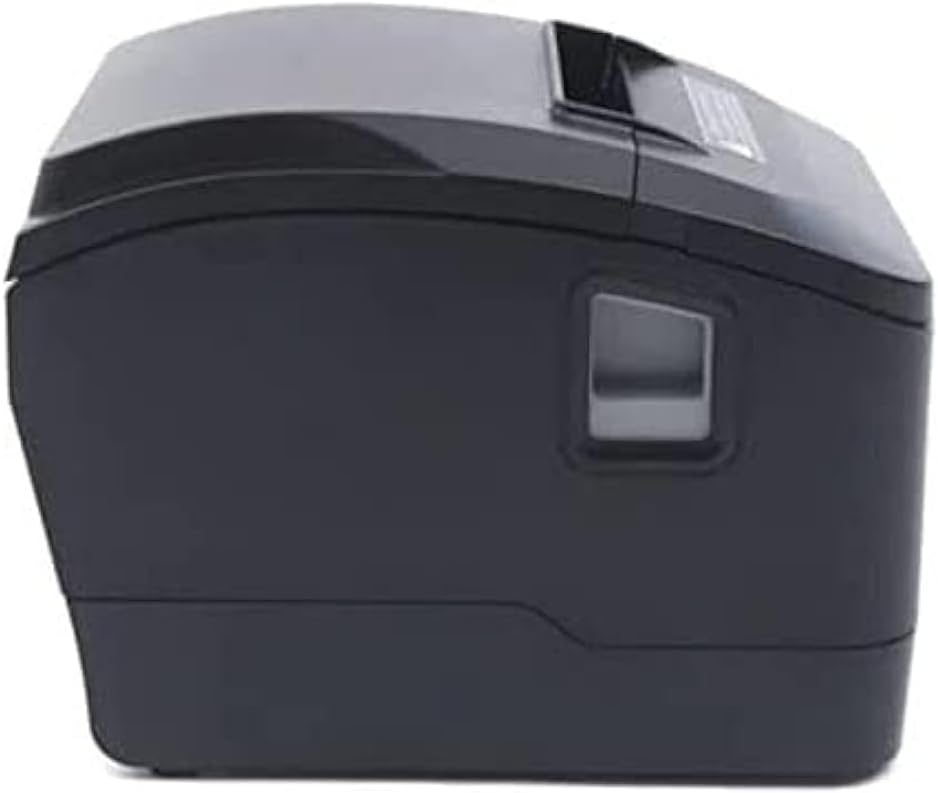
Slika 4.1: Sprednja stran view of the Xprinter XP-D200N Thermal Receipt Printer. This image shows the sleek, black casing and the paper output slot.
Slika 4.2: Stran view of the Xprinter XP-D200N Thermal Receipt Printer. This perspective highlights the compact design and the power switch on the right side.

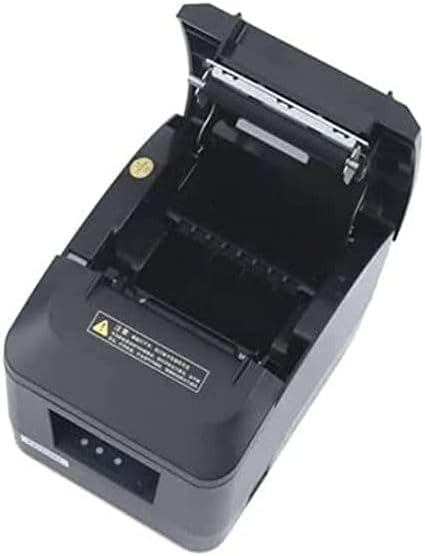
Slika 4.3: Vrh view of the Xprinter XP-D200N Thermal Receipt Printer with the cover open, revealing the thermal paper roll compartment and the print head mechanism. This view is essential for paper loading and maintenance.
5. Nastavitev
5.1 Priključitev napajanja
- Ensure the printer's power switch is in the OFF position.
- Priključite napajalnik v vhod za napajanje na zadnji strani tiskalnika.
- Plug the power cord into the power adapter, then into a standard electrical outlet.
5.2 Povezava z računalnikom
The XP-D200N supports both USB and LAN connectivity.
USB povezava:
- Connect one end of the USB cable to the USB port on the printer.
- Drugi konec kabla USB priključite na razpoložljiva vrata USB na vašem računalniku.
LAN (ethernet) povezava:
- Connect an Ethernet cable to the LAN port on the printer.
- Drugi konec ethernetnega kabla povežite z omrežnim usmerjevalnikom ali stikalom.
- Refer to the printer's advanced settings or driver utility for network configuration (e.g., IP address settings).
5.3 Vstavljanje termičnega papirja
- Open the printer cover by pressing the release button or lifting the cover latch. (Refer to Figure 4.3).
- Insert the thermal paper roll into the compartment with the paper feeding from the bottom and the leading edge extending towards the front of the printer. Ensure the paper is aligned correctly.
- Izvlecite majhno količino papirja mimo rezalnika.
- Pokrov tiskalnika trdno zaprite, dokler se ne zaskoči.
5.4 Namestitev gonilnika
After connecting the printer, you will need to install the appropriate drivers on your computer. Drivers are typically provided on a CD included with the printer or can be downloaded from the official Xprinter website. Follow the on-screen instructions during installation.
6. Navodila za uporabo
6.1 Vklop/izklop
- To power on: Ensure the power cord is connected, then flip the power switch to the ON position. The indicator light will illuminate.
- To power off: Flip the power switch to the OFF position.
6.2 Osnovno tiskanje
Once the printer is connected and drivers are installed, you can print receipts from your point-of-sale (POS) software or other applications. Select the Xprinter XP-D200N as your default printer in your application's print settings.
6.3 Indikatorji stanja
The printer features indicator lights (usually on the front panel) that provide information about its status:
- Indikator moči: Solid light indicates the printer is powered on.
- Indikator napake: Flashing or solid light indicates an error (e.g., paper out, cover open, print head overheat). Refer to the troubleshooting section.
- Paper Out Indicator: Illuminates when the paper roll is empty or nearly empty.
7. Vzdrževanje
7.1 Čiščenje tiskalne glave
Redno čiščenje tiskalne glave zagotavlja optimalno kakovost tiskanja in podaljšuje življenjsko dobo tiskalnika.
- Izklopite tiskalnik in izključite napajalni kabel.
- Odprite pokrov tiskalnika.
- Z vatirano palčko rahlo obrišiteampened with isopropyl alcohol (70% or higher) to gently wipe the thermal print head surface. Avoid touching the print head with bare hands.
- Allow the print head to dry completely before closing the cover and reconnecting power (approximately 2-3 minutes).
7.2 Generalno čiščenje
Zunanjost tiskalnika obrišite z mehko,amp krpo. Ne uporabljajte abrazivnih čistil ali topil.
7.3 Zamenjava papirnatega zvitka
When the paper out indicator illuminates or print quality degrades, it's time to replace the paper roll. Follow the steps in Section 5.3 "Loading Thermal Paper".
8. Odpravljanje težav
| Težava | Možen vzrok | rešitev |
|---|---|---|
| Tiskalnik se ne vklopi. | No power, faulty power adapter/cord. | Check power connections. Ensure power switch is ON. Test outlet. |
| No printing. | Paper out, cover open, incorrect driver, incorrect printer selected, cable disconnected. | Load paper, close cover, check USB/LAN connection, verify driver installation, select correct printer in software. |
| Poor print quality (faint, blank lines). | Dirty print head, low quality thermal paper, print head damage. | Clean print head (Section 7.1). Replace thermal paper. If problem persists, contact support. |
| Zastoj papirja. | Improper paper loading, foreign object. | Turn off printer, open cover, carefully remove jammed paper. Reload paper correctly. |
| Error indicator light is on/flashing. | General error, paper out, cover open. | Check for paper out, ensure cover is closed. Power cycle the printer. If error persists, consult manufacturer's support. |
9. Specifikacije
| Znamka: | Xprinter |
| Model: | XP-D200N |
| Vrsta tiskalnika: | Toplotni sprejemni tiskalnik |
| Način tiskanja: | Neposredna toplota |
| Hitrost tiskanja: | 220 mm/sec (as per product description) |
| Največja velikost medija: | 8 cm (80 mm) |
| Povezljivost: | USB, LAN (Ethernet) |
| Vhodna moč: | 24V – 2.5A |
| Izhod tiskalnika: | Enobarvno |
| Posebne lastnosti: | Sleek, Compact, Lightweight Design, High Print Quality, Durability, Low Noise, Automatic Paper Cutting |
| Dimenzije izdelka: | 18.4 x 14 x 13.5 cm |
| Teža artikla: | 1.63 kg |
10. Garancija in podpora
The Xprinter XP-D200N Thermal Receipt Printer comes with a standard manufacturer's warranty. For specific warranty terms and conditions, please refer to the warranty card included with your product or visit the official Xprinter website. For technical support, driver downloads, or service inquiries, please contact your local dealer or the Xprinter customer support team through their official channels.
Za najnovejše informacije in vire podpore obiščite: www.xprinter.net


