1. Izdelek je končanview
The SOVMIKU Wireless Security Camera System provides comprehensive surveillance for indoor and outdoor environments. This system includes a 10-inch NVR monitor with a built-in 1TB HDD, two 3-megapixel wireless cameras, and features such as two-way audio, AI motion detection, and IP66 waterproof rating.

Slika 1: Konecview of the SOVMIKU Wireless Security Camera System, including the NVR monitor, two cameras, and 1TB hard drive.
Ključne značilnosti:
- 10-inch NVR Monitor: Integrated display for live viewpredvajanje in predvajanje.
- Vgrajen 1TB trdi disk: Zagotavlja ample storage for continuous recording with overwrite function.
- 3-Megapixel Cameras: Delivers clear 1536P video resolution.
- Dvosmerni zvok: Vgrajen mikrofon in zvočnik za komunikacijo.
- Zaznavanje gibanja z umetno inteligenco: Advanced detection to minimize false alarms and optimize recording.
- Vodoodporen IP66: Cameras are designed for reliable outdoor use in various weather conditions.
- Oddaljeno spremljanje: Access live and recorded footage via smartphone, tablet, or PC application.
- H.265 video kompresija: Efficient storage utilization, reducing capacity requirements by approximately 50% compared to H.264.
2. Vsebina paketa
Preverite, ali so v vašem paketu priloženi vsi spodaj navedeni elementi:

Figure 2: Illustration of the items included in the SOVMIKU security camera system package.
- NVR Main Unit (with 1TB HDD built-in)
- 3-Megapixel IP66 Waterproof Cameras (Quantity: 2)
- Power Adapters for Cameras
- Napajalnik za NVR
- Miška USB
- LAN kabel
- HDMI kabel
- Mounting Screws and Anti-theft Stickers
- User Manual (Japanese, but this document serves as the English equivalent)
3. Navodila za namestitev
3.1 Začetna nastavitev
The system is designed for simple setup. Cameras are pre-paired with the NVR. Simply power on the devices to begin surveillance.
- Povežite snemalnik: Connect the NVR power adapter to the NVR and plug it into a power outlet.
- Povežite kamere: Connect each camera's power adapter to the camera and plug it into a power outlet.
- Zaslon monitorja: The NVR's integrated 10-inch monitor will display the camera feeds automatically.
- Povezava z miško: Connect the included USB mouse to the NVR for navigation and configuration.

Figure 3: Diagram illustrating the simple power-on setup for the NVR and cameras, showing automatic wireless connection.
3.2 Namestitev kamere
The cameras are IP66 waterproof, suitable for both indoor and outdoor installation. Ensure a stable power source is available at the installation location.
- Montaža: Use the provided screws to securely mount the cameras to a wall or ceiling.
- Prilagoditev kota: The camera features 180° horizontal and 360° vertical adjustment for optimal viewing angles. Secure the angle after adjustment.
- Waterproofing Connections: For outdoor installations, ensure all cable connections are properly sealed and protected from moisture.
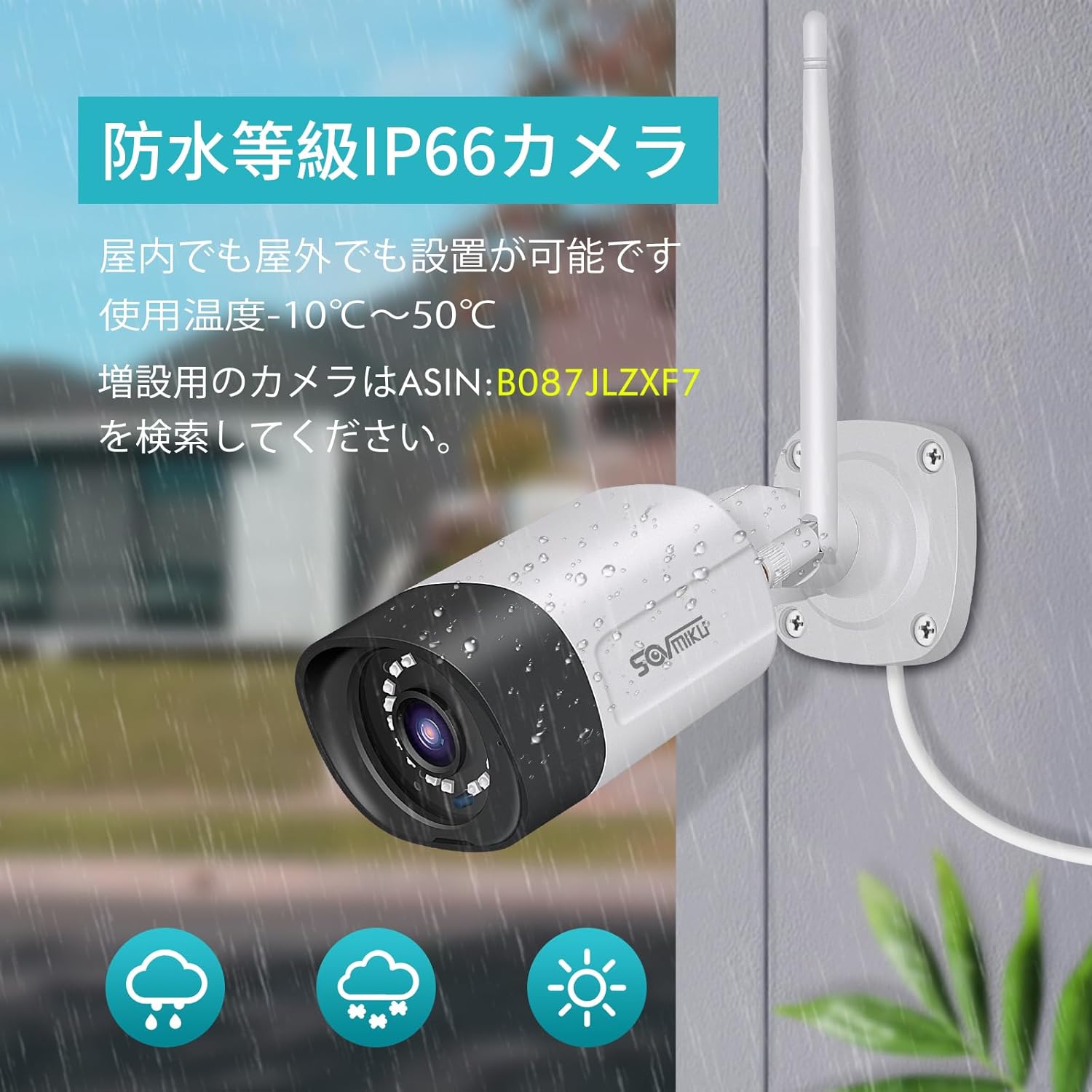
Figure 4: A SOVMIKU camera installed outdoors, demonstrating its IP66 waterproof rating against rain and snow.

Figure 5: Detailed diagram showing the camera components (wireless antenna, LED, lens, microphone, sensor light, speaker, adjustable bracket) and NVR ports (power, USB, HDMI, Ethernet, reset, TF card slot).
4. Navodila za uporabo
4.1 Viewing Live Feed and Playback
- On NVR Monitor: The 10-inch NVR monitor displays live feeds from connected cameras. Use the USB mouse to navigate the NVR interface for playback, system settings, and other functions.
- Remote Monitoring (EseeCloud App):
- Connect the NVR to your internet router using the provided LAN cable.
- Download the "EseeCloud" app on your smartphone or tablet (available for iOS).
- Follow the in-app instructions to add your NVR device.
- Ko ste povezani, lahko view v živo, dostop do posnete hranetage, and receive notifications from anywhere.
- Programska oprema za PC: For PC monitoring, download the "EseeCloud" software.
4.2 Načini snemanja
The system supports various recording modes to suit your needs:
- Nenehno snemanje: Records 24/7. The 1TB HDD with H.265 compression allows for extended recording periods (e.g., over 2 months for 2 cameras). Older data is automatically overwritten when the HDD is full.
- Predvideno snemanje: Določite določene čase za snemanje.
- Snemanje zaznavanja gibanja: Snema samo, ko zazna gibanje, kar prihrani prostor za shranjevanje in omogoča snemanje dogodkovview učinkovitejši.

Figure 6: Visual representation of continuous, scheduled, and motion detection recording modes, along with notification options via app or email.
4.3 Dvosmerni zvok
Each camera is equipped with a built-in microphone and speaker, enabling two-way communication.
- Initiating Communication: Use the EseeCloud app on your mobile device to speak through the camera's speaker and listen through its microphone.
- Jasen zvok: The omnidirectional microphone and optimized algorithms ensure clear sound quality.

Figure 7: Demonstration of the two-way audio function, showing a user communicating with someone at their door via the camera and smartphone app.
4.4 AI Motion Detection and Notifications
The system utilizes AI human detection to accurately identify human movement, reducing false alarms from pets or environmental factors.
- Event Notification: When motion is detected, the system can send instant notifications to your mobile app or email.
- Efficient Search: Recorded events triggered by motion detection can be quickly searched and reviewizd.

Figure 8: Illustration of H.265 video compression efficiency (1TB H.265 equals 2TB H.264) and AI human detection identifying a person in a scene.

Figure 9: A visual comparison demonstrating the superior clarity and detail of 5-megapixel resolution compared to 1.3-megapixel resolution, highlighting the system's high-definition capabilities.
5. Vzdrževanje
Redno vzdrževanje zagotavlja optimalno delovanje in dolgo življenjsko dobo vašega varnostnega sistema.
- Čiščenje objektiva fotoaparata: Leče fotoaparata občasno čistite z mehko krpoamp krpo, da odstranite prah, umazanijo ali vodne madeže, ki lahko zakrijejo viewIzogibajte se abrazivnim čistilom.
- Preverite povezave: Prepričajte se, da so vsi napajalni in omrežni kabli varno priključeni in nepoškodovani.
- Posodobitve vdelane programske opreme: Check the EseeCloud app or SOVMIKU website for any available firmware updates for the NVR and cameras to ensure the latest features and security patches.
- Zdravje trdega diska: While the 1TB HDD is built-in, it's good practice to periodically check its status through the NVR settings to ensure it's functioning correctly.
6. Odpravljanje težav
If you encounter issues with your SOVMIKU security camera system, refer to the following common troubleshooting steps:
- Ni slike na monitorju:
- Ensure the NVR and cameras are powered on and their power adapters are securely connected.
- Check if the NVR's internal monitor is functioning. If using an external monitor, ensure the HDMI cable is connected correctly.
- Cameras Not Connecting to NVR:
- Verify that cameras are within range of the NVR's wireless signal. Walls and obstacles can reduce signal strength.
- Ponovno zaženite tako NVR kot kamere.
- If adding new cameras or re-pairing, refer to the NVR's on-screen menu for camera pairing instructions.
- No Remote Access via App:
- Ensure the NVR is connected to your internet router via the LAN cable.
- Preverite internetno povezavo.
- Verify that the NVR is correctly added to the EseeCloud app and has an active network status.
- Slaba kakovost slike:
- Očistite lečo fotoaparata.
- Prepričajte se, da v vidnem polju kamere ni ovir view.
- Check the camera's resolution settings in the NVR interface.
- Težave z dvosmernim zvokom:
- Ensure the microphone and speaker settings are enabled in the NVR or app.
- Check for any physical obstructions blocking the microphone or speaker on the camera.
- Preverite stabilnost omrežja za jasen prenos zvoka.
7. Specifikacije
| Funkcija | Podrobnost |
|---|---|
| Znamka | SOVMIKU |
| Številka modela | SFWK-10V-2HB312-1T |
| Ločljivost zajema videa | 1536p (3 milijona slikovnih pik) |
| Posebna funkcija | Vodoodporen (IP66) |
| Število kanalov | 8 (Supports up to 8 cameras) |
| Zmogljivost pomnilnika | 1 TB trdi disk (vgrajen) |
| Vir napajanja | Električni na kabel |
| Operacijski sistem (aplikacija) | iOS (and Android compatible via EseeCloud app) |
| Združljive naprave | Pametni telefon, tablični računalnik, računalnik |
| Druge funkcije fotoaparata | Front-facing, Night color (low light technology) |
| Način snemanja | Continuous, Scheduled, Motion Detection |
| Strojni vmesnik | 802.11 ac/b/g/n (Wireless), Ethernet, HDMI, USB |
| Vrsta objektiva | Wide Angle (3.6 mm) |
| Dimenzije izdelka (NVR) | 29 x 17 x 24 cm |
| Teža predmeta | 2.88 kg |
| UPC | 616612550644 |
8. Garancija in podpora
SOVMIKU provides comprehensive support for its products.
- 1-letna garancija kakovosti: Izdelek ima 12-mesečno garancijo od datuma nakupa.
- Tehnična podpora: Professional technical support is available to assist with setup, operation, and troubleshooting.
- Kontaktni podatki: For any questions or issues, please contact SOVMIKU customer support via email or phone. (Specific contact details are usually provided in the physical manual or on the product's official webspletno mesto.)
- Certifikat PSE: Our products have passed PSE certification in accordance with Japanese electrical safety standards, ensuring safe usage.


