1. Uvod
Welcome to the instruction manual for your new Sunstech CELT23 flip phone. This phone is specifically designed for ease of use, featuring large keys, a clear display, and essential functions like an SOS button for emergencies. Please read this manual carefully to understand how to operate your device safely and efficiently.
2. Izdelek je končanview
The Sunstech CELT23 is a clamshell-style mobile phone, offering simplicity and security. Its design prioritizes user comfort and accessibility.
Ključne značilnosti:
- Oblika preklopa: Protects the screen and keypad when closed.
- Velike tipke: Oversized buttons for easy dialing and texting.
- Gumb SOS: Located on the back for emergency calls and SMS.
- 2.4-palčni zaslon: Clear screen for easy viewing.
- Hitro klicanje: Assign contacts to speed dial keys.
- Loud Sound: Enhanced audio for calls and ringtones.
- FM radio: Built-in radio for entertainment.
- 1100 mAh baterija: Provides reliable battery life.
Komponente telefona:
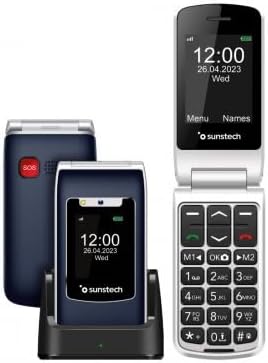
Opis slike: This image displays the Sunstech CELT23 flip phone in two states: open, showing the screen and large keypad, and closed, resting in its charging dock. The back of the closed phone, featuring the red SOS button, is also visible. This illustrates the phone's compact design and user-friendly interface.

Opis slike: This image shows the Sunstech CELT23 flip phone in its charging dock, with the phone in a closed position. The prominent red SOS button on the back of the phone is clearly visible, highlighting a key safety feature. The phone's external display is also visible, showing the time and date.

Opis slike: This image presents a collection of Sunstech CELT23 flip phones, showcasing different color options (blue and black) and configurations. Some phones are open, displaying their keypads and screens, while others are closed and placed in their charging docks. This provides a comprehensive view of the product's design and available variations.
3. Nastavitev
3.1. Vstavljanje SIM kartice in baterije
- Odprite telefon: Nežno odprite zadnji pokrov telefona.
- Vstavite kartico SIM: Locate the SIM card slot. Carefully insert your activated SIM card into the designated slot, ensuring the gold contacts face downwards and the cut corner aligns correctly.
- Vstavite baterijo: Place the provided Lithium-ion battery into the battery compartment, aligning the contacts.
- Zapri naslovnico: Namestite zadnji pokrov, dokler se ne zaskoči.
3.2. Polnjenje telefona
- Uporaba polnilne postaje: Place the phone into the charging dock, ensuring it sits firmly and the charging indicator light (if present) illuminates.
- Neposredno polnjenje prek USB-ja: Alternatively, connect the USB Type C cable to the phone's charging port and the other end to a compatible power adapter.
- Prva polnjenje: Za optimalno delovanje baterije telefon pred prvo uporabo popolnoma napolnite.
3.3. Vklop/izklop
- Za vklop: Press and hold the Power/End Call button (usually red) until the screen lights up.
- Za izklop: Pritisnite in držite gumb za vklop/končanje klica, dokler se ne prikažejo možnosti izklopa, nato izberite »Izklop«.
4. Navodila za uporabo
4.1. Klicanje in sprejemanje klicev
- Za klic:
- Odprite telefon.
- Dial the number using the large keypad.
- Pritisnite zeleni gumb za klic, da začnete klic.
- Če želite prejeti klic:
- When the phone rings, open the flip or press the Green Call button.
- Če želite končati klic, pritisnite rdeči gumb za končanje klica.
4.2. Sending SMS Messages
- V glavnem meniju pojdite na »Sporočila«.
- Select "Write Message" or "New SMS".
- Vnesite številko prejemnika ali jo izberite iz stikov.
- S tipkovnico vnesite sporočilo.
- Pritisnite »Pošlji«.
4.3 Funkcija klica v sili SOS
The SOS button is designed for emergencies. When pressed, it will activate an audible warning signal and automatically dial up to 5 pre-set emergency contacts. It will also send a customizable emergency SMS message to these contacts.
- Nastavitev stikov za klic v sili:
- Pojdite v »Nastavitve« > »Nastavitve SOS«.
- Add up to 5 emergency contact numbers.
- Customize the emergency SMS message if desired.
- Uporaba gumba SOS:
- In an emergency, press and hold the red SOS button on the back of the phone for a few seconds.
- The phone will emit an alarm and begin dialing your emergency contacts sequentially until one answers.
- An emergency SMS will also be sent to all pre-set contacts.
4.4. Hitro klicanje
Assign frequently called numbers to specific keys for quick dialing.
- Go to "Contacts" or "Settings" > "Speed Dial".
- Select an available key (e.g., M1, M2, or number keys 2-9).
- Assign a contact from your phonebook or enter a new number.
- To use, simply press and hold the assigned speed dial key.
4.5. FM radio
To listen to the FM radio, ensure headphones are connected (they act as an antenna).
- Connect 3.5mm headphones to the phone's audio jack.
- Navigate to "Multimedia" or "Tools" > "FM Radio".
- Za iskanje postaj ali ročno iskanje uporabite navigacijske tipke.
5. Vzdrževanje
- Čiščenje: Za čiščenje zaslona in ohišja telefona uporabljajte mehko, suho krpo. Izogibajte se tekočim čistilom.
- Vzdrževanje baterije:
- Izogibajte se ekstremnim temperaturam.
- Baterije ne puščajte dlje časa popolnoma izpraznjene.
- Uporabljajte samo originalni polnilec in baterijo.
- Shranjevanje: Telefon shranjujte na hladnem in suhem mestu, stran od neposredne sončne svetlobe in vlage.
6. Odpravljanje težav
| Težava | Možen vzrok/rešitev |
|---|---|
| Telefon se ne vklopi. | Battery is discharged. Charge the phone. Battery not inserted correctly. Reinsert the battery. |
| Ne morem klicati ali sprejemati klicev. | No SIM card inserted or SIM card not activated. Check SIM card. Out of network coverage. Move to an area with better signal. |
| Med klici ni zvoka. | Volume is too low. Adjust the call volume using the side keys. Speaker/earpiece might be blocked. Clean gently. |
| Gumb SOS ne deluje. | SOS contacts not set up. Configure emergency contacts in SOS settings. |
7. Specifikacije
- Znamka: Sunstech
- Model: KELT23
- Vrsta izdelka: Preklopni telefon
- Operacijski sistem: RTOS
- Velikost zaslona: 2.4 palcev
- Resolucija: 240 x 320
- Povezave: USB Type C, 3.5 mm Jack
- Posebne lastnosti: SOS Button, FM Radio
- Sestava baterije: Litij-ionski
- Kapaciteta baterije: 1100 mAh (inferred from product description)
- Velikost RAM-a: 48 MB
- Zmogljivost shranjevanja: 128 GB (Note: This capacity is typically for external memory card support in basic phones)
- Hitrost procesorja: 800 MHz
- Proizvajalec: SUNSTECH
- Država izvora: Kitajska
8. Garancija in podpora
This product is manufactured by SUNSTECH. For specific warranty details, please refer to the warranty card included with your purchase or contact Sunstech customer support.
- Razpoložljivost rezervnih delov: 10 Years (as per manufacturer information).
- Posodobitve programske opreme: Podatki niso na voljo.
For further assistance, please visit the official Sunstech webali se obrnite na njihov oddelek za pomoč uporabnikom.


