1. Uvod
This manual provides comprehensive instructions for the installation, operation, and maintenance of your Turing TP-MED4M28-1Y 4MP Turret IP Camera. Please read this manual thoroughly before using the product to ensure proper setup and functionality. Keep this manual for future reference.
2. Varnostne informacije
Za preprečitev poškodb ali škode na izdelku upoštevajte naslednje varnostne ukrepe:
- Ensure the power supply meets the camera's specifications (DC 12V+/-25% or PoE IEEE 802.3af).
- Fotoaparata ne izpostavljajte ekstremnim temperaturam, vlagi ali korozivnim okoljem.
- Izogibajte se neposredni izpostavljenosti objektiva močnim virom svetlobe, saj lahko to poškoduje slikovni senzor.
- Ne poskušajte razstavljati ali spreminjati fotoaparata. Vsa servisna dela prepustite usposobljenemu osebju.
- Handle the camera with care to prevent physical shock or vibration.
- Poskrbite za pravilno ozemljitev, da preprečite nevarnosti električnega toka.
3. Vsebina paketa
Preverite, ali so v paketu vsi predmeti. Če kateri koli predmet manjka ali je poškodovan, se obrnite na prodajalca.
- Turing TP-MED4M28-1Y 4MP Turret IP Camera
- Pritrdilni vijaki in stenski vložki
- Waterproof Connector for Ethernet Cable
- Predloga vrtanja
- Vodnik za hiter začetek
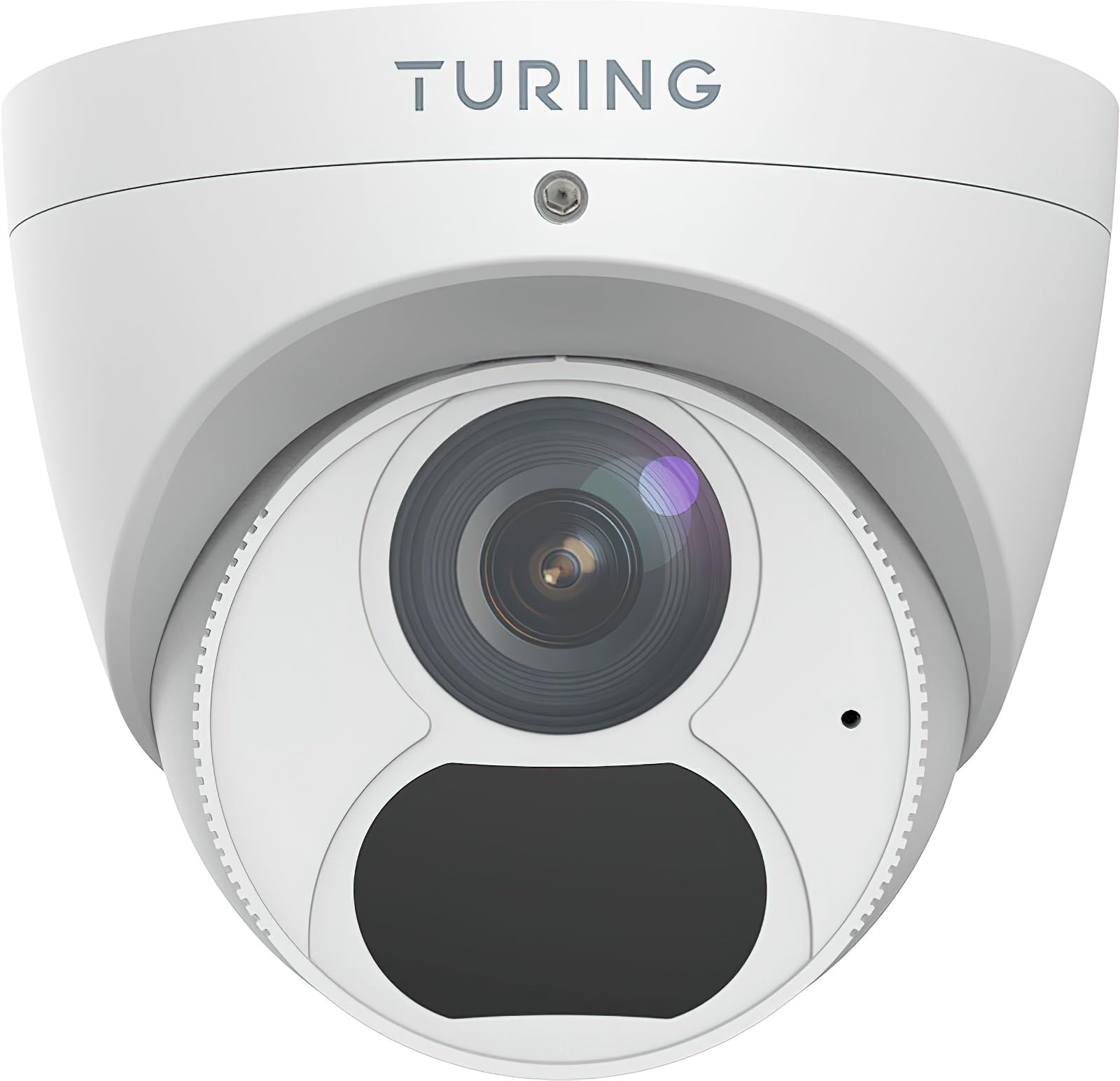
Figure 1: Turing TP-MED4M28-1Y 4MP Turret IP Camera and included accessories. The image shows the camera unit, mounting hardware, and a waterproof connector.
4. Izdelek je končanview
The Turing TP-MED4M28-1Y is a 4MP low-light turret IP camera designed for surveillance applications. It features a 2.8mm fixed lens, TwilightVision for enhanced low-light performance, and Smart IR up to 30m (98ft). The camera supports a 256GB microSD card for local storage and integrates with the Turing Vision Core AI platform.
Ključne značilnosti:
- Max. 4MP (2688x1520) at 30fps resolution
- 2.8mm fixed lens with 101.1° horizontal view
- TwilightVision for optimal image clarity in low light (0.002 Lux)
- Smart IR illumination up to 30m (98ft)
- IP67 weather protection, WDR (Wide Dynamic Range), PoE (Power over Ethernet)
- Built-in microphone for audio monitoring
- Podpira microSD kartico do 256 GB (ni priložena)
- Integrated with Turing Vision Core AI for advanced analytics (1st year license included)
- Skladno z NDAA
5. Nastavitev in namestitev
Follow these steps for proper installation of your IP camera.
5.1 Namestitev fotoaparata
- Izberite lokacijo: Select a suitable mounting location, typically a ceiling or wall, ensuring a clear field of view and within range of your network connection. The camera is IP67 rated for outdoor use.
- Pripravite površino: Use the provided drill template to mark the screw holes on the mounting surface. Drill pilot holes as needed.
- Zavarujte bazo: Attach the camera's mounting base to the surface using the supplied screws and wall plugs. Ensure it is firmly secured.
- Upravljanje kablov: Route the Ethernet cable through the designated cable entry point. Use the waterproof connector for outdoor installations to protect the Ethernet connection.
5.2 Network Connection and Power
- Povežite se z ethernetom: Priključite ethernetni kabel iz omrežnega stikala ali usmerjevalnika na vrata RJ45 na kameri.
- Napajanje:
- PoE (napajanje prek etherneta): If your network switch supports PoE (IEEE 802.3af), the camera will receive power directly through the Ethernet cable. No separate power adapter is needed.
- DC 12 V: If PoE is not available, connect a DC 12V power adapter (not included) to the camera's power input port.
- Začetni zagon: The camera will power on and initiate its boot sequence. This may take a few minutes.
5.3 Začetna konfiguracija
Refer to the Turing Vision Quick Start Guide or the Turing Vision platform documentation for detailed instructions on adding and configuring your camera within the Turing Vision ecosystem.
- Access the camera via the Turing Vision platform or a web brskalnik z uporabo njegovega naslova IP.
- Zaradi varnosti spremenite privzeto geslo.
- Configure network settings, video resolution, and recording schedules.
- Adjust image settings such as WDR, 2D/3D DNR, and defog for optimal video quality.
6. Upravljanje kamere
The Turing TP-MED4M28-1Y camera is primarily operated and managed through the Turing Vision cloud platform or a compatible NVR/VMS system.
6.1 V živo View in Snemanje
- Access the live video feed through the Turing Vision application or web vmesnik.
- Configure continuous recording, motion-triggered recording, or scheduled recording via the platform settings.
- Review posnet footage by navigating to the playback section within the Turing Vision platform.
6.2 AI Features (Turing Vision Core AI)
With the included Turing CORE AI License, the camera leverages advanced analytics:
- People and Vehicle Search: Utilize the Turing Vision platform to quickly search for specific events involving people or vehicles.
- Inteligentna opozorila: Receive real-time notifications for detected events based on configured rules.
- Pattern Detection: Analyze patterns across multiple locations for improved operational efficiency and safety.
6.3 Image Enhancement Features
- TwilightVision: Automatically enhances image clarity in extremely low-light conditions, providing color images where traditional cameras would switch to black and white.
- Pametni IR: Adjusts the intensity of the infrared LEDs to prevent overexposure of objects close to the camera, ensuring balanced night vision.
- WDR (širok dinamični razpon): Balances areas of high contrast in the image, ensuring details are visible in both bright and dark regions simultaneously.
7. Vzdrževanje
Redno vzdrževanje zagotavlja optimalno delovanje in dolgo življenjsko dobo vašega fotoaparata.
- Čiščenje leč: Gently clean the camera lens with a soft, dry cloth. For stubborn dirt, use a lens cleaning solution and a microfiber cloth. Avoid abrasive materials.
- Posodobitve vdelane programske opreme: Periodically check for and install firmware updates through the Turing Vision platform or the camera's web interface. Firmware updates often include performance improvements and security enhancements.
- Fizični pregled: Regularly inspect the camera housing and mounting for any signs of damage, loose connections, or corrosion, especially for outdoor installations.
- Upravljanje shranjevanja: If using a microSD card, periodically check its status and manage recorded data to prevent it from filling up. Format the card if necessary (this will erase all data).
8. Odpravljanje težav
Če imate težave s fotoaparatom, si oglejte naslednje pogoste težave in rešitve:
| Težava | Možen vzrok | rešitev |
|---|---|---|
| Ni vira slik/videoposnetkov | No power; Network connection issue; Incorrect IP address | Check power supply (PoE or DC 12V). Verify Ethernet cable connection. Ensure camera is on the same network subnet as your viewing device or NVR. |
| Slaba kakovost slike | Dirty lens; Incorrect focus (fixed lens, but check for obstructions); Insufficient lighting; Incorrect image settings | Clean the lens. Ensure adequate lighting or verify Smart IR/TwilightVision settings. Adjust WDR, brightness, contrast in camera settings. |
| Cannot connect to Turing Vision | Network issues; Incorrect camera registration; Firewall blocking connection | Verify internet connectivity. Ensure the camera is correctly added to your Turing Vision account. Check firewall settings on your network. |
| Kartica MicroSD ne snema | Card full; Card not formatted; Faulty card; Recording schedule not set | Check card capacity. Format the microSD card via camera settings. Replace faulty card. Configure recording schedule. |
If the problem persists, contact Turing technical support for assistance.
9. Specifikacije
Detailed technical specifications for the Turing TP-MED4M28-1Y camera:
| Funkcija | Specifikacija |
|---|---|
| Model | TP-MED4M28-1Y |
| Slikovni senzor | 1/3-inch 4MP 16:9 Progressive Scan CMOS |
| Resolucija | Max. 4MP (2688x1520) at 30fps |
| Objektiv | 2.8 mm fiksna leča |
| Kot kota View (H/V/D) | 101.1 ° / 55.3 ° / 111.1 ° |
| Minimalna osvetlitev | Color: 0.002 Lux (F1.6, AGC on); 0 Lux with IR on |
| IR obseg | Up to 30m (98ft) Smart IR |
| Stiskanje videa | Ultra 265, H.265, H.264, MJPEG |
| Digitalna obdelava | 120 dB WDR, 2D/3D DNR, Defog |
| Avdio | Built-in microphone, G.711, Noise suppression |
| Vgrajena shramba | MicroSD card slot, up to 256 GB (card not included) |
| Napajalnik | DC 12V+/-25%, PoE (IEEE 802.3af) |
| Poraba energije | Max. 4.0W |
| Zaščita | IP67, 4KV Surge Protection |
| Dimenzije (Ø x V) | 4.4 x 3.7 palca (111.8 x 94 mm) |
| Teža | 0.93 lbs (0.42 kg) |
| Delovna temperatura | -30 °C do 60 °C (-22 °F do 140 °F) |
10. Garancija in podpora
Turing provides a limited warranty for its products. Please refer to the official Turing website or your purchase documentation for detailed warranty terms and conditions. The first year of Turing CORE AI License is included with this product.
For technical support, product inquiries, or warranty claims, please contact Turing customer service through their official webspletno mesto ali kontaktne podatke, ki ste jih prejeli ob nakupu.
Spletni viri: Visit the Turing support portal for FAQs, software downloads, and additional documentation.


